OM-1 Video setting query?

rd6743

Suspended / Banned
Messages
245
Name
rd6743
Edit My Images
Yes
One of the things I like about a gopro is a don't really need to edit video out of it.

Can anyone suggest settings for video on OM1 that I can have set and will typically get me footage of wildlife with the need to edit. I've got davinci so can do basic cut and trim etc, but colour grading etc etc are beyond me with no real desire to learn. Still photography is where I'm at.

Or is there a lut that works well for OM1? - I think a lut is similar to a lightroom preset...could be wrong though!
 
With some simple research, there's some info searching with Google.

Sorry I use gopro with LUTs, so can't help.
 
With some simple research, there's some info searching with Google.

Sorry I use gopro with LUTs, so can't help.
There is, but if I want to know about a steak I ask a butcher not someone in a supermarket! :)
 
There is, but if I want to know about a steak I ask a butcher not someone in a supermarket! :)
No need to be like that I was only trying to help:cautious: Bet there's plenty of videos on youtube too. But you don't want to know about them so I can't help and no one else will if you're only sticking with what those on here know:p
 
Last edited:
No need to be like that I was only trying to help:cautious: Bet there's plenty of videos on youtube too. But you don't want to know about them so I can't help and no one else will if you're only sticking with what those on here know:p
Sorry you took it that I was being a plick; I was meaning it in humour and added a smiley to try and help convey that.

I don't know enough about video / video settings to know who on youtube or google is talking credibly or not. For example, been thinking about making a hiking staff, and seems most people on youtube talking about hiking staffs point out "and it's a good defensive weapon" and spend the next 30 seconds twirling it about their head and body. I've spent years now hiking and never had to fend anyone of anything off.

I put more faith in what people on this forum say when it comes to photography / videography.
 
I'm not sure what you mean by not needing to edit video from an action camera. I've got a DJI and find the camera settings limited, meaning colour correction is almost a necessity.

I have a Panasonic G9ii and have a series of settings for specific situations. I take stills and video of walks in woods and such, and a setting that was spot on when I cross a field will probably have to be changed when in heavy woodland. This is especially true if I take video of insects. Video settings for a caterpillar will differ for those of a butterfly.

As for which setting I use, I took advice from various YouTube posters, tried them, and those that were useful, or rather an improvement of what I was doing, I'd keep. But it was, for me, a matter of trial and error - lots of errors - and it's not as if it ever ends. Colour grading seems very variable. I too use Resolve, Studio for me, and the ability of the software to correct poor colour is the old thing that stops me giving up on photography.
 
Hi Dek I am in East Sussex

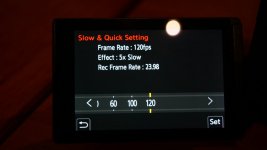
I have that panas G9ii camera as well. At the moment I am trying out doing videos in slow motion using the panas 35-100mm f2.8 lens. I have not tried it with the 100-400mm lens yet. Yes I could also do the same with an editing suite I suppose but that may produce stuttering????? not the smooth video below saved in C1 as well


using this setting record quality MOV 4K 24p /420/10L
in high resolution mode

P1015414.JPG

one of my first test videos below. My aim is to try and capture videos in slow mo of birds flying. This is all completely new to me doing slow motion but I think I am getting there

View: https://youtu.be/Vpdtd7rdREc

If I did the same with the panasonic G9 then able to slow it down further to 180fps or 150fps which again have yet to try out
 
Last edited:
I dont have Olympus, and dont shoot a lot of video with DSLR, but when I have I generally take the contrast down and the saturation up slightly.
My GoPro images tend to be nice from camera, that works for me, matching a DSLR might need some experiment.
Biggest issue with using a DSLR I've found is sound quality, you need external sound as the cameras focusing can usually be heard.
 
Back
Top