Olympus OM-D E-M5, E-M1, E-M10 - Mk1, Mk2 & Mk3 Owners Thread

Hi,

I decided to update the firmware in my OM1 to V1.3 and watched the OM video on how to do it. It said to be sure to use the USB3 ->USB3 cable supplied with the camera. Needless to say I can't find mine. How critical is it to use THAT cable or could I use any USB3 cable or even a USB3 > USB 2 cable? What did you use and was it successful?
Mine is a USB-c cable at both ends. I don’t have a USB C port so I now have to use my husband’s computer to update mine. It all went smoothly.

USB-C doesn’t matter which way up you put the cable. Although I have an adaptor to convert it to USB A (or is it B?), it can be critical which way up you plug it in, so I didn’t want to risk it, so I used his computer rather than the adaptor on mine.

Previously when I still owned the EM1ii, I used that cable to update my later cameras that had USB C ports (I.e, c at one end and a/b at the other). Although this wasn’t the correct cable, it was still a cable that came with an Olympus camera. I’m not sure whether other cables are okay.
 
A tip I picked up from OM Ambassador Emilie Talpin, is to map the L-Fn button on some OM Pro lenses as a very fast and easy shortcut to whatever group of settings you have saved in C1 or C2, C3, C4.

It's easy to change which C-settings you map the L-Fn to according to your day's shooting mission via the Menu.

I also have the red video button mapped to C1 but it's not as reliable if you are needing to switch quickly and reliably while still keeping your eye in the viewfinder. The L-Fn button is far easier for such actions.

Out of curiosity, what have you got your L-Fn buttons mapped to?
 
I have so many buttons I haven’t got that far yet!

One issue with the Lens button is that not all lenses have one.
 
Mine is a USB-c cable at both ends. I don’t have a USB C port so I now have to use my husband’s computer to update mine. It all went smoothly.

USB-C doesn’t matter which way up you put the cable. Although I have an adaptor to convert it to USB A (or is it B?), it can be critical which way up you plug it in, so I didn’t want to risk it, so I used his computer rather than the adaptor on mine.

Previously when I still owned the EM1ii, I used that cable to update my later cameras that had USB C ports (I.e, c at one end and a/b at the other). Although this wasn’t the correct cable, it was still a cable that came with an Olympus camera. I’m not sure whether other cables are okay.
Thanks. Sorry I got my USB terminology wrong!
 
A tip I picked up from OM Ambassador Emilie Talpin, is to map the L-Fn button on some OM Pro lenses as a very fast and easy shortcut to whatever group of settings you have saved in C1 or C2, C3, C4.

It's easy to change which C-settings you map the L-Fn to according to your day's shooting mission via the Menu.

I also have the red video button mapped to C1 but it's not as reliable if you are needing to switch quickly and reliably while still keeping your eye in the viewfinder. The L-Fn button is far easier for such actions.

Out of curiosity, what have you got your L-Fn buttons mapped to?
Left mine as standard - to stop a/f. I have trouble remembering what button I have assigned to which function!
 

Attachments

  • as shot .jpg
    as shot .jpg
    89.5 KB · Views: 3
Last edited:
A tip I picked up from OM Ambassador Emilie Talpin, is to map the L-Fn button on some OM Pro lenses as a very fast and easy shortcut to whatever group of settings you have saved in C1 or C2, C3, C4.

It's easy to change which C-settings you map the L-Fn to according to your day's shooting mission via the Menu.

I also have the red video button mapped to C1 but it's not as reliable if you are needing to switch quickly and reliably while still keeping your eye in the viewfinder. The L-Fn button is far easier for such actions.

Out of curiosity, what have you got your L-Fn buttons mapped to?
I sometimes change my buttons when I’m in the field but the latest I have settled on is to use the two buttons at the front of the camera to quickly change settings. I have the top one set to C1 and I pretty much keep that on bif settings with bird detect. Then I have the camera set to whatever but with a single point focus, I think the other button turns focus bracketing on and off.…. Nope I just checked and the other is set to toggle subject detection. My Ln button is currently set to focus stacking so I must have changed that.

I find it slightly annoying that the subject detect option is only within the focusing area you have set, and mostly I choose the whole frame. I never want the whole frame if subject detection is off. This means it’s never one button press to switch and why I have started to have a button for a custom mode - C1 in this case.
On my Canon, subject detection always works across the whole frame, and I have one back button to focus with it on, and one with it off. One of the few features I prefer on the Canon.

I put the custom buttons settings into my favourites menu so that I can have a quick recap if necessary. It’s so easy to forget and the worst was when I set the lever for video (which it still is ) but that caught me out when I’d put the camera away like that. I won’t forget again! That lever can get you in a pickle!
 
I have so many buttons I haven’t got that far yet!

One issue with the Lens button is that not all
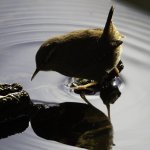
wren taken in deep shadow under a boardwalk so pleased with this result. (original shot underneath)
lurker at the threshold by jeff cohen, on Flickr
You have recovered this very well. Have you ever tried fill in flash? This would appear to be the ideal situation for it. I realise that it is not everyone’s cup of tea but if used well can deliver some good ‘natural looking’ results. If done badly……..
TFS
 
You have recovered this very well. Have you ever tried fill in flash? This would appear to be the ideal situation for it. I realise that it is not everyone’s cup of tea but if used well can deliver some good ‘natural looking’ results. If done badly……..
TFS

someone else mentioned using HDR. the point is with wrens in particular they never stay in the same spot for more than 15 -30 seconds you have to grab what's available in that time frame . the E-M1X doesn't have a pop up flash so it would mean either having one attached or digging it out of the bag , as with HDR if its pre-set (never yet used it) then you still have to press buttons etc to enable it . by which time the bird has moved on .
 
Hi all, I'm currently a Nikon owner (don't boo me) and I'm wondering how the em1 mark iii compares against the Nikon z6 or Z7? I'm thinking the only thing I'll miss from Z6 is it's dynamic range?

I shoot currently mainly with Nikon though I still have an Olympus camera after shooting more or less exclusively m43 a while back so I retain an interest in that system. You say that landscape will be a major interest and for this it would make sense to get a system with the biggest sensor you can afford or want to carry around. In a lot of shots, the difference is marginal but in more tricky lighting conditions, smaller sensors (including the Fuji I also had for a few years) can fail to deal with the dynamic range or simply give a rather artificial look to images. The Nikon Z6 has almost totally reliable single AF with native lenses -- where there is a problem, as so many have pointed out -- is with tracking and other than the Z9, Nikon mirriorless is perhaps not currently the system for action.

The emphasis with m43 is often wildlife which is hardly surprising as that's the area where it's possible to get long lenses at an affordable cost. For a lot of hiking when weight is at a premium then it's worth considering but you can't expect quite the same IQ for landscape.
 
Is that a Shag?
 
Well I can’t remember if the other end is USB A or B :ROFLMAO: but I suppose the gist of what I was saying is, I did successfully use a different lead, but it was a camera lead with a different end on it.
Good luck.


I eventually realised that the USB-C cable is also used to charge the battery! The wonders of modern technology! :)
 
Don't get me wrong, the OM-1 is a great video camera and certainly the best of the OM-D cameras in that respect (4K 60, 10bit internal, C4K, etc), but if i was really serious about video, there are better systems out there, depends on how deep into Videography you want to go. i.e. if you need Raw Video, XLR Audio inputs, 12 bit internal Waveforms, open gate etc. then the Olympus is probably not for you, but for casual videography it can certainly hold it's own. I just wish in 10 bit mode we weren't just limited to OM-Log400 and HLG only, as I'd like access to the Flat and standard profiles as well (when I don't need or want to do a lot of post processing on the video).
That is my issue with the OM1 video. 10bit mode limited to log400 and therefore ISO400 minimum is so annoying. 10bit and flat so I can get iso200 would help it be so much more versatile.
 
I am still very much learning about the 90mm and focus stacking (great fun by the way) but thought it would be interesting to compare the inbody stacking and then Helicon focus stacking with the same set of images. This was shot handheld with no flash just a run and gun really. (well crouch and try not move). 12 photo stack using 4 step.
Top one is inbody stacking. Bottom one is with Helicon focus. I can just about tell HC stacks the images slightly better but its marginal for my type of shooting on the go. I am sure proper macro photographers would get a clearer difference but for me I could get away with in body I think.

spider300323.jpg
in body

spider300323hc.jpg
Helicon
 
I am still very much learning about the 90mm and focus stacking (great fun by the way) but thought it would be interesting to compare the inbody stacking and then Helicon focus stacking with the same set of images. This was shot handheld with no flash just a run and gun really. (well crouch and try not move). 12 photo stack using 4 step.
Top one is inbody stacking. Bottom one is with Helicon focus. I can just about tell HC stacks the images slightly better but its marginal for my type of shooting on the go. I am sure proper macro photographers would get a clearer difference but for me I could get away with in body I think.

View attachment 385207
in body

View attachment 385209
Helicon
.... I agree - Very little difference in this case. However, I have noticed that combining a stack onboard camera does not darken the exposure as much as post stacking using third-party external software and so personally I prefer the onboard result as it seems to preserve the correct exposure much better.
 
cuteness overload...................
 
Not sure how the image quality holds up. I downloaded these from camera to phone. Then shared here.
View attachment 385266View attachment 385267View attachment 385268

.... Great moments very well captured but I'm not gonna lie when I say that I think the image quality has suffered in translation IMHO - A bit soft, not very crisp.

I have never downloaded from camera to phone but wouldn't that compromise any editing enhancements?

After editing / post-processing my RAW files I usually send JPEG copies to both my iPhone and iPad.
 
@RedRobin Yes mate. Just tried it for convenience. Not had chance recently to get on my computer.
 
I am still very much learning about the 90mm and focus stacking (great fun by the way) but thought it would be interesting to compare the inbody stacking and then Helicon focus stacking with the same set of images. This was shot handheld with no flash just a run and gun really. (well crouch and try not move). 12 photo stack using 4 step.
Top one is inbody stacking. Bottom one is with Helicon focus. I can just about tell HC stacks the images slightly better but its marginal for my type of shooting on the go. I am sure proper macro photographers would get a clearer difference but for me I could get away with in body I think.

View attachment 385207
in body

View attachment 385209
Helicon

Nice work
 
Been out more with the 90mm today. First 3 are in body focus stacking, last one is Helicon focus. (all handheld with no flash). I think if the OM1 manages to stack in body then I will use that. If it doesn't then Ill try rescue the stack in Helicon.
fly010423.jpg
 

Attachments

  • beetle010423.jpg
    beetle010423.jpg
    110.6 KB · Views: 11
  • wolfspider010423b.jpg
    wolfspider010423b.jpg
    70.9 KB · Views: 14
  • hoverfly010423s.jpg
    hoverfly010423s.jpg
    82 KB · Views: 14
super few hours out this afternoon heres the first shot pp so far little egret and fish
the hunger games by jeff cohen, on Flickr
 
.... Nicely post-processed too. White birds are always tricky to get looking right.
Thanks Robin the M1X does seem to gel well with my 100-400 . Tried a OM1 last week with my lens and in all honesty nothing in it I.q wise
 
Been out more with the 90mm today. First 3 are in body focus stacking, last one is Helicon focus. (all handheld with no flash). I think if the OM1 manages to stack in body then I will use that. If it doesn't then Ill try rescue the stack in Helicon.
View attachment 385386
Amazing shots. I've never seen a hoverfly like that one around here.
 
Some pics from Monday of our Charlie and Daisy playing in a nearby field. Bright sunlight I'm afraid, so very contrasty lighting.

OM-1, 40-150 F2.8 Pro


Last edited:
Back
Top