Noobie quess - always out of focus?

Flower

Suspended / Banned
Messages
7
Edit My Images
Yes
Hi guys,

I've recently got a canon EOS 450D - my first SLR.

I can't seem to figure out why none of my pics are in focus - even when I leave it on the manual settings? Is there somehow I can test that the auto focus is actually working?

When I blow the image up in photoshop to 100% is way to blurry!

If someone can give me some advice (I am a complete novice btw! - so if you could explain in idiots language that would be great!)

Thanks all
 
Have you checked that the Auto is set on the lens and in the camera settings?? Also can you hear the lens trying to focus when you change between an object that is very close and then very far away? Another thing I found with my old compact (though you should not have the same problem with this camera) is if you simply point and shoot without giving the camera time to focus. Always press the shutter button half way to focus then the rest of the way to take the picture.
I dont know if this will help (i'm sure you have tried some of this before) but a bit more information on the thread will help narrow down the problem. :-)
 
i would say check the diopte is right for your vision, but if it's on auto-focus that shouldnt affect it.
 
Like sowen6 and marcusp13 say, (check the lever near the viewfinder) but also - as this is a DSLR which you are using, YOU see exactly what the film - in this case SENSOR - sees. So.... if what you see is in focus then what you get on your computer screen is in focus. Take the time to look at what you see in the viewfinder - study what you see.

The CANON software should be able to tell you which focus points were active when you took the shot too - can't remember the name but think it is the Zoombrowser software which has a toggle icon so that you can overlaty the focus point onto your image. Those which were active show up red.

Hope this helps,
Alan
 
I was gunna suggest learning about manually selecting focus points. Select the centre point and point that at what you want to be in focus. Half press the shutter button till it flashes red and then press the button the rest of the way.

Then check the photo on your computer, see if the part you had the focus point on is in focus. If so then you are fine, if not then id get it serviced/replaced
 
Select the centre AF point only - and make sure that the AF rectangle in the viewfinder is over a part of the subject/scene which has enough detail or areas of adjoining contrast to be able to function. If the AF point has no detail within it - a plain wall for example, the lens will hunt back and forth and you'll never achieve focus until you reposition that AF point.
 
Ok thanks guys - will have a look at your suggestions and try them out!

I have been using the autofocus and also manually selecting the focus points too - both not very sharp results.

Will report back once i've done what you've all said (may take a while! lol!)
 
What shutter speed and focal length are you using? It might be a touch of blur rather than being out of focus
 
What shutter speed and focal length are you using? It might be a touch of blur rather than being out of focus

Good point, if your using slow shutter speed then it could be down to camera shake
 
YOU see exactly what the film - in this case SENSOR - sees.

I wish this were true :)

I may see a beautiful scene through the viewfinder but my choice of shutter speed, aperture and ISO will determine what the camera produces.

To the OP - Check all exposure attributes. Better still post an image so we can try to determine the problem.
 
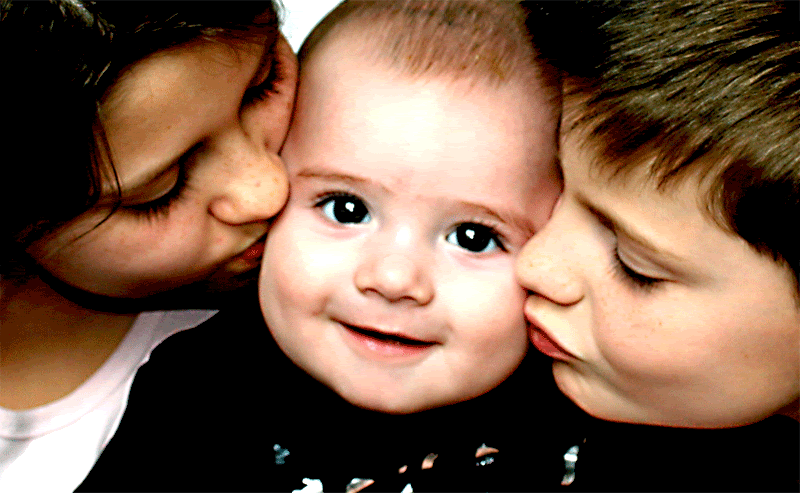
Here's an example

The camera was placed on a table and I used a remote for it - so it couldn't be camera shake - on this shot everything was manual except for the AF points - which I choose myself.

IMG_0671-c.gif


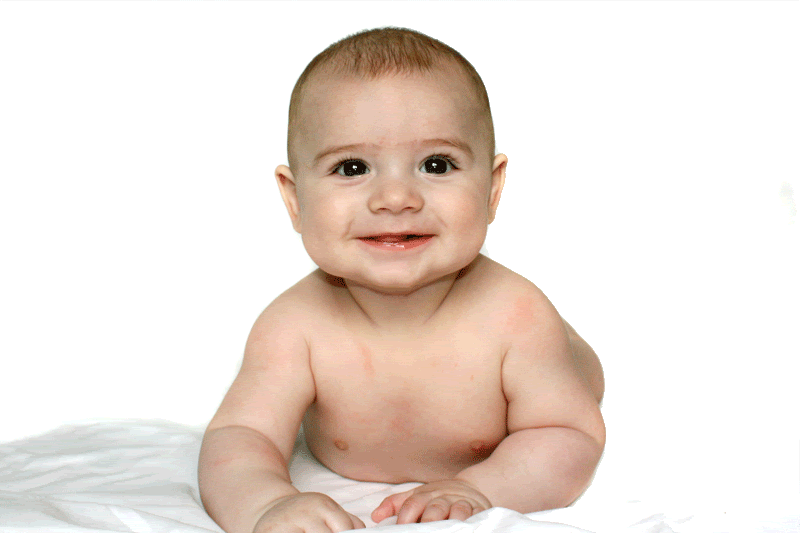
Excuse the colour - I had been mucking about with it - but the orig is still out of focus here's another one - not sure if you can see on this size - but when I zoom in 100% its still not that sharp.

IMG_0538b.gif
 
Go outside to the garden and stand 3ft from the fence pick a point on the fence about 12ft away and focus on a specific point then check where is actually in focus. try and repeat this several times with a similar shot. Is it always the same amount out of focus? Is the dioptre set right? Are you using a very shallow depth of field?

Does this happen too when you fire the camera whilst it is sat on a table using the timer? - If you are using a show lens with no flash etc etc then it might be that the shutter speed is too slow for hand held shots!

We really do need to be seeing your shots with exif data in place so that we can see exactly what is going on.

EDIT---- I was typing this whilst you answered :)
 
Here's an example

The camera was placed on a table and I used a remote for it - so it couldn't be camera shake - on this shot everything was manual except for the AF points - which I choose myself.

Can you recreate the table shot with everything as auto.
 
the second pic doesn't look too bad, don't forget most digital photos benefit from a sharpen in pp. And viewing your pics at 100% they are going to look a bit soft, don't be too over critical.
 
The shots above look quite noisy, what was the ISO number you used?

High ISO can cause a lack of sharpness I believe (correct me if I'm wrong)
 
the ifrst one just looks soft and agree with you. the 2nd one is not bad at all and just needs a little sharpening.
 
Are you shooting in Raw or Jpg as Raw will require a certain amount of sharpening as it's not done in camera.
 
What focal length and shutter speed are you using? You need to make sure the shutter speed is at least as fast as the focal length, eg. 50mm lens needs 1/50s shutter otherwise you risk camera shake which will look like blur.
 
Flower - as suggested, please post a shot along with its exif data.

Alan
 
Looks like you didn't have sufficient depth of field. i.e. you used too large an aperture to get everything in focus. Try f8 although that depends on focal length and distance to subject.

On the 2nd one I think your focus is on the baby's ches?

You neeed to use a single AF point and make sure you focus on the eyes. Best not to move the camera after setting the focus.
 
If you used the single centre AF point then this image shows where you tried to focus...

3253968885_2bc8d96dd8_o.jpg


There's just not enough image detail or contrast in that area for the AF system to lock on reliably.

If on the other hand you used all the focus points or just one of the others, it's entirely possible focus was on one of the two kids on either side who do seem a bit sharper.

BTW are you aware you're saving these images as 256 colour GIFs rather than jpegs?

The second image isn't actually too bad at all, but if you mark the central focus point on that image, it again falls on the chin - a completely plain area, and you would really focus on the eyes normally with a portrait.
 
Flower - as suggested, please post a shot along with its exif data.

Alan

How do I get the exif data - from the camera & type it in or is there another way?

With regards to all your suggestions on AF, if I use for instance one AF point - how do I focus it on the eyes - surely that would be one eye - I've tried to centre it between the eyes - presumably thats wrong?
 
With regards to all your suggestions on AF, if I use for instance one AF point - how do I focus it on the eyes - surely that would be one eye - I've tried to centre it between the eyes - presumably thats wrong?

Well if you focused on one eye and the subject was square on to the camera as in your pics, the other eye would be in focus as well, as it's the same distance from the camera. Where the subject's head is at an angle to the camera then it's usual to focus on the eye nearest to you. With a large aperture there may not be sufficient DOF and the far eye may be slightly oof, which is not unusual in portrait shots anyway. If you wanted to be sure of both eyes being sharp then you'd need to stop down a couple of stops or so to increase the DOF, but to some extent you lose the pleasant and flattering effect of the larger aperture.

You can get away with quite a lot of shots of people and critters where a lot of the subject's head is unsharp but as long as the eyes are sharp it usually works OK.
 
Like others have suggested, I think the first pic is simply incorrectly focused, and you have used too wide an aperture for depth of field to cover it. There could be other things going on, like maybe some subject movement, but focus is surely the crux of it. The whole subject has moved, probably backwards, away from the plane of focus you set.
 
How do I get the exif data - from the camera & type it in or is there another way?

No doubt others will set me right but simply post a JPG which you have not converted from another format - the JPG from the camera or a JPG after some basic editing in Photoshop for example. To be honest, I am never quite clear on why the EXIF data gets erased from some pics and not others but it is there in your original file for sure - there are various browser plugins which will enable you to right click and see the EXIF. I use OPANDA for Internet Explorer and something called "EXIF Viewer" in Firefox. (There is a link to Exif Viewer somewher on this forum somewhere).

Alan
 
Back
Top