Nikon VR, does it really work?

Only tested handheld, you can tell the image has moved its in a slightly different place when the mirror returns.

I used to see this problem with my VR lenses, the solution ( for me ) was to make sure i had a really firm grip of the camera and squeezed the shutter release rather than press it.
Then, it works perfectly.

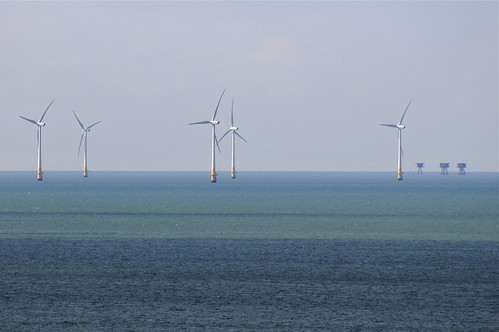
Heres one I took handheld with a Nikon 70-300 VR, a couple of days ago, those wind turbines were 8 km away, the forts, another 7km.

You can almost read the writing on the turbines


Click on pic for other sizes

Allan
 
Allan - That turbine shot was 1/1600 - in other words 5 times the safe shutter speed limit for most folks (1/300 for 300mm)

VR didn't do anything for you in that shot. It would have been sharper with VR off.
 
Are you saying that you will actually get better results with the VR turn off when using a tripod even if you are taken shots of flying birds etc?

Newbie question!

thanks

jim

Nikon's VR does NOT work on a tripod - the gyro sets up an interference against the tripod...we tested extensively using the old 70-400mm VR Nikkors and if you lightly touched the camera with VR switched on you could feel the camera vibrating...

VR is only for hand-held applications...

If you're using a tripod to shoot birds, use a good head and an electronic cable release instead...
 
Allan - That turbine shot was 1/1600 - in other words 5 times the safe shutter speed limit for most folks (1/300 for 300mm)

VR didn't do anything for you in that shot. It would have been sharper with VR off.

Take your point about VR not being of any benefit in that situation Pudders, but would it have been sharper with VR off? I think I know where you're coming from, from a theoretical stand point, but I've never seen any evidence of this. I think on balance it is still better to leave VR on.

Not wishing to have any argument, but if you have some practical results, that would be very intersting ;)
 
Copied from Nikon Websire and adapted slightly due to loss of compatibility tables:


What is the difference between the Normal and Active VR modes ?

Normal mode on the Nikon VR lenses reduction camera shake, the lens will automatically detect if you pan the camera horizontally and only vibration in the vertical axis is reduced.
Active mode should be used when taking images from a moving vehicle or vessel. The frequency of camera shake experienced during handheld shooting is different from that encountered when trying to shoot from a moving vehicle or vessel. The VR active function is designed to be able to compensate for severe vibrations encountered when you're in a car, boat, on a train or airplane, and even aboard a helicopter. The active mode does not automatically distinguish panning from camera shake unlike normal mode. If you wish to pan it is recommended you use normal mode.


Monopod: Nikon recommends turning it on when using a monopod or when using a tripod on which the panhead is not locked.

Tripod - Not Recommended:
AF-S VR 200-400, AF-S VR 200 and AF-S VR 300 only, VR can be turned on. The lens can automatically detect when it is mounted on a tripod and reduce camera shake accordingly.

Tripod - Can be used but may cause problems:
AF-S VR 400, AF-S VR 500 and AF-S VR 600 only, t he lens should be set to tripod mode when mounted on a tripod. VR operation will occur at a reduced amount.

What are the differences between the two VR modes of the Nikon 80-400mm VR lens?

In mode 1, VR system starts when the cameras shutter release button is lightly pressed and allows the user to see that any camera shake is reduced by looking through the viewfinder. Of course, VR operation carries on during exposure
In mode 2, to conserve battery power VR operation is only executed during taking of the image. You cannot see the VR operation through the viewfinder in this mode. This mode is designed for those who feel uncomfortable with compensated viewfinder images caused by the vibration reduction mechanism and conserves battery power. Actual photo results are the same as for mode 1.

Nikon's VR system claims to offers the equivalent of shooting at a shutter speed three or four stops (eight times) faster. Could you explain this?

While Nikon's VR system offers the user the possibility to shoot at a shutter speed several stops slower than the user could normally hand hold a lens without camera shake occurring in the images. Please note that the possibility of camera shake occurring will be the same when you use a faster shutter speed or a shutter speed 3 stops slower (4 stops for the Nikon VR II mechanism) in same situation with VR activated. For example, if the possibility of camera shake is 30% when using a 400mm lens at 1/250 sec, the possibility of camera shake remains the same 30% at 1/30 sec if the VR is activated (thus about 70% of shots taken should not suffer with camera shake). The quoted number of stops is an average figure and it does not mean shooting is possible with a shutter speed about three stops slower than recommend shutter speed to prevent camera shake at a given focal length - 1/f (1/focal distance e.g. 1/500th of a second for a 500mm lens).
Exposure time, the photographer's ability, shooting conditions and such will also effect the amount of reduction which can be performed by the VR system. (The effects of reduction is Approx. 4 stops at maximum and 1 to 2 stops at minimum.)
 
Allan - That turbine shot was 1/1600 - in other words 5 times the safe shutter speed limit for most folks (1/300 for 300mm)

VR didn't do anything for you in that shot. It would have been sharper with VR off.

Your probably right, i'll have another go next week, same shot with and without vr at lower shutter speeds

Allan
 
At the end of the day ,good camera technique are more help than VR, but VR with good technique are better than with no VR IMHO

Newbies when holding a camera cradle the lens with the left hand (from there you can zoom or manual focus) Lock you're elbows into you're ribs
giving you a more stable grip.

And NEVER JUST PRESS THE SHUTTER, tickle the shutter till it goes of.

A good way for the shutter is to roll the finger across the release,takes some getting used to but when you get it right ,the shutter going off should surprise you.:eek:
 
I took some quick comparison shots with and without VR on my 70-300 vr. At low shutter speeds, shots were sharper with vr on. I took some at higher speeds too to see if there was a difference in IQ.
All the shots were hand held on a windy hill late in the afternoon, so there was some heat haze coming up.
They are on My Flickr below, make your own mind up which were sharper if you want to have a look.

The windfarm is 8 km away, the forts 15km, the towers on land, about 4 km, all shots are jpeg and straight out of the camera, all at 300mm

Allan
 
Didn't get a chance to check the VR on panning at the weekend... will have to have a go in 2 weeks time... not giving up on the test though!
 
Didn't get a chance to check the VR on panning at the weekend... will have to have a go in 2 weeks time... not giving up on the test though!

I'm sure that if you test it enough, you'll get the answer you're looking for. Against global opinion ;)
 
Thats not true actually Hoppy, this thread inspired me to do what I should have done ages ago and test it...

I will say so far its proved it makes no odds for me... but then again the moving stuff is what I shoot 99.9% of the time, so will check with that.

Would be far easier if VR (or IS) status was reported in the EXIF...
 
Would be far easier if VR (or IS) status was reported in the EXIF...

It is....
 
As what? Can you show me?

I've just looked at both my motorsport shots from the weekend (posted in the motorsport section) with VR definitely OFF and my sample shot in this thread with it definitely ON and can't see anything...
 
Open the NEFs in Capture NX or ViewNX.

Only Nikon software understands the VR On / Off tag.
 
NEF?! I shoot jpg :D

I did have a look around actually with google just now and there are some tools which display the Nikon specific fields in the EXIF (just as you describe), but thats not much good really - I was looking more to use Lightroom's attribute filtering to give me a survey of my photo library to date...
 
The field is embedded in JPEG as well, and you can see the VR status on the image review screen as well.
 
On the Sony in body system you can see how much the VR is working through the viewfinder which I found quite usefull. It's one of the things I miss since moving to Nikon.
 
On the Sony in body system you can see how much the VR is working through the viewfinder which I found quite usefull. It's one of the things I miss since moving to Nikon.

It's the opposite :thinking: You can't see in-body working as it's behind the mirror - one of the main drawbacks of Sony etc.
 
It's the opposite :thinking: You can't see in-body working as it's behind the mirror - one of the main drawbacks of Sony etc.

The viewfinder has a small graph that illustrates how hard it has to work (1 bar, nice and steady, 5 lay off the coffee!)
 
:agree:


How do you see the VR working on the Nikon?

Through the viewfinder! The image is stabilised before it comes in, not after it hits the sensor. Can't believe you've not noticed this - fit a long lens and hold it at a steady, before activating IS/VR with the shutter release. The image dances about. Half-press the release and bing! it all goes smooth. Major advantage of in-lens.

Not sure how Sony manages to get their viewfinder display thingy - it can't be reading off the sensor so it must be picking up some into off the AF system, as a guess. Clever, and I imagine quite useful - quite a good clue abouit how fast a shutter speed you should be looking at I imagine. But of course the image itself still moves, making it harder to track fast moving stuff with a long lens.
 
I'd have thought the little scale indicator is just driven off of the accelerometers that are used to measure the vibration in the first place...
 
I'd have thought the little scale indicator is just driven off of the accelerometers that are used to measure the vibration in the first place...

Yeah, could be I guess, I suppose they don't need an image to do that :thumbs:

This sounds like a handy feature (the viewfinder indicator) though I've not used it. I wonder why Canon/Nikon doesn't run a display off the lens accellerometers in the same way? I guess they think it's just one more distracting bit of info we don't need with their system, but you could always turn it off.
 
I think its missing from Canon/Nikon because the functionality is seperated from the camera body - it would mean another stream of data being passed back over the lens mount and probably there isn't spare channels for that, which would mean a change to the mount - something neither will want to do as the mount system is the strength of both of them!
 
I think its missing from Canon/Nikon because the functionality is seperated from the camera body - it would mean another stream of data being passed back over the lens mount and probably there isn't spare channels for that, which would mean a change to the mount - something neither will want to do as the mount system is the strength of both of them!

Probably. Just looking at my Canon 40D, it has eight contacts inside the lens mount, and checking a couple of EF-S lenses, they both have seven (although one is clearly two, doubled into one. And my EF 70-200 4 IS has a rather splendid TEN! What do they all do? I know some do clever stuff like tell the flash gun the focusing distance, but what else? (Calling Canon Bob :) )
 
Just bought a Nikon 70-200mm

Does this technology actually work in the real world or is it a sales ploy?

Or is it me!

Not being a Nikon user I can't comment on the VR, but in my experience:


  1. Don't use VR/IS if the camera is mounted on a tripod/monopod
  2. Don't use VR/IS if the shutter speed is greater than the reciprocal of the focal length

Whilst VR/IS is an invaluable aid, it is not a magical panacea, and does have its limitations.
 
Well, thats an interesting article and it says a lot about the 80-200 vs the 70-200VR but not a lot really about the subject of VR itself, other than:

Shooting styles will have to change slightly when using VR, as one cannot simply rattle off a series of motor driven shots the moment you want. You need to wait for VR to engage first in order to utilize it and that requires a brief delay.

Which may of course be the problem I was experiencing, mind you, as I said earlier, I'd used Canon IS for several years and never turned it off - so its not like I'm not used to the idea that those little gyros need to spin up and the system stabalise.

Something I did notice the other day during my test which I'd never seen before with the Canon is that the image in the viewfinder "jumps" when I click the shutter release. I guess thats the moving VR element pinging back to the default centre position each time.... I don't think Canon's IS does that - if you still have the button mashed the system keeps on stabalising until you release the button - could this be the issue?

of John's two points above:

1. Don't use VR/IS if the camera is mounted on a tripod/monopod
2. Don't use VR/IS if the shutter speed is greater than the reciprocal of the focal length

Well, 1 is true of the 70-200VR, but not true of all VR/IS systems if you read the manufacturers manuals.

Point 2, I'm not quite sure what you mean, do you mean that you should turn it off just because you don't need it or because it actually impedes the shot?
 
From the article Pics not copied


VR Comparisons - Handheld Shots
Here we have some handheld shots at 200mm of a car in the shade. The images were processed through Photoshop's Camera Raw Converter from Nikon NEF to JPEG-High with a 300% USM applied before conversion to JPEG. The crop of the car's door handle is at 100% magnification from the D100's output.

Because of my ability or luck at being able to handhold the lens at relatively slow speeds, I used the very slow f22 shots to clearly show the advantage that VR provides.

At f22 the shutter speed was 1/8 of a second. Of the three images shot at f22, the VR Normal shot is the best of the three and although it is still soft in absolute terms, it could certainly be usable if push came to shove. The shot at f2.8 with a fast 1/500 shutter speed with VR off is for comparison purposes for a sharp image.

We can also see that using the VR Active mode is actually detrimental to the image quality when used for normal static shooting situations.

Also, keep in mind that with the D100 camera being used, the smaller CCD results in a cropping factor that turns the 200mm to a 300mm equivalent for the long range of the lens. While not a true 300mm magnification, it has all the problems of vibration and shake of a 300mm lens.


--------------------------------
VR and Tripod Use
While Nikon's implementation of VR betters Canon's IS in incorporating panning detection without the need to flick a switch, it is worse than Canon's in not being compatible when a lens is tripod mounted. Nikon recommends turning off VR when the lens is mounted on a tripod and I agree for the most part. When I took the first sample shots below, it was quite bright out and comparing the shots with VR off, on and active at f8 @ 1/320, saw no difference at all, but not at f22 where the shutter speed fell to 1/40. The second set of shots were indoors and were at f5.6 @ 1/10, but they still confirm the results of the outdoor shots. In both sets of shots a Gitzo 1345 tripod and Arca Swiss B1 head were used.

Why isn't VR compatible with tripod use? My guess (educated or not) is that the VR element is like a gyroscope that is always active in trying to repel vibrations when you have VR on. If you tend to shake in one direction, the VR element will shift the opposite direction to counteract the shake and provide a sharp image. However, on a tripod with VR on, the VR element is still active and in this current generation from Nikon, it is not yet "intelligent" enough to recognize when it is on a stable platform and when it is not, thus blurred images with VR on. So VR continues to attempt to counteract vibration and shake even when not necessary.

Strangely though, the Active mode of VR presented an image that was a little less clear than with VR off, whereas the VR normal mode is very blurred. So, yes, do follow Nikon's recommendation to turn off VR when using the lens on a tripod.
-------------------------------------
VR on a Weak Tripod
VR is not advised for use when the lens is mounted on a tripod; however, not all tripods are created equal. I dug out my father’s ancient tripod that no self-respecting serious photographer would ever want to use due to it being short with thin diameter legs and being very wobbly. So wobbly that I had to wait several seconds between exposures during the testing whereas I only had wait a second or two for the lens mounted on the Gitzo 1345 to settle down. And yes, I even used the centre column of the wobbly tripod, a practice anathema to those that care about sharpness.

This was to confirm the notion that VR does not work well on a good, solid tripod because of the stability provided versus VR working well with weak tripods or monopods because of the inherent instability.

As with the shots taken on the Gitzo 1345 tripod, the shots taken on the weak tripod at fast shutter speeds showed no differences between VR off, on, or active.

At slower shutter speeds, VR On was still detrimental to the image with a slight blur being revealed, but certainly not as bad as with the Gitzo shot. I found the Active mode though, provided a subtly better image than with VR off. I suspect that with slower shutter speeds, the flimsy tripod will definitely benefit from VR being on Active mode than off and only within the danger zone of speeds of 1/60 to 1/2 of a second for cameras without benefit of mirror lockup.
-------------------------------------------
When VR is on one can hear the little click of the VR motor engaging and the viewfinder image shifts slightly. There is no waviness causing seasickness, as I’ve heard of for older VR/IS lenses. It is simply amazing to see the trembling of the viewfinder caused by one’s own hands shaking being counteracted by the VR mechanism and it is even more amazing to see the sharp images appear on the computer screen and comparing it to non-VR shots at the same slow shutter speeds.

However, as other experienced users of IS/VR have noted, one should really not use VR as a crutch for bad technique. Your percentage of sharp images at slow shutter speeds will certainly improve, but in order to obtain the best advantage that VR has to offer, good technique is still required.

In some of the test shots I did, I surprised myself at how well I was able to handhold the lens with 2x TC attached (400mm @ 1/60), with the results matching the quality offered with VR on, but that was only when I made a conscious effort to be steady. At other times when I was particularly sloppy in technique, not even with VR on would the shot be usable.

Normal VR mode is suitable for the majority of photographic opportunities with this lens with Active VR really only required during very shaky situations. Using Active VR in normal situations can result in blurred images due to the aggressive implementation of VR by the lens in this mode.

Shooting styles will have to change slightly when using VR, as one cannot simply rattle off a series of motor driven shots the moment you want. You need to wait for VR to engage first in order to utilize it and that requires a brief delay. In quiet moments you can hear it and know when to start shooting, but in noisy environments, best to give a half-second pause before releasing the shutter.

There were references made on one of the Nikon lists that VR was not functional with the AF-On feature of current Nikon cameras. Without knowing more details and specifics, I made an automatic presumption I could no longer use the AF-On button to focus the lens and would have to use the shutter release to do so in order to enjoy the use of VR at the same time.

This was an incorrect presumption on my part and I take the curses uttered at Nikon back. VR is indeed only engaged by the shutter release button; however, this does not preclude one from continuing to use the AF-On button to focus. While you can choose to have VR and focusing both on the shutter release button, using the shutter release for focusing has become so alien to me that during the brief period of time I had the AF-On disengaged, I found that I instinctively had my right thumb reaching for the button instead of focusing via the shutter release.

I prefer not to have the AF via the shutter release because focus is not locked while I continue to have the meter active. As I compose and meter the scene, the subject focus shifts as I move the focus away from it. With the AF-On feature, I can lock focus first, release the thumb on the AF-On and compose the scene or meter other parts as desired.

It really is quite simple and effective to have focus on the AF-On and meter-lock and VR on the shutter release. I could also use AF/AE button to lock focus, but this was awkward for me to keep the index finger engaged at the same time, as I was engaging and dis-engaging the AE/AF lock button when I wanted the focus locked.

 
Point 2, I'm not quite sure what you mean, do you mean that you should turn it off just because you don't need it or because it actually impedes the shot?

I've done quite a few comparison shots at most speed /aperture combinations and in all but a very few ( probably to do with me not VR) cases, VR got me the sharper shot.
I posted an image of the Kentish Flats Windfarm earlier in the thread at 1/1600th at 300mm with VR on. I tried the shot again with VR off a couple of days later and the image wasnt as sharp. 10/10 for VR there! The same shot on a tripod with VR off looked the same as the original VR assisted image.
My hands, and I guess many others', arent as steady as they used to be. VR for me isnt just about getting a steady shot in lower light, its about reducing vibration in everyday shots, and it works for me.

Allan
 
And that was my expection based on my Canon IS experience to be honest Allan, but it might just be down to the "issues" I described in my last post :D
 
I got the jumping image in the viewfinder and thought there was a problem, but I have had other vr lenses that did the same, it seems to be a "feature" of Nikons vr. I minimised this with changing my technique, a good solid grip of the camera and squeezed the shutter release. I probably should be doing this anyway, but it made a big difference in the sharpness of my vr images. The image in the viewfinder doesn't jump anymore

Allan
 
...Something I did notice the other day during my test which I'd never seen before with the Canon is that the image in the viewfinder "jumps" when I click the shutter release. I guess thats the moving VR element pinging back to the default centre position each time.... I don't think Canon's IS does that - if you still have the button mashed the system keeps on stabalising until you release the button - could this be the issue?...

Canon IS makes noises and can also jump slightly when switched on.

If you don't let the system settle momentarily before shooting, yes you might well get problems.
 
I just did another quick and dirty comparison today - hand held using 70-200 VR f/2.8

Outdoors: 500th at f/2.8 @ 200mm with and without VR - the images with VR are noticably soft...
those without are pinners...

Indoors: 15th at f/2.8 with and without VR - the images with VR are fine and those without are rubbish (surprise...lol)
 
I just did another quick and dirty comparison today - hand held using 70-200 VR f/2.8

Outdoors: 500th at f/2.8 @ 200mm with and without VR - the images with VR are noticably soft...
those without are pinners...

Indoors: 15th at f/2.8 with and without VR - the images with VR are fine and those without are rubbish (surprise...lol)

I did the same thing with a 70-300 VR over the weekend, and past 1/2000 shutter I could spot the degradation (even on my D700 which is low res really)

But this doesn't surprise me - at these shutter speeds its clear that VR can only negatively impact IQ as you have an element moving around that doesn't need to be moving.
 
...right you are - I hadn't used this particular lens with VR on at high shutter speeds before, so I thought I'd better check...
I know this was the case with the 'old' 80-400 VR lens but I hated that bloody thing and used any excuse to leave it behind...
 
I rarely use VR. Certainly on my 70-200 VR it was always off - not only does it impact sharpness, it also impacts bokeh.

Ironically the best VR is probably in the 18-200 VR, but as that is **** to begin with its hard to do much damage there :)
 
sometimes i have to - like I said: 15th wide open at 800iso
 
I just did another quick and dirty comparison today - hand held using 70-200 VR f/2.8

Outdoors: 500th at f/2.8 @ 200mm with and without VR - the images with VR are noticably soft...
those without are pinners...

It would be interesting to see these results as my findings are different.

Allan
 
Back
Top