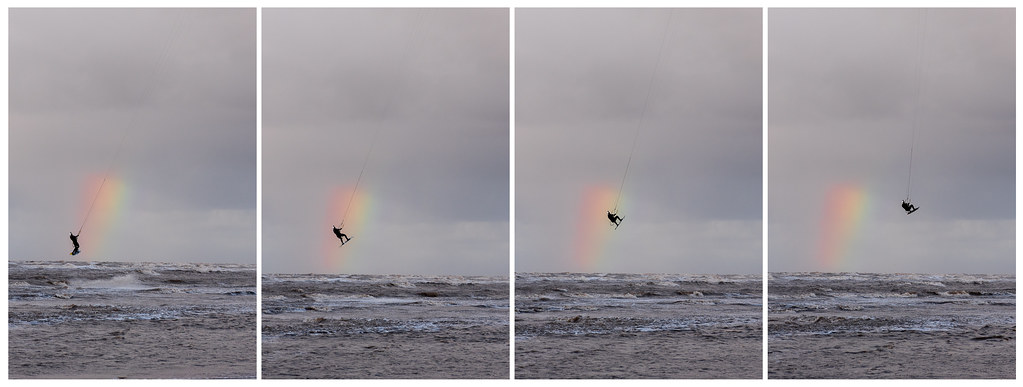
Nikon D750 & D780

Is that the sigma dock? For infinity focus just focus on something very far away. Don’t trust the infinity mark on the lens unless your lens has a hard stop and doesn’t go past infinite (most modern lenses go past infinite).
Yep, that's the sigma dock - can set it the adjustments for 4 different distances (distances are set by the software i believe and not adjustable).

So based on the screenshot anything beyond ~3 meters would be classed as infinity, so if i did 8/9 meters to be safe. Obviously the further away the target is, the harder to tell if it's pin sharp.
 
Yep, that's the sigma dock - can set it the adjustments for 4 different distances (distances are set by the software i believe and not adjustable).

So based on the screenshot anything beyond ~3 meters would be classed as infinity, so if i did 8/9 meters to be safe. Obviously the further away the target is, the harder to tell if it's pin sharp.
8/9m isn’t very far away ;) TBH I don’t know exactly at what point a distance becomes ‘infinity’ but I’d be focussing on something much much further than 8/9m. You don’t have to go as far as focusing on the moon, although of course this would give you a very good infinity focus (although technically there’s no such thing as infinity focus of course ;))
 
Last edited:
8/9m isn’t very far away ;) TBH I don’t know exactly at what point a distance becomes ‘infinite’ but I’d be focussing on something much much further than 8/9m. You don’t have to go as far as focusing on the moon, although of course this would give you a very good infinite focus (although technically there’s no such thing as infinite focus of course ;))
What distance would you recommend? 20meters? more?
 
What distance would you recommend? 20meters? more?
As I say I don’t know what distance becomes infinity, and of course it will depend on the lens too. When I’ve gone for infinity focus I’ve focussed on distant hillsides or something, like the background of a landscape shot. You could probably focus on something much closer and still be at infinity on the lens, but I like to make sure ;)
 
Last edited:
I would say that infinity is certainly further away than the highest distance on the lens scale, never really paid attention, nearly always done a manual or auto focus through the eye piece
 
1st law of photography. When you see something unexpectedly photogenic you WILL have the wrong lens with you. I think I'm going to weld my 28-300 to my camera. All I had was a pesky 28-105. So I had to crop. I hate cropping.


This one I had to crop because a dust spot arrived unannounced. :mad:

 
All I had was a pesky 28-105. So I had to crop. I hate cropping

But aren't you cropping with a zoom lens - just optically?

Good grab though :)
 
Last edited:
Had a dawdle around our local National Trust house yesterday... thought I'd take the D750 with just the 85mm f1.8. Nothing of really great note, but there was a couple of really nice MGC's in the car park and very cold fishermen! :cool:

I really like the 85mm f1.8, keep looking at the 1.4's but trying to resist at present!

 
Had a dawdle around our local National Trust house yesterday... thought I'd take the D750 with just the 85mm f1.8. Nothing of really great note, but there was a couple of really nice MGC's in the car park and very cold fishermen! :cool:

I really like the 85mm f1.8, keep looking at the 1.4's but trying to resist at present!

Nice set, nice processing. It's nice to just go out with one focal length, makes you work for the shot.
Do you really need the 1.4 version? None of those shots were at 1.8 ;)

Had my shoot Sunday for the mother and daughter and Sigma does seem to be front focusing still on some of the longer distance - so going to need that sigma dock :(
Just need to find a way of setting up to do some calibration for the longer distances... as the paper method wouldn't work due to the distances involved. Any recommendations?
 
Took Mrs. Chuckles' D750 to Iceland last week - such fun. (I think the D750 handles high ISO better than my D800) Amazing how little light you get this time of year - and the 'colour temp' changes minute by minute.

[Just a work trip so didn't get to the usual tourist spots and there was no Solar activity]

#1
iceland-1694.jpg by Barry Cant, on Flickr

#2
iceland-1725.jpg by Barry Cant, on Flickr

#3
iceland-1759.jpg by Barry Cant, on Flickr

#4
iceland-1657.jpg by Barry Cant, on Flickr

#5
iceland-1685.jpg by Barry Cant, on Flickr
 
I like no. 2 and also no. 5 but would prefer the mountain without the top chopped off.
 
I'm trying to set the white balance on one of my images, so i'm clicking on a white sock/top but it's throwing an awful orange tint on everything.

What's the best way to deal with tint on images?
 
I'm trying to set the white balance on one of my images, so i'm clicking on a white sock/top but it's throwing an awful orange tint on everything.

What's the best way to deal with tint on images?

Are you sure it's white? It doesn't have to be white per se, just a neutral grey. What software are you using?
 
I'm trying to set the white balance on one of my images, so i'm clicking on a white sock/top but it's throwing an awful orange tint on everything.

What's the best way to deal with tint on images?
Are you setting it using the dropper in Lightroom? If so it's very unreliable unless you know you have a perfect neutral grey, such as a very card as a reference point.
 
Lightroom.

I'll have another look tonight, maybe i was overly tired when editing. Doesn't help i'm colour blind on white either lol
You don't use the dropper on white, you use it on 'neutral grey' (y)
 
Lightroom.

I'll have another look tonight, maybe i was overly tired when editing. Doesn't help i'm colour blind on white either lol

Initially I had the LR border around the image set as neutral grey, as that was something that was recommended early on. Another very well known tog recommended setting it to white to use as a reference against, well...you know...white. It does help!
 
I always thought it was on neutral grey, dunno ;)
The grey floor under the subject fixed it. Thanks!
Although I'm sure i've seen videos of people doing it with white, they always say to click the white wedding dress for wedding shots. Either way your solution fixed it for me :)

Initially I had the LR border around the image set as neutral grey, as that was something that was recommended early on. Another very well known tog recommended setting it to white to use as a reference against, well...you know...white. It does help!
Yeh, especially when you're posting to social media too, if you drop the whites slightly it can help stand off the white backgrounds.
 
Not having much luck with the MPB. Working on the works laptop earlier and the Mac was folded away about 2ft behind. Hadn’t clocked that the missus had strategically placed a full mug of tea in between. Suffice to say, that it got drowned when I tried to show her something.. But, only a little seems to have gotten inside and has drip dried ok. Is currently working....
 
Not having much luck with the MPB. Working on the works laptop earlier and the Mac was folded away about 2ft behind. Hadn’t clocked that the missus had strategically placed a full mug of tea in between. Suffice to say, that it got drowned when I tried to show her something.. But, only a little seems to have gotten inside and has drip dried ok. Is currently working....

Ouch !!
 
I may have spoken too soon... USB ports on the one side where there seemed to be ingress aren't working. FFS!!!!
 
Although I'm sure i've seen videos of people doing it with white, they always say to click the white wedding dress for wedding shots

Yep, that's fine as long as it's not totally overexposed - in which case it'll always be 'white' but not in 'balance' with the rest of the world!

It has to be argued that there are 256 (0-255) different levels from black to white for each of the three channels - they each carry a credible value except for 255 which is deemed to be pure white. In other words, there is no data from which to form the correct white balance.
 
Has anyone else suffered with the flare/reflection issue since the latest recall? I had this for the first time when shooting some backlit scenes - the top part of the images have dark lines across them...
 
I purchased the sigma dock today, but thought i'd log the focusing issue with MPB too (where i bought the lens).

It front focused on all distances, but i settled for +14 as an average. From my calibration the lens was out like +20 on the AF fine tune on one distance (which is it's max). They've offered to replace the item, i'm wondering if i should go for a replacement, i'd live with it if it was +/-5-10.. but 20 seems too much IMO.
 
Last edited:
I purchased the sigma dock today, but thought i'd log the focusing issue with MPB too (where i bought the lens).

It front focused on all distances, but i settled for +14 as an average. From my calibration the lens was out like +20 on the AF fine tune on one distance (which is it's max). They've offered to replace the item, i'm wondering if i should go for a replacement, i'd live with it if it was +/-5-10.. but 20 seems too much IMO.
At the end of the day they are offering you a solution to the micro focusing problem, go for it and take their offer, if the replacement fails badly too then you can just send it back and demand your money back.
 
I purchased the sigma dock today, but thought i'd log the focusing issue with MPB too (where i bought the lens).

It front focused on all distances, but i settled for +14 as an average. From my calibration the lens was out like +20 on the AF fine tune on one distance (which is it's max). They've offered to replace the item, i'm wondering if i should go for a replacement, i'd live with it if it was +/-5-10.. but 20 seems too much IMO.

Wait to see how you get on with dock. Mine was all over the place but so sharp now.
 
Back
Top