Nikon D750 & D780

I've never had an issue with time machine tbh, always worked perfectly for me.

Nice pic (y)

Seems to be Adobe doesn't copy across. Had LR crash twice last night too so hope it's not buggy. Haven't much time to play today but I'll suss it all. I said the other day the MBP didn't get hot, it does whilst using intensive programs, very hot!

Do you work offline as it were Toby i.e. Without your files attached with smart previews? I had to move my catalog back to the Mac HDD to set it up and build new smart previews. If I reboot into LR without the external attached it throws up as files missing still?
 
Seems to be Adobe doesn't copy across. Had LR crash twice last night too so hope it's not buggy. Haven't much time to play today but I'll suss it all. I said the other day the MBP didn't get hot, it does whilst using intensive programs, very hot!

Do you work offline as it were Toby i.e. Without your files attached with smart previews? I had to move my catalog back to the Mac HDD to set it up and build new smart previews. If I reboot into LR without the external attached it throws up as files missing still?

Should have stuck with your Mac Mini, bought a 58 and photographed the £1500 you'd still have.
 
Quick update. The stuff I imported yesterday and built previews with, works fine offline from the SP's. The rest are missing.
 
Seems to be Adobe doesn't copy across. Had LR crash twice last night too so hope it's not buggy. Haven't much time to play today but I'll suss it all. I said the other day the MBP didn't get hot, it does whilst using intensive programs, very hot!

Do you work offline as it were Toby i.e. Without your files attached with smart previews? I had to move my catalog back to the Mac HDD to set it up and build new smart previews. If I reboot into LR without the external attached it throws up as files missing still?

Are you using the laptop closed and connected to your Dell monitor? The MBPr also get very hot and the Unibody designs previously. Thermally they can't really burn out but can get uncomfortable using if using solo?

I'm still trying to source a 2015 and save a chunk of change or even a MacBook M7 as an interim machine but not really sure.

Back on the D750 front, I went light yesterday with just the body, 35 f2 and a monopod and left the heavy 24-70 at home for a family kids party and it opened up a new way of shooting video. The smaller setup blended in and no one was staring at a big setup. I do want mirrorless for things like IBIS and electronic viewfinder but then saw the footage and it's just something else for skin tones and true to WB colours.
 
Last edited:
Are you using the laptop closed and connected to your Dell monitor? The MBPr also get very hot and the Unibody designs previously. Thermally they can't really burn out but can get uncomfortable using if using solo?

I'm still trying to source a 2015 and save a chunk of change or even a MacBook M7 as an interim machine but not really sure.

Back on the D750 front, I went light yesterday with just the body, 35 f2 and a monopod and left the heavy 24-70 at home for a family kids party and it opened up a new way of shooting video. The smaller setup blended in and no one was staring at a big setup. I do want mirrorless for things like IBIS and electronic viewfinder but then saw the footage and it's just something else for skin tones and true to WB colours.
Same with any laptop or all in one machine really vs a proper desktop. Just not enough space to move air around.
 
Sussed the problem. I thought I had built previews for everything, but clearly not. This may sound silly, but really changes the way I can work. Another from yesterday..

32577999323_3f3a804562_b.jpg
 
Same with any laptop or all in one machine really vs a proper desktop. Just not enough space to move air around.

Do you use a MBP Andy? Haven't plugged into my large monitor yet as lead only turned up yesterday but very happy so far. It's very quick and snappy with LR.
 
Hi all, Just got myself the LG G4 phone, last Samsung died, This LG G4 has a camera to die for, all auto or manual mode, just as a DSLR, I can change all the settings like ISO and shutter speedd and can also take RAW shots and it takes nice shots with it`s 13 MP camera.
Not too bad for a Phone I guess, heres a taster shot.

17218354_10154339725629327_8969166571964326504_o.jpg
 
Whilst some of you are talking about LR Preview.. these are editable how large are these as I am thinking of going down this route
 
Looks a tad under exposed... I'd stick with the 750 ;)
Yeah but it was facing the sun so I guess it exposed itself to compensate. Other than that, a nice sharp shot (for a phone)
 
Yeah but it was facing the sun so I guess it exposed itself to compensate. Other than that, a nice sharp shot (for a phone)

Be interested to see if you can boost the shadow a bit
 
Seems to be Adobe doesn't copy across. Had LR crash twice last night too so hope it's not buggy. Haven't much time to play today but I'll suss it all. I said the other day the MBP didn't get hot, it does whilst using intensive programs, very hot!

Do you work offline as it were Toby i.e. Without your files attached with smart previews? I had to move my catalog back to the Mac HDD to set it up and build new smart previews. If I reboot into LR without the external attached it throws up as files missing still?
No, normally I have the working RAWs on my hard drive, then when I happy I've finished with them I offload onto an external drive. Previews automatically delete after 30 days or so. What I have noticed is that if I do reimport RAWs to re-edit old pics it's much slower, probably as a result of not having previews.

As well as getting hot do the fans on the new MBP go crazy? Mine sounds like a jet plane taking off :lol:
 
Last edited:
No, normally I have the working RAWs on my hard drive, then when I happy I've finished with them I offload onto an external drive. Previews automatically delete after 30 days or so. What I have noticed is that if I do reimport RAWs to re-edit old pics it's much slower, probably as a result of not having previews.

As well as getting hot do the fans on the new MBP go crazy? Mine sounds like a jet plane taking off :lol:

Actually no, was thinking how quiet all round it is. First time I've had an SSD drive too, definitely notice the difference with that.
 
And what a difference they make but
M.2 are faster.
Probably an argument for another day, while they are fast, the price increase doesn't really reflect the gains in speed you'd get over your typical SSD, IMHO.
 
Actually no, was thinking how quiet all round it is. First time I've had an SSD drive too, definitely notice the difference with that.
That's good to know. Yeah, SSD's are the first things I add if they're not already installed.
 
That's good to know. Yeah, SSD's are the first things I add if they're not already installed.

I was in apple earlier looking for a new iMac. They advise me get a 2tb fusion drive as just as good??
 
Anyone using the 24-120mm F4 for weddings? I use a 35/85 combo most of the time but looking for something to cover the wider end for groups and to act as a back up to the primes. Is it good enough?
 
I was in apple earlier looking for a new iMac. They advise me get a 2tb fusion drive as just as good??

You get a lot more for your money with the desktop, it's a ridiculous markup for the extra compactness of a lap top.

I need to be able to work downstairs of an evening with being around the family but don't want a desktop in one corner. It's a totally whole new workflow for me but far more sociable.

I did look at the Dell XPS, and whilst they're very nice, I just don't like windows. OSX just seems to last IMO.
 
Grrr. Just gone through 200+ photos in LR marking the crap for deletion only to find I hadn't marked them for deletion... :banghead:

As you were folks.:D
 
Well, this is weird. I tried again and although it was showing as rejected each time I clicked 'X' and it advanced to the next frame all that happened was the first frame (which I wasn't rejecting) got marked as rejected. :thinking:

Have closed and reopened LR and all is working as it should. Feckin computers.
 
Grrr. Just gone through 200+ photos in LR marking the crap for deletion only to find I hadn't marked them for deletion... :banghead:

As you were folks.:D

Do you 'edit out' Ed? Big improvement for me in culling was when I started to edit in ie. flag what you want to keep, filter by no flag and delete. I'm quite ruthless these days!
 
I was in apple earlier looking for a new iMac. They advise me get a 2tb fusion drive as just as good??
Yes and know. If the fusion drive could read your mind then yes as it would put everything you want onto the SSD part of the drive. I chose to have an SSD and then external drives, that way I can choose what goes on the SSD and not apple.
 
Anyone using the 24-120mm F4 for weddings? I use a 35/85 combo most of the time but looking for something to cover the wider end for groups and to act as a back up to the primes. Is it good enough?
I've used it as a wedding guest and for good results with it. However, AF is not good enough for professional use and can struggle in low light.
 
Yes and know. If the fusion drive could read your mind then yes as it would put everything you want onto the SSD part of the drive. I chose to have an SSD and then external drives, that way I can choose what goes on the SSD and not apple.
But apple told me Application goes on the SSD automatically
 
Do you 'edit out' Ed? Big improvement for me in culling was when I started to edit in ie. flag what you want to keep, filter by no flag and delete. I'm quite ruthless these days!
That wouldn't work for me. I can't tell what's good straight away, but crap is simple to spot.

A few years back I dug out my negatives from 1980 and found some shots that I'd never printed which were good. The passage of time alters how we consider our pictures. Even a week makes a difference.

But then I keep photos that aren't technically perfect but 'work' and delete technically good pics that don't work. I also don't edit to find single images but sets of pictures. You don't need every picture in a set/sequence to be great, but you don't know which pics you need until you start sequencing a set.

My process is a quick rejection of the absolute crap, flagging anything that is obviously good in the same pass. Then I delete the crap and go through again flagging anything I think is worth a longer look. Next I go through the flagged pics and do another cull of anything that isn't sharp enough where it needs to be sharp and the less good ones from a few very similar frames. Finally I'll go through the unflagged pics to cull the junk, but keep any that have something going for them. I can always have another clear out in the future, but I can't bring a 'sleeper' back if it's been deleted. It's the same way I used to treat my slides really.
 
But apple told me Application goes on the SSD automatically
For the most part it can work well, and if you're happy to let the computer sort and rotate files and programs for you that's fine. Apparently it works pretty well, I'm just a control freak, I want things where I want them ;)

Whether all applications stay on the SSD I'm not sure, definitely those in frequent use
 
I should have realised that the horizon disappearing meant there was rain heading my way. I was only a mile and a half from the car when it hit. No prizes for guessing where my waterproofs were...

RuJCawC99kCW-PR__HySarDbIVNLLO184hsbcPB3GwJ5dmSn0xbyf1UBZ-tymRmxCUWx-V6nqSeIfSlcViukn4Q-i8zDpSWUOn2J401_6yAp6hqFKl3WTm3pIM7SeE7-D5j24XsgKRVio5YzZKFx_5NkKlK4dWDB1KDaRNajZU4gCQqZyv6EmvNei6xn7IWDOklI3o96pa21v-rDjZkIkLMfDFd4_K0uWLPE2fVpfs6cU55J9CfS-T8P76SBYafeJaLli0-qDc-LrwqPdG0z34bychHpiFBHXsS_8pYl_z8ZNX3JTvUensH3dahtQhAdrrxGETE2Ch81Cfw_-gOgXB2BTgwwM7XexYG76wi6jUflhAV618Q1o0rTzwnwB1RdD3OrC7vL0JCsj768WYvhT5CWfKttcMs6wbn-Sy5xG-6huvmqP61rtbFAW_STOz6CdWiozN1nJX_TtPTMYzkfZXg7VAk6stD11LO556RoSllgUwBALEF4tNQk5_xqYUHYvrq7I3SBjGDEObljmEjQF1fgqA0jlPxarveaZRVRqyAETRxq7bSYIABJMMwj6-50EdQ61tUzUKR6MzQ7HWdtxno8tM7csb0sGww95IsKuWEhjuyPjFTtdA=w900-h601-no


exthHWx75VLIu7x-1DKc7Q0tuTjQUrMPAbjS3HO2AdH_91Dyt5dUiB3uwbUTqsgMHBikbdE7nmaCQxHxqbS5sf8o9SJ4uNZXI5Ngo5se2F-CIU_wcUGN70ThU0G5YZIfjuhIf2xltlfn1OdGTIzmiMOzDf2fnoPtf4rWf1o7ESP-kPeeJDepXkAKBzX6wnPMVQdFzBV3GS2UQbHeeZzAwZ3u1w7fk9BcJAgSWlK17cTh1ZY870lqv_Jkb5fqaOfmUldxW67LwUB6xoLveu1uwu50jW2F0NC_PEpcJQ5SJ99G5PVnGNkTyUuN5evQHtSL9dEBZrZABqUvn0xiikyObwEd7rgfDPx9WCnEsLy1eTvm9JIYi2536YnSvS4JOmZ1akVjs8wv-RuvuvQIomm_mj2JEY0oXsBlit59gU0d7ZRTKUxCxUN30v8pXcIz6STxWIfUmQs5aZmLR8y9tLGmXOkA47_IfgvtuwnBw5Q3hV1KaR_JT4NTwgFE32x_8xcTHPiCaR5JG1SSINmUliG-gpV5rISMuvO0bKk5zHm01ypkjlmHKwrU1A18oyXQlbplKAF3q2WCLFeaXj1_9l6wHiNv_ipcttupPXEk_B3uGJrYaJe5H8B75A=w900-h601-no
 
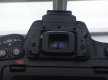
I don't believe it, I have had and lost 5 eyepieces so far so on my new (sixth) one I followed Minnits advice and stuck it on with strong double sided tape then set of to local zoo on Saturday with youngest grandson. I slung camera over my shoulder and set of around the zoo. Upon seeing my first photo opportunity I slide camera up to my eye and found this.


image.jpg
I give up unless anyone's got a permanent solution that will work, it's getting rather silly now.
Took about 200 shots but not very optimistic about them as it was a grey day and mainly shooting through dirty sticky fingerprinted and scratched glass doesn't lend itself to nice sharp photos.
 
I don't believe it, I have had and lost 5 eyepieces so far so on my new (sixth) one I followed Minnits advice and stuck it on with strong double sided tape then set of to local zoo on Saturday with youngest grandson. I slung camera over my shoulder and set of around the zoo. Upon seeing my first photo opportunity I slide camera up to my eye and found this.


View attachment 97711
I give up unless anyone's got a permanent solution that will work, it's getting rather silly now.
Took about 200 shots but not very optimistic about them as it was a grey day and mainly shooting through dirty sticky fingerprinted and scratched glass doesn't lend itself to nice sharp photos.

That is poor you lost 6 wow..

D500 calling :P
 
Back
Top