

Nikon D7100 problem

RayJ

Suspended / Banned
Messages
36
Name
Ray
Edit My Images
Yes
Hi all,
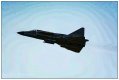
I went to an airshow yesterday and on processing the images I noticed a banding effect on the raw files.This became more apparent after importing to lightroom and using the de-haze slider.
Any ideas as to what the problem is.I have attached an image highlighting the problem with the de-haze slider to 100.
The banding is mainly noticeable on blue skies.

TIA
Ray
 

Attachments

  • DSC_6731.jpg
    DSC_6731.jpg
    59.4 KB · Views: 95
Yes it's caused by the lack of filter in front of the sensor, not had it on the sky before but have on white shirts and tiled roofs.
Someone will be along shortly to tell us what it's called
 
OK thank you, I have it booked for return for repair (if its not a filter problem)
Hopefully its just user error which can be rectified by using a polarising filter
 
Yes it's caused by the lack of filter in front of the sensor, not had it on the sky before but have on white shirts and tiled roofs.
Someone will be along shortly to tell us what it's called
If you're referring to the lack of an AA filter, I'm pretty sure you'll only get 'interference' on fine lines or fine patterns, rather then gradient banding, which this is. I don't use LR so can't comment on settings but it looks like the number of colours is limited so the gradient is not smooth.
 
Quite a few dust-bunnies on the sensor too btw. What F stop were you using?
 
Thanks for the comments
I was using F8, the dust bunnies are not my concern as I know that can be rectified. Its the serious banding, which Im hoping is not the infamous oil on the sensor problem.
 
Not saying its the cause for you but i had it on a old D70 which had been incorrectly stored for about 7 years,the lens was a write off and the camera displayed the same problem as yours especially in sky areas,i put it down to damp getting between the sensor and AA filter,hope its not the same with yours.
 
Thanks Mike,
The camera is always stored in my camera bag with the silicon packets.I have never been out with it in damp situations.Only has about 6k actuations.As its still under warranty I will send it in to get checked out.

Ray
 
That's not moire caused by the lack of AA filter on the sensor as that affects fine repetitive patterns. That's quite bad - I did notice banding once or twice with my old D7100 but nothing that bad.
 
Looks like the banding is related to how the air moved as the aircraft is passing through it. The pattern looks like it's similar to the air flow around the aircraft (note the pattern at the nose and the afterburner jet pattern). Where was the sun in relation to the aircraft? the aircraft looks like it's quite dark (dark shadow facing the camera) compared to the sky behind it.
 
Thanks Rob,
The sun was to the left and slightly behind me if I remember correctly.
The aircraft has been deliberately darkened using the de-haze slider to enhance the banding.
I had originally noticed it in the raw image.

Ray
 
Looks like the banding is related to how the air moved as the aircraft is passing through it. The pattern looks like it's similar to the air flow around the aircraft (note the pattern at the nose and the afterburner jet pattern). Where was the sun in relation to the aircraft? the aircraft looks like it's quite dark (dark shadow facing the camera) compared to the sky behind it.
That's definitely not caused by the airflow around the aircraft, for one thing it wouldn't flow like that around the aircraft.

Does the banding appear on the raw file without any processing? Over processed blues and reds always, without fail, cause banding issues.
 
Back
Top