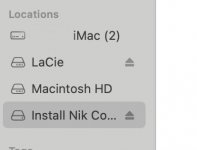
It's not folder, it's a virtual disk.
You downloaded a .dmg file, which creates a virtual disk when you open it. It behave exactly like you had connected a disk to your Mac.
The installer for your Nik Collection was/is in there. This is/was a common way for software to be distributed (less so since the advent of the App Store perhaps, but still).
If you finished the installation, simply eject the disk (click the Eject icon you can see next to the name or select the disk like you have already in the screen shot and type Command-E) and it will go away for ever.
You can then safely delete the .dmg file from your Downloads folder if you want the disk space back. Otherwise keep the .dmg file somewhere handy in case you ever need to reinstall your software.