New Vuescan Professional feature

Peter B

Double Numpty
Suspended / Banned
Messages
6,206
Name
Peter
Edit My Images
Yes
The October Newsletter introduces a Colorize feature for black and white scans, if that's of interest to users? I haven't tried it, but apparently it can be accessed on the trial version of Vuescan as well.
 
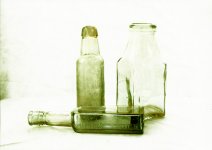
Just spent a few minutes updating Vuescan and trying out the Colorize filter. The image I chose isn't very helpful because the bottles could be any colour really; I was able to get them to turn green like the actual bottles I photographed, but I would really need to seperate out the background to keep that white - which probably drives me to Lightroom or Photoshop. I'll try tomorrow with some landscapes and portraits.

I also tried Photoshop with the same image but forgot that, at least on my PC,
Photoshop usually goes into error when I try to use the neural filters.
Glass bottles with colorize, green 2.jpg
 
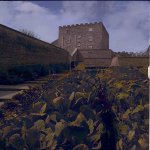
Here's a photo on which I tried the colorize feature. On the one hand it's amazing that the filter can get anywhere near the colours as I remember them, but on the other hand it isn't close enough to be actually useable in the real world.

I also tried it on an old black and white photo of deceased family members (it's surprising how few photos of people I have). I don't wish to shown the result here, but it did seems good enough to be useful in a context where nobody can rembember the actual colours in the scene. So if you had a lot of old photos of people you wished to colourise, it could be useful. If they have already been scanned in B&W, Vuescan allows you to take the exisitng file as an input, so rescanning the photo is not necessary.
 

Attachments

  • Bishop Auckland 1.jpg
    Bishop Auckland 1.jpg
    191.4 KB · Views: 22
Here's a photo on which I tried the colorize feature. On the one hand it's amazing that the filter can get anywhere near the colours as I remember them, but on the other hand it isn't close enough to be actually useable in the real world.

I also tried it on an old black and white photo of deceased family members (it's surprising how few photos of people I have). I don't wish to shown the result here, but it did seems good enough to be useful in a context where nobody can rembember the actual colours in the scene. So if you had a lot of old photos of people you wished to colourise, it could be useful. If they have already been scanned in B&W, Vuescan allows you to take the exisitng file as an input, so rescanning the photo is not necessary.
That looks like a reasonable starting point for tweaking the colours in PS, so I'll be giving this a try. And I'll be doing it even sooner since you've said I can use an existing scan to do it! :)
 
Here's a photo on which I tried the colorize feature. On the one hand it's amazing that the filter can get anywhere near the colours as I remember them, but on the other hand it isn't close enough to be actually useable in the real world.

I also tried it on an old black and white photo of deceased family members (it's surprising how few photos of people I have). I don't wish to shown the result here, but it did seems good enough to be useful in a context where nobody can rembember the actual colours in the scene. So if you had a lot of old photos of people you wished to colourise, it could be useful. If they have already been scanned in B&W, Vuescan allows you to take the exisitng file as an input, so rescanning the photo is not necessary.


That looks reasonably close to '70s prints of similar subjects I have - and far closer to reality than most hand colourised shots I've seen from the earlier days of photography.
 
I've had it for donkeys years and I just downloaded and installed the update yesterday. It recognised my serial number straight away - at one time you had to type in your serial number after upgrading.
It doesn't like me. I seem to have bought after the "Free Upgrades for Life" and now it wants me to pay. Pay for updates?!!!
 
Back
Top