New portfolio site, cheque please

petemc

Suspended / Banned
Messages
9,504
Name
Pete
Edit My Images
No
Hey hey. I've spent the past few weeks updating my portfolio website. Its seperate from my photoblog. Just the best images, n such. So if you could cast your eye over the site, give it the old 1, 2. I'm happy with the design so I won't really be doing any major changes (unless its quick and makes things better ;)). I'm after spelling mistakes, links that don't work, bugs basically. I've tested it on FF, Safari and Opera. I'm fairly sure it worked on IE6 at one point too.

http://www.petecarr.net/

Thank you and goodnight.
 
On a quick look seems to be working well, one spelling mistake noticed, on Get in touch page, should be commissioning you missed an m out. :)
 
Very sleek ! I like it with a good mix of flash and quick to load. I like the slideslow too, giving people to look at whilst deciding where to go next. I'd make it more obvious that the menu is indeed a menu as at the moment it looks like some text next to the picture show. Small niggle I know but generally I think you've hit the nail on the head ! :)
 
Hey Pete - cracking site, some awesome pictures on there.

Couple of things I have spotted so far, you have missed the 'r' in portrait in text on bottom of main page. Also (and this my not be important) you have called link Who Am I?, but when clicked you talk in third person - ie Pete Carr is....

HTH.

:)
 
hi pete liked site loaded fast for me. I know i'm pleeb in photo stakes but in landscapes the content are mainly HDR images, great as they are. I think a few more landscapes that are not HDR would be better.
 
I'd make it more obvious that the menu is indeed a menu as at the moment it looks like some text next to the picture show. Small niggle I know but generally I think you've hit the nail on the head ! :)

You mean the main navigation? The music, people, news, etc?

hi pete liked site loaded fast for me. I know i'm pleeb in photo stakes but in landscapes the content are mainly HDR images, great as they are. I think a few more landscapes that are not HDR would be better.

Whats the point in a portfolio if I don't show my best work? People who hire me won't care what technique was used only that I do my best.

two words:
bigger letters

That or use medium for font size. That way it might be dependent on the system settings (dpi and font size), but readability will improve.

Other than that, it's very nice, simple, yet looking good.

Size 11 is a perfectly normal font size. This forum is set to 10 according to the CSS. I could expand the line height.

I am currently rewriting the "who i am" page too.
 
I am currently rewriting the "who i am" page too.

pleased to hear it, cant be doing with this alto-ego crap..

great site with great pictures, just change the 'He is' 'His passion' mumbo jumbo as though your talking about someone else.
 
. I'd make it more obvious that the menu is indeed a menu as at the moment it looks like some text next to the picture show. Small niggle I know but generally I think you've hit the nail on the head ! :)

Hmmm have to agree, navigation menu looks just a little weak for me (presentation wise) other than that loads quick all links that I tested which where quite a few in all categories worked no problem (Mozilla) Looks Good. Regards Jim
 
I've updated the "who i am" page. I'm not entirely sure how to better the navigation. I didn't want it to be too strong but to simply sit next to the images. I'm sure it works as theres nothing else on the site for people to click :D
 
On IE 7 when you navigate between your different pages, i.e. Music, people etc, when that word appears at the top of the main frame just above slideshow it appears to be chopped off. Yoiu need to make your text box a little bigger of reduce your font.
 
who am i?

"with a degree in Software Engineering. My interest in web design lead me to learn Photoshop and from their expanded my "

should be "...... from there expanded.... " not their
 
on your contact me page, i would remove the phone number and include a tick box asking how would they prefer to be contactacted, and ensure there is a field for the number.
 
the photoblog link takes them to your other site in the main window, I would consider opening a new window as you are taking people away from your site.
 
one final point - change the word desktops to downloads....

yes I am picking hence all these commenst, but I work in web development all day and see some right poop! and also know therefore what customers want to see.
 
on your contact me page, i would remove the phone number and include a tick box asking how would they prefer to be contactacted, and ensure there is a field for the number.

Not 100% sure about that. I imagine a lot of people would prefer to call right there n then rather than email and hope.

the photoblog link takes them to your other site in the main window, I would consider opening a new window as you are taking people away from your site.

There's that. However, on the photoblog site theres a link back to the portfolio site :)

one final point - change the word desktops to downloads....

Hmmmmm. Not 100% sure about changing it to downloads. Desktops, or maybe wallpapers lets people know exactly what they're getting. It lets them know there are desktops for them to get. *ponders*
 
By the way, if you'd like to separate the menu more, how about a thin border to the right of the link, forming a thin stripe along the menu, changing its colour just like menu links on hover.

Hmmm not sure really. I was hoping use of empty space would be enough to clearly show that its the menu.
 
Hmmm not sure really. I was hoping use of empty space would be enough to clearly show that its the menu.

It is, but that way, it would catch more attention.
Then again, you might place a link to a form for reporting on website functionality and design complaints. If you'd be lucky, you might get some useful comments.
 
Perhaps. I can't imagine people commenting on the design though. I'll post it on a designers forum for some real harsh critique :D
 
cheque please.

You want us to pay you too?? ;~)

The i in "who i am" should be capitalised "who I am" it won't look out of place.
 
You want us to pay you too?? ;~)

The i in "who i am" should be capitalised "who I am" it won't look out of place.

It might look out of place given everything else is lower case :)
 
I don't think so, try it and see.
 
Nah it does. Its 1 single capital letter when the design is all lowercase.
 
Bit of a nit pick but something that caught my eye was the tooltips for the images, some of them are IMG_8456_edit2_edit2.jpg and so on. Might be worth changing them to something more descriptive.
 
Bit of a nit pick but something that caught my eye was the tooltips for the images, some of them are IMG_8456_edit2_edit2.jpg and so on. Might be worth changing them to something more descriptive.

Good point, but its automated. Each page is built on the fly from the contents of the directory.
 
Just to let you know Pete, that your site is already indexed on Google for HDR images. I was trying to explain to my wife (who was suddenly and unexpectedly interested in my photography for, ooooh.... 10 seconds) all about HDR images and searched google with her. Your site came up.... so, had already seen it mate, and excellent it is too.

Reading through the comments already posted on here I don't think there's more I can add to be honest, except two things;
  1. that it seems a tad slow to load - and I'm on a 20MB connection; but I guess there's not much you can do about that.
  2. perhaps consider removing the full stop after Photographer below your name
Nice work Pete.
 
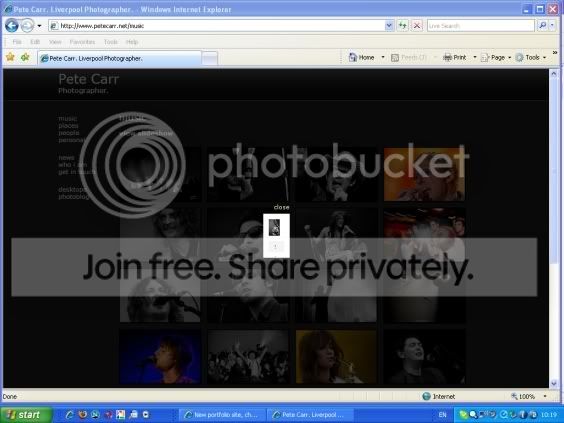
Pete, in IE if I click on one of the thumbnails to see the bigger version it collapses into a tiny image in the centre of the screen. If I do the same in Opera it expands it properly. I'm using a laptop if that makes any difference.
 
Just to let you know Pete, that your site is already indexed on Google for HDR images. I was trying to explain to my wife (who was suddenly and unexpectedly interested in my photography for, ooooh.... 10 seconds) all about HDR images and searched google with her. Your site came up.... so, had already seen it mate, and excellent it is too.

Surely not this site. I only put it up yesterday.

Reading through the comments already posted on here I don't think there's more I can add to be honest, except two things;
  1. that it seems a tad slow to load - and I'm on a 20MB connection; but I guess there's not much you can do about that.
  2. perhaps consider removing the full stop after Photographer below your name
Nice work Pete.

Yeah nothing I can do about the speed. I imagine it was a glitch because its been fine for me on 8mb. I seriously doubt the site is actually slow. Theres only a few hundred k of content on the page. Also, the full stop is there for a stylistic reason. I feel that it finalises the word photographer.

Pete, in IE if I click on one of the thumbnails to see the bigger version it collapses into a tiny image in the centre of the screen. If I do the same in Opera it expands it properly. I'm using a laptop if that makes any difference.

Strange. I'm on a laptop too but its a Mac so I haven't fully tested it in IE. I'll do so later. Can't see why thats happening. Anyone else get that? IE6 or 7? If you say 5 I will hit you :p
 
IE7. I'll post a screen shot for you in a minute
 
Here's what happens

Pete.jpg


It collapses in the exact opposite of the way in which it expands in opera.
 
Dang, thats crazy. Cheers I'll see if theres something I can do.
 
Here's what happens

Pete.jpg


It collapses in the exact opposite of the way in which it expands in opera.

i'm also having this problem with it,also using a laptop at the moment, will take a more indept look when i'm home on my pc, excellent image's though :thumbs:
 
Glad it's not just me, wish I could suggest something. Oh, and I checked on Netscape and FF and they're fine.
 
Surely not this site. I only put it up yesterday.
Well, I will admit to not being 100% certain of it being this site... but I am 100% certain of the black background, and the HDR images coming up.

EDIT: Just went to wifes PC to see if it was in the history folder, and bingo it was. Your image came up on this site;

http://www.vanilladays.com/hdr-guide/

When I entered HDR Pictures into google.co.uk search.
 
Back
Top