New M4 mac mini

Adamcski

Suspended / Banned
Messages
2,984
Name
Adam
Edit My Images
No
Afternoon all, I hope all is well.

I am loving the 16" M4 Pro Macbook I recently purchased and I am considering a Mac mini as we have no desktop in the house. Kids have Chromebooks and old windows laptops (nothing fancy really) and the wife has her own basic laptop that she uses for her work.

I have a monitor and mouse / keyboard already that I plug into for editing and such.

Question is...do you really need the M4 Pro (my laptop is the 14/20/16) chip? Watching Youtube and such you get mixed messages. Also, reddit is full of people telling you to just max the thing out. It would be used for general word processing, web, music, and my photo editing on affinity / LR and PS. I currently do nothing video editing wise and don't have any plans to really (I am not a pro tog).

Mini with 10/10/16 M4, 24 gb ram and 512 is about £899 (I do get education discount also). M4 Pro with 12/16/16 M4 Pro, 24gb ram and 512 is £1,299. Is the extra £400 worth spending? Alternatively the M4 with 10/10/16, 32gb ram and 512 is £1,079.

Anyone here using one to edit on?
 
What do you need it for? My MacBook Pro does double duty as a desktop - I just plug it into my monitor in clamshell mode. Given how efficient the Apple Silicon chips are there is no longer a penalty for using a laptop as a workstation.
 
I have the Mac mini with the M2 chip and it is fine for everyday tasks plus editing.
 
I run both an M1 and M1 Pro machine - day to day I do not notice a difference, it is only on really heavy loads that I either notice the M1 slowing down, or the M1 Pro spinning up its fans. By really heavy loads I mean multiple docker containers and mobile device emulator for software development, or multiple denoise processes in Lightroom.

Personally, I would prioritise storage space and RAM before processor when speccing up a Mac.
 
Still early days for me as you know. Was editing S5 images on Affinity Photo 2 today - a lot of them each with masks. Was surprised who much faster it was than my previous iMac, no lag with my Wacom tablet and exporting batches really swift. No idea if the M4 would have been as fast, but this handled it really easily.
 
Last edited:
Still early days for me as you know. Was editing S5 images on Affinity Photo 2 today - a lot of them each with masks. Was surprised who much faster it was than my previous iMac, no lag with my Wacom tablet and exporting batches really swift. No idea if the M4 would have been as fast, but this handled it really easily.
Yes, I've not had any issues with the MacBook I purchased. Part of me just says to go for the M4 Pro and up it to the 48 GB and that should handle anything I throw at it for years but I've watched various videos where the base M4 hasn't been too far behind the M4 Pro in some tasks, so is it worth the extra?
 
Yes, I've not had any issues with the MacBook I purchased. Part of me just says to go for the M4 Pro and up it to the 48 GB and that should handle anything I throw at it for years but I've watched various videos where the base M4 hasn't been too far behind the M4 Pro in some tasks, so is it worth the extra?
There are loads of vids on YouTube showing the base model is the Best Buy, the pro model does come with that bit extra ram and a slightly bigger ssd and thunderbolt 5 but I don't think you will take advantage of the extra horsepower doing what you intend to use it for. You can always add extra storage later on if you need to. Basically you can get two base mini's for the price of one pro and have some change :)

EDIT : In fact you can get three base mini's if you choose the 48gig version. Apple charge extortionate prices for ram £400 for 24 gig, they are sucking you in with that markup.
 
Last edited:
Afternoon all, I hope all is well.

I am loving the 16" M4 Pro Macbook I recently purchased and I am considering a Mac mini as we have no desktop in the house. Kids have Chromebooks and old windows laptops (nothing fancy really) and the wife has her own basic laptop that she uses for her work.

I have a monitor and mouse / keyboard already that I plug into for editing and such.

Question is...do you really need the M4 Pro (my laptop is the 14/20/16) chip? Watching Youtube and such you get mixed messages. Also, reddit is full of people telling you to just max the thing out. It would be used for general word processing, web, music, and my photo editing on affinity / LR and PS. I currently do nothing video editing wise and don't have any plans to really (I am not a pro tog).

Mini with 10/10/16 M4, 24 gb ram and 512 is about £899 (I do get education discount also). M4 Pro with 12/16/16 M4 Pro, 24gb ram and 512 is £1,299. Is the extra £400 worth spending? Alternatively the M4 with 10/10/16, 32gb ram and 512 is £1,079.

Anyone here using one to edit on?
I have the Macbook Pro M1 Max with 64GB RAM and it handles lightroom and photoshop with no problem. It also handles Logic Pro X with everything I've thrown at it including intensive plugins and multiple MIDI devices.

I don't know for sure but I'd imagine the M4 Pro is better than the M1 Max chip so as long as you have sufficient RAM I don't see any reason why you'd need the Mini.
 
I have the Macbook Pro M1 Max with 64GB RAM and it handles lightroom and photoshop with no problem. It also handles Logic Pro X with everything I've thrown at it including intensive plugins and multiple MIDI devices.

I don't know for sure but I'd imagine the M4 Pro is better than the M1 Max chip so as long as you have sufficient RAM I don't see any reason why you'd need the Mini.
Because it's for the house to use, not just me. Don't want the kids using my MacBook pro all the time lol
 
Because it's for the house to use, not just me. Don't want the kids using my MacBook pro all the time lol
Ahh OK, I think even the base spec could cope with web browsing, youtube etc, however I'm not familiar with Affinity and how much ram and GPU is uses.
 
Ahh OK, I think even the base spec could cope with web browsing, youtube etc, however I'm not familiar with Affinity and how much ram and GPU is uses.
From the affinity site

Mac
Hardware
Mac Pro, iMac, iMac Pro, MacBook, MacBook Pro, MacBook Air, Mac mini
Mac with Apple silicon (M1/M2/M3) chip or Intel processor
8GB RAM recommended
Up to 2.8GB of available hard drive space; more during installation
1280x768 display size or larger
 
Entry level Mac Mini M4 (non M4 Pro model) with 16GB is more than enough for the sort of application you're describing. The only upgrade I would suggest, however, is to go for the 512GB rather than 256GB model. Trust me - you'll thank me later!

For the record, I have a number of Macs - an M1 Pro MacBook Pro with 16GB MBP and an M2 Max MacBook Pro with 64GB. Until recently I also had an M1 Mac Mini with just 8GB. It ran stuff like Photoshop and Lightroom very well considering it's limited RAM and 1st generation Apple Silicon processor. If it can do that, do you honestly think that an M4 with 16GB would have a problem with day to day stuff?
 
Entry level Mac Mini M4 (non M4 Pro model) with 16GB is more than enough for the sort of application you're describing. The only upgrade I would suggest, however, is to go for the 512GB rather than 256GB model. Trust me - you'll thank me later!

For the record, I have a number of Macs - an M1 Pro MacBook Pro with 16GB MBP and an M2 Max MacBook Pro with 64GB. Until recently I also had an M1 Mac Mini with just 8GB. It ran stuff like Photoshop and Lightroom very well considering it's limited RAM and 1st generation Apple Silicon processor. If it can do that, do you honestly think that an M4 with 16GB would have a problem with day to day stuff?
the problem with going to 512 ssd is it costs £200, which is a pi$$ take. Get an external thunderbolt housing and a 2Tb nvme for the same price. I bought one from Amazon and it is just as fast as the internal drives on the Mac mini
 
I saw a Colorii USB-C hub with SSD enclosure on Aliexpress a few days ago. Seems it is no longer available to UK. Probably not the best there will be but they are likely to start perculating down soon.
 
the problem with going to 512 ssd is it costs £200, which is a pi$$ take. Get an external thunderbolt housing and a 2Tb nvme for the same price. I bought one from Amazon and it is just as fast as the internal drives on the Mac mini
Extra storage is crazy, I wanted 4TB in my MBP but it was an extra £1k over the standard 1TB :mad:
 
I spent a ton of money back in 2022 in replacing my ageing MacBook with a then top of the range 16" MacBook Pro with the M1 Max Chip (10C CPU, 24 core GPU), 32GB unified memory, and 2TB SSD drive. It cost me a fortune 2 years ago but I was (and still am) absolutely amazed by the performance difference compared to my outgoing 2017 MBP (which had the Intel I7 processor (running at 2.6ghz). To this day, it still eats though my video projects via Davinci Studio and lightroom works flawlessly whether it's 24mp images or the 45mp ones from my Nikon Z8 or Z9.

It got me thinking as we are now on the M4 chips (and like I say, I'm running an M1 Max), how much in the real world any performance difference would be. Sure of course it will be faster at say encoding a video in Davinci or Premiere etc. but how much faster - is it just percent's, or genuinely 2-3 times quicker ?
 
Earlier this year I bought a Mini M2 Pro and to replace my intel iMac which was struggling a little with photo editing. The new one absolutely chews up everything while using Lightroom. I think I'd have to get into far heavier applications - video etc - before this doesn't meet my needs. Completely agree about the storage upgrades which are absurdly priced but the Mini is really neat and doesn't look any worse for having an external drive sitting on the top of it.
 
the problem with going to 512 ssd is it costs £200, which is a pi$$ take. Get an external thunderbolt housing and a 2Tb nvme for the same price. I bought one from Amazon and it is just as fast as the internal drives on the Mac mini
Hehe. Totally agree that Apple's storage pricing takes the p***! The problem is that it's the internal SSD that does all the hard work and gives the machine the 'leg room' it needs. For future proofing the machine (well, as future proof as any machine can be), I would still recommend taking the hit. I am honestly surprised that Apple stuck with the 256GB storage option when they made 16GB the new entry level. But hey, we know Apple loves to price gouge it's customers, right? Ker-ching!
 
I spent a ton of money back in 2022 in replacing my ageing MacBook with a then top of the range 16" MacBook Pro with the M1 Max Chip (10C CPU, 24 core GPU), 32GB unified memory, and 2TB SSD drive. It cost me a fortune 2 years ago but I was (and still am) absolutely amazed by the performance difference compared to my outgoing 2017 MBP (which had the Intel I7 processor (running at 2.6ghz). To this day, it still eats though my video projects via Davinci Studio and lightroom works flawlessly whether it's 24mp images or the 45mp ones from my Nikon Z8 or Z9.

It got me thinking as we are now on the M4 chips (and like I say, I'm running an M1 Max), how much in the real world any performance difference would be. Sure of course it will be faster at say encoding a video in Davinci or Premiere etc. but how much faster - is it just percent's, or genuinely 2-3 times quicker ?
Very similar to me, I bought the same Macbook Pro but with 64GB RAM and it’s night and day different from my previous 2017 touchbar Macbook Pro.
 
Yes the prices of upgrades are a joke.

Silly question perhaps but I am assuming the editing of video is more intensive on these machine and components than lightroom and photoshop? I will be doing basic edits and stacks for macro mainly. I see youtube videos of people editing on the base M4 and M4 pro saying there is little in it.
 
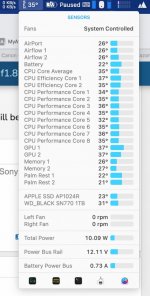
Adam, you will ne fine with the base model. I have the M1 Pro from 2022 with 16 gig and it runs Photoshop/Capture One no problem. Never breaks into a sweat and I have never heard the fans on at all. See attached for temps and power usage, this machine is dream.
Screenshot 2024-12-12 at 12.58.56.jpg
 
The only thing I would look for is at least 512gb SSD . All the added ram etc is a waste I’m still using a M1 chip mini and it’s fast . A external SSD copes with any storage needs . But you really need that 512 SSD to load your software on
 
I have just purchased a 1TB M4 Pro MacBook Pro. The lowest RAM was 24GB and that is what I have gone for - it was a good price and upgrading to 48GB was another £650 ( that one was not on offer). I did quite a lot of research and found posts on Reddiit where a guy was saying he was exporting two videos, and doing various other tasks at the same time and it was fine with 24GB RAM. So I would guess that 48GB is overkill for a family computer.

I posted a thread in the Computers and websites section and someone shared a really useful video, that looked at processors and memory. It's worth a look.
 
I went for the M4 PRO with 512gb
I store my images/video files on an external drive
This is my first Mac
Mike, did you get this from the photo judge that works in the Apple store?

I'm thinking of moving to mac as my laptop is showing it's age and wondering if there were good deals to be had :)
 
Sadly, Not this time, John.
I did for my laptop though ;)
I could have waited until mid January as his discounts for the year have all been used up.
Might be worth your while waiting until then.

This was an early Crimbo present from the family
 
Back
Top