New D500 - Need memory cards

petrolhead

Suspended / Banned
Messages
427
Edit My Images
No
Just bought a D500 and need 2 memory cars to fill both slots, or do I? It has the lastest firmware

Crumbs these CFexpress cars are expensive compared to what I have used in the past, SD UHs I

I am an amature so what would you reccomend please
 
No you don't unless you are a 'machine gunner' - I used Sandisk Extreme Pro 95 mbs and never wanted for better.
 
Thanks for that, looks good

Obviously I will need a reader, any reccomendations?
It depends on how you shoot and how many images you're planning on storing on a card at any one time.... As a sports shooter, I'm usually downloading loads of images and consequently, a faster card read can make a big difference.

I usually go for a cheap one off amazon, minimum usb 3 card reader. If you want absolute speed, make sure it's uhs ii compatible, but sd cards are backwards compatible, so if you don't need the speed advantage, it wont matter which sd reader you go for.
 
Last edited:
I'm more than happy with Kingston Canvas React UHSii in Sony A7Siii
Under £100 for 128GB. They come with a USHSii card reader is noticeably faster than any others I have too
With the Sony if you put one a bit less fast in the other slot it reminds you every time = v.annoying
 
Last edited:
Yep - SD cards are fine.

I recently picked up an a very affordable UHS-II card from Lexar:


This is surprisingly quick and for the money, a really good match for the D500
One thing to note with those cards the read speed is 250MB/s whilst the write speed is just 120MB/s. You have to be careful of the write speed as often it’s lower than the stated speed on the card (they often quote the read speed as it sounds much better). Write speed it what matters with the camera. Read speed only matters when you’re transferring the images to the computer.

The price of the fastest UHS-II SD cards can be quite high but there are potential savings depending on brand. I recently picked one of these when they were on offer after someone kindly pointed out the offer on here. It was £60 for a 64GB card at the time. It was cheaper than the SanDisk UHS-ii 300MB/s card I have in the other slot which I think was around £120 at the time I purchased it a few years ago.


I’ve found this to be a good website in the past. It’s not as up to date as it once was but you can see the effect different cards have on write speed with the D500.

 
Last edited:
One thing to note with those cards the read speed is 250MB/s whilst the write speed is just 120MB/s. You have to be careful of the write speed as often it’s lower than the stated speed on the card (they often quote the read speed as it sounds much better). Write speed it what matters with the camera. Read speed only matters when you’re transferring the images to the computer.

The price of the fastest UHS-II SD cards can be quite high but there are potential savings depending on brand. I recently picked one of these when they were on offer after someone kindly pointed out the offer on here. It was £60 for a 64GB card at the time. It was cheaper than the SanDisk UHS-ii 300MB/s card I have in the other slot which I think was around £120 at the time I purchased it a few years ago.


I’ve found this to be a good website in the past. It’s not as up to date as it once was but you can see the effect different cards have on write speed with the D500.

Agreed, OP isn't looking for / requires outright speed... The card I quoted seems to be an excellent compromise of performance, capacity and price.

I looked for some fast SD cards, but the price really climbs quickly! I have an XQD in my D500 and one of the aforementioned cards and I seldom run into any issues waiting for the camerea to clear the buffer. I'd rather run redundancy with an xqd and slower sd card, than a single fast card.

That said, using just a fast xqd, the d500 is essentially bufferless
 
Over twice the price for the ProGrade card

To get an idea of read write speeds on storage devices I use CrystalDiskMark v8.04 - here

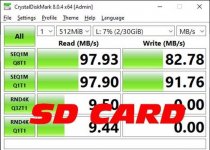
So for instance did a speed test with a card I use in another camera, a 32GB Sandisk Extream Pro. This was the result:
sdcard.jpg

I would be interested to see how the cars you guys linked to compare
 
Last edited:
Having just bought a D850 I was looking for cards to use in it. I've already got 4 x32Gb Xqd cards already (3 Lexar and 1 Sony) and a mix of SD UHS-1 and UHS-II cards for my D500. Since getting my D500 XQDs have only gone up in price thanks to Macron ditching the Lexar brand, and if and when you buy a card reader they are not cheap and I am not sure whether my XQD card reader can read CFExpressB cards so I got another XQD (Sony G 128Gb) - so that's something to bear in mind when buying cards in future. Unless you plan on shooting 1000s of images in one session a 32Gb XQD card should be sufficient, and a bog standard Extreme Pro type SD card in the other slot.

Enjoy your D500, they might be 6 years old now but still a phenomenal camera.
 
Having just bought a D850 I was looking for cards to use in it. I've already got 4 x32Gb Xqd cards already (3 Lexar and 1 Sony) and a mix of SD UHS-1 and UHS-II cards for my D500. Since getting my D500 XQDs have only gone up in price thanks to Macron ditching the Lexar brand, and if and when you buy a card reader they are not cheap and I am not sure whether my XQD card reader can read CFExpressB cards so I got another XQD (Sony G 128Gb) - so that's something to bear in mind when buying cards in future. Unless you plan on shooting 1000s of images in one session a 32Gb XQD card should be sufficient, and a bog standard Extreme Pro type SD card in the other slot.

Enjoy your D500, they might be 6 years old now but still a phenomenal camera.
Thanks, just done some math and if shooting JPEG and RAW thats 40mb in total. Lets say out of 32gb you get 30GB thats actually 750 photos :)
 
I always save RAWs to one card and JPEGs to another but, touching wood, I've never had a card fail on me. I've got a mixture of Integral, Lexar and Sandisk SD cards, the UHS-1 are used on my D810, D500 and K-1.
 
Over twice the price for the ProGrade card

To get an idea of read write speeds on storage devices I use CrystalDiskMark v8.04 - here

So for instance did a speed test with a card I use in another camera, a 32GB Sandisk Extream Pro. This was the result:
View attachment 349036

I would be interested to see how the cars you guys linked to compare
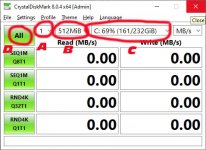
I downloaded crystal disk, but not sure how to run the sd card test....
 
Untitled-1.jpg

A = Number of time to run, set this to 1
B = Data size, set this to 512MB
C= Select you SD drive from here
D= Once done click this to start
 
View attachment 349114

A = Number of time to run, set this to 1
B = Data size, set this to 512MB
C= Select you SD drive from here
D= Once done click this to start
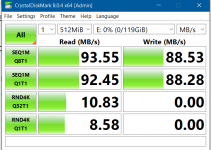
Thanks - results from the lexar card i mentioned previously. Not sure if the card reader / usb drivers will make a difference but here are my results just now. Not sure if I have a uhs ii card reader either
 

Attachments

  • sd test.PNG
    sd test.PNG
    27.1 KB · Views: 2
Last edited:
Thanks - results from the lexar card i mentioned previously. Not sure if the card reader / usb drivers will make a difference but here are my results just now
Thanks, is your card rear a UHs I or UHS II. Looking at the speeds I supect its just a UHs I and the read and write is no better than reading above which was was a UHs I card
 
Back
Top