New Computer - advice please

matt_wright

Suspended / Banned
Messages
482
Name
Matt Wright
Edit My Images
Yes
Hi there - I am looking to purchase a new computer

The main uses will be,,,
....Typical home office / family use
....to do of my photo work (which is essentially 100% in Adobe Lightroom) (possibly looking at photoshop elements - I've had the full PS before - but just never used it)
...and I would like to do some video editing (but I'm talking about knocking together some family videos taken on the GoPro etc - nothing too fancy or advanced) - perhaps using Premier elements or something similar from other companies

Currently running a computer from 2010 (this info means not a lot to me - but might mean something to you)
AMD PHENOM II X6 1090T (3.20GHz/9MB CACHE/AM3/)
8GB SAMSUNG DDR3 DUAL-DDR3 1333MHz (2 X 4GB)
1GB NVIDIA GEFORCE GTX465 GDDR5 PCI EXPRESS - DirectX® 11
640GB WD CAVIAR BLACK WD6402AAEX, SATA 6 Gb/s, 64MB CACHE (7200rpm)
2TB WD CAVIAR GREEN WD20EARS, SATA 3 Gb/s, 64MB CACHE

The PC is basically full (I know I need to do a better job with deleting old photos / backups etc) - which is making it super slow to really do anything.

I guess my budget would be around £1000 - but could stretch to £1500 if it was really worth it (or less if that was sensible). I don't want to have to upgrade again in 4 years. I have fairly recently bought a new monitor - so really only need to the actual PC. Totally open to Mac products if suitable and in the price range.

I'm not 100% sure what a computer needs to be good in these areas. RAM, Graphics cards, processor, Hard disks (SSD) etc

Any thoughts on these two products (this is literally just the starting point of my searching) - Would they do the job? Too much / not enough etc? (would they be a significant performance improvement from existing PC - If I was to clear that and almost start it again?)

Here - £1500

Click here - £900

I've only look at PC World so far - any other places you would recommend looking?

Sorry - Loads of info / Questions there - but if you were able to offer any advice / info that would be amazing


Thanks

Matt
 
Hi Matt, I've just been through this myself and I'm no expert by a long way but will share my recent experience by way of a cautionary tale.

I run the stand alone Lightroom 6.4 and Photoshop Elements15 so no subscription and no cloud. When I bought a new computer I couldn't get my old Adobe products to re-initialise and no amount of dialogue with Adobe Customer Care helped, all they said was I needed to upgrade to the nes subscription based products which I was not prepared to do. In the end I decided to return the new computer as I couldn't get it to run my software and soldier on with my old one. I had a bigger hard drive fited (actually did it myself it's so easy). I have a Hard drive with my operating system on and save everything to the 4TB Storage Drive, this means that the computer runs faster as the OS is on a dedicated drive and I have loads of space for storage which is upgradable.

Of course all this means nothing if you don't mind or are already on the subscription products. One other point though if you go to MAC all your softwares will need replacing unless they are already swappable betweem operating systems.

Point is it may be better to upgrade your existing system (as I did) rather than buy new.
 
Give Novatech a call and tell them what you want to do with it.

Very helpful and knowledgeable guys there.

I use an i5 processor, 16GB RAM and a decent graphics card (Geforce 1660S)

I'd go for 32GB RAM though and an i7.
 
Have a look at the Dell Refurb site. Most of the stock is low /medium spec, but occasionally something really worth having comes up. If you see something high spec grab it straight away! New stock arrives on the site at 3 pm and some time overnight. I got a fairly high spec model from there recently. I had a few issues ordering mine because it wasn't correctly described but they reserved it for me over the w/e while they sorted it out and gave me a completely unasked for 10% off!
 
I've just built a new machine, but if you don't want to do it yourself then I'd use the Dell Outlet as Jeremy suggested above. The equivalent of the £1500 machine is less than £1200 there as a certified refurb. I like the way they also supply computers with a basic windows install, rather than with lots of junk you don't need.

I would also budget for more hard drive space because no machine in this budget will have enough. With a desktop it's easy to ad another 4, 6 or 8 tb. You may also want to double the memory to 32gb, although that's not essential immediately.
 
Last edited:
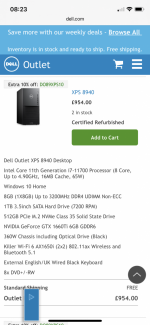
Thanks for advice so far guys. I’ve had a look at Dell refurb and seen this


Do you think this would be suitable?

Has good storage, decent ram and i7. (4gb graphic card)


How do you know if you can add extra RAM / Hard drives at a later point?


Have a look at the Dell Refurb site. Most of the stock is low /medium spec, but occasionally something really worth having comes up. If you see something high spec grab it straight away! New stock arrives on the site at 3 pm and some time overnight. I got a fairly high spec model from there recently. I had a few issues ordering mine because it wasn't correctly described but they reserved it for me over the w/e while they sorted it out and gave me a completely unasked for 10% off!

I've just built a new machine, but if you don't want to do it yourself then I'd use the Dell Outlet as Jeremy suggested above. The equivalent of the £1500 machine is less than £1200 there as a certified refurb. I like the way they also supply computers with a basic windows install, rather than with lots of junk you don't need.

I would also budget for more hard drive space because no machine in this budget will have enough. With a desktop it's easy to ad another 4, 6 or 8 tb. You may also want to double the memory to 32gb, although that's not essential immediately.
 
Last edited:
Give Novatech a call and tell them what you want to do with it.

Very helpful and knowledgeable guys there.

I use an i5 processor, 16GB RAM and a decent graphics card (Geforce 1660S)

I'd go for 32GB RAM though and an i7.

Another vote for Novatech. Really helpful in generating a specification to match my needs plus a quick build and delivery. Really easy company to deal with (y)
 
I'm no expert - far from it - but I think the graphic card is a bit low spec. The one that came in my machine is equally low spec, but as it's a small form factor box it only has room for a physically small card.

I'm so lacking in knowledge about computers I'm going to refrain from offering any more advice!
 
Thanks for advice so far guys. I’ve had a look at Dell refurb and seen this


Do you think this would be suitable?

Has good storage, decent ram and i7. (4gb graphic card)


How do you know if you can add extra RAM / Hard drives at a later point?

I wouldn't touch that because the processor is 8th gen (now at 11 - 12 gen and 8 cores) and the graphics card is low spec. It's likely the internal architecture is older and slower too.

It would be an upgrade, but it's already 3 years old without enough saving to justify over a more recent version.

Try the Dell Outlet - not that site.
 
Last edited:
This is the one I'd pick: https://outlet.euro.dell.com/Online/SecondaryInventorySearch.aspx?c=uk&cs=ukdfh1&l=en&s=dfh&sign=PXhcOSHtr1T4IOw/PR7UdawNpfAGyNCiDeWHcPWgx4puGirdmJPRAC2I7I0YKQCAuyfJExilJr+7KocbCyaJ1Hh/WRjY8Z2E3vhQVSGO6L1CPWVuvlE5WwVlXz/qQrmOPHPFW1+KWUAk1XOxKPDGggBZpi2r2l/NIYjfjZ/r7ZPGRxYVsd1EYX129J1+B1kQ9a0f7nZxf9ImT2TXmstShsxJ19f9leXpmmWOkWQtXLQ=

FWIW the system I just built cost around £1200, and is slightly higher spec than that (2TB SSD, 6TB HDD, 32GB RAM, higher end MOBO, AMD 3800X processor, 500W gold power supply, RTX3060 graphics, nice case with good cooling and lots of upgrade/expansion possibilities). For <£1200 that Dell is excellent value out of the box.
 
Last edited:
When you look at Intel CPU's, as above for example, i7 8700, the first number of the 4 digits indicates the generation number so as ancient mariner said, it's 8th generation.
For your budget I can't see any reason for you not to have the latest generation which is 11.
My laptop is 9th generation and it passed the Windows 11 compatability check.
MS have not been very forthcoming about Win 11 compatability but I know I have more chance of winning the lotterys than the 5th generation in my desktop supporting it.

With regard to the likes of Dell, there was a time when they didn't use industry standard components such as ATX motherboards and power supplies.
This use to mean £60 or more for a replacement power supply whereas an ATX one would cost £30.
It's been a long time since I've poked my head inside a Dell box and for all I know they may have changed.
Along with Novatech these guys also have a very good reputation: https://www.pcspecialist.co.uk.
 
Last edited:
I would suggest you take a look at this site and follow the 'Configure a Custom PC' link.

No matter where you purchase from it allows you to play around with specifications and prices to suit your needs, it even checks compatibility of parts for you

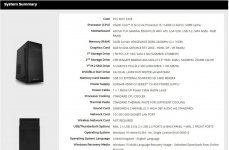
As an example I just did this one to get you started on the right track. All for £1333 inc VAT and Delivery
512Mb M.2 SSD for Windows and Programs, 1Tb SSD for working Files and 4TB Hard Disk for Archive/Backup with an OK graphics card.

PS Go for the 'F' processor if your using a discrete Graphics Card - it is cheaper as it has NO onboard Graphics capabilities
PC Spec.jpg
 
This is the one I'd pick: https://outlet.euro.dell.com/Online/SecondaryInventorySearch.aspx?c=uk&cs=ukdfh1&l=en&s=dfh&sign=PXhcOSHtr1T4IOw/PR7UdawNpfAGyNCiDeWHcPWgx4puGirdmJPRAC2I7I0YKQCAuyfJExilJr+7KocbCyaJ1Hh/WRjY8Z2E3vhQVSGO6L1CPWVuvlE5WwVlXz/qQrmOPHPFW1+KWUAk1XOxKPDGggBZpi2r2l/NIYjfjZ/r7ZPGRxYVsd1EYX129J1+B1kQ9a0f7nZxf9ImT2TXmstShsxJ19f9leXpmmWOkWQtXLQ=

FWIW the system I just built cost around £1200, and is slightly higher spec than that (2TB SSD, 6TB HDD, 32GB RAM, higher end MOBO, AMD 3800X processor, 500W gold power supply, RTX3060 graphics, nice case with good cooling and lots of upgrade/expansion possibilities). For <£1200 that Dell is excellent value out of the box.
Hi - thanks for info - but really sorry the link didn’t take me to a specific computer. Would you be able to have a look again for me.
Thanks
 
Min 512GB SSD for Windows and programs
2TB storage on a regular drive it's easy to move older stuff on 2 or 4TB external drives periodically.
32GB RAM and a powerful graphics card.
Many programs are increasingly able to offload work like rendering video onto the graphic card making economising in this area unwise.

The PC world one for £900 with only 8GB Ram is ridiculous for Windows 10.
I'd agree look out for refurbs, bargains to be had.
Basically you want a mid-spec gaming machine for speedy editing photos and video
 
Min 512GB SSD for Windows and programs
2TB storage on a regular drive it's easy to move older stuff on 2 or 4TB external drives periodically.
32GB RAM and a powerful graphics card.
Many programs are increasingly able to offload work like rendering video onto the graphic card making economising in this area unwise.

The PC world one for £900 with only 8GB Ram is ridiculous for Windows 10.
I'd agree look out for refurbs, bargains to be had.
Basically you want a mid-spec gaming machine for speedy editing photos and video
Thanks for the advice.
How do you know what a decent / powerful graphics card is?
 
Hi - thanks for info - but really sorry the link didn’t take me to a specific computer. Would you be able to have a look again for me.
Thanks

OK, they've sold out for now - check back tomorrow.

Go to Refurbished Desktop Computers and All-in-One PCs, then on the refine your search section select i7 processors. Pick a machine with a processor that starts 11XXX. More memory can easily be added later, ditton hard drives, but make sure it has AT LEAST a 256GB SSD and avoid the all in ones because upgrading is unpredictable.

They do have this, although it's a little over budget: https://outlet.euro.dell.com/Online...JGa2VxygKOFNxQe8DdHVF1TuAjh2yIDZfTVmTqa4NoOwJ

Thanks for the advice.
How do you know what a decent / powerful graphics card is?

Look for at least 4GB RAM, probably more like 8 or 12 GB. Nvidia models will be 20XX or 30XX numbered. No idea on AMD cards.

FWIW Lightroom and photoshop STILL barely use the processing power of a graphics card, although hopefully they'll eventually catch up with the rest of the world. If you use other image processing software then they will likely use graphing processing and it will matter much more.
 
Thanks for all your help and advice so far guys. Certainly getting a better understanding of what I need (well want).

what does it mean when it talks about M2 storage? SSD (I know this means solid state - but what is that). And SATA?
So priority would be processor and graphics card (assuming say 8gb Ram and decent decent storage to start - as they can be easily upgraded?)

@ancient_mariner i wish you hadn’t linked that last one - can’t stop looking at it now
 

Attachments

  • 88E629B5-8813-4F7E-B519-E48FE2496D81.png
    88E629B5-8813-4F7E-B519-E48FE2496D81.png
    310.8 KB · Views: 5
  • B751D74F-1047-41F5-92D2-5FEF7CB71235.png
    B751D74F-1047-41F5-92D2-5FEF7CB71235.png
    309.4 KB · Views: 5
Last edited:
Edit - links don’t seem to have worked so have added screenshota

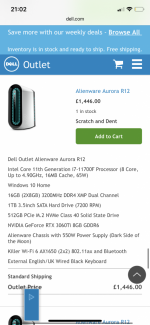
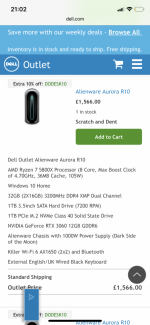
Any thoughts of these two?
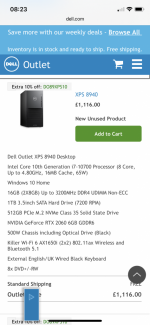
This one looks pretty decent? (First photo)
https://outlet.euro.dell.com/Online/InventorySearch.aspx?c=uk&cs=ukdfh1&l=en&s=dfh&brandid=7


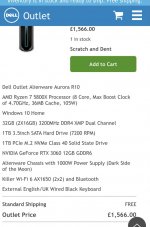
This has better spec - but uses a different type of processor - AMD Ryzen 7 - anyone have experience with them? (Second photo)
https://outlet.euro.dell.com/Online/InventorySearch.aspx?c=uk&cs=ukdfh1&l=en&s=dfh&brandid=7


Thanks

They're both good - either would do, although the cheaper one is slightly better value. In terms of processing speed they'll be similar with the AMD version being a bit faster, however the cheaper model has a faster graphics card, and the 'lost' 500GB of SSD doesn't matter too much since a 1TB m2 SSD is less than £100 now.

FWIW My new machine is based on a Ryzen 7, although it's a 3600X rather than 5800X which is a faster processor.

what does it mean when it talks about M2 storage? SSD (I know this means solid state - but what is that). And SATA?
So priority would be processor and graphics card (assuming say 8gb Ram and decent decent storage to start - as they can be easily upgraded?)

m2 is the format of the storage & interface, and these may also be called NVME (although IIRC that's the interface standard). There is also mSATA (a dead standard, used in older achines like this Dell XPS) with a different & slower data rate. The m2 memory usually runs through the PCIE interface, and with the best motherboards will give extremely fast data transfer rates. This is useful when you're editing or culling pictures, because the images can open faster and be saved more quickly.

SATA is Serial ATA inferface, and it's used to connect devices like conventional hard drives and DVD players to the motherboard.
 
Last edited:
Thanks again for your comments and help (especially @ancient_mariner).
so in very basic terms a M2 SSD is quicker to acces files etc ?

so what would you loads on the SSD - and what would go on the ‘normal’ drive ?

also I’ve just noticed (if I’m reading correctly) that none of these have a cd drive?

I’m guessing that’s something that can be added directly to the computer (or perhaps via usb? And still work normally asif it was already part of the computer?
Something like this ?

https://www.amazon.co.uk/Rioddas-External-Portable-Rewriter-Desktop/dp/B07JGWBLVH
 
Last edited:
Thanks again for your comments and help (especially @ancient_mariner).
so in very basic terms a M2 SSD is quicker to acces files etc ?

so what would you loads on the SSD - and what would go on the ‘normal’ drive ?

also I’ve just noticed (if I’m reading correctly) that none of these have a cd drive?

I’m guessing that’s something that can be added directly to the computer (or perhaps via usb? And still work normally asif it was already part of the computer?
Something like this ?

https://www.amazon.co.uk/Rioddas-External-Portable-Rewriter-Desktop/dp/B07JGWBLVH


Ive just bought a new PC with a 256Gb SSD and I have 2 x 2TB external HD's and a 1TD External SSD all on a USB hub

The HD's are for storeage only

Have you considered calling DELL or other PC makers and have them make one to your spec? Given you heathly budget :

Les

PS My brother used thes guys for a top spec PC

 
Last edited by a moderator:
If I went for something a tad cheaper like one of the two below - do you think I’d miss much?

I actually thought maybe the cheaper of the two might be better (as newer processor). And then pay to upgrade the ram to make it 16gb (anyone know how easy this is to actually do - and possibly link a product). The only difference then would be the graphics card - not sure really what the difference is as both say 6gb)
 

Attachments

  • 12CBD98B-1FB8-4DA9-9626-ABC402B0CAAC.png
    12CBD98B-1FB8-4DA9-9626-ABC402B0CAAC.png
    309.2 KB · Views: 5
  • 6E976277-321C-4C4B-B9DF-D350B967486A.png
    6E976277-321C-4C4B-B9DF-D350B967486A.png
    309.6 KB · Views: 4
Thanks again for your comments and help (especially @ancient_mariner).
so in very basic terms a M2 SSD is quicker to acces files etc ?

so what would you loads on the SSD - and what would go on the ‘normal’ drive ?

also I’ve just noticed (if I’m reading correctly) that none of these have a cd drive?

I’m guessing that’s something that can be added directly to the computer (or perhaps via usb? And still work normally asif it was already part of the computer?
Something like this ?

https://www.amazon.co.uk/Rioddas-External-Portable-Rewriter-Desktop/dp/B07JGWBLVH

Yes, SSD especially M2, especially those designed to work with 4X pcie port will be quicker. The old SATA connected 2.5" style SSD types top out around 500MBS, but a fast M2 drive could be over 3000MBS.

I have a 1TB SSD in the laptop and use it for OS, programs and at least the last year's pictures on the principal I'm likely to go back and edit more of them. The new machine has a 2TB SSD and I'll use it the same way. Conventional HDD is for storage and occasional work only, and with the low speed of these there's no disadvantage to using external drives via usb3 other than risk of dropping them. They top out at 100mbs.
 
If I went for something a tad cheaper like one of the two below - do you think I’d miss much?

I actually thought maybe the cheaper of the two might be better (as newer processor). And then pay to upgrade the ram to make it 16gb (anyone know how easy this is to actually do - and possibly link a product). The only difference then would be the graphics card - not sure really what the difference is as both say 6gb)

Neither of those are as impressive. 1660 is a slow old card, 2060 is a less slow still old card. They would both be an upgrade, and I'd buy the cheaper one if that was the choice, then add memory to 32GB. Possibly a better graphics card later, but that would also require a bigger power supply.
 
Last edited:
Neither of those are as impressive. 1660 is a slow old card, 2060 is a less slow still old card. They would both be an upgrade, and I'd buy the cheaper one if that was the choice, then add memory to 32GB. Possibly a better graphics card later, but that would also require a bigger power supply.
Thanks - I feel like with every bit I understand a tad more - another set of questions comes.
I’ll keep an eye out and see what pops up.

Did you have any idea about either a) the ease to update RAM on one of the lower spec models.
Or b) the effectiveness of adding a cd drive to one of the Alienware ones?
 
Upgrading ram is easy - just make sure it's the right spec. External DVD drives are fine, and I've used one for years.
 
Have you considered Ebay?
There are bargains galore if you know what you want.
I recently bought an i7 - 3770 machine with 16GB DDR3 RAM and a 500GB HDD with what looks like an almost new case and M/B for £102 - delivered!
Not quite good enough for your needs but it gives you an idea.
There are quite a few i9 machines going as well.
If you look at my YouTube channel you'll see how I bought a really cheap Z800 machine (with a few problems) and how I'm now supercharging it:
View: https://www.youtube.com/watch?v=rCpP7bMrYFI

And with Ebay any problems and you'll always get your money back.
 
Last edited:
Thanks again all
Have you considered Ebay?
There are bargains galore if you know what you want.
I recently bought an i7 - 3770 machine with 16GB DDR3 RAM and a 500GB HDD with what looks like an almost new case and M/B for £102 - delivered!
Not quite good enough for your needs but it gives you an idea.
There are quite a few i9 machines going as well.
If you look at my YouTube channel you'll see how I bought a really cheap Z800 machine (with a few problems) and how I'm now supercharging it:
View: https://www.youtube.com/watch?v=rCpP7bMrYFI

And with Ebay any problems and you'll always get your money back.
Thanks for the advice. I haven’t considered eBay to be honest.
I still don’t think I know enough to get what the right - but sounds like you hit a bargain there.

when you talk about my ‘needs’ - I do wonder if they’ve been blown out of proportion.

@ancient_mariner and anyone else
I just want a new computer that will handle my photos via lightroom (possible photoshops elements at some point) and stitching together / basic editing of a few go pro files to make some family videos (in some sort of editing program).

Do I really need to spend £1000-£1500 to achieve this?

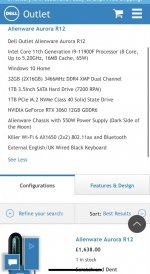
If I was to spend the top end of the budget would there be much difference between theses two
FEDC00C7-9178-48B2-9016-1730A154FB1D.jpeg
632C1505-4789-4109-96CD-81B817FD2490.jpeg


Thanks

Matt
 
Last edited:
Do I really need to spend £1000-£1500 to achieve this?

No, you can edit on a 7 year old machine like I did until this week - cost around £200-£450 depending on spec. It will be ok for a couple of years and maybe more, but if you're subscribing to lightroom etc then eventually it will get slower and may become frustrating to use. £1200 to £1500 will get a machine that should be good for 10 years and will be super snappy to begin.

It's hard to know what people's objectives and requirements and in these discussions, and also whether they're happy to spend up to their limit or not. If you don't really want to spend £1500 on a new machine then look for 5-6 years old for the range I suggested. 4, 5 or 6 series i7, 16 GB RAM, SSD. Check out itzoo.co.uk - they often have good deals with a bit of warranty.
 
Right, following up, this is £240 with a warranty: https://itzoo.co.uk/collections/pc-...20-midtower-pc-i7-4790-1tb-hdd-8gb-windows-10

The processor is about 20% quicker than the one in this Dell XPS, although the graphics card is rather rudimentary. If I bought this I would want to immediately add a conventional SSD :
500GB around £45 https://www.hotukdeals.com/deals/cr...ternal-ssd-ps4499-delivered-at-amazon-3775512
1TB around £84 https://www.hotukdeals.com/deals/patriot-p210-1tb-25-sata-iii-ssd-ssd1276-3775753
2TB around £143 https://www.hotukdeals.com/deals/2t...-ps14291-uk-mainland-at-amazon-france-3777687

I would also want to double the memory in there - if possible add another 2 4GB sticks for 8GB, likely cost around £40-£50 or a single 8GB stick if there were just one.

For around £400 you'd have something to keep going for a while, and quite a bit quicker than your present machine.
 
stitching together / basic editing of a few go pro files to make some family videos (in some sort of editing program).

Do I really need to spend £1000-£1500 to achieve this?
I use Video Pad Editor in a virtual machine to make all my YouTube videos so it would easily run on almost any machine.
You can use it for FREE (you will get a few nag screens) but I actually paid for it after a few months for the extras I got.
It's very easy to use and you should be able to use it for what you want.
 
Back
Top