Network cabling

JonathanRyan

Suspended / Banned
Messages
10,765
Name
Jonathan
Edit My Images
Yes
I have Virgin fibre delivered to my living room. I want to *cable* to my study which is about 5 metres away. I plan to do this on the outside of the house so there are no cables inside which will make a run of about 8 - 10 metres (there's a buttress in the way). I then want to run a lead from my Virgin modem to a nice socket on the wall and then another lead from a socket in my study to the computer/switch.

What do I need to do this?

I was hoping the answer was something like 20 metres of shielded Cat 6 (may as well run 2 cables), a couple of RJ45 sockets with back boxes and a punch down tool. Is it really that easy?

[BTW HomePlugs are great and WiFi is pretty nice these days - but I want to cable it.]
 
That would do the job nicely. FAR better to go on the side of overkill than push the limits of the kit (IMO).
 
Shielded is overkill, you won't notice any difference in a home environment.
 
From what I have been told Shielded cables are a pain to terminate.

I would go for something like this:

I'd second that, seems fine.
Solid core, full copper, 23awg.

Excellent - thanks. Will I regret Cat 6 in a few years for normal domestic use? In theory I have 600+ Mbps fibre - so I'm using about half the max of Cat6. Cat 7 is about 15 quid more on a 50 metre drum but as you say may be harder to terminate. Is it worth it?
 
Excellent - thanks. Will I regret Cat 6 in a few years for normal domestic use? In theory I have 600+ Mbps fibre - so I'm using about half the max of Cat6. Cat 7 is about 15 quid more on a 50 metre drum but as you say may be harder to terminate. Is it worth it?
I think you should be okay with cat 6, also Cat 7 is not very good if you need to make sharp bends.
 
Cat6 will easily do 10Gb at typical distances, think it's certified 10Gbaset at 55meters. I already have 5Gb going through my cat6 zero problems.
 
Last edited:
From a post on AvF that I read...


A tip is not to try and take that cable directly through the wall, use compression glands into Wiska Boxes. Once the cable enters the gland, split away the outer PVC sheath and bring the cable in through the wall, just with the inner flexible sheath. This will help you maintain the correct bend radius for the cable and is much tidier.


Why not just use power over Ethernet?
How quick is your fibre connection? A PoE adaptor can now reach some pretty impressive speeds.
Do you mean Powerline where you use the domestic AC wiring to transport ethernet data packets ?

PoE is used to deliver a DC voltage over an ethernet cable to power a remote ethernet device such as a CCTV camera or wireless access point? We used PoE switches to run our school wireless access points and CCTV system.
 
Do you mean Powerline where you use the domestic AC wiring to transport ethernet data packets ?

PoE is used to deliver a DC voltage over an ethernet cable to power a remote ethernet device such as a CCTV camera or wireless access point? We used PoE switches to run our school wireless access points and CCTV system.
I did sorry, it just just a very quick post before I moved on to something else :)
 
I did sorry, it just just a very quick post before I moved on to something else :)
Do you mean Powerline where you use the domestic AC wiring to transport ethernet data packets ?

PoE is used to deliver a DC voltage over an ethernet cable to power a remote ethernet device such as a CCTV camera or wireless access point? We used PoE switches to run our school wireless access points and CCTV system.
I use POE for my home CCTV cameras.
I also use some power line adaptors in my in-laws, and the tech is getting much better, impressive speeds.
 
I use POE for my home CCTV cameras.
I also use some power line adaptors in my in-laws, and the tech is getting much better, impressive speeds.
I think the issue with Powerline is the quality of the wiring in the house. It does give enough but when you are getting 200mbs the max a AV2000 home plug would give is around 50-60mbps.
 
From a post on AvF that I read...


A tip is not to try and take that cable directly through the wall, use compression glands into Wiska Boxes. Once the cable enters the gland, split away the outer PVC sheath and bring the cable in through the wall, just with the inner flexible sheath. This will help you maintain the correct bend radius for the cable and is much tidier.


Thanks - that looks a really good idea. I hadn't thought of that at all (Virgin and Sky just silicon the holes they made - this will be neater.

I use POE for my home CCTV cameras.
I also use some power line adaptors in my in-laws, and the tech is getting much better, impressive speeds.

Yeah, POE is basically the opposite of Powerline :) Powerline ids great for webcams and low bandwidth stuff. But I've tried them on our system and get very poor speeds for continuous throughput. They also seem to be susceptible to line noise such as fringes on the same circuit.
 
So after a busy weekend, I'm now an "expert" at installing ethernet :)

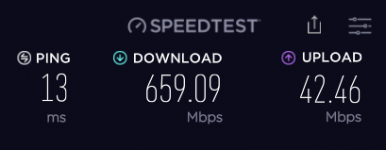
I was going to get the Cat 6 linked above but unfortunately it was out of stock and not due to come in stock in 50m drums for a while. Quick chat with CS and I upgraded to Cat 7 direct burial. I haven't buried it but it has a bitter gel in case anything decides to nibble it which is a bonus. Termination wasn't too tricky - I'd highly recommend the £4 test tool that Kenable sold me. One wire wasn't making connection and it pinpointed it for me in seconds. The hard part was actually getting 9mm thick cable through an 80s cavity wall.

And as I said at the start, the main reason wasn't speed, but my WiFi was topping out at about 450Mbps. Here's my latest stats

1633877274377.png

Looks like I got it wired OK :). And Virgin just announced that I'm eligible for their gigabit offering......
 
Cat7, why not Cat6a at least that's a standard not a proprietary one. Are you sure its Cat7 as its different connectors as well?

Either way looks like its working alright.
 
Last edited:
Cat7, why not Cat6a at least that's a standard not a proprietary one. Are you sure its Cat7 as its different connectors as well?

Either way looks like its working alright.

Ah yes, sorry - it's Cat 7 compatible cable but I wired it to Cat 6 sockets. It won't get the crazy speeds of full Cat 7 but those are way beyond what I need anyway. If ever the world shiftfs and cat7 becomes common I can rewire using the existing cable. Laying the cable was the hard bit :)
 
Cat7 will never be adopted it's a proprietary spec.
Cat6a then Cat8 as far as I'm aware.
For home though cat6 is ample it will do 10G at typical lengths.
 
Cat7 will never be adopted it's a proprietary spec.
Cat6a then Cat8 as far as I'm aware.
For home though cat6 is ample it will do 10G at typical lengths.
Ah, maybe I'm not quite an expert yet :)

Either way, I appreciate all the help.
 
It does not help you now but I had a similar requirement and explained to Virgin when they arrived and they installed it just as I requested.

Dave
 
Last edited:
the speed of the cable is kind of irrelevant as it is generally restricted by whatever you are sending down it realistically 100mb is good enough never mid 1gb and beyond
 
It does not help you now but I had a similar requirement and explained to Virgin when they arrived and they installed it just as I requested.

Dave
Yes with hindsight, even if I'd had to give the installer a few quid it would have been easier for them to do it than me :)

the speed of the cable is kind of irrelevant as it is generally restricted by whatever you are sending down it realistically 100mb is good enough never mid 1gb and beyond

Yeah...100 wouldn't be enough. If my internet dropped to 100mb I'd be quite miffed :) And I don't currently use internal networking but 100mb internal connection would be painful.
 
the speed of the cable is kind of irrelevant as it is generally restricted by whatever you are sending down it realistically 100mb is good enough never mid 1gb and beyond
100mb I'd cry of my network went that slow. Lol

Mines a mix of 10gb, 5gb and 1gb.
 
100mb? Pretty sure you mean Mb. HUGE difference.
 
Surely, regardless of network speed, and I'm referring to an internal network, you're limited to the slowest part of the chain, which would generally be hard disks, how quickly they can read and write data.

I have a 10TB NAS and I could have a 10Gb internal network speed but when I'm copying huge files from my Mac to my NAS it'll only transfer as fast as it can buffer and write to the NAS.

We've just moved, from a house with 500Mb Virgin internet to a house that has Sky with a max download speed of 30Mb, and we rarely get that.

When we first moved in it was awful but, in all honesty, it doesn't seem to affect us at all that much now. I have 2 teenage boys who play on their gaming pc forever and stream Netflix at the same time and they don't seem to notice. Hopefully at some point we'll be upgraded to fibre to the premise.
 
Surely, regardless of network speed, and I'm referring to an internal network, you're limited to the slowest part of the chain, which would generally be hard disks, how quickly they can read and write data.

I have a 10TB NAS and I could have a 10Gb internal network speed but when I'm copying huge files from my Mac to my NAS it'll only transfer as fast as it can buffer and write to the NAS.

We've just moved, from a house with 500Mb Virgin internet to a house that has Sky with a max download speed of 30Mb, and we rarely get that.

When we first moved in it was awful but, in all honesty, it doesn't seem to affect us at all that much now. I have 2 teenage boys who play on their gaming pc forever and stream Netflix at the same time and they don't seem to notice. Hopefully at some point we'll be upgraded to fibre to the premise.
You're right but even 1Gb isn't fast enough for a HDD, 125MBs, when a HDD can do about 140MBs
If you have for instance SSD cache like I do, it transfers to that first.
Then you have 1Gb fiber internet.
1Gb should be a minimum at the minute, 2.5 and 5Gb are nice to have. Lot of modern stuff is 2.5Gb. My motherboard and NAS are both 2.5Gb.
 
You're right but even 1Gb isn't fast enough for a HDD, 125MBs, when a HDD can do about 140MBs
If you have for instance SSD cache like I do, it transfers to that first.
Then you have 1Gb fiber internet.
1Gb should be a minimum at the minute, 2.5 and 5Gb are nice to have. Lot of modern stuff is 2.5Gb. My motherboard and NAS are both 2.5Gb.
Damn it may be time to upgrade my NAS :ROFLMAO:
 
Definitely. I have 10GbE cards in both my NAS and main PC and I see 4Gb/s when copying large files between them. Admittedly that's copying to SSD rather than HDD but I only have spinning rust in my NASs these days.
 
Back
Top