Negative scanning advice

DaveHope

Suspended / Banned
Messages
257
Name
Dave Hope
Edit My Images
Yes
I've picked up a 35mm rangefinder and a medium format (6x6) system camera and am loving the slower pace of things giving me more time to concentrate on the image, having sold my DSLR years ago.

I'm currently shooting predominantly B&W, with occasional colour in both formats.

A roll of film costs me about £13 for dev & scan to medium format TIFF at a local business with a turnaround of about 2 weeks.

I've picked up a few development bits and plan on developing my film, partly to expand the enjoyment (I hope!) and partly for a quicker turnaround. I'm still trying to decide on scanning.

I've read countless posts here and elsewhere, and am mostly settled on a V700 or greater flatbed (i got quite the shock seeing the prices these still go for!). Ideally I'd like to have one scanner for both formats, but compromise definitely an option.

Does anyone have any "words of wisdom" if they've been through the scanning decision lately?
 
Have a look at the Big Film Scanner thread, https://www.talkphotography.co.uk/threads/a-big-film-scanner-thread.709453/ for some background. Could do with updating I think. I'd generally agree with you that V700 and above is a good place to aim at; the issue is getting good enough quality for your 135 scans. The larger negative size for 120 means that is much more forgiving.

However, before shelling out quite a bit for a big scanner, if you already have a decent digital camera, a macro lens, a tripod and a white light source, you can at least experiment with camera scanning, and inverting the result yourself with software. The thread above is weak on this, as I don't have an appropriate camera. Camera scanning can get very expensive very quickly if you buy all the gear (copy stand, negative holder etc), but with less convenience you should be able to bodge it up pretty quickly!
 
It really depends on your commitment to film. I have a Plustek for 135 and a V550 for larger formats. Originally I had just a V550 but I was dissatisfied with both the hassle and the quality of 135 so I picked up the Plustek.

If you're going to develop your own, there really is no better feeling than taking the photo and seeing it right the way through to print from capture. Scanning though is probably the most complicated, frustrating, and tedious part, hence Chris' thread mentioned above which is well worth a read through. Even though it's very long, it's very comprehensive.
 
If you're scanning 135 and 120, then a flatbed is the only real option for a dedicated device, unless you want to start looking at the more expensive new or used options (where you're looking at well in excess of £1000). The other option would be to use a digital camera, and there are various devices on the market to allow negative and reversal film to be scanned. You do need a suitable digital camera and macro lens to do this though.

The Epson scanners produce good results for 120 film and decent results for 135, although a dedicated Plustek or Reflecta scanner will give sharper output. It depends on the level of quality you require - I'm quite fussy, but the results are likely perfectly acceptable for most people.

I'm currently selling my Epson V550 in the trading folder and I have plenty of examples of the results I've gotten from that on my Flickr stream.

e.g.

An example 135 scan - 3k resolution. Scanned at 2400ppi. Ilford HP5+.
An example 135 scan - 3k resolution. Scanned at 2400ppi. Agfa Vista Plus 200.
An example 120 scan - 3k resolution. Scanned at 2400 ppi. Ilford HP5+.
An example 120 scan - 3k resolution. Scanned at 2400ppi. Kodak Portra 400

You can see the photos at different resolutions using the links at the top of the pages. realistically, you'll probably not view them at such high resolutions - they look better to the eye at lower resolution - but it gives a good idea of what the scanner can resolve. Note that all the images will have been further processes in Lightroom, so there will have been some tweaks that will have further improved contrast and sharpness etc.
 
Last edited:
Thanks everyone (especially @ChrisR for the long post, which I'd read previously).

I've long since traded in anything digital to MBP and expect I'd get tempted by something new and shiny if I ended up looking at a camera for scanning, and then perhaps not use the film cameras as much. So trying to avoid that temptation.

Photos look great @FishyFish , and the scanner well priced from what I can tell - but think if I go the flatbed route I'll go V700/V800/V850.

One option, I suppose, is to try not to use the same solution for both 135 and 120.
 
Well before you go the expensive route for V700 etc you can always buy an older model to see "if scanning is for you" instead of sending film off to e.g. filmdev. There are a couple of good ones made in the past but one of the advantages of V700 etc is it can do more negs in one scan.
 
Thanks everyone (especially @ChrisR for the long post, which I'd read previously).

I've long since traded in anything digital to MBP and expect I'd get tempted by something new and shiny if I ended up looking at a camera for scanning, and then perhaps not use the film cameras as much. So trying to avoid that temptation.

Photos look great @FishyFish , and the scanner well priced from what I can tell - but think if I go the flatbed route I'll go V700/V800/V850.

One option, I suppose, is to try not to use the same solution for both 135 and 120.

If you're planning on shooting both 135 and 120, then a flatbed is the obvious choice to start with. If, later, you decide the quality of 135 scans could be improved, then a dedicated 135 scanner is probably the way to go (unless, or course, you can afford one of the high-quality Nikon Coolscan models that does the lot :) ).

I will probably have a V700 for sale soon too (I recently upgraded to a V850), which I'll stick in the trading folder when I do. It scans perfectly,but it's a bit rougher cosmetically, and I will be keeping the 120 and 4x5 film holders (as I prefer them to the V850 holders), but I'll reflect that in the price.

Apologies for sounding like some sort of Epson sales rep. These are the first two scanners I've ever sold. Honest! :D
 
Hah! I'll keep an eye out on the sale section for the V700 then (I saw the V850 thread before I posted, very jealous!)
 
I've long since traded in anything digital to MBP and expect I'd get tempted by something new and shiny if I ended up looking at a camera for scanning, and then perhaps not use the film cameras as much. So trying to avoid that temptation.
I fully understand that, and it was implicit in your first post. And yet, to stir the pot ...

You would hardly need the latest & shiniest! Some thing a bit long in the tooth should do it. What about a Nikon D300 (just say) with just a used F-mount manual focus macro lens?

Plus a small light panel, copy stand, film holder ... especially for mono, which eliminates any hassle that can be involved in orange mask removal + reversing colours with colour neg film.

Scanning can be achingly slow, along with those weird gurning noises that scanners make. Is that really the quality of life you want?
 
Scanning can be achingly slow, along with those weird gurning noises that scanners make. Is that really the quality of life you want?

Probably not. Looking at prices in the classifieds here and eBay, looks like a D300 would be ~£100 (or a D600 for ~£250) plus a "Nikon 55mm f/3.5" for ~£60 (or a "Nikkor 60mm f/2.8 AF-D Micro" for ~£150). Plus a holder/light source.

Alright, maybe I need to give that some more thought.
 
I'm thinking the D300 res @12mpx would be plenty for 'scanning' either format. A D600 would be better on dynamic range / shadow noise, but whilst that can be useful out in the wild, it's probably less important photographing negs ...
 
Last edited:
Looking at prices in the classifieds here and eBay, looks like a D300 would be ~£100 (or a D600 for ~£250) plus a "Nikon 55mm f/3.5" for ~£60 (or a "Nikkor 60mm f/2.8 AF-D Micro" for ~£150). Plus a holder/light source.
Clearly you can do camera scanning with a tripod, or even a pile of bricks, to support the camera pointing downwards, but sooner or later I reckon you're going to need a copy stand. Just check out their prices before you go too far! And the prices being asked for some of the neg holder/lightsource options are similarly staggering. A V750 is going to look like a bargain! (They're big, though...).

I have a Plustek 7500i for my 135 and an Epson V500 for my 120. Not ideal (put together, they'd be larger than a V750, but the V500 normally lives in a cu[board), and if I did much more 120 it would be a right pain in the proverbial, but it sort of works. .
 
you're going to need a copy stand
Circa £125 used ...?
(They're big, though...)
Neither are copy stands that diminutive ! Though you might detach the column for storage.

As far as light sources go a small, cheap light panel shouldn't break the bank - especially for mono negs where colour temp accuracy might be ignored.

If on a budget, neg handling could even be improvised from raw materials or found parts ...
 
Last edited:
If on a budget, neg handling could even be improvised from raw materials or found parts ...
Absolutely agree with this part, the whole thing can be bodged up (meant positively), and probably should be when experimenting to see whether it's the way you want to go. I'm just astounded at the range of highly expensive (and one hopes, high quality) accessories offered in this market!
 
I ended up camera-scanning for 35mm, 120 and 5x5 - some info here: https://www.talkphotography.co.uk/t...4x5-b-w-scanning-service.764866/#post-9582840

Basically I went with a pixl-latr, light panel from wex, and a TTArtisan 40/2.8 Macro I already had.

To date using a tripod with overhead arm instead of a copy stand, and have also used a tripod shooting down onto the table. A copy stand would be easier, and I might make one based around a Macro rail as the fine distance control is what I really want. Grain2pixel plugin for photoshop to convert thus far.

Happy to answer questions etc. if it'd help. Only just getting into it though!
 
Thanks everyone.

For a stand, my "plan" is probably to pick up an old enlarger and ditch the enlarger and just keep the copy stand. For now, I'll try just using my tripod.

I did see the pixl-latr and think something like that and a Cinestill light will do the job.
Happy to answer questions etc. if it'd help. Only just getting into it though!
Thanks! How long is it taking you to setup the tripod etc? Presume once set, it's then only a minute or two to "scan".
 
For a stand, my "plan" is probably to pick up an old enlarger and ditch the enlarger and just keep the copy stand.
Or keep any neg carriers to use as your film holders ... ;-)
 
Or keep any neg carriers to use as your film holders ... ;-)
I suspect the house clearance price range on Facebook marketplace will have long since lost those, but fingers crossed!
 
Thanks! How long is it taking you to setup the tripod etc? Presume once set, it's then only a minute or two to "scan".

It’d be quicker if I was scanning whole rolls. It’s my late father’s negatives which have been cut into strips for archive in folders. Once a strip is in it’s quite quick. I tether my camera so I can preview on my laptop or iPad screen as it’s much easier to spot anything wrong.

The time isn’t in any one task, it’s all the little things like blowing dust off, slight tweaks to alignment, getting precise focus etc. it got faster when I shot a bit wider and cropped in post. It’s quite easy to move something when changing negatives (as they’re not in one strip) so if aligning precisely I have to do it each strip (or in post).

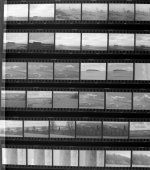
I have very quickly shot contact sheets by placing the pages of the folders on the a4 light panel I’m using which is nice. Maybe 2 hours total to capture ~3,000 negatives that way?
 
Ah to be clear that’s _really_ low resolution and quality. Just enough I can see what they’re of and decide to scan properly later. I was using 12Mp across an A4 folder page of negatives that I wasn’t even removing from the folder.

E.g. here’s an example sheet at random:

folder_one-23.JPG

Note alignment is bad, contrast and focus is bad etc… bu I can see what the photos are at least.
 
Last edited:
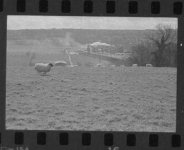
And a crop from that contact sheet:

IMG_0250.jpeg

I shot the contact sheets with my iphone as I didn’t have a proper camera to hand, in raw so limited to 12Mp. It was a quick and dirty solution to get digital copies quickly with limited access to the folders.
 
Good enough for contact sheets, so well done.
 
It’d be quicker if I was scanning whole rolls. It’s my late father’s negatives which have been cut into strips for archive in folders. Once a strip is in it’s quite quick. I tether my camera so I can preview on my laptop or iPad screen as it’s much easier to spot anything wrong.

The time isn’t in any one task, it’s all the little things like blowing dust off, slight tweaks to alignment, getting precise focus etc. it got faster when I shot a bit wider and cropped in post. It’s quite easy to move something when changing negatives (as they’re not in one strip) so if aligning precisely I have to do it each strip (or in post).
I have a wooden box jammed full of my late father's negatives from the 1930s to 50s (6x6 or 6x9). The general idea is to scan a few each time I set up the scanner for a roll of my own 120. Unfortunately all his are cut into single negatives, so the positioning is much harder. Sometimes I manage to get 2 negatives reasonably aligned in the holder! So far I've just been scanning the loose envelopes scattered in the top of the box; I've yet to try the bulk of the 6x9s from exotic places all jammed together in little folds of paper with faint pencil writing on them! I really do need to get on to this while my 92 year old brother (who could probably identify some of the locations) is still with us!
 
I have a similar issue with the larger formats - there are 6x6 and 5x4".

I'm doing contact sheets of those too, not even taking them out sleeves if they're in them, and shooting the whole A4 light panel so I can get 12 or 9 frame per sheet quickly without precise alignment, then I have a digital index to review at leisure then re-visit to scan.
 
@ChrisR I use Clearfile (or similar name - I 'd have to check if it matters) which are designed to let you contact print with the negatives in them. That might help with the loose negatives, assuming focus is still OK in the scanner. As I assume you're still storing the negatives in the box, I could post a single sheet to you to save buying a pack.
 
Last edited:
The idea of doing a contact sheet by photographing all the negatives on a lightbox in one photograph is brilliant. That will be ideal to be able to quickly choose the right negative to scan.

I've learned a lot from people on here about scanning. In the last two or three weeks I've made all the beginner mistakes and gradually formulated a work flow. Only the other day I discovered that I could scan to TIFF rather than JPG and not lose image quality in editing.

Tomorrow is cold turkey day. Three sets of negatives processed without scanning will arrive. No digital back up. First job will be to do a contact photo for each roll.
 
@ChrisR I use Clearfile (or similar name - I 'd have to check if it matters) which are designed to let you contact print with the negatives in them. That might help with the loose negatives, assuming focus is still OK in the scanner. As I assume you're still storing the negatives in the box, I could post a single sheet to you to save buying a pack.
Thanks for the suggestion. Just checked and my 120 negative storage sheets and they are clear, well worth a try. Focus/rings could be a problem, we'll see. Alignment would be a lot easier. although I suspect I'd be wise only to put one 6x9 neg per row, otherwise I'd never get them out!
 
Hi,
thought I'd piggyback on this thread, as it's relevant.

I've got a more than 12 rolls of 120 back from the dev house. I've got an old Epson 4490 scanner, which I'm not happy with the results.

I've also assembled the parts for camera scanning. I'm using an XT5, Vivitar 90mm macro f2.8 1:1, EFH and a panel light to illuminate the film. I'm using a monopod with a desk clamp.

  1. How do you get the camera/lens and film to be scanned parallel to the sensor?
  2. I can feel the thing vibrate, so a remote trigger is necessary, I think I can use the camera app for that.
  3. Is there a better way of holding the whole combination together?
  4. Do you change the tones curves to reverse the colour?
  5. I had some Velvia 50 developed, looks great on the slide, but the highlights are blown out if I use auto exposure. I expected the XT5's sensor to have better DR
 
Still earlt days for me. But so far:

1, Align with a mirror on the surface and center through viewfinder

2, definitely. Ive been using "helicon remote" for tethered capture to speed things up. A bit buggy on my phone, by fine on my PC.

3, I built a copy stand out of some ply and 15mm rod to mount a DSLR. I had the ply, the rod was aprox. £60. An old enlarger would probably work well if you can find one locally.

4, not done any colour yet so cant help with this one.

5, I try and expose at f8 and find the slowest shutter speed I can without blowing out the light source just checking highlights on the camera. No film on the light at that point. Then scan the whole roll with the same settings.
 
Great ideas Dave, I'll shall look for a suitable mirror and look for an old enlarger, I had a very solid one that I disposed of 10 years ago because I'd thought I would never use it ...
 
Also with the mirror, positioned on top of the negative holder.

Trigger with lightroom using it for tethered capture. Also means you get a large screen to check focus etc.

https://grain2pixel.com/ To handle the negative inversion etc.
 
If you have a tripod you can reverse the centre on, try having the tripod straddle the light panel and shoot straight down,
 
Also with the mirror, positioned on top of the negative holder.

Trigger with lightroom using it for tethered capture. Also means you get a large screen to check focus etc.

https://grain2pixel.com/ To handle the negative inversion etc.

If you're using LR, you can get it to auto apply import settings in a session - including doing the negative conversion.

The only downside of using LR to do it (IMO) is that all your sliders then work in reverse. i.e. to increase exposure, you have to drag it as if you were lowering it. No biggy in reality but feels counter-intuitive.

Spend enough time creating a preset (or set of presets for differing conditions) and you could get some decent results very quickly.

Some info here:

Tethered shooting presets:

View: https://www.youtube.com/watch?v=YvO2d40qkkI


Converting negatives in LR:

View: https://www.youtube.com/watch?v=7Ty-Opnmj30
 
Last edited:
Back
Top