
Need help with a certain function in PS

elliotedwards

Suspended / Banned
Messages
150
Name
E
Edit My Images
No
Hi forum.

Need some help/advice on a certain function in PS.

Im trying to fix the areas in red. I'm not sure if the shadows/tone looks right.
I've tried Dodging it but it just doesn't seem to work properly. :bang:

How can I fix it, does it even need to be fixed? Kill two bird with one stone, what else can I do to improve?
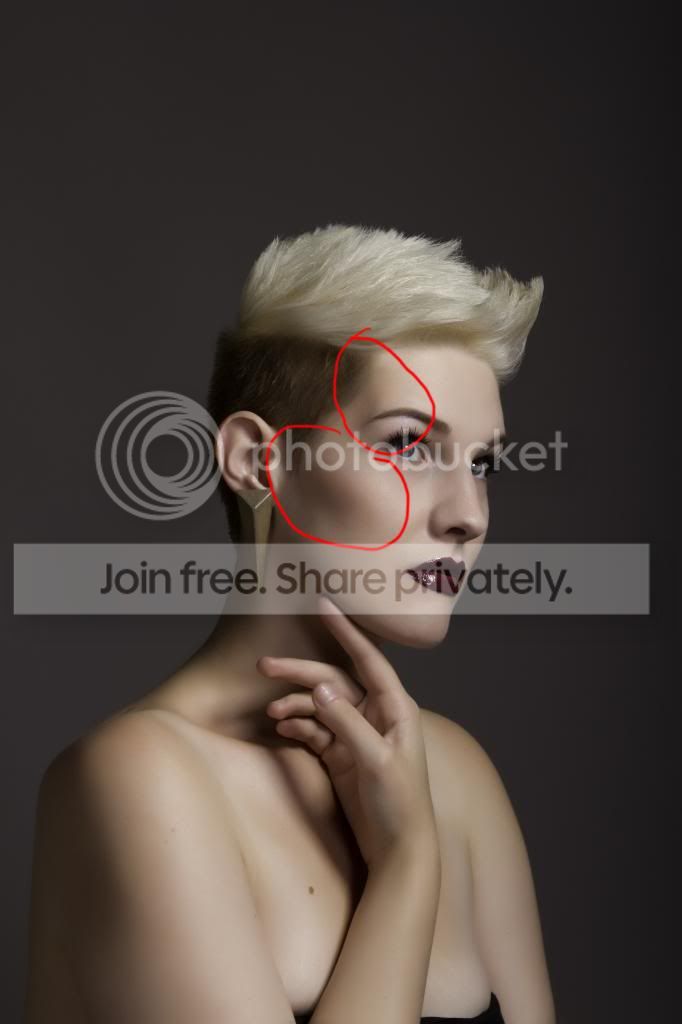
_MG_2889-Edit-Edit-Edit_zpse784a4e3.jpg
 
What do you want to achieve ?
Those tones are what gives shape to the face.
 
What do you want to achieve ?
Those tones are what gives shape to the face.

Well.

I'm just aiming at the higher end type of image. Im pretty new to this and I cant seem to tell if those darker areas are likely to be considered as flaws or just as facial features.

The cheek one doesn't bother me too much its mainly the temple/forehead area one that bothers me.
 
Neither bother me in the least they are necessary to show the form of the face.
We do not have white shapeless faces.
What you are showing is what portrait photographers and painters try to achieve.
 
One way, if you decide you do want to lift the shadow, is to use the lasso tool, well feathered, to draw around the area you want to alter, then use Levels to lighten it a touch (mid tones, perhaps?).
 
I think those areas look okay.

I would however crop off the bottom to lose her top and clone out the blemishes on her arm and chest.
 
I think those areas look okay.

I would however crop off the bottom to lose her top and clone out the blemishes on her arm and chest.

Yes, ive done a 1x1 crop prior to you mentioning. :thumbs:

Thats just the orignal file prior to crop.

Also, the picture colours look weird when exported from LR. I'm using sRGB and then a standard "multimedia" for my desktop/web browsing.

How can I make it look better on other devices? It looks really bad on the ipad etc.

Here is an example of the lightroom file and the exported file

2013-09-0308_35_03-_MG_2889-Edit-Edit-Edit-Edit_zps614a4e15.png
 
Back
Top