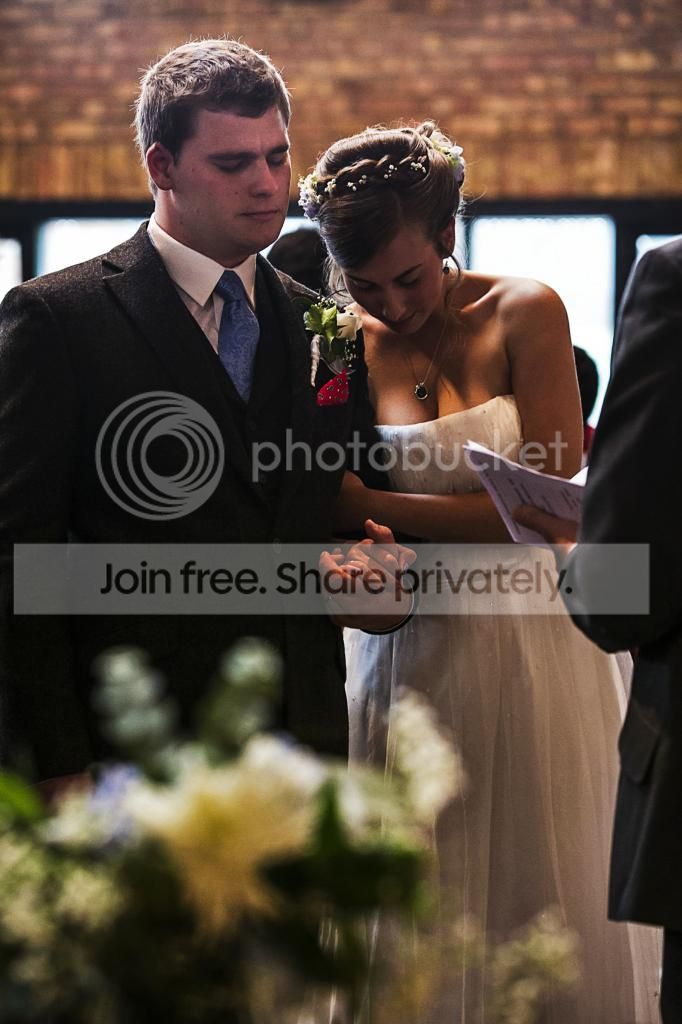
Need help/pointers for image edits. (Wedding)

elliotedwards

Suspended / Banned
Messages
150
Name
E
Edit My Images
No
Hi TP

I'm having difficulties editing certain images from the ceremony.

I keep reverting to B+W as I like B+W, its quick and I feel that it gives more depth. Other than that, how could I go about editing this....

(Note the pastor/minister told me I can only photograph from a certain area. The pastor, mic and a table with flower on top etc were in the way, being my first wedding I didn't want to ignore what I had been told and go wandering around)

2AHYtLB.jpg


This is my take, It's obviously a bit better, but its lacking/something is wrong. What needs to be done?

L6avONg.jpg


And here is the B+w version...

5tSjLQ5.jpg


Again, I rather this picture in B+W more than colour...

I3hHO96.jpg


I should actually just advertise myself as a b+w photographer I like it so much!
 
It's lacking in contrast due to lens flare, whilst you can do stuff in post to minimise the effects, you should start by trying to avoid it in the first place:
No filters
Always use a lens hood
Clean your lenses
Just small changes of position can make a massive difference to the amount of flare.
Learn to 'use' the flare to your advantage, when we're shooting to create lens flare there's a lot of minor moves to create the right amount of flare.

If you use LR you can do a graduated mask from the left with subtly higher saturation/increased contrast/clarity/shift the black point, it's fairly fiddly but you can't 'break' anything. And whilst I agree the 2nd B&W image looks great, the B&W version of the original image isn't really an improvement on the colour version, because it suffers in exactly the same way as the colour version.

Hope that helps.
 
A bit of burning dodging and contrast, tweek the colours and it comes up ok even when I did it quickly (although you'd want to do it properly for the album)
As Phil says it's best to try and avoid the issues in the first place, but some times theres nothing you can do, I've been in places the light is so bad you need to change sides and use a few Kw of lighting, sadly the vicar/priest don't seem that keen on that :thinking: So we have to make the best of it.
 
It all depends on what aplication you are editing the images in. If it's Lightroom you've a lot of tools in the develop module to help. Certainly with the first image I would lighten the shadows to give more detail into the Bride and Groom. Plus a bit more editing to get the tonality right.

In Photoshop it may be a bit more complicated. I must admit I haven't use PS for B&W conversion for some years, preferring Lightroom , but I seem to remember the simple "Convert to Grey Scale " option was pretty naff. You needed to work on the image to get a good B&W conversion. Hence my preference for Lightroom. Later versions of PS with the B&W option were better , but always seemed flat
 
This was in CS6 RAW. Brought the exposure down a tad, then played around with the vibrance and contrast.

2AHYtLBa_zpsc8a5c6d3.jpg
 
Jon the OP hasn't got edit my images ticked so I didn't post my version. Maybe the OP would like us to post our versions to show?
 
Ooops! Sorry, Elliot - hadn't noticed. Thanks for pointing it out Wayne. Will remove it if you like (if I can work out how. May have to appeal to On High)
 
This was in CS6 RAW. Brought the exposure down a tad, then played around with the vibrance and contrast.

2AHYtLBa_zpsc8a5c6d3.jpg

why make them so crazy dark? I hope you don't edit yours like this.
 
So whats your advice on fixing this for the op then?

There is nothing too complicated. Get WB right (a bit too magenta and slightly too warm) and brighten them up until the faces are decently exposed, then clean up the noise. Obviously the shots are fairly underexposed as they are - should have thought about bright windows there and then and dial in exposure compensation accordingly. It's not a funeral to make them dark and unresolvable. Ok, colour is awful due to mixed lighting in the building, so BW conversion is not bad idea, but it still needs decent exposure and some contrast and channel mixing, not just dull dark straight BW conversion.

no 2. Not sure why I am looking at the backside and trousers of some guy? Frame tighter or only include relevant or pretty foreground bits.
 
why make them so crazy dark? I hope you don't edit yours like this.

If memory serves, I spent 13.4865 (approx) seconds on this, to give an idea of what direction to take. If I was doing it seriously, I would spend, ooh, perhaps twenty seconds on it.

Or pass it on to a proper expert, such as yourself.
 
to give an idea of what direction to take

I know this is sort of art as well as craft, but "opposite direction" firmly springs to mind. Sorry
 
If memory serves, I spent 13.4865 (approx) seconds on this, to give an idea of what direction to take. If I was doing it seriously, I would spend, ooh, perhaps twenty seconds on it.

Or pass it on to a proper expert, such as yourself.
Maybe if you'd added a balloon he'd have liked it better :exit:
 
Back
Top