

Need a simple explanation

mikew

Suspended / Banned
Messages
5,548
Name
mike
Edit My Images
Yes
I do mean simple.

Had a major windows 10 update, it looks like it reinstalled windows because apps that where not working are now working and apps i removed are now back,

Not had any problems since the update until today, i tried to remove the DXO program and the sigma update app, it would not let me do it and i got this box.
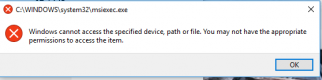
Capture.PNG

Thanks
 
Can you remove them via the Control Panel (Windows System -> Control Panel -> Programs and Features -> Uninstall a program)?
 
Do you have a security like anti virus running on the PC ?

Turn if off, turn off windows defender, turn off the windows firewall.

Then try again.

You might be very lucky and that will work.

Otherwise it looks like people have a very tough time solving this and have to do extensive troubleshooting and following expert guides to try to fix it, sometimes with no success anyway.
 
Can you remove them via the Control Panel (Windows System -> Control Panel -> Programs and Features -> Uninstall a program)?

No thats the way i have been trying
 
1. press 'start button' and type cmd.
2. when cmd.exe appears in the menu, right click and click 'Run As Administrator'
3. type c: and press ENTER , then type cd c:\windows\system32 ENTER
4. Do dir msiexec* and check if msiexec.exe is present in the output
5. If it's there:
  • a) do msiexec /unreg
  • b) check for any errors
  • c) do msiexec /regserver
  • d) if no errors, try your uninstaller again
6. If it's not there, do steps 3 - 4 but for c:\windows\syswow64
7. If you found it, do copy c:\windows\syswow64\msiexec.exe c:\windows\system32
8. do cd c:\windows\system32 and repeat step 5
 
4.5 is an old version, it's not going to work in Win10
 
and MS doesn't publish 5.0 redistributable unfortunatelly
 
I was going to try a app remover but thought i would give it one more try, both programs removed no problem
 
Back
Top