ND Filter Advice

dankellys

Suspended / Banned
Messages
221
Name
Dan
Edit My Images
Yes
Just after some advice really. My Haida 10 stopper arrived yesterday, so I took it out for a few test shots. I first when out at 5pm, here is the result (straight from camera - ignore the fact that its a boring photo, was purely a test of the filter):
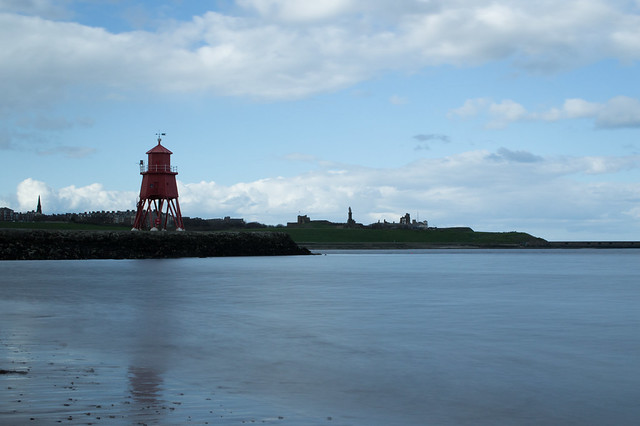

Test Shot with New ND Filter by dankellys, on Flickr

My opinion is the sky is fine (would have liked some wind for cloud movement, but never mind), but ground level is under exposed (Should I have got a ND Grad Filter?).

So, went out again at around 8:30pm, and here is the result (this has had a little bit of PP done to it, but nothing drastic):
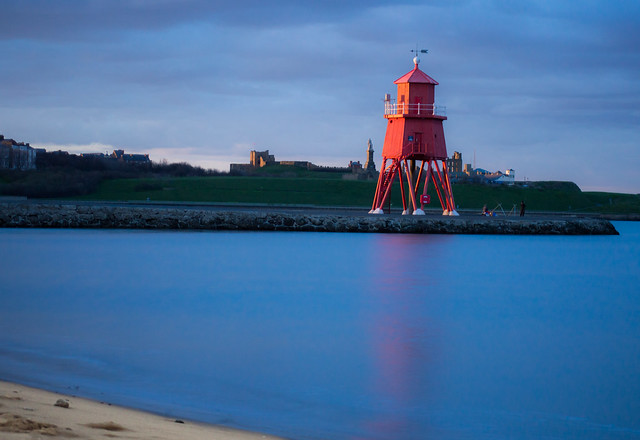

Back at the Groyne by dankellys, on Flickr

I said it had a little PP applied, mostly exposure as it was massively under exposed...

To be honest I think I had 2 main issues. Firstly, I was out at 5pm, in bright sunshine, then again at 8:30pm in almost darkness. I think I need to get out somewhere in the middle to ge the best light for the 10 stopper (would people agree with that, or should I be able to use it at any time with correct camera settings?). I found the earlier ones were too over exposed and the later ones too under exposed.

Secondly, I lack in skills and probs just need to get out with it more and practice. I made silly mistakes such as putting the Filter on, and then trying to let the camera auto-focus, which it obviously couldnt do in complete darkness...

So, the advice I am after basically is:
- Is it best to be in complete manual focus, without the filter on, focus it manually, then screw the filter on?

- Should I be able to use it at (almost) any time of day, and are my problems due to the settings, rather than the filter being to dark/no dark enough? Or is there only certain lights that I should use it in?

- Is it possible to control the ISO more? In the second photo, I was in manual mode - 4sec f/4 ISO400, as that was the closest I could get to the ISO i wanted, but the camera only has the option for auto, 100, 200, 400, 800 etc etc. Is it possible to set it to say 500, or 300 for example?

- Any other advice on using a 10 stopper would be much appreciated.

I hope these "issues" I am having are my fault, and not the fault of the equipment :)
 
Last edited:
So, the advice I am after basically is:
- Is it best to be in complete manual focus, without the filter on, focus it manually, then screw the filter on?

I would say 99 times out of a 100 you always have to focus and compose your shot without the filter fitted. Whether that is manual or auto focus depends on the results you are generally happy with.

- Should I be able to use it at (almost) any time of day, and are my problems due to the settings, rather than the filter being to dark/no dark enough? Or is there only certain lights that I should use it in?
Nothing to stop you using it any time of the day but obviously the brighter it is the less 'length' you will get for your shots so the effect will be more subtle. Using Shields and water as an example, it looks like it was a fairly calm night, so 4 secs helped you smooth the water out. In the daytime, brighter light, rougher sea, you might not quite have managed it. A dead calm day, a smaller aperture, lowest ISO possible and you might just get the flat sea you were after. You just have to think about what you want and your conditions.

- Is it possible to control the ISO more? In the second photo, I was in manual mode - 4sec f/4 ISO400, as that was the closest I could get to the ISO i wanted, but the camera only has the option for auto, 100, 200, 400, 800 etc etc. Is it possible to set it to say 500, or 300 for example?
No reason you can't control ISO more, going lower will let you double your exposure time for every stop you go down remember so if you had shot at ISO100 instead of 400 your time would have been 16secs. You can go the other way too but it depends on how your camera handles noise.

- Any other advice on using a 10 stopper would be much appreciated.

I'd spend time in a number of different 'neutral' conditions, where the light isn't changing too much, checking to see if your camera is a 10 stop, each one is individual. Take a shot without the filter, take the same shot with the filter, adjusted 10 stops, and compare histograms. Adjust your time until you get a fairly good match on histograms and work out how many stops difference that is for a filtered and non-filtered shot. You may get a difference between say a brightly lit scene and an overcast scene.

The only other thing I would say is that there may well be a slightly blue cast introduced with your filter. Take a look at methods to control that in post. You may get away with just adjusting colour temperature or tint slightly. You may want to go into it in more detail.

There are ways to combat this as you take the shot you can look at too.
 
Last edited:
If you have live view you then composing / focussing with filter on should be fine. I'd certainly consider mixing a grad with the 10 stop to balance the exposure across the frame.
 
Last edited:
I would say 99 times out of a 100 you always have to focus and compose your shot without the filter fitted. Whether that is manual or auto focus depends on the results you are generally happy with.

So, if i was to leave it in auto-focus, with the filter off, then line the shot up and half-press the shutter button, it will auto-focus. Then I go and fit the filter on the end. How do I prevent it from trying to auto-focus again when I re-press the shutter button to take the shot?

No reason you can't control ISO more, going lower will let you double your exposure time for every stop you go down remember so if you had shot at ISO100 instead of 400 your time would have been 16secs. You can go the other way too but it depends on how your camera handles noise.

So, is it not possible to set the ISO to something like 420 or 360 for example, does it have to be within the constaints of doubling each time (100, 200, 400, 800 etc)


I'd spend time in a number of different 'neutral' conditions, where the light isn't changing too much, checking to see if your camera is a 10 stop, each one is individual. Take a shot without the filter, take the same shot with the filter, adjusted 10 stops, and compare histograms. Adjust your time until you get a fairly good match on histograms and work out how many stops difference that is for a filtered and non-filtered shot. You may get a difference between say a brightly lit scene and an overcast scene.
Great Advice, I will give that a go this evening. Would you perhaps recommend doing this indoors with curtains closed and just the lights switched on, to give a consistant light source?

The only other thing I would say is that there may well be a slightly blue cast introduced with your filter. Take a look at methods to control that in post. You may get away with just adjusting colour temperature or tint slightly. You may want to go into it in more detail.

There are ways to combat this as you take the shot you can look at too.

Yeah I have read a few things about colour cast. Didnt really have time for PP yesterday as it was a very brief test of the filter more than anything.

Cheers for all the advice, greatly appreciated.
 
So, if i was to leave it in auto-focus, with the filter off, then line the shot up and half-press the shutter button, it will auto-focus. Then I go and fit the filter on the end. How do I prevent it from trying to auto-focus again when I re-press the shutter button to take the shot?

There's a switch on your 55-200mm lens which says "A M", and the switch will currently be on A. You need to switch it to M.

(A for autofocus, M for manual focus)
 
There's a switch on your 55-200mm lens which says "A M", and the switch will currently be on A. You need to switch it to M.

(A for autofocus, M for manual focus)

So, just to clarify. Should I auto-focus (no filter attached). Then attached Filter. Then switch to "M". Then take the shot? Or, do the whole focus manually? Sorry, I am just a bit of a numpty :bonk:

I wrote a piece about how to use ND filters for long exposures, which a few people have said has helped them, http://www.markmullenphotography.co.uk/blog/2012/8/long-exposure-photography---my-tips

Cheers, will have a read through that this afternoon.
 
So, if i was to leave it in auto-focus, with the filter off, then line the shot up and half-press the shutter button, it will auto-focus. Then I go and fit the filter on the end. How do I prevent it from trying to auto-focus again when I re-press the shutter button to take the shot?

Once you auto-focus you could switch your lens back to manual. Consider setting your camera up for 'back-button' focus if available. That means that the shutter release button won't try to focus, you would use another button for that when you need to.

So, is it not possible to set the ISO to something like 420 or 360 for example, does it have to be within the constaints of doubling each time (100, 200, 400, 800 etc)

Yes you may be able to get 1/2 or 1/3 stop settings in between the 100, 200, 400 etc. It will be a dependent on your camera and selectable from a menu setting if it is available.

Great Advice, I will give that a go this evening. Would you perhaps recommend doing this indoors with curtains closed and just the lights switched on, to give a consistant light source?
You could do but I try to use real world examples I am likely to shoot in.

Cheers for all the advice, greatly appreciated.

You're welcome.
 
So, just to clarify. Should I auto-focus (no filter attached). Then attached Filter. Then switch to "M". Then take the shot? Or, do the whole focus manually? Sorry, I am just a bit of a numpty :bonk:

It's okay, you are just asking all the normal questions :)

The easiest would be to auto focus, then attach filter, then switch to M, then take the shot.

Remember to switch it back to auto focus afterwards, otherwise you'll wonder why your lens isn't doing anything.

I don't think the D3200 has the ability to back button focus, so I wouldn't concern yourself with that too much.
 
The easiest would be to auto focus, then attach filter, then switch to M, then take the shot.

Great, looking forward to having another go at it tonight now. Was rather frustrated when I got home last night and found just 1 shot out of about 60 that was somewhere near usable... Will be sure to post my results from tonight here too.
 
you can always take note of what the camera is telling you as a shutter speed, switch the dial to "S" and then rotate the control wheel left for 30 clicks to get your 10 stopper time.

Obviously wont work if the 10 stop time becomes more than 30s as you'll be into bulb mode then
 
Cheers, NDFilterCalc is available for android too (makes it a bit easier, means I dont need to hump my iPad down to the beach with me). Will give it a go over the weekend, along with your method damian. Thanks again.
 
Nice last shot.

I think a lot of your [earlier] 'issues' are down to experience. You've just proven that by knocking that shot out there ^^^

A few things....

I use back button focus so the trying-to-refocus-when-firing-the-shutter issue doesn't apply to me.
I can also focus manually with the filter in place using live view.
If I'm at 17mm then I don't even bother to focus as I [pretty much] permanantly set the lens to 1 metre & use hyperfocal as typically the f/stop is smaller than f/10 anyway so DOF isn't an issue.
Yes NDGrads can help balance the sky or fire off 2 exposures for sky/sea & blend in PP.
I know that for a milky smooth sea I need to be looking at over 30 seconds exposure time usually.
I know that my 10 stop is actually more than 10 stops.
I also know that if I get a shutter speed of 1/100th without the filter, then with the filter I'm looking at around 20seconds and I will admit that I very often 'guesstimate' the exposure required based on that.
I do have an android app called Exposure Calculator & it has an orange icon.
I do know too that you should just keep practising with it :)
 
Mark, blog was very useful, thank you for that.

Lee,

My 'issues' were down to experience and it just took a little playing around to get used to it.

I have found the following to be the easiest way:

1. Switch to Aperture Priority, set to around about the f8-f11 mark, then let the camera auto-focus.

2. Screw on ND Filter

3. Switch to Manual mode, turn off auto-focus and VR.

4. Play around with a few different exposure lengths. Tend to start at about 3-4seconds, then work up to 6, 10 15 and 20 seconds.

I find that the apeture doesnt really effect DoF in these shots, so I tend to play around with that a little in increase/decrease exposure. If it looks to dark on he preview sceen, just open the apeture up a little, then try again. Haven't had an problems so far.

Obviously all of the above is dependant on the time of day/amount of light, but so far I have been out at around the same time each evening so starting to get a good idea of what works and what doesnt.
 
Last edited:
Mark, blog was very useful, thank you for that.

Lee,

My 'issues' were down to experience and it just took a little playing around to get used to it.

I have found the following to be the easiest way:

1. Switch to Aperture Priority, set to around about the f8-f11 mark, then let the camera auto-focus.

2. Screw on ND Filter

3. Switch to Manual mode, turn off auto-focus and VR.

4. Play around with a few different exposure lengths. Tend to start at about 3-4seconds, then work up to 6, 10 15 and 20 seconds.

I find that the apeture doesnt really effect DoF in these shots, so I tend to play around with that a little in increase/decrease exposure. If it looks to dark on he preview sceen, just open the apeture up a little, then try again. Haven't had an problems so far.

Obviously all of the above is dependant on the time of day/amount of light, but so far I have been out at around the same time each evening so starting to get a good idea of what works and what doesnt.

And don't forget to cover the viewfinder.
 
Last edited:
Cheers, NDFilterCalc is available for android too

What's it called?
I don't see anything called "NDfiltercalc", there's an "ND Calc" and a few others.

I'm quite curious because even a Google search doesn't show anything useful and i've had this before where I couldn't find apps that other people could.
 
Back
Top