

My first ever real life photo printed out! + second pic added!

AshMashMash

Suspended / Banned
Messages
2,043
Edit My Images
Yes
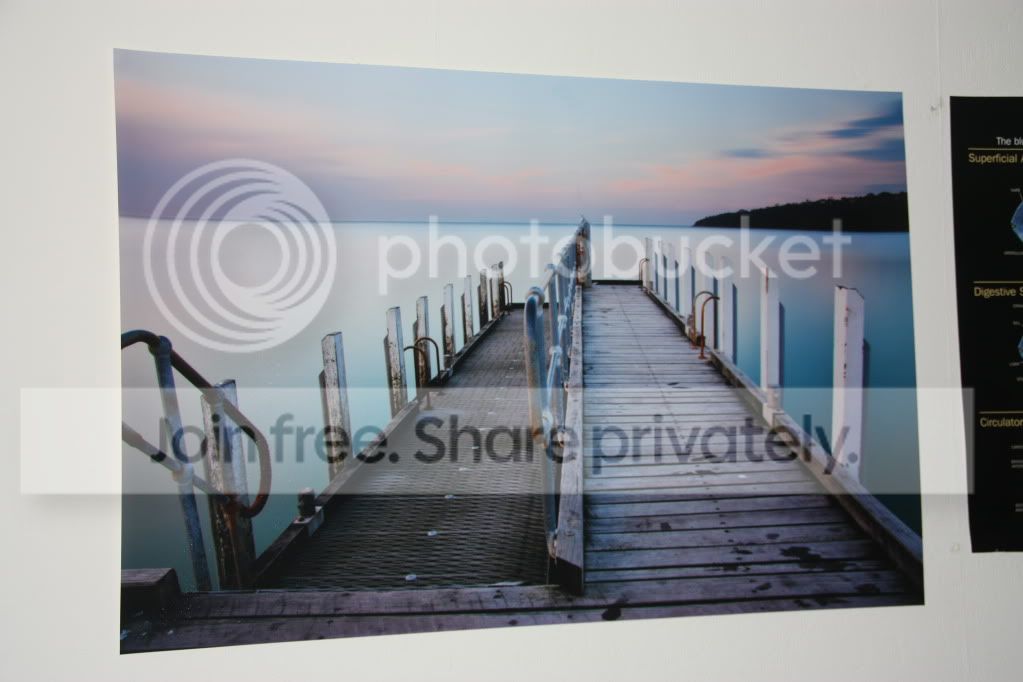
I've never actually had any of my (digital) photos printed :eek: But thanks to Kevin over at photologue I have now had my first photo printed that I took!

Here's the actual thing:
IMG_7403.jpg


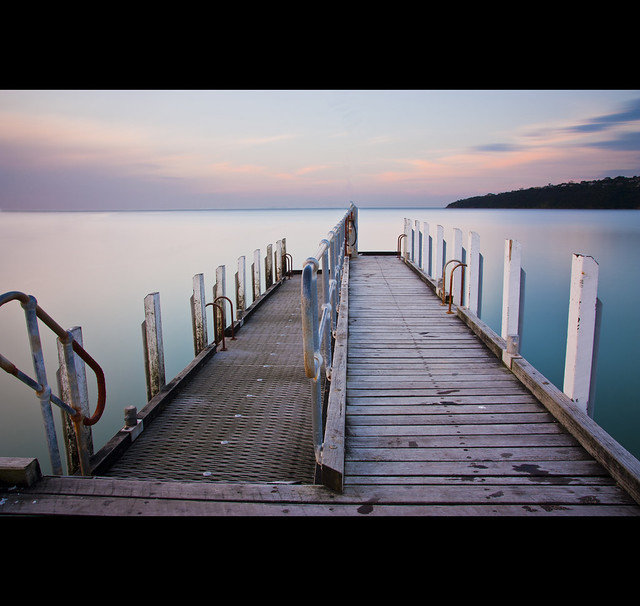
And here's which pic it is:


Jordan's Pier by AshMashMash, on Flickr

It's perfect quality print, spot on! I am chuffed to bits :D I wonder if the printed version looks ~0.5 stops under exposed, or whether it's my eyes/lighting/bad comparison with laptop screen. Either way it's cool :D

Anyone print any of their own?
 
Last edited:
Nice, what size is that? Looks pretty big! Ive just had a 40x30 done.
 
Do the decent thing and get it in a frame!!!

Nice one, like the pic.
 
Got my 40x30 from Wilkinsons. About £20 Not top drawer, but its ok.
 
Brilliant Ash, it gets addictive though. I now have about a dozen frames on the wall and love swapping images about.
It does not look like colour correction has been applied, I should hope not as they have been told many times !
If you got to photobox website, you can order a free "calibration print" then adjust the colour on your monitor to match. Colour correction the easy way. As has been mentioned save as sRGB when finished editing. To be extra safe, order a 9x6 at £1 before jumping right in with the 30x20 :-)
I love your images, it is a pleasure to give you a gallery to display them.
Many thanks
 
:thumbs: Very nice.
I've never printed a photo either . . . Might just give it a try after seeing this.

Thanks, do!

Brilliant Ash, it gets addictive though. I now have about a dozen frames on the wall and love swapping images about.
It does not look like colour correction has been applied, I should hope not as they have been told many times !
If you got to photobox website, you can order a free "calibration print" then adjust the colour on your monitor to match. Colour correction the easy way. As has been mentioned save as sRGB when finished editing. To be extra safe, order a 9x6 at £1 before jumping right in with the 30x20 :-)
I love your images, it is a pleasure to give you a gallery to display them.
Many thanks

Thanks again Kevin! I should perhaps do that... how do I find out if it's in sRGB?
 
Nice looking shot, so much better when it's your doing and not shop bought.
 
I was told just recently there's about 5 f-stops to print but 12-14 f-stops to a monitor, which is why sometimes it doesn't always look the same
 
I was told just recently there's about 5 f-stops to print but 12-14 f-stops to a monitor, which is why sometimes it doesn't always look the same

??? how does that work ???
Maybe a good monitor can display 12 - 14 F-stops but,
the human eye can only see 10 stops and all DSLR's can only record 5 stops.
.... this is not a statement of fact BTW, just my understanding, feel free to correct me :-)

Ashley, I now use srgb profile in the camera settings as it is less hassle and (for me) good enough. I understand that the range of colours is more limited than say AdobeRGB but I like to print my images and the print labs can't go beyond sRGB. I think the option to convert to sRGB is in the "file" menu on photoshop (only have elements on this PC) and am sure there is a preference to use sRGB. To be honest, I have never printed beyond A3 yet but can see virtually no difference on the same image from the same lab with sRGB and AdobeRGB profiles. The biggest issue I had was when they were applying colour correction, especially long exposure night shots. Yes the histogram might show it as 2 stops underexposed but thats how I wanted it, "colour correction" just seems to do an auto levels and the print comes back "properly" exposed, the nice underexposed purple sky now white :-(

In fact, forget all my waffle above, my top tip is to ensure that you disable colour correction, whatever lab you use. When you get your first print, adjust your monitor to show the soft image as per the hard image then your monitor is "colour calibrated" to the print lab you are using. Then there should be very little difference from what you are seeing on the screen to what you get on the print.
 
Nice shot gratz:thumbs:

Ta!

I was told just recently there's about 5 f-stops to print but 12-14 f-stops to a monitor, which is why sometimes it doesn't always look the same

??? how does that work ???
Maybe a good monitor can display 12 - 14 F-stops but,
the human eye can only see 10 stops and all DSLR's can only record 5 stops.
.... this is not a statement of fact BTW, just my understanding, feel free to correct me :-)

Ashley, I now use srgb profile in the camera settings as it is less hassle and (for me) good enough. I understand that the range of colours is more limited than say AdobeRGB but I like to print my images and the print labs can't go beyond sRGB. I think the option to convert to sRGB is in the "file" menu on photoshop (only have elements on this PC) and am sure there is a preference to use sRGB. To be honest, I have never printed beyond A3 yet but can see virtually no difference on the same image from the same lab with sRGB and AdobeRGB profiles. The biggest issue I had was when they were applying colour correction, especially long exposure night shots. Yes the histogram might show it as 2 stops underexposed but thats how I wanted it, "colour correction" just seems to do an auto levels and the print comes back "properly" exposed, the nice underexposed purple sky now white :-(

In fact, forget all my waffle above, my top tip is to ensure that you disable colour correction, whatever lab you use. When you get your first print, adjust your monitor to show the soft image as per the hard image then your monitor is "colour calibrated" to the print lab you are using. Then there should be very little difference from what you are seeing on the screen to what you get on the print.

Thanks Kevin, I shall have a look into the sRGB thing. There's one I want to print next so I shall check it's colour code thingy before I do :D
 
you could have many more problems with adobe rgb than benefits.
recommend to stick to srgb unless you know exactly what you want

paper depends very much on the conditions in witch it's displayed
photo paper normally has a brightness standard
glossy paper normally looks brighter than matte paper
 
Unless you know what you're doing stick with sRGB.
 
AshMashMash, as Trixster suggests, stick with sRGB unless you know what you're talking about - it's a potential minefield that people get hung up on and there's no need really (for a day job, I sell high level workflow automation software and handle colour management etc etc).

And if you don't know which profile you're using, I'd put money on it being sRGB as that's normally the default setting for a camera manufacturer.

The majority of us will be fine using sRGB, especially if we use labs to print for us. I have my own A3+ HP printer and use nice paper from PermaJet so I see the benefit of using AdobeRGB1998 for it's slightly larger colour gamut. but that's another thread!

And if a lab is 'colour correcting' and the images come back with Auto Levels type corrections, they're not colour correcting. Colour correcting, in very simple terms, is the ability to take the same image and apply corrections so it prints exactly the same on HP, Ilford, Hahnemule, PermaJet etc paper. Each paper has it's own characteristics and colour correction should just ensure print consistency. You should be able to view prints on multiple different paper types and not see a difference (think the same pic being printed in the Financial Times, The Sun and The Mail's You magazine - wildly varying paper colours/weights and the colour correction just means the 'red' is 'red' regardless of paper used.

Nice shot by he way :)
 
AshMashMash said:
I've never actually had any of my (digital) photos printed :eek: But thanks to Kevin over at photologue I have now had my first photo printed that I took!

Here's the actual thing:

And here's which pic it is:
http://www.flickr.com/photos/ashmashmash/5165922561/
Jordan's Pier by AshMashMash, on Flickr

It's perfect quality print, spot on! I am chuffed to bits :D I wonder if the printed version looks ~0.5 stops under exposed, or whether it's my eyes/lighting/bad comparison with laptop screen. Either way it's cool :D

Anyone print any of their own?

Your monitor is calibrated? Looks nice. But I heard if the monitor is not calibrated, the printed color will not be the same.
 
#2, Nice shot there.

Thanks!

you could have many more problems with adobe rgb than benefits.
recommend to stick to srgb unless you know exactly what you want

paper depends very much on the conditions in witch it's displayed
photo paper normally has a brightness standard
glossy paper normally looks brighter than matte paper

Unless you know what you're doing stick with sRGB.

AshMashMash, as Trixster suggests, stick with sRGB unless you know what you're talking about - it's a potential minefield that people get hung up on and there's no need really (for a day job, I sell high level workflow automation software and handle colour management etc etc).

And if you don't know which profile you're using, I'd put money on it being sRGB as that's normally the default setting for a camera manufacturer.

The majority of us will be fine using sRGB, especially if we use labs to print for us. I have my own A3+ HP printer and use nice paper from PermaJet so I see the benefit of using AdobeRGB1998 for it's slightly larger colour gamut. but that's another thread!

And if a lab is 'colour correcting' and the images come back with Auto Levels type corrections, they're not colour correcting. Colour correcting, in very simple terms, is the ability to take the same image and apply corrections so it prints exactly the same on HP, Ilford, Hahnemule, PermaJet etc paper. Each paper has it's own characteristics and colour correction should just ensure print consistency. You should be able to view prints on multiple different paper types and not see a difference (think the same pic being printed in the Financial Times, The Sun and The Mail's You magazine - wildly varying paper colours/weights and the colour correction just means the 'red' is 'red' regardless of paper used.

Nice shot by he way :)

Wow thanks for the replies guys - so, stick with sRGB? So if the pic was an sRGB pic, as we think it is (edited in CS5 and saved without any particular modification), why would it come out slightly underexposed if it's not colour correction? Or am I being dense?

Very nice

Ta :)

Your monitor is calibrated? Looks nice. But I heard if the monitor is not calibrated, the printed color will not be the same.

Calibrated? Dunno... it's a laptop screen I've done nothing with!
 
AshMashMash, a lot of laptops have very bright backlit screens and the images can look fine to you but, in reality, they're slightly underexposed in reality. It's not a perfect way of doing it, but check your histogram - a well exposed image should have a good 'mountain' right from the left side to the right. There are loads of scenes where this doesn't apply though - snow scenes will be loaded towards the right and sunrises towards the left...

I'm lucky in that I print my own. When I first got the printer, they didn't match the screen. I basically did test prints adjusting brightness/contrast/saturation etc until I was happy with the print. I then took the print and adjusted the screen until it looked like the print. This is so very much the wrong way to 'calibrate' your screen but I know that what I see on screen is what gets printed out.

Try Googling 'histogram' - bound to be a wealth of info and verdicts out there!!
 
Oh, and by the way. If you've got CS5, open the file, go to File > Edit > Convert to Profile. The actual image file profile will be listed at the top - bet you a beer it's sRGB :)

Cheers
Andy
 
Such a beautifully balanced picture. Where is Jordan's pier? I would be proud of that one!

I have printed and framed several of my own, I have a thing about having pictures and art that has been created by people I know, or of places we have been.....makes it a bit more personal.
 
AshMashMash, a lot of laptops have very bright backlit screens and the images can look fine to you but, in reality, they're slightly underexposed in reality. It's not a perfect way of doing it, but check your histogram - a well exposed image should have a good 'mountain' right from the left side to the right. There are loads of scenes where this doesn't apply though - snow scenes will be loaded towards the right and sunrises towards the left...

I'm lucky in that I print my own. When I first got the printer, they didn't match the screen. I basically did test prints adjusting brightness/contrast/saturation etc until I was happy with the print. I then took the print and adjusted the screen until it looked like the print. This is so very much the wrong way to 'calibrate' your screen but I know that what I see on screen is what gets printed out.

Try Googling 'histogram' - bound to be a wealth of info and verdicts out there!!

Thank you very much for this - I think as you say perhaps it's the backlit screen effect then, as it looks perfect on my laptop. I understand about histograms, but in all honesty don't use them that much - I should perhaps!

Oh, and by the way. If you've got CS5, open the file, go to File > Edit > Convert to Profile. The actual image file profile will be listed at the top - bet you a beer it's sRGB :)

Cheers
Andy

Just had a look... and no! :eek: The Source Space is "Adobe RGB 1998", and the Working Space is "Working CMYK U.S. Web Coated (SWOP) v2".

If I change the latter to "sRGB IEC61966-2.1" is that the correct thing?

What a lovely image, I'm looking forward to getting some of mine printed for the first time too... excited!

Thank you!

Such a beautifully balanced picture. Where is Jordan's pier? I would be proud of that one!

I have printed and framed several of my own, I have a thing about having pictures and art that has been created by people I know, or of places we have been.....makes it a bit more personal.

Thank you very much! The pier is actually an unnamed (?) pier in Victoria, Australia. Jordan is the name of my younger brother who came along for this shoot :)
 
great shot stunning work
 
Ahhh, AshMashMash, I owe you a beer :) Remind me next time I'm down your way!!

Ok, if you've got Adobe 1998 RGB as the colour profile, that's fine. sRGB vs Adobe 1998 RGB (or aRGB for short) is one of those topics that raises many heated debates amongst digital togs. A bit like Canon or Nikon - or PC or Mac... (Canon and Mac combo rocks by the way!!). Some really don't see the point of aRGB and others swear by it. For most, sRGB is fine and the one I'd recommend for most (not sure if I've mentioned this before but for a day job, I sell colour management and workflow automation software to agencies, printers, publishers etc). Here's the science (or at least a few words on the subject).

sRGB - think 'saturated RGB' as it normally gives you a stronger, more saturated colour. Mainly as sRGB is for monitor/computer/online display usage. The majority of high street photo printers that I've dealt with (and I'm expecting others to jump in here) will expect your images to be sRGB, particularly the photo booth type applications.

aRGB - gives you a wider colour gamut which can, potentially, offer better colour gradations particularly when printing at A3 or above. However, aRGB will look slightly flat on a website or monitor compared to sRGB.

So, which is best? For the majority, I'd say sRGB as it's good saturated images that look good onscreen and generally get printed well by labs. For people like me, who have invested in a decent printer, I'd say aRGB is better as it gives you a bit more to print with.

And that is colour spaces in a very small nutshell :)

Something I should have asked before - are you shooting RAW or JPG? If shooting RAW, you can change the colour space to sRGB in the workflow options in ACR. If shooting JPG, you can change the colour space in the camera menu so you always shoot sRGB. For your existing library, I guess it makes sense to have them all in the same version - so either leave as aRGB and continue shooting this way, or convert to sRGB. I shoot RAW plus Small JPG - the camera is set to sRGB for the small thumbnails and the RAW are converted to aRGB. This gives me a low res thumbnail that can be emailed straight away plus a RAW to fettle and tweak.

Another thing to consider, 97% couldn't tell one from the other if shown the same image in different spaces especially onscreen. You only really see the benefit when printing out and using ICC profiles for the paper.

Hope that helps:)

Cheers
Andy
 
Hope that helps:)

Cheers
Andy

Andy that's immensely helpful! Thanks for your time. I do shoot RAW indeed.

As you say, currently the colourspace in ACR is aRGB - I shall swap it to sRGB then as I do mostly use online sharing of photos. Perhaps I shall use aRGB again in future if I were to be printing pictures from a proper printing place like the one from the start of this thread is :)

Learn something new every day! That's what I love about this, there's just no end to the amount you can learn and do!
 
You're welcome AshMashMash, glad it's of help to you. Looking forward to seeing some more images :)

Cheers
Andy
 
You're welcome AshMashMash, glad it's of help to you. Looking forward to seeing some more images :)

Cheers
Andy


A person from another forum should be purchasing one today later on, so I may update this thread (or he can - he's on here :thinking:) with that too if it's all good :D
 
Back
Top