Move to MAC from PC ?

taxboy

Suspended / Banned
Messages
1,985
Edit My Images
Yes
I've always used a Windows PC both at work and home.
I've got to upgrade my old PC - still running Windows 8 and the last non sub versions of Photoshop and Lightroom. My initial research has led me to look at a Mac 1 Mini with 16GB RAM. From what I can tell budget wise it's not too much different from a decently specced PC. However not being familiar with Mac are there any issues I may run into in viewing archive files e.g. Word and Excel files plus will my ageing Epson R2880 drivers still work the printer etc.
I won't be gaming on it just the usual light office tasks, internet etc plus image editing. It is likely I will upgrade to a Canon R5 so will be handling much bigger RAW files in the future.
Any input or advice appreciated thanks
 
If you are getting a Mac mini make sure it is the M1 version and not intel.
Pages and Numbers will open your files as long as they are not too complex but I would assume they are not as coming from Win 8. Pages and numbers come free with the Mac.

Cannot help with your printer but I should imagine it should work as there is a support page for it on Epsons website for Mac OS.
 
Until a couple of years ago I had used Windows all of my Internet life but with 'lockdown' I needed a large screen for Zoom and went reluctantly with an iMac.
I found it an easy learning curve and can't believe how well I've come to love it ... it just works and I now have an M1 iMac and may get another.
I do my editing with PhotoLab5 and Affinity (your Photoshop & Lightroom are probably dedicated to Windows, so you will probably need to get something else).
LibreOffice (free) works with Excel and Word files so you shouldn't have a problem there - I have no idea about your printer though.
 
I've always used a Windows PC both at work and home.
I've got to upgrade my old PC - still running Windows 8 and the last non sub versions of Photoshop and Lightroom. My initial research has led me to look at a Mac 1 Mini with 16GB RAM. From what I can tell budget wise it's not too much different from a decently specced PC. However not being familiar with Mac are there any issues I may run into in viewing archive files e.g. Word and Excel files plus will my ageing Epson R2880 drivers still work the printer etc.
I won't be gaming on it just the usual light office tasks, internet etc plus image editing. It is likely I will upgrade to a Canon R5 so will be handling much bigger RAW files in the future.
Any input or advice appreciated thanks
I have a Mac mini with 8 GB RAM and runs good with my Nikon d850 working with Lightroom and photoshop
 
I would highly recommend an M1 Mac Mini with 16Gb (for futureproofing), if you already have a decent screen. I have one for other purposes and am very pleased with it. To be fair though I am using both Windows (mainly for work - IT stuff) and Mac (various machines) and far prefer the Mac infrastructure/environment as a user. I would suggest getting Office for Windows though really, I find the built in Apple Numbers and Pages apps a bit clunky by comparison.
 
I’ve been using Mac machines for a few years now, absolutely love it. Consider Libre Office for your documents and workbooks.
 
I’ve been using Mac machines for a few years now, absolutely love it. Consider Libre Office for your documents and workbooks.
I'm already using Libre Office for Word and Excel files for personal use, so that's good to hear.
 
Can I ask please what sort of memory size the Mac OS utilises - just to try and get the balance between usability and future headroom against the cost of SSD. I'll be using external drives for backup storage in the same way as I do now
 
I also can highly recommend the 16Gb M1 Mac Mini. I run LibreOffice, doesn't have all the whistle & bells of Word & XL ... but then do you need them. I also run Opera as my web browser, its lighter than Firefox and Safari and works more smoothly. I also use Airmail as my email client which also works really well.

Just one thing to remember is you will also need a keyboard and rodent as they are not part of the M1 package
 
Just a thought , will your non sub versions of PS and LR install and run on a mac?
Are the Adobe activation servers still working for those versions
Similarly if you were to upgrade your PC same applies and will your old versions handle files from the Canon R5 on either platform.
 
Last edited:
Just checked my Mac:

Apps ... 15.36 Gb
OS ....... 15.76 Gb
Sys ...... 11.95 Gb

So it means I have approx 450 Gb of a 500 Gb SSD available, I also have a 2 Tb external SSD available
 
Just a thought , will your non sub versions of PS and LR install and run on a mac?
Are the Adobe activation servers still working for those versions
Similarly if you were to upgrade your PC same applies and will your old versions handle files from the Canon R5 on either platform.
Thanks for that but part of the reason for the upgrade is to move to the subscription versions ....there's been so much new good stuff added to PS and LR since then
 
Just checked my Mac:

Apps ... 15.36 Gb
OS ....... 15.76 Gb
Sys ...... 11.95 Gb

So it means I have approx 450 Gb of a 500 Gb SSD available, I also have a 2 Tb external SSD available
Thanks for that. It confirms a 500Gb SSD should give a bit of future proofing
 
After several decades of using MS-DOS and then Windows PCs of all versions (up to Windows 10 on SWMBO‘s laptop), I bought a late 2012 iMac 27 in 2013. Still a very good machine. Even though it’s not a 5k screen, it’s still a joy to use.

It was however getting sluggish, so I have migrated the operating system to a USB3 SSD. Works very well, though not the tidiest solution. I don’t have confidence to take it apart, fit an internal SSD and then put it back together without messing it up.

Sadly it’s not compatible with anything later than Catalina, so may have to change it one day I guess.

All that said, I wouldn’t be keen to go back to Windows. I just find Windows ‘clunky’ now, though I’ve not tried Windows 11 yet.
 
we switched over to mac for home and creative stuff about 12 years ago and haven't looked back. word and excel work fine on both except a few cases that are slightly and annoyingly different if you are deep into vba automation.
 
You want 32GB RAM and 8TB hard drive with 256GB M.2 SSD for the OS.

Does Apple make that though, i doubt it. Or if they do the price will be simply stupid.
 
The transaction won't be seamless but the Apple OS is much more intuitive and enjoyable to use despite Windows improving in the last few years.

I currently have to juggle between a windows environment at work and Apple at home. I like the integration between all my devices (iMac at Home plus MacBook, iPad and iPhones) and my iMac is still amazing considering it is 8-9 years old.

When I replace mine I will seriously consider the M1 Mac Mini with a separate screen rather than a new iMac but am waiting to see the spec and pricing go the M1 27" before I decide!

The advantage of an iMac 27" is the ability to increase RAM but buy right with a mini (16GB) and you should be fine. There was a guy on YouTub who did a video on all thing Mac coming from a windows environment, I'll see if I can find it.
 
I have a couple of M1 Macs, a personal M1 Pro for photography and software development (16GB/1TB) and a standard M1 (16GB/500GB) from work for software development. The performance on both is great.
 
You want 32GB RAM and 8TB hard drive with 256GB M.2 SSD for the OS.
Fix that to 64GB RAM, 2TB NVME and 2x 14TB NAS kept in a separate room.
 
I’m doing a similar thing moving from an old Dell PC to a 16 inch M1 MacBook Pro
Nothing wrong with the Dell it’s been completely reliable but it’s over 15 years old

I was recommended to go for 32gb ram and the M1 pro chip
 
Another noticeable thing with the M1 Mac mini ... the sound of silence
 
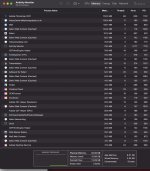
For those wondering about how much ram you need I think the OP will be fine with 16 gig.

I have 32 in my Mac and I have never seen any swapping of page files and most of the time memory usage is between 8-12 gig.

just done a screenshot (see below) which shows the memory usage and I have a few apps running and I'm on an intel Mac, the M1 machines are much better at utilising memory.

Screenshot 2022-01-22 at 09.33.26 (2).jpg
 
About 15 years ago, I swapped from PC to Mac overnight. Everything was surprisingly easy except for the odd device that no matter what I tried would not work under OS X or even emulation. I used my wife's PC for those.

A couple of years ago, I swapped back. Again, very straightforward. I think for most consumers there's very little difference. If you need to get your head round hypervisors, registry updates and different flavours of Java etc it gets more murky.

IMO historically Macs had
  1. Lower total cost of ownership - this is less true as older Macs will refuse to install newer OSs.
  2. Better reliability - their security against malware was better so you didn't need to mess about so much with security apps which made things less stable. PCs have somewhat caught up because MS Defender is now good enough for most people.
  3. Easier to purchase - still very true. Choose your budget/need and buy that model - compare with the countless "spec a PC for me" threads.
  4. Prettier - still mostly true.
  5. Quieter. Still definitely true - my super silent PC build still has a faint fan noise compared to my silent iMac.
I bet you'll be really happy with a Mac Mini.
 
Thanks for all the helpful replies. Can I also ask I'll need a usb hub for all my peripherals. Do I need anything specific for a Mac, same with cables
 
Thanks for all the helpful replies. Can I also ask I'll need a usb hub for all my peripherals. Do I need anything specific for a Mac, same with cables
A standard USB hub will suffice. Dedicated Thunderbolt hubs are available, but not cheap.
 
Thanks for all the helpful replies. Can I also ask I'll need a usb hub for all my peripherals. Do I need anything specific for a Mac, same with cables
Depends on what you are plugging in. It has two USB A ports and two USB C ports, if you have a wireless mouse and keyboard then the A ports will be free. Just need a HDMI cable for monitor or USB C/Thunderbolt cable if your monitor supports thunderbolt ( a lot do not)
 
I have a 27" mac.
It comes with it's own versions of excel and word for free.
It can read both windows excel and word files.

I dual boot mine so my old windows software works as well.
 
I have just been given a Macbook Pro 14” by work (joined a new company). I’ve used PCs all my life so this is my first Mac.

There seem to be numerous weird things, but one is that when I plug in my 4k monitor via HDMI it only displays 1080 (HD) and not 4k. Why? Works fine on my PC. Any hints? Ta
 
About 15 years ago, I swapped from PC to Mac overnight. Everything was surprisingly easy except for the odd device that no matter what I tried would not work under OS X or even emulation. I used my wife's PC for those.

A couple of years ago, I swapped back. Again, very straightforward. I think for most consumers there's very little difference. If you need to get your head round hypervisors, registry updates and different flavours of Java etc it gets more murky.

IMO historically Macs had
  1. Lower total cost of ownership - this is less true as older Macs will refuse to install newer OSs.
  2. Better reliability - their security against malware was better so you didn't need to mess about so much with security apps which made things less stable. PCs have somewhat caught up because MS Defender is now good enough for most people.
  3. Easier to purchase - still very true. Choose your budget/need and buy that model - compare with the countless "spec a PC for me" threads.
  4. Prettier - still mostly true.
  5. Quieter. Still definitely true - my super silent PC build still has a faint fan noise compared to my silent iMac.
I bet you'll be really happy with a Mac Mini.
Can I ask why you reverted to a pc?
 
I have just been given a Macbook Pro 14” by work (joined a new company). I’ve used PCs all my life so this is my first Mac.

There seem to be numerous weird things, but one is that when I plug in my 4k monitor via HDMI it only displays 1080 (HD) and not 4k. Why? Works fine on my PC. Any hints?
Is it an M1 Mac ??? or an intel version, the M1 version can do 4k, not sure about the older version.
go to System prefs / display and you can change the resolution in there.
 
Thanks. It’s an M1. I‘ve tried changing the res but it won’t go any higher. It will go lower.
 
I have just been given a Macbook Pro 14” by work (joined a new company). I’ve used PCs all my life so this is my first Mac.

There seem to be numerous weird things, but one is that when I plug in my 4k monitor via HDMI it only displays 1080 (HD) and not 4k. Why? Works fine on my PC. Any hints? Ta
Are you sure it is 1920x1080 or "looks like 1920x1080"?

I'm currently typing on a 14" MPB connected to a 4k monitor and the default set up is "looks like 1920x1080", which is basically doubling the pixels, but keeping the interface the same size, as everything would look tiny otherwise. It is actually 3840x2160 pixels (4k), but looks like 1080p.
 
I have a 27" mac.
It comes with it's own versions of excel and word for free.
It can read both windows excel and word files.

I dual boot mine so my old windows software works as well.
I do the same but you can’t do it on the new M1 Macs natively using Bootcamp like you can on the Intel Macs. You can only run it as a virtual machine using something like Desktop Parallels etc

Shame
 
I've had Macs for years, currently have a 2020 iMac, and also a 2014 14' Macbook Pro. We're an Apple household, with 2 iPhones & 2 iPads between us as well. There is very little that I cannot do on my Mac that I can do on my Windows laptop. I also have a Raspberry Pi 400, but that's mainly for my amateur radio stuff.

I wouldn't go back to Windows as my main machine. The Win10 laptop was purchased as my wife had to do some stuff for work and their software was Windows only. About 3 months after we bought it, they migrated to a web based version, so she used the MBP now :banghead:
 
Can I ask why you reverted to a pc?

Mostly cost. To spec out a Mac that would do what I wanted was seriously expensive mostly because at the time the choice was basically iMac. I would have to pay for a screen better than I needed (and pay a *lot* of money to have 2 screens) just to get the chip / storage I wanted. IMO the total cost of ownership of PCs has dropped while that of Macs has risen in the past several years - W10 is fast and stable and if you already have the right hardware (and that's a big issue - I was lucky) then W11 is the same or better.

If the M1s had been available when I purchased I might have mad a different choice but I have an extremely fast tower (thanks to all the help I received here) based around M2 and SSD storage which runs 2 X 32 4K monitors. Including the monitors and a very nice keyboard / mouse combo, I got change out of £2K. I can also plug a cheap Windows laptop into that kit to have a really nice mobile setup that I can take out with me.

By contrast, 27 inch iMacs start at £1800 and Mac Pros are no longer a sensible way to spend your own money.
 
Thanks. It’s an M1. I‘ve tried changing the res but it won’t go any higher. It will go lower.

Depends on the monitor.


Also worth checking you are up to date on OS X updates as apparently there are some issues only Apple can fix.
 
Are you sure it is 1920x1080 or "looks like 1920x1080"?

I'm currently typing on a 14" MPB connected to a 4k monitor and the default set up is "looks like 1920x1080", which is basically doubling the pixels, but keeping the interface the same size, as everything would look tiny otherwise. It is actually 3840x2160 pixels (4k), but looks like 1080p.

The Mac display settings doesn’t give me anything more than 1920x1080 resolution as an option for the display.
Depends on the monitor.


Also worth checking you are up to date on OS X updates as apparently there are some issues only Apple can fix.

Thanks - I’ll have to dig deeper. I wonder if I need to get a USBC-Mini Displayport adapter and try that instead. More bloody dongles.
 
Back
Top