More than one person

Nickler

Suspended / Banned
Messages
105
Name
Nikki
Edit My Images
Yes
Hi.
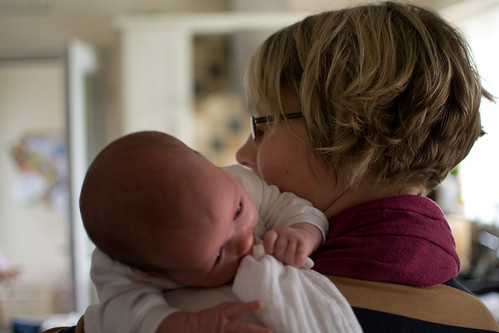
I was trying to take some pictures of my son and is girlfriend last night with my née tamron 90mm. But only one of them was in focus. Please can you tell what to put setting on. Newbie here.
I have nikon d3100
Many thanks x
 
Hi
I was trying to take some pictures of my son and his girlfriend last night with my new tamron 90mm.
The only thing is one was in focus and one was not. What setting can I use so both are in focus.
Sorry if sounds silly. Newbie.
I have nikon d3100
Thanks nikki
 
Higher f number or get them both exactly parallel with the focal plane.
 
Post an example, that would be beneficial, though the above post is more than likely the right answer.
 
Thanks for that but when I set it up it has the focus that I can move the red spot into the object I want in focus. How do I set it that both are. Sorry just confused
 
fracster said:
Post an example, that would be beneficial, though the above post is more than likely the right answer.

It will be ;p

I would imagine the op was shooting at f/2.8 or similar and a boy/girl probably one behind the other. The DOF at f/2.8 will be pretty shallow so open up to f/8 or so. Even that might not be enough and then we hit the ugly slow shutter problem, so your next question will be "what flash shall I buy?"
 
what Tom said above :) the problem is that the Tamron 90mm is a Macro lens and although it lends itself very well as portrait lens its great for single portraits, for groups of two or more you might struggle, as Tom says go to a higher F number but I still think unless you are taking a side by side shot with both an equal distance from the lens then you will struggle, have you another lens, possibly the kit lens that came with your D3100
 
Nickler said:
Thanks for that but when I set it up it has the focus that I can move the red spot into the object I want in focus. How do I set it that both are. Sorry just confused

See my first post. You can't set more than one focal point on a camera. You set one and adjust the aperture accordingly to create the DOF you require. All focal points on the focal plane will be in focus, everything infront and behind won't be.
 
Look at this one I took...... same problem as you are haviing.


DSC_0636 by Zarch1972, on Flickr


I used too small an f-number (1.8) so the baby is out of focus (my mistake), a higher number would mean both subjects in focus regardless of which one you actually focus on as a higher f-number increases the amount of depth that is in focus (as the other have said)
 
Last edited:
Thanks for that but when I set it up it has the focus that I can move the red spot into the object I want in focus. How do I set it that both are. Sorry just confused

You can`t. Unless both subjects faces are on the same plane or you have a high enough depth of field/F number, then one will be "Blurred".
 
I don't think you can really rely on the 'dots' for this. Essentially you will either need to create a larger depth of field by using a narrower aperture (what aperture have you been using?), or position the shot so that both your subjects are a similar distance to the camera. Use their eyes for reference and make sure both sets are in focus as a starting point.
 
Sounds like you have an issue with DOF, what aperture was the image taken at? Try shooting at f8 to keep them both sharp Nikki.
 
what Tom said above :) the problem is that the Tamron 90mm is a Macro lens and although it lends itself very well as portrait lens its great for single portraits, for groups of two or more you might struggle, as Tom says go to a higher F number but I still think unless you are taking a side by side shot with both an equal distance from the lens then you will struggle, have you another lens, possibly the kit lens that came with your D3100

Should it matter that it is a macro lens? Surely at the end of the day it is just a fast 90mm prime (albeit with the ability to close focus). It will still be possible to create a large DOF by moving the subjects an appropriate distance away from the camera and selecting an appropriate aperture.
 
I was using f3.5 and others. Think I'll just have to practice.
 
.
 
Last edited:
Stick it up to F/8 and try again. You'll need good light though, and even F/8 might not be enough
 
You need to understand depth of field, as mentioned above. It's the zone of acceptable sharpness within a picture, and extends in front and behind the point of actual focus. It varies with the aperture used, and also with the magnification of the image. That is, lower f/numbers give shallow depth of field, and if you make the subject bigger, either by moving close or by fitting a longer lens, that makes it shallower too. And the reverse of course.

So, if you're close to the subject and using a longish lens with a lower f/number, as you were doing, depth of field will be quite shallow. This is often a nice effect for portraits, as it throws the background out of focus and makes the subject stand out.

The best way to make that work is to ensure both people are the same distance from the camera. The eyes are most important, so line them up in the same plane as best you can. If that's not possible or doesn't work for the picture you want, then you must increase the depth of field by using a higher f/number, so that everything you want sharp is covered. If you do that though, you will need to drop the shutter speed quite a lot to maintain correct exposure and you'll quickly run into camera shake problems unless the light is very bright.

In situation like this, the exact position of the plane of sharpest focus, ie the focus point, is very important. If you let the camera use auto-point select, it will usually go for the closest part of the subject which probably won't be accurate enough (though it's better than going got the background). So switch to single-point AF, position that over the eyes and lock it there with half-pressure on the shutter release, then recompose the picture as you want it. You need to make sure neither you nor the subject moves while you do this, but if you take more than a couple of pictures they probably will, so keep checking and resetting it. It's easy and fast once you get the hang of it.

To find out exactly how much depth of field you've got, go to http://www.dofmaster.com/dofjs.html and input your settings - camera type, focal length, lens aperture and subject distance. It calculates it instantly. While you're there, input some different f/numbers and see how it changes.

 
Last edited:
If you want to keep your aperture wide open then you will need their faces to be in the same plane.
I still think that you will benefit a lot from learning more about Dof
 
That link the HoppyUK supplied is excellent. Putting in your camera, a 90mm focal length, 3.6 aperture (it doesn't have 3.5 as an option) and a guessed subject distance of 10 feet, your depth of field is only 0.5 feet. You can see that if your subjects were not an almost identical distance from the camera, one of them is going to be either partially or entirely out of focus.

Changing the aperture to F8 gives you about 1.2 feet of usable DOF and F11 will give you 1.7 feet. You can see that the distance is becoming much more usable but will still likely give you a nice out of focus back ground.

It's worth having a play with the numbers on that program. Two things in particular are worth noting. The first is that generally if you set the focus point on an object and your calculated DOF is around 6 feet the areas that will be in focus will be approx 2 feet in front of the object and 4 feet behind. i.e 1/3 and 2/3. This is why you will often hear people referring to focussing 1/3 into your scene when discussing landscapes.

The other thing worth noting is that to increase your depth of field, as well as the aperture, moving your subjects in relation to the lens makes a big difference. In your example at F3.5, if instead of taking the photo 10 feet from your subject you were to step back to 15 feet. Your DOF more than doubles. At the other end of the scale, if you were shooting a macro shot from 3 feet away, your DOF at F3.5 is only going to be a fraction of an inch. That is why nailing the focus on macro can be so tricky and why even shots taken at f11+ still have a very narrow depth of field.
 
Last edited:
I had this problem way back when, and honestly to figure it out, all i did was bung my Camera on a Tripod ( if you don't have one balance it somewhere) and then arrange three Cups on kitchen surface at 45 degrees in a line, and focused on the middle one.

i soon realised that as i cycled through all the Aperture settings from (lens at time) F3.5 - F22, i could see the DOF changing, but then i noticed that my Shutter speed was Slowing down, hence i learnt ISO control to up the ISO to regain Shutter Speed..its all a learning curve, but once you click and understand it, it all makes sense.

try to practice on non moving inanimate objects around the house, set up a shot and take shots through F range of given lens, then look at them on a computer, remember the digital age allows you to take hundreds of testing shots , just so you can learn something..

you will be surprised that when your camera is on tripod (or placed and not Moved) how all the settings suddenly make sense...

hope this helps, its how i learnt and now it second nature..
 
Back
Top