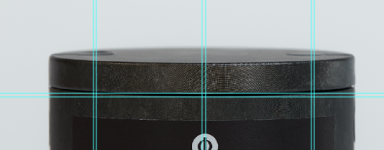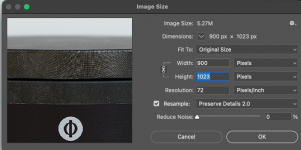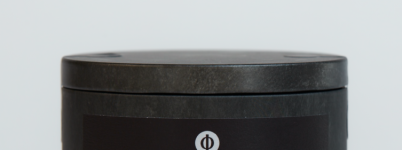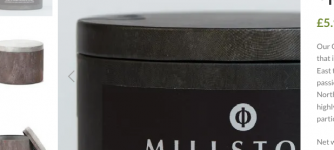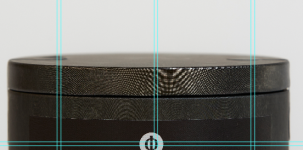
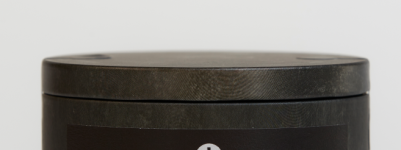
Moire Problem..

mrk123

Suspended / Banned
Messages
290
Name
kane
Edit My Images
No
Screenshot 2025-03-27 at 15.09.40.pngScreenshot 2025-03-27 at 15.09.48.png

Image on the left is the resized pic, image on the right is the original.
The original was shot with Canon 5dmk3 and 70-200ii.
I need to resize image to fit on a 800pc tall image, the original is about 5000px.. It is creating this Moire effect, it's very bad.. Is there any way I can get this of this??
I thought rasterise would work but could not even find the option?
Any ideas??
 
I am, C1, then into photoshop... any ideas?
How are you resizing. I seem to remember there is a preferred algorithm in PS for downsizing. But without googling I can't remember which of the options available, it is.

Have you tried C1? I've found it pretty good for downsizing and I remember someone (who I considered credible, but can't remember who) comparing C1 and PS for resizing and found C1 to be better. But this is saving from raw in C1, so if you have worked on the file in PS and it needs to go into C1 as a PSD/TIFF, then it seems less likely to work well.
 
How are you resizing. I seem to remember there is a preferred algorithm in PS for downsizing. But without googling I can't remember which of the options available, it is.

Have you tried C1? I've found it pretty good for downsizing and I remember someone (who I considered credible, but can't remember who) comparing C1 and PS for resizing and found C1 to be better. But this is saving from raw in C1, so if you have worked on the file in PS and it needs to go into C1 as a PSD/TIFF, then it seems less likely to work well.
Hi, I put into C1, tweak, then edit in photoshop... I then go to image size and resize from 5000px to 1000px or less. And that's when the crunch and moire happens...
So resize in C1? That mean's saving it from C1 as say a jpg or tiff? And then manually importing that into PS?
 
Hi, I put into C1, tweak, then edit in photoshop... I then go to image size and resize from 5000px to 1000px or less. And that's when the crunch and moire happens...
So resize in C1? That mean's saving it from C1 as say a jpg or tiff? And then manually importing that into PS?
When you resize in PS, there is a choice of resizing algorithms (methods) for resizing. Have you googled to find out which one you should be using for downsizing (as I suggested in my post).

You need to export as a TIFF or PSD to work in PS anyway as PS doesn't work with raw files. But downsizing should be the last thing you do (after all edits are complete).

I would do as much editing as I could in C1, and then round trip to PS from C1 using "edit with" in C1 (selecting a PSD as my file format choice, but you could equally well use TIFF. I would never choose to edit a JPEG) do whatever editing I needed in PS. and then, after saving in PS, go back in C1 to do the downsizing in C1 when exporting the final image (JPEG or TIFF).

But I would compare downsizing in PS to downsizing in C1 and decide which gives the best results.

You don't need to manually export anything from C1 into PS, as the "edit with" command looks after this for you i.e. it creates an edited PSD/TIFF in C1 and then opens it in PS for you. Saving in PS, saves to the PSD/TIFF that is already in C1.
 
When you resize in PS, the.....
So essentially just CMD SAVE in PS so that TIFF creates back into Photoshop and then downsize from C1?
In Photosp I set the image as in my case 800px x 700px for a product shot, I don't have that kind of control in C1... As I have a "product master file" in photoshop, it is 800px x 700px.. It needs to be framed up to that so all products look perfect on website... In C1 there is no such control... ??
I need to resize in Photoshop so I know my product pic is bang on.
 
So essentially just CMD SAVE in PS so that TIFF creates back into Photoshop and then downsize from C1?

Only if you used the "edit with" option in C1 to open PS, then yes Cmd+S wll save over the TIFF that C1 created.
In Photosp I set the image as in my case 800px x 700px for a product shot, I don't have that kind of control in C1... As I have a "product master file" in photoshop, it is 800px x 700px.. It needs to be framed up to that so all products look perfect on website... In C1 there is no such control... ??
I need to resize in Photoshop so I know my product pic is bang on.
I'm not sure what you mean by "framed up"

If it's being produced for a website, I assume you are downsizing to a JPEG, and you can export from C1 to a JPEG of any dimensions (in any units, including pixels). You just need to set them up in the export recipe. You can also set the crop in C1 to 800 x 700 and set up a recipe to use the same dimensions as the crop. Or indeed do both, depending on how you work

I have several export recipes saved with different dimensions and naming rules to make life easy. Managing file exports is tremendously versatile in C1 and considered one of its strengths. It's often given as one of the reasons for people changing from LR to C1.

You still haven't mentioned which resizing method you are using in Photoshop. If you aren't using the correct downsizing algorithm, this may still be the issue,
 
Screenshot 2025-03-28 at 15.06.28.pngScreenshot 2025-03-28 at 15.07.04.png

Thought I had it then realised that the size was 2300 pixels tall... made it 1000px tall then the crunch happened..
Here are my output settings.
Also in MODE > I have made it 16 bit, as opposed to 8 bit on all images.. ?
 
Last edited:
Played about a bit, on that drop down menu in image size I chose the last option, bi sample.. I found if I do this on original PSD import from C1 and then drag into master product image it seems ok.. gods knows.. it should not be this difficult... 4 hours total over 2 days and still not happy!
Image here of what it looks like online, it might do for bnow. Screenshot 2025-03-28 at 15.42.59.png
 
View attachment 449299View attachment 449300

Thought I had it then realised that the size was 2300 pixels tall... made it 1000px tall then the crunch happened..
Here are my output settings.
Also in MODE > I have made it 16 bit, as opposed to 8 bit on all images.. ?
Is that the best choice of resampling algorithm for downsizing?

I would prefer to check once actually exported as JPEG, No point in making it 16bit

With the C1 image is that a screengrab of the exported Jpeg

I wouldn't make any final decision until comparing like for like, Export both as JPEGs of the correct size and then open side by side in C1 or Photoshop, or even preview
 
Just so I'm clear, as these the actual finished out put images or screen caps from photoshop? I'm courious what happenes if you downsize from full 5000 to say 2500 first then downsize again to 900 or whatever it was.
Also are you viewing these at 100%?
 
Last edited:
Played about a bit, on that drop down menu in image size I chose the last option, bi sample.. I found if I do this on original PSD import from C1 and then drag into master product image it seems ok.. gods knows.. it should not be this difficult... 4 hours total over 2 days and still not happy!
Image here of what it looks like online, it might do for bnow. View attachment 449303
Have you actually read up on the different resampling algorithms? Based on all your posts here, you could save yourself a lot of angst by spending a bit more time learning how o do these things.

I'm still not clear on what you are doing, are you resampling the PSD, rather than creating a downsampled JPEG from the PSD. I'm not familiar enough with PS to fully understand how it works for this. When downsampling for web pages, I've never felt the need to use anything other than C1.

Is the pattern wood grain? Is there a reason why the C1 version isn't showing any of the pattern?
 
Just so I'm clear, as these the actual finished out put images or screen caps from photoshop? I'm courious what happenes if you downsize from full 5000 to say 2500 first then downsize again to 900 or whatever it was.
Also are you viewing these at 100%?
I read about that hack, did not seem to work when i tried it.. To be honest I have got it ot a point where it is ok, but still bugging me as it't not perfect. Yeah the moire kicks in around 90 to 100%
 
Have you actually read up on the different resampling algorithms? Based on all your posts here, you could save yourself a lot of angst by spending a bit more time learning how o do these things.

I'm still not clear on what you are doing, are you resampling the PSD, rather than creating a downsampled JPEG from the PSD. I'm not familiar enough with PS to fully understand how it works for this. When downsampling for web pages, I've never felt the need to use anything other than C1.

Is the pattern wood grain? Is there a reason why the C1 version isn't showing any of the pattern?
I deffo need to research, just short on time before I go asway for 12 days, where website will have a launching in 2 weeks banner, but products will be live.
I export from C1 into Photoshoop, then resize image from 5000px to 1000px and the crunch happens,
I have looked at the resize options in C1 but they are not clear, Plus I need to go into photoshop so I can place product on a clean background and have a consistent look overall.
 
I deffo need to research, just short on time before I go asway for 12 days, where website will have a launching in 2 weeks banner, but products will be live.
I export from C1 into Photoshoop, then resize image from 5000px to 1000px and the crunch happens,
I have looked at the resize options in C1 but they are not clear, Plus I need to go into photoshop so I can place product on a clean background and have a consistent look overall.
I find using C1 as a "control centre" for everything works well, especially as the export options are so good.

And as "edit with" allows you to run Photoshop as a "C1 Plugin" I find it easy to round trip to PS, Many pictures spend some time in PS, but always get finished off n C1.

You obviously, just need to spend more comparing which options work best for your particular needs.
 
I find using C1 as a "control centre" for everything works well, especially as the export options are so good.

And as "edit with" allows you to run Photoshop as a "C1 Plugin" I find it easy to round trip to PS, Many pictures spend some time in PS, but always get finished off n C1.

You obviously, just need to spend more comparing which options work best for your particular needs.
Thanks, I have found something that works, not sure what, it just seems to work.. But the resample modes helped, I realised I could view the mode in real time before pressing run, and I think it was one named 'smoothing'... Seemed to have worked.
For sure though I need to do more theory, I always just rush into it.
Thanks for all your help.
 
Thanks, I have found something that works, not sure what, it just seems to work.. But the resample modes helped, I realised I could view the mode in real time before pressing run, and I think it was one named 'smoothing'... Seemed to have worked.
For sure though I need to do more theory, I always just rush into it.
Thanks for all your help.
As an aside, none of this is theory, it's technique. You don't need to understand "how" the algorithms work, it's just easier and quicker if you know what the different algorithms have been designed to do.
 
"It is creating this Moire effect"

I don't think it is creating it, as I can see it on your original.
Making it more obvious because of the relative pixel size.
 
"It is creating this Moire effect"

I don't think it is creating it, as I can see it on your original.
Making it more obvious because of the relative pixel size.
Yes, I did ask about this in an earlier post as It looks like woodgrain to me, but I'm still guessing.
 
Back
Top