
Milky way processing

ben_wtrs

Suspended / Banned
Messages
111
Name
Ben
Edit My Images
Yes
I have seen loads of nice shots of the Milky Way and have had a go myself.
With my limited gear I have managed to capture it although it is very noisy. Now I have been looking around for processing tips, but all I seam to find is people say they add curve layers and levels but I have been playing around and can't seam to get my head around it. I know the detail has to be there in the first place and I won't have enough of that as the light pollution is to high, but I can see a (smudge) so really just wondering how to brighten it with out the rest of the image.
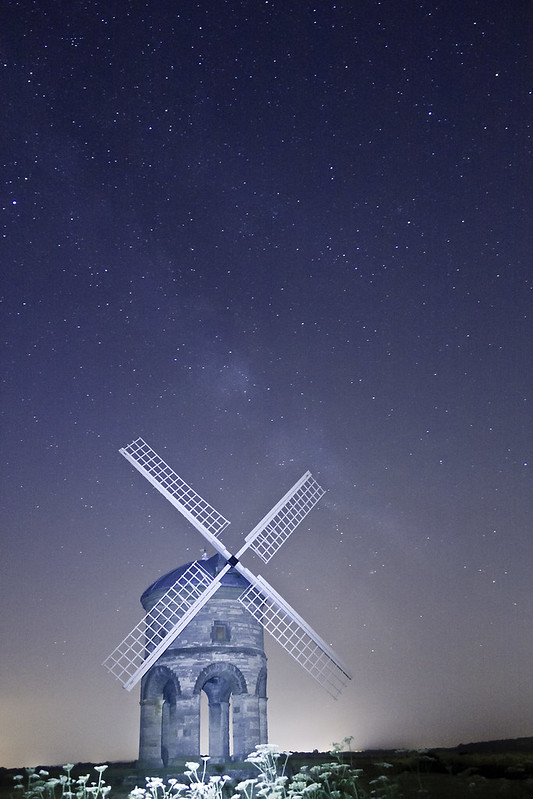
Chesterton windmill milkyway by ben_wtrs79, on Flickr

I would be thankful of any help or ideas
Thanks
Ben
 
The difficulty you've got in this instance is the skyglow extends so far above the horizon you're losing a good chunk of true night sky. You really need to get out to a properly dark location - I'd expect your darks to still be dark after 30sec at ISO1600 & f/2.8 or equivalent where here the darks are starting to push into the midtones.

Matt (MWHCVT) is a dab hand at night stuff and has shot this location a fair amount only having nailed the Milky Way once, fairly faintly. If anyone could do it here, Matt could so don't be too hard on yourself.

As for processing I follow a similar workflow for most of my Milky Way images, using ACR for whole-file adjustments like WB, blacks, brightness & contrast. I also play about with the HSL sliders at this point. Once the file's open in PhotoShop proper it's a case of adding localised adjustment layers where necessary and playing with layer blending modes.

That might not sound particularly helpful but it's just my take on things to get an image to my style, having worked out what I liked/ disliked from others' shots.
 
You absolutely need to be away from light pollution, or you'll struggle to get the exposures you need. There are two main problems to overcome with exposure, which are the earth's rotation (star trails) and noise. Because of the earths rotation you have a maximum of around 20 seconds exposure with a normal wide lens, or perhaps 30 seconds with a really wide lens.... That's it. So I order to get the detail need wide apertures and high ISO. Usually, I use ISO6400 and f2.8 or f4. If you find the sky is too bright at those settings, you are getting too much light pollution. The Milky Way is faint.

You could stack and align more than one exposure, but only if its a shot of the sky and no foreground... Unless you start compositing things in photoshop.

Processing requires a delicate touch if you want it to look natural. Clarity in Lightroom can be useful to bring out detail, but mainly, it's curves, and levels to stretch the histogram.

The darker the sky, the less processing you will need.
 
Back
Top