Metering: incident, reflective or use an app?

srichards

Suspended / Banned
Messages
10,968
Name
Suz
Edit My Images
Yes
First roll through the TLR and I chose incident. Waved the light meter around and went with what it said. It's not too bad. I metered where the camera was ie where I was standing figuring the light is falling where the camera is so it can't be too wrong. I went with incident as it is a generally 'it's this bright' kind of reading method. Skies do seem a bit washed out so I reckon it has over exposed a bit but that may have been partly down to me choosing to err on over exposure rather than under. I can't remember whether the sky was a decent blue or the hazy cloudy ick it appears to be in the photos. Shots without sky in look right and roughly how it was on the day.

Any thoughts?

The other idea was to just use the phone and one of the light meter apps with the idea that if I point it roughly what I shall be taking a photo of it won't be too far out.

How do you meter correctly for scenes you don't actually have physical access to? It's all very well saying meter from the subject and point back at the camera but if that subject is a landscape flipping miles away then by the time you've tramped over to the nice bit of rock you are exposing for and tramped back the light will have changed ;)

What is the best way of getting something decent the majority of the time?
 
Sunny 11, F8 and be there.

If you put a digital grad on the sky you'll probably be able to get some detail.
 
Depends on whether it's negative or slide.

As to how do you deal with a subject miles away, just make sure that the same light level is hitting the meter and turn round to face to camera (assuming you're standing in front if it.

The simplest way is to stick the palm of your hand in the same light as the subject, take a reflected reading from that, and open up one stop.

If you're using black and white film, skies will always come out too light (if blue) unless you use a filter (yellow at a minimum).
 
For landscape I always use a reflected light reading. Sometimes I use the palm as a convenient surface to meter off, but reckon that my palm is only about half a stop brighter than an 18% grey card ...
 
iPhone app for me and (touch wood!) I've had no major issues with slide or negative film.
But do you use it differently per chosen medium? In terms of where you point the device and how you interpret the readings?
 
If iPhone app works then it stops me needing a separate light meter as well :thumbs:
 
Nope, open app, point at subject, set my camera :0)

At the end of the day, the metering app uses the same hardware that the phones' own camera uses to meter the scene so there's no reason why it shouldn't deliver results equal in exposure to the digital camera built in.

I never really got into reflective/incident readings, maybe I'm just lazy!
 
For landscape I always use a reflected light reading. Sometimes I use the palm as a convenient surface to meter off, but reckon that my palm is only about half a stop brighter than an 18% grey card ...

If my maths is correct (and I am tired, so it may not be) that agrees perfectly with my method of meter the palm and add a stop since my palm would appear to half a stop up on an 18% grey card.
 
Hi Suz, Incident readings are generally considered pretty accurate providing obviously the meter is correctly calibrated. The best way is to point the meter (in incident mode) at the camera position from the subject/scene itself or from a position that is at the same angle and in the same light as the subject. It's very seldom using this method that you will need to make any compensations.

For accurate reflected readings using a handheld meter I have always found the use of a grey card to be very accurate if used correctly. The method of taking a reading from your hand can be fairly accurate but bear in mind that the reflective values of human skin varies from one person to another, so obviously you need to run a few tests from your own hand to get an accurate assessment.

Readings for negative film do not need to be quite so accurate (but it's still best to get them as near as possible) as there is a considerable amount of exposure latitude in negative film. If using colour transparency film then your exposures need to be more accurate as there is less exposure latitude with this type of film. With colour transparency film I usually under expose it by a quarter-third of a stop in an attempt to avoid highlights from burning out.

The reason for what you consider to be over exposure in your shots may not be your metering that is at fault, it could be your camera shutter or aperture diaphragm being a bit on the lazy side. It's always worth running a few tests with your equipment to make sure you know just how it is all performing.

All these results have been attained from quite a bit of personal experience. Hope this helps.,

George.
 
If my maths is correct (and I am tired, so it may not be) that agrees perfectly with my method of meter the palm and add a stop since my palm would appear to half a stop up on an 18% grey card.
I'm really bad at maths, but - for slide film in average lighting I'd use the palm reading directly, since a slight nominal underexposure is what I'd aim for anyway with slide film ...
 
As much as a handheld light meter is more traditional, I've personally found the few I've used to be over-complicated. Reading this thread is already making my head spin ;0)

This is a selection of shots I've metered using my iPhone and shot on various manual kit;

Velvia in full sun on a Kowa Six

View attachment 20465

Kodak T400 on a Kiev 80

View attachment 20467

Agfa Vista in an Ensign 20

View attachment 20468

Ektar on Yashica Mat 124 (that had no battery!)

View attachment 20469

Acros 100 on a Kowa Six

View attachment 20470

Ektar on an M645J with WLF

View attachment 20471

I'd definitely recommend giving an app a go before try to learn incident/reflective metering.
 
Last edited:
If I remember right Suz, aren't you in Stoke?

If so, I'd be happy to meet up for an hour or so and go through my metering methods with you.
 
iPhone metered shots look just right to me.

Think my schoolboy error was pointing incident meter the wrong way. Should have had it pointing it back at the camera consistently rather than anywhere but!
 
If I remember right Suz, aren't you in Stoke?

If so, I'd be happy to meet up for an hour or so and go through my metering methods with you.

Thanks. I am. I'll bear that in mind if the next roll doesn't look right :thumbs:
 
As much as a handheld light meter is more traditional, I've personally found the few I've used to be over-complicated. Reading this thread is already making my head spin ;0)

I'd definitely recommend giving an app a go before try to learn incident/reflective metering.

Nothing's simpler than a hand-held meter, Steve - after all, you're using your phone+app as one! And it's reflective metering, isn't it, as most meters do, so incident metering is irrelevant in the circumstances. If anything, you've got blown highlights here and there, so it's back to where you point the phone+app (as your meter) having regard to its acceptance angle, and how you moderate what it tells you according to the type of light on the subject.
 
Given that what seemed pretty straighforwrd to me has been found tricky, I suggest that the faint hearted just ignore this post.

1. The palm of the hand. Caucasian palms vary very little in reflectance. The palm is suggested because it doesn't usually tan.
2. The 18% grey card is deceptive. Meters are (where you can actually find out the figures) normally calibrated for 12%. There are now some caveats to be made here, but it was once certainly the case. Kodak say that their 18% grey card should be angled at 45 degrees to the light. Guess what? That brings the reflectance down to 12%...
3. Incident light (and the palm of the hand) are giving a reading based solely on the amount of light hitting the subject. They are designed to prevent overexposure, which kills slide and digital. If your subject doesn't have any bright highlights but has important shadow areas, you may end up underexposing this way.
4. The methods generally work with negative film because the latitude is so large; problems only really arise with an exceptionally large subject brightness range.

I think that's my last word on this one as the advice already given in earlier posts seems simple and clear.
 
Apologies if I've caused offence regarding the suitability of handheld meters vs iPhone.

The point I intended to make was that the digital meter can be as effective as a handheld meter and requires very little effort (if that's what you're after). I am a million miles away from a metering expert but, in my own experience, thought the OP may appreciate an alternative recommendation to the 'classic' meters.

With regards to the shots I posted, they were just some I grabbed from Flickr that I knew I'd metered with the iPhone as examples. The first shot has the most blown highlights but as it was shot in full midday sun, in Fuertaventura, on Velvia, I was pretty pleased with the result overall ;0)

Cheers
Steve
 
I wasn't intending to appear negative, Steve, but just trying to contribute some resolution to the topic. Your using the phone+app is entirely valid, and yes it worked pretty good.
 
I've just shot a few rolls of Tri-X and Portra using this method http://www.johnnypatience.com/metering-for-film/

In summary: set your meter (or camera) at half box speed and incident meter the shadows . If you can't get the meter into the shadows, create your own by shading the bulb.

I haven't yet had any film back from the dev shop, or time to do my own, but I'll post my findings here as a side-by-side using this method (UK Film Lab vs AG Photographic vs home dev and scan).
 
The iPhone app does work pretty well for what it is and it's free too. I have used it a couple of times myself and only got the odd one or two pics which are maybe a bit out.

I recently got a Sekonic 308 cheap from eBay and have just sent a couple of rolls off to UK Film Lab using the method mentioned in the link above so am waiting to see how they will come out. Using your phone does mean that you have one less thing to carry around although I think after a 3 or 4 rolls you can get an idea of what exposure settings you need for the situation. If ever I have been unsure I have tended to go on the side of overexposure.
 
I agree with @droj that the simplest option for metering is handheld meters. You just stick it in the same light as the subject (or a shaded area in the scene), point it back at the camera, and you've got your reading. Easy, simple, reliable, and the meter doesn't require constant charging like my phone does (using my iPhone for metering would create problems when I'm travelling). I might only take one reading early on though and then just wing it the rest of the way unless the lighting changes.

With regard to iPhone apps, I just find the iPhone too fiddly for determining exposure unless it's a really tricky situation, I'd rather just guess, but it has worked well when I've had to use it.

At any rate, I think we're seriously overthinking this metering thing with regard to negative film. I'd be surprised if any of us could really tell the difference between similar shots shot at drastically different EVs, so there's likely little need to stress about 'getting it right'.


For instance, in the two photos below shot only about one minute apart, one shot is two stops overexposed (i.e., shot at 100 EI) and the other photo is an additional 3 stops overexposed (so at least five stops overexposed overall). Could you really tell which one is which?

View attachment 20480 View attachment 20481


Same thing here; one shot is about two stops overexposed and the other an additional five stops. Both were taken moments apart.

View attachment 20482 View attachment 20483

I'm not saying that there aren't differences at these different EVs, but they're tough to nail down and will largely go unnoticed unless you're shooting numerous photos of the same scene at different EVs. Like me apparently... :whistle:
 
Another + for the iPhone light meter app, unless I'm actually lugging around the 5x4 in which case I'll take the Pentax Spotmeter, but for pretty much everything else the app has served me well for the last couple of years.
 
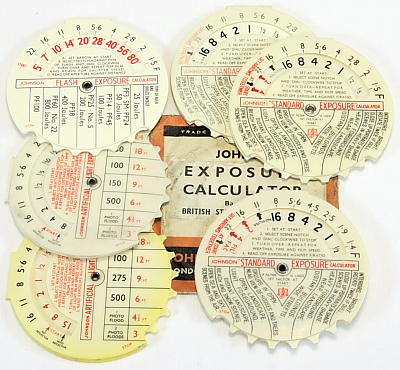
I don't know how the iPhone app works but the various Android ones use the sensor for determining screen brightness and in my previous phone it worked as a good reflective meter. I've been meaning to investigate the slide "meter" that accompanies the ultimate exposure calculator I've used the tables on his site a few times and not been disappointed.
 
I always found Incident metering to be the most accurate for slide and negative films, you just had to make sure the light one the meters invacone was the same as falling on the scene.

Mind you modern Matrix type metering does a good job the vast majority of the time these days, for me anyway ;)

What was the old B&W negative film rule, expose for the shadows and develop for the highlights, or was it the otherway around.

The Sunny 16 rule also worked most of the time, well when we had sun that is :)

Whats everyone favorite Exposure App

Paul
 
If my maths is correct (and I am tired, so it may not be) that agrees perfectly with my method of meter the palm and add a stop since my palm would appear to half a stop up on an 18% grey card.

Weston meters have a pointer which you set the number to when metering from your palm. It is one stop different from normal metering.

The Sunny 16 rule also worked most of the time, well when we had sun that is

It works in all possible levels of daylight. It doesn't have to be sunny!

Whats everyone favorite Exposure App

If you mean favourite, it's this one:

E40-6.JPG


It just needs the application of some intelligence and observation and it's accurate enough for slide film.


Steve.
 
Last edited:
  • Like
Reactions: Jao
For instance, in the two photos below shot only about one minute apart, one shot is two stops overexposed (i.e., shot at 100 EI) and the other photo is an additional 3 stops overexposed (so at least five stops overexposed overall). Could you really tell which one is which?

I'm guessing the second shots have the most exposure? They seem more saturated which fits the test shots that UK Film lab posted on their blog.

What should be taken from these examples is that when you're shooting colour negative film, the important thing is to expose enough, rather than trying to hit some kind of mythical 'perfect' exposure. Get an extra stop by shooting at half box speed, plus another one or two by metering the shadows and the image should sort itself out.

If you're using slide film then I guess (haven't shot slide film in over 30 years) you have to be much more careful. I'm not at all clear what the above method would do with slides, but it may not be pretty!

Another question in my mind is how good are the negatives for use in an enlarger? Clearly they work great in a scanner. Can anyone confirm whether the above method produces negatives that are okay (ie. not too thick) for a wet darkroom?

Johnny Patience didn't elaborate on using the method for B&W, particularly on the development side. After reading around a little it seems that it still applies - you are exposing for the shadows - but the development time should be reduced by 15-20% to avoid the highlights being over developed.
 
Small experiment with back garden, matrix metering film camera and light meter.

Incident metering done from the camera position and pointing at the subject is pretty much identical to the camera using its inbuilt matrix metering. This is also the easiest as it is one handed, point it at the thing and bingo. I think I will be sticking with this method as it seems fairly consistent.

I will try it again on something miles away at some point too ;)
 
I've just shot a few rolls of Tri-X and Portra using this method http://www.johnnypatience.com/metering-for-film/

In summary: set your meter (or camera) at half box speed and incident meter the shadows . If you can't get the meter into the shadows, create your own by shading the bulb.

I haven't yet had any film back from the dev shop, or time to do my own, but I'll post my findings here as a side-by-side using this method (UK Film Lab vs AG Photographic vs home dev and scan).
I recently tried this method and sent 3 films to UKFL for them to process and scan. Their feedback info stated that all the exposures were "very good" (probably a first for me!). So for colour* film I'm happy to stick with this method.
Edit: Negative
 
Last edited:
Small experiment with back garden, matrix metering film camera and light meter.

Incident metering done from the camera position and pointing at the subject is pretty much identical to the camera using its inbuilt matrix metering. This is also the easiest as it is one handed, point it at the thing and bingo. I think I will be sticking with this method as it seems fairly consistent.

I will try it again on something miles away at some point too ;)
That's odd, I'd expect a reflected reading to be nearly the same as the camera but not an incident reading.
 
Small experiment with back garden, matrix metering film camera and light meter.

Incident metering done from the camera position and pointing at the subject is pretty much identical to the camera using its inbuilt matrix metering. This is also the easiest as it is one handed, point it at the thing and bingo. I think I will be sticking with this method as it seems fairly consistent.

I will try it again on something miles away at some point too ;)


The correct way to use an incident meter is from the subject towards the camera.
If the subject is distant but in the same light as you are just stand between the camera and subject and point towards the camera.
I have been using incident meters since 1956 and it works every time.

If every thing is just being lit in the open, by overcast sky light, it will make surprisingly little difference where you point the meter... but it should still be pointed at the camera.
 
Last edited:
I'm guessing the second shots have the most exposure? They seem more saturated which fits the test shots that UK Film lab posted on their blog.

It's actually the first photo from the first set and then the second shot from the second.

What should be taken from these examples is that when you're shooting colour negative film, the important thing is to expose enough, rather than trying to hit some kind of mythical 'perfect' exposure. Get an extra stop by shooting at half box speed, plus another one or two by metering the shadows and the image should sort itself out.

Yep, it's very difficult to overexpose colour negative, so just be sure to get enough exposure and you should be good to go.

If you're using slide film then I guess (haven't shot slide film in over 30 years) you have to be much more careful. I'm not at all clear what the above method would do with slides, but it may not be pretty!

For slide, I simply set my light meter for box speed, stick the meter in the same light as the subject, and then point it back in the direction of the camera. You need to watch out for scenes with extended subject brightness ranges though, so sometimes I'll take a couple of incident readings to gauge this or use the spot meter function on my Sekonic.

Small experiment with back garden, matrix metering film camera and light meter.

Incident metering done from the camera position and pointing at the subject is pretty much identical to the camera using its inbuilt matrix metering. This is also the easiest as it is one handed, point it at the thing and bingo. I think I will be sticking with this method as it seems fairly consistent.

I will try it again on something miles away at some point too ;)

Incident metering from the camera and pointed toward the subject? I'm guessing that you must have done this test on an overcast day? If the sun is out, this method is more likely to lead to underexposure, which is the one thing you want to avoid with negative film. I would not recommend using an incident meter this way.

Also, when the sun is out and you're shooting a backlit subject, this is when matrix metering and incident metering are more likely to disagree, as inbuilt meters can often be fooled by the bright light of the sun. The incident meter, if used in the same light as the backlit subject (i.e., in shadow), will definitely provide more reliable readings.
 
I don't know how the iPhone app works but the various Android ones use the sensor for determining screen brightness

The Android API provides a function to get the exposure details out of the camera's meter, but it's up to the manufacturer whether to provide the real values or just a dummy function. For the latter phones, it'll use the screen brightness sensor, as you say, but for the phones that the apps say are "supported", they'll use the accurate meter.

My Huawei y300 is one of the latter, and the screen sensor is useless - several stops out and not consistent. The next phone I buy will have the proper support. (Moto G, possibly)
 
That's not incident metering. That would be reflective metering.


Steve.

Now I'm really confused. I always thought an incident light reading was taken with the invercone on or is it nothing to do with that and what you're pointing the meter at the makes it incident or reflective ie at the subject it's reflective and pointed at the camera is incident?

You can see why I just use an inbuilt meter where I have one as it is much easier :D
 
Ah, I can see where the confusion has come from.

A reflective meter reading is usually taken from the camera position pointing towards the subject so you are measuring the light reflected from the subject. A reflective reading does not use the invercone on the meter.

An incident reading is usually taken from the subject pointed back at the camera position. Here you are measuring the light falling on the subject. Incident comes from the latin "incidere" which literally means to fall upon. Here you use the invercone on you meter.
 
Reflective - you're measuring the light reflected from the subject. You point it from the camera to the subject.

Incident - you're measuring the light falling on the subject. You point it from the subject to the camera, but you also need to use the invercone to accurately measure all the light falling on it, not just the light coming directly from the direction of the camera.
 
Now I'm really confused. I always thought an incident light reading was taken with the invercone on or is it nothing to do with that and what you're pointing the meter at the makes it incident or reflective ie at the subject it's reflective and pointed at the camera is incident?

You can see why I just use an inbuilt meter where I have one as it is much easier :D

You use an invercone on a weston meter and a dome on most others.
This acts a proxy for the subject and gathers the light falling on it in the same proportions it falls on the subjects surfaces.
It is pointed toward the camera because the dome or ivercone is representing the side of the subject that faces the camera.
The light passes through the dome or invercone and illuminates its inside surface, which is then measured by the meter cell.

As a result the resulting exposure is pegged very accurately to the light falling on the subject... at no time does it measure the light reflected from it.
In this way all the tones come out as they were seen.
Nothing is easier than an incident meter. but they can not be built into auto cameras for the obvious reason. that they need to point toward it.

 
Back
Top