Mega Converging Verticals

kalibre

Suspended / Banned
Messages
1,121
Name
Doug
Edit My Images
Yes
Hi All,

I'm lucky enough to be off to NY city in less than a week, and I want to get my wide angle technique down before then.

Since going full frame and ditching my Sigma 10-20 I've now got a Tamron 17-35. This is a lovely lens but the distortion is quite mega when going ultra wide.

I want to know if I'm already doing everything in my power to correct or preempt the distortion.

For example:
BB-2.jpg

BB-1.jpg


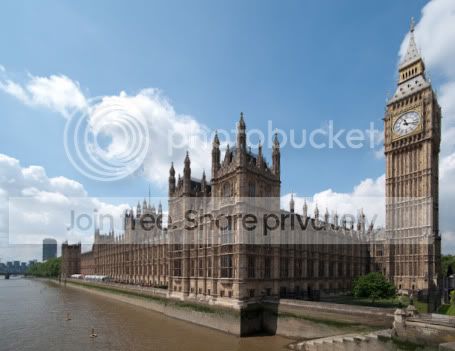
Ignoring the colour processing on the 2nd image, this has been through the lens correction filter in photoshop and also via the PTLens plugin to correct the inherent barrel distortion. The resultant image still has a surrealness about it, which I'm putting down to standard perspective distortion, but I want to be sure.

Can anyone think of a better way or correcting the image, or better still have a go and repost?

It would have been nice to retain the top of the tower but after lens correction I couldn't help but lose some of the image. (Lesson learnt for next time :bonk:.)

Cheers.
 
The perspective distortion is because you are so close, not a lens fault. But I think you know that.

In the example above, you have pushed the correction as far as you can IMO. Maybe too far? When it gets past 10 degrees or so it looks better to leave it alone than to pull it straight. I think you are using all the right tools. PTLens is handy (for others, it's here: http://epaperpress.com/ptlens/ ).

Perspective distortion only seems to be a problem with architecture. We don't expect mountains to be straight. Sometimes the only way is to move back and shoot with a longer lens. Tricky in New York, so maybe put up with converging verticals, or straighten them regardless, and make a virtue out of the sometimes unnatural look?

If you're going to do a lot of this, as I think you have discovered you need quite a lot of space around the image so that you don't need to crop off important stuff. And there is sometimes two ways of doing it, either by enlarging the top, or shrinking the bottom. Sometimes you can do a bit of both.
 
This is a crap effort on my behalf, but I would try and get the perspective right on the clock.

I just used the warp tool and buggered about for a few mins. Dont do too much though else it ends up looking worse.

My edit is poor but with more time and effort, I think it can be done.. . . . . .

BB-1.jpg
 
The building on the extreme left has gone the other way in both attempts, and the central tower is off :thinking:
 
The building on the extreme left has gone the other way in both attempts, and the central tower is off :thinking:

I didn't alter the left, or the central tower.

I took the o/p's edited image and just altered the clock tower.

Now that you mention it though, they do look EVER SO SLIGHTLY off.

:)
 
I used Photoshop CS4 lens correction on your top image, for me the distortion in the clock face etc is still a problem and would need further work in photoshop, but extreme corrections can be made.

BB-2.jpg
 
Try a 2 or 3 image pan but turn the camera vertically first.

That way you can get all the image you require but keep the camera horizontal/vertical to avoid the "falling over".

You may end up with lots of sky/foreground, but you will have lots of spare pixels you can crop out.

HTH

David
 
There is one thing most forget or do not understand and that is of Height
If you lean the tower back it will be shorter so when correcting the angels you also need to correct the height I have done a quick fix here you will see the difference of height to the start photo
3683170672_4a49ea41cb_o.jpg
BB-2.jpg
 
You'll never get that place perfect..it's the most crooked house in the country. ;)
 
Imho, none of the images posted 'look right'. Is this lens particularly bad for distortion? It looks a lot worse than my 10-20 ever did, or the 17-40 now does.

I think when the distortion is that bad you are going to struggle to get a pleasing result that looks right, and you'd be better off using the distortion to your advantage to produce some really extreme converging verticals and really exagerate the height and scale of the NY skyline.
 
There is one thing most forget or do not understand and that is of Height
If you lean the tower back it will be shorter so when correcting the angels you also need to correct the height I have done a quick fix here you will see the difference of height to the start photo
3683170672_4a49ea41cb_o.jpg
BB-2.jpg

Once again we're reminded here that apparently most of us get it wrong and tend to forget things... but holy c%$p, that's just awful... does absolutely nothing to enhance the original image. Each to their own I guess.
 
Once again we're reminded here that apparently most of us get it wrong and tend to forget things... but holy c%$p, that's just awful... does absolutely nothing to enhance the original image. Each to their own I guess.

Have to agree with you John, it looks terrible, and it's probably not fixable in this way.

I think the problem is that the OP tried to make a portrait of the building from too close distance and you can't do that. Either move in really close, make a virtue of the converging verticals and some dynamic composition, or move back for a more normal portrait view - from the other side of Westminster Bridge - and shoot with a longer lens. A little bit of correction would then look entirely natural.
 
Cheers for the input guys. In this instance I was indeed shooting too close to end up with a pleasing corrected image, I learnt that immediately. In terms of distortion correction (rather than perspective) it would appear that I can't do much else (other than tweak the far left buildings a tad).
 
BB-2.jpg


Best I could Get :)

The main problem of doing any perspective creation (including levelling a wonky horizon) in Photoshop is that you lose resolution and sharpness.

If you know you are going to get converging verticals then it pays to make sure the camera is dead level on the other rotational axis as it will make it easier to remove the distortion if you only have to correct in one direction.
 
BB-2.jpg


Best I could Get :)

The main problem of doing any perspective creation (including levelling a wonky horizon) in Photoshop is that you lose resolution and sharpness.

If you know you are going to get converging verticals then it pays to make sure the camera is dead level on the other rotational axis as it will make it easier to remove the distortion if you only have to correct in one direction.

Good work :thumbs:, how did you manage to correct it without losing much of the image??
 
just using the distortion tool in cs4. combination of vertical and horizontal shifts, coupled with a bit of rotation.
 
Back
Top