Macbook

cruso

Suspended / Banned
Messages
6,762
Name
kevin
Edit My Images
Yes
hi all A happy new year to you all I am getting ready to update my computer as I retire at the weekend and will be spending more time with my Camera
Anyway I need some advise on what I would need I have Been looking at the m4 max chip Processor but what Ram would I need 32g or 48 for my photo editing Different shops are saying different and now I am confused if 48 would be an over kill ? any help would be grateful at the moment I don't have any big photo software maybe I should of put in the Computer section ?
 
Last edited:
I've got a MacBook Pro M1 with 16GB and it runs were fast compare to my previous MBP 2012. I do not know for sure if 48 will be an over kill, or not. More RAM is always better, but you have to have a upper limit.
 
Hi Kevin,happy new year to you. I think that you should get as much memory as you can afford. Apple memory is expensive and can not be addaed after purchase. I have been using this Macbook Air for two years, very pleased that I have changed from Windows. I only have 8gb and have lots of photographic images and other documents stored on it. I still have over 4gb left. I use an external hard drive for stuff that I do not use regularly. I use Photoshop Elements. Since 32gb is four times the amount I have, i would say that the actual amount you might get is down to cost. That is only my humble, uneducated opinion.
 
I'm a great believer in having as much memory as you can, software upgrades and becomes more power hungry, so it's good to future proof. I don't use a mac, but the last PC I had built 2 years ago, I had enough room to expand to 128gb of memory, it's currently running 32gb, so with the expansion facility, it should keep me going for a few years yet.
 
Hi Kevin.

I'm using a Mac Studio M1 Max - 32Gb RAM - 500Gb Internal SSD. 6TB external Sandisk G-Drive and several external SSD's in a RAID configuration.

I run various photo and video editing software, and have noticed that RAM can be an issue.

If I were to purchase today, I'd go for more RAM.

Is the Macbook the way to go, or would a Studio be a better solution? Although, you'd also need a screen if you went with a Mac Studio.

As always, I recommend using, "CleanMyMac".
 
I have a Mac Studio with an M1 Max CPU and 32Gb Ram.

I have no issues whatsoever running Lightroom, Photoshop, stitching panos etc.

If you can afford the extra and get 48Gb then do it but 32Gb will be absolutely fine.
 
Last edited:
Screenshot 2025-01-01 at 12.01.00.png
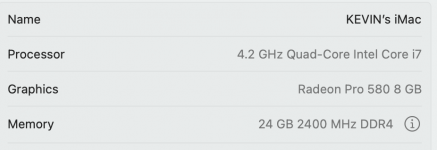
I have this at the moment and is increasingly getting a lot slower I don't know a lot about computers but Its since I got the r5 mk2 and started shooting in raw-c and my file sizes have got a lot bigger and its seems to been struggling ? Maybe it needs a clear out
 
Last edited:
The switch to an Apple Silicon processor will be the biggest change. If I was speccing up a good computer for editing I would go for an M4 Pro MBP, probably the middle top spec £2,399 spec on, even that will be overkill for photo processing.
 
View attachment 442232
I have this at the moment and is increasingly getting a lot slower I don't know a lot about computers but Its since I got the r5 mk2 and started shooting in raw-c and my file sizes have got a lot bigger and its seems to been struggling ? Maybe it needs a clear out

I went from an i7 iMac with 64Gb Ram to the M1 Max Studio (mentioned above) and the difference was night and day. The M series processors just do things differently, they are far more efficient then Intel CPU's. I've not tried an M4 CPU but it has to be better then the M1 and I promise you the M1 is no slouch.

I have an R5 and shoot full size Raw files.
 
Notwithstanding the expectation that there will (may) be an upgrade to an M4 in March, this MacBook Air looks like a good deal to me…


I have had an M2 MacBook Air since last February and it’s a joy to use.
 
Last edited:
Enjoy the retirement Kev, looking forward to seeing more from you.

All the above is correct - the more RAM the better. However, it comes down to what you're actually going to do with your shots.

Are you looking at getting into stitched panoramas or shooting video, or other things that will eat up the memory?

If not and you're looking at sticking with regular Lightroom / photoshop processing then I don't think you need to go crazy. My MacBook is starting to creak and I'm considering a new one in the next year or so, and for what I do - LR / PS / Topaz, and a new specialist underwater program called XTC, I'll probably only get 16, or at the most 24gb RAM

Yes, more is better, and if you have the money then get it, but no need to spend crazy if the Monet can go elsewhere

Mike
 
Exciting times ahead! I have recently updated to an M4 Pro. I decided not to go for the Max after researching. You may want to have a read through the thread I started in the computer section. There was a really useful YouTube video that compared a few processors.

I went for 24GB RAM. I'm sure more memory will be more future proof, but as I got my model at a reduced rate, I was looking at an extra £600/£650, to go to48GB.
 
Hi Kevin,
Sorry I cannot help with the computer stuff but would like to wish you a long, happy and healthy retirement! Look forward to seeing the fruits of your new toy
Cheers
John
 
Exciting times ahead! I have recently updated to an M4 Pro. I decided not to go for the Max after researching. You may want to have a read through the thread I started in the computer section. There was a really useful YouTube video that compared a few processors.

I went for 24GB RAM. I'm sure more memory will be more future proof, but as I got my model at a reduced rate, I was looking at an extra £600/£650, to go to48GB.
Thanks Bebop every bit of help is welcome I will check it out
 
I have a m3 max 14" pro with 36gb ram and it absolutely flies, it is significantly faster than my windows desktop (i9, 10 core, 64gb RAM, rtx 4070) for everything except AI image processing where the discrete graphics card is significantly faster. For any task that is cpu or memory limited the MacBook is incredibly quick. Stacking 40-80 raw images in photoshop is not a problem and I have yet to run out of ram.
 
Me with my M1 Pro 16" MacBook with 16gig ram and 1Tb SSD. It does everything with ease, never breaks into a sweat and I have yet to hear or see the fans kick in.
The silicon inside these machines is phenomenal and apple are knocking it out of the ball park with every release.

Everyone saying you need 32, 48 gig must think you are running Final Cut Pro alongside Capture One and Photoshop whilst having 20 tabs open in Safari. Trust me 16 gig is fine for most of us doing photography related tasks.
 
I recently purchased my first MacBook, the 16" MacBook M4 Pro with 24 GB RAM and 512 SSD. I do a lot of stacking for macro and use lightroom, Photoshop and affinity. I've yet to cause the laptop any stress at all. I also have an i9 Asus Zenbook duo with 32 GB RAM and 8 GB 3070TI and the Mac is much faster than the Asus.

I don't know what your photography workflow is, I'm just a hobby tog but I did a lot of research also, went in and talked to Apple. I was contemplating the £400 upgrade to 48 GB RAM but the chap at Apple told me it wasn't necessary for what I do and I'd be spending money for no reason.
 
I recently purchased my first MacBook, the 16" MacBook M4 Pro with 24 GB RAM and 512 SSD. I do a lot of stacking for macro and use lightroom, Photoshop and affinity. I've yet to cause the laptop any stress at all. I also have an i9 Asus Zenbook duo with 32 GB RAM and 8 GB 3070TI and the Mac is much faster than the Asus.

I don't know what your photography workflow is, I'm just a hobby tog but I did a lot of research also, went in and talked to Apple. I was contemplating the £400 upgrade to 48 GB RAM but the chap at Apple told me it wasn't necessary for what I do and I'd be spending money for no reason.
I am just a hobbyist Adam just like you At the moment I just do wildlife and macro I don’t do stacking at all but might have a play in the future
 
Then you may be looking to spend more money than you need to @cruso. I don't think mine has been out of the green zone at all. I usually have chrome open, YouTube music, email and the editing tool I am using. I don't have 50+ tabs open, never have.
 
I'm a hobby photographer in a similar position but bought a 24gb Mac Mini Pro and not yet regretted it at all. I don’t use Photoshop/Lightroom but PhotoMechanic / Affinity Photo / DXO 8 and similar to Adam do some stacking, occasionally stitching but usually just basic editing with multiple masks.

All the bloggers played to my insecurities - it is a good chunk of money to me and needed to be well spent. Now I probably know better, 16gb would have been sufficient for my needs along with the M4, not pro but I felt the need to future proof - but accept we all do different things in different ways. I probably could have gotten away with M4 / 16gb but want this to last a few years and don’t regret it, better a bit better than not enough. My Mac Mini has never felt stressed at all apart from the one time I was stacking a bunch of images and thought it had crashed. It hadn't but it had just finished the task faster than I realised. Significantly faster than my old iMac.

I suspect that if you use really huge RAW files (I have a ff Panasonic S5) or work with video maybe you'd need more memory.
 
Enjoy your retirement, its the best thing i ever did, you’ll be able to get out just when you want with your camera
To be honest any of the current MacBooks will be good for photo editing
I use an M1 MacBook Pro with 32 GB ram and the pro chip
I do multiple image stacks with R5 files and have no issues at all, as already mentioned it is a good idea to future proof tho and i would with 48 gb
 
In all honesty you don't need 48GB of RAM, unless you're editing video. But good to 'future proof' if you want to do video.

I have 32GB in my desktop. It's all I need. No issues when editing video in Davinci Resolve, or editing photos in Lr
 
Get 32G of Ram, it should be fine, but of course, more can't hurt but the prices are silly.

I have to disagree with Cleanmymac being a recommendation though, it caused my Mac to start crashing, even after a format/restore. When it was removed it has been fine.
 
My macBook Pro (Intel i9) has 64GB RAM and my M2 Mac Studio which is now my main machine has 32GB, everything I do feels quicker on the Mac Studio.
However, if I have Lightroom, Photoshop and maybe Photo Mechanic open I do get the odd "your memory is running low" message, but it's never felt like it's slowed me down.
 
I have a 16gb m1 mbp and it handles all of my 4k 10 bit 4.2.2 video editing and 60mp photo editing without an issue. Buy more if you can/want but it’s in no way necessary. The ssd is the place I’d be more concerned about skimping on.
 
Get 32G of Ram, it should be fine, but of course, more can't hurt but the prices are silly.

I have to disagree with Cleanmymac being a recommendation though, it caused my Mac to start crashing, even after a format/restore. When it was removed it has been fine.
That's interesting around Clean My Mac, I've never had an issue with it and I've used it for years
 
That's interesting around Clean My Mac, I've never had an issue with it and I've used it for years

I did too....until about 18months ago.

On a different computer forum, several IT people (who are much better into the core of how the Mac works than me) advice against using it at all.
 
Do they say why?
I have always assumed that recent ex-Windows users were the only ones that would pay for this as most of the functionality is provided by MacOS. Why add to your startup a checklist that is likely to slow things down or take system resources when you least need it.
 
In all the years I have been a Mac user I have never used anything like Cleanmymac. As Chris says it will use system resources, keep running in the background doing god know what. The Mac OS is very efficient at what it does, unlike a certain other OS
 
I quote “It's expensive and unnecessary software that can actually interfere with the Mac's own automated cleanup tasks. And almost all information it presents is false, only to give you the sense that you need to do their cleanup when you don't.”
Can you say where this has come from?
 
a guy on a computer forum call OCUK, username HACO.
Thanks, I eventually found the quote, but no info on who Haco is and the credibility of his opinion.

My own experience has been very good with CleanMyMac (which must be 10 years now), and have found it does what it says it does. But if it's as risky as proposed and I've just been lucky, then I would consider going back to the free options I used to use (which that forum seemed to recommend). Not as convenient, but CleanMyMac has become rather pricey now.
 
What does clean my Mac actually do that say something like Onyx does, which is what I have used for ages... and it is free.
 
Also a long time Onyx user - I also run the free version of Malwarebytes from time to time but never seen it pick anything up but both of these are at my wish and when convenient.
 
Back
Top