Mac mini M1 to M4

Messages
17,082
Name
Jeff
Edit My Images
No
Currently running a Mac mini with M1 chip but since getting the Nikon Z8 I’m finding processing a tad slower especially Lightroom denoise obviously with larger files , so now considering a change to a M4 chip … has anyone else done that leap / upgrade and is it worth it ..
I normally just do stills but hoping to have a go a short video snippets to
 
As in ?
 
I haven't switched my Mac Mini yet, I'm still finding the M1 is fine for my needs. I've just bought an M3 iPad Air though, and it's a beast: everything I've tried on it so far has run instantly, so I'd assume the M4 Mini is going to feel quite a bit nippier than your M1.
 
I have a Mac Studio rather than a mini. It’s my first Mac in about 15 years so can’t compare it to another Mac but it’s ridiculously fast compared to the windows p.c it replaced which was maxed out with 128gb of ram etc.

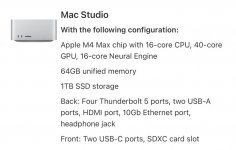
This is the spec of my Mac Studio. It’s the only computer I have had were even high res files from our 64 mp bodies fly through the same as our others.

IMG_4495.jpeg

Don’t know if it makes much difference but all of my raws etc are on external TB5 enclosures with Samsung 990 pro drives. Lightning fast. Denoise etc. is pretty much instant.
 
Last edited:
I have a Mac Studio rather than a mini. It’s my first Mac in about 15 years so can’t compare it to another Mac but it’s ridiculously fast compared to the windows p.c it replaced which was maxed out with 128gb of ram etc.

This is the spec of my Mac Studio. It’s the only computer I have had were even high res files from our 64 mp bodies fly through the same as our others.

View attachment 474382

Don’t know if it makes much difference but all of my raws etc are on external TB5 enclosures with Samsung 990 pro drives. Lightning fast. Denoise etc. is pretty much instant.
Sorry to hijack Jeffs post, I am contemplating a mac studio, some good deals about especially on the older Ultra models, its making my head spin comparing all the specs and I work in IT, good to know the M4 MAX is pretty much instant on Denoise.
 
I got the base M4 mini at Christmas and it is handling my GFX50 files with minimal fuss, it is more than a match for my M1 Pro MacBook, but cost about 20% of the price. As you are going from the M1 to the M4, I suspect it will be noticeable and if you can afford to go to 24 or 32gb RAM also future proofed.
 
I got the M2 Max Studio nearly a year ago and it's super fast and discounted as I think the M4s were coming out.
 
I have an M2 Mac which is fine for me. If your M1 is only a tad slower does it matter?
 
I have M1 Pro and M4 Pro MBPs (personal and work) and the M1 Pro does feel a bit sluggish now. However, RAM/fast storage are still going to be more important than processor.
 
done deal just bought a M4 on advice from my son ,brand new from Costco ,waiting on a hub later today via amazon for my peripherals and he will set it up tomorrow for me
 
all set up a running o.k , thankfully my son is expert with computers
 
I went from a Mac Pro trash can with 64GB Ram to a Mac Mini M4 and it is like night and day, everything runs much faster, I have an M2 Macbook Air when shooting abroad and that is also quick, but the M4 chip is a beast, I am sure you will love it.
 
Back
Top