M2 SSD compatibility

Sangoma

Suspended / Banned
Messages
2,951
Name
Steve, Coventry, England
Edit My Images
Yes
I'll use pictures to ask the question :)

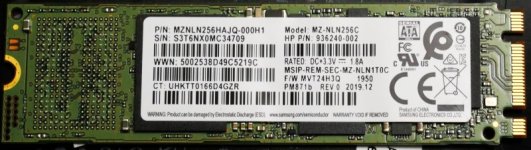
One of my laptops (HP 255 G7) has this SSD
mem1.jpg


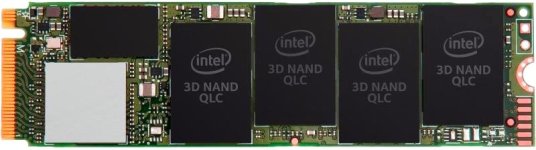
Can I replace it with this SSD

mem2.jpg
M.2 PCIe 3.0 x4 (NVMe)


So far I have found 4 "knowledgeable" answers:-

Yes
No
Maybe
Yes but it will only work at half it possible speed

After a long time searching, I am no further forward :)
 
Not possible to put that new one in, different connection to motherboard
the one at the top is an m type SATA the other is a nvme
 
Last edited:
I decided to buy one, the more I read, the more I think it will work, though the majority of replies I have had on forums say it won't :)
 
I decided to buy one, the more I read, the more I think it will work, though the majority of replies I have had on forums say it won't :)
The one at the top from your laptop has two cutouts on the right of the image that slot into the motherboard housing.
The one you are buying only has one, left side of the image.
The new one will not work, its as simple as that as it will not physically fit into the slot where the old one was.
 
The one at the top from your laptop has two cutouts on the right of the image that slot into the motherboard housing.
The one you are buying only has one, left side of the image.
The new one will not work, its as simple as that as it will not physically fit into the slot where the old one was.
Why not?
There is only one key on the motherboard, so it will physically fit.
Yes there are two key slots on the old SSD, but nothing goes into the B slot.
 
I should have rephrased my answer above when I meant physically fit.
This might be a better answer.
NVMe drives rely on having a direct connection to the PCI-E bus and cannot connect to a SATA hard drive controller. Therefore, an NVMe drive will not work in an M.2 SATA slot, even though it will physically fit if it is an M-keyed slot as opposed to a B-keyed slot.
 
It's installed, cloned and working great.
Read speed is about 3 times what the old one was, and write about twice.
Also noticed that the motherboard had a connector for a DVD, though there is no bay or provision for it in the case, so with a bit od duct tape technology, I have added an old 1TB mechanical drive, so now I have the 1TB M2 disc, a 1TB SSD and a 1TB mechanical drive in the laptop :)
 
For the 1TB storage :)
And why would you not instead plug in say 5tb via usb if and when you need it? That noise of mechanic drives is so so nasty it makes laptop unusable
 
And why would you not instead plug in say 5tb via usb if and when you need it? That noise of mechanic drives is so so nasty it makes laptop unusable
I have 3 NAS boxes, a mini server, and two 6TB USB drives attached to another very small PC, and 3 2TB USB drives I use for backup, so not short of drives, but I want all the photo files to be available on the laptop.

The drive can't be heard, the only noise from the laptop is the fan. Can just hear the head stepping if I pick the laptop up and put it to my ear when the fan is not running.
 
Back
Top