LuLa article on scannerless scanning!

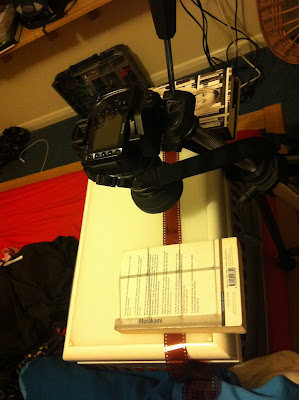
Interesting! I used a lightbox and a DSLR on a tripod, before I had the 35mm scanner. Like this:

photo+1-5.JPG


Not bad results, either:

8346782257_0208a6bf9d_c.jpg
 
last night i had a go at using my tablet for a lighbox and my D800 with a macro lens to shoot the neg. Result were pretty woeful, you could see the pixels on the tablet which ruined everything. Definitely need a proper light box i think. TBH i couldnt see any extra detail on the shot, ignoring all the tablet pixels. It looked like my Epson scanner would do a better job of it.
 
last night i had a go at using my tablet for a lighbox and my D800 with a macro lens to shoot the neg. Result were pretty woeful, you could see the pixels on the tablet which ruined everything. Definitely need a proper light box i think. TBH i couldnt see any extra detail on the shot, ignoring all the tablet pixels. It looked like my Epson scanner would do a better job of it.

I remember from one of the other threads on this that it made a big difference using an iPad Retina screen over the older lower res one, with regard to seeing the pixels. Still, probably cheaper to get a lightbox :P
 
well i had another go at shooting my negs with the Nikon. Slightly better results but the flatbed is still winning out. I think i need a proper lightbox, so ive added one to my xmas pressie amazon wishlist :)

Here's the flatbed with a crop in around the funky dude


And here is the Nikon/Tablet effort. I put the negative on top of some acid etched glass to try and reduce the tablet pixels showing through, i tried putting it between 2 bits to keep it flat but lost a lot of detail when i was trying to focus through it. Clear glass would "clearly" be better ;)


So at the moment the Epson is beating the Nikon. The text on the bag pretty much is as sharp as each other but there is clearly too much noise going on around the guys head.
 
well i had another go at shooting my negs with the Nikon. Slightly better results but the flatbed is still winning out. I think i need a proper lightbox, so ive added one to my xmas pressie amazon wishlist :)

Here's the flatbed with a crop in around the funky dude


And here is the Nikon/Tablet effort. I put the negative on top of some acid etched glass to try and reduce the tablet pixels showing through, i tried putting it between 2 bits to keep it flat but lost a lot of detail when i was trying to focus through it. Clear glass would "clearly" be better ;)


So at the moment the Epson is beating the Nikon. The text on the bag pretty much is as sharp as each other but there is clearly too much noise going on around the guys head.


Can you not put a piece of plain A4 paper on top of the iPad or something? Let the light through but without showing any pixels?
 
well that's what the acid etched glass should be doing, one side of it is a matte, partly opaque finish. If you put something too opaque there then it will cut too much light out. I think i just need something on top of the neg to keep it perfectly flat, the noise and lack of detail around his face could be due to the curve of the neg taking it out of the focus band of the lens.
 
Last edited:
Plain A4 paper will still show a lot of imperfections when the light shines through it. The best option is a sheet of 2 or 3mm thick opaque acrylic which gives a flat light. This is what you will find on a standard lightbox. I use this on the 5v LED lightbox picture frame I'm putting together;

Lightbox Frame now Wireless by Steve Lloyd, on Flickr

https://www.dropbox.com/s/fey76iobevwdd1s/Photo 25-07-2014 10 16 01.jpg?dl=0

https://www.dropbox.com/s/wa5z4wqais43pz7/Photo 21-05-2014 15 33 22.jpg?dl=0

Cheers
Steve
 
well that's what the acid etched glass should be doing, one side of it is a matte, partly opaque finish. If you put something too opaque there then it will cut too much light out. I think i just need something on top of the neg to keep it perfectly flat, the noise and lack of detail around his face could be due to the curve of the neg taking it out of the focus band of the lens.

Ahh ok, I see what you mean. I think I have similar problems with my V550 scanner as the film is curved in the holder (well, that's what I'm blaming my blurry photos on, anyway!).

What about if you were to put the film between two regular pieces of glass on top of the iPad, but then put some spacers between the bottom piece of glass and the ipad at the sides out of the frame? That would keep the film flat but lift the film off the iPad screen slightly which might make the pixels blurry if you shoot the film at a large aperture?
 
Plain A4 paper will still show a lot of imperfections when the light shines through it. The best option is a sheet of 2 or 3mm thick opaque acrylic which gives a flat light. This is what you will find on a standard lightbox. I use this on the 5v LED lightbox picture frame I'm putting together;

Lightbox Frame now Wireless by Steve Lloyd, on Flickr

https://www.dropbox.com/s/fey76iobevwdd1s/Photo 25-07-2014 10 16 01.jpg?dl=0

https://www.dropbox.com/s/wa5z4wqais43pz7/Photo 21-05-2014 15 33 22.jpg?dl=0

Cheers
Steve

Wow I like this, seems much cheaper than buying an actual light box. I'd like to give this a go but I feel I'd end up electrocute myself, cut my fingers off with a saw, or set my film on fire
 
Back
Top