Lucisarts plugin.

david357

Suspended / Banned
Messages
3,024
Name
Umm......................
Edit My Images
Yes
Is anyone using the Lucisarts plugins, and are they worth the (not inconsiderable) cost. I have seen examples with the ED plugin that seem to do what I want.

I have been trying to achieve Dave Hill style processing, and I know that DH does a lot of work in camera by lighting the images to suit in the first place, but I have also seen Lucisarts quoted as producing a very similar effect, especially the Enhanced Detail modules.

I have downloaded a trial, but it is limited to 800 pixel size, and is severely limited in what it will let you do, and printing even at that size is not supported. Without seeing something at a suitable size, it is difficult to tell if the end result warrants the cost, or whether it will just be another underused piece of software.

Thanks in advance for any help.
 
We have it but don't actually use it much, I quite like the effect for some things.
Is it worth the money... in all honesty probably not, but it seemed like a good idea at the time.

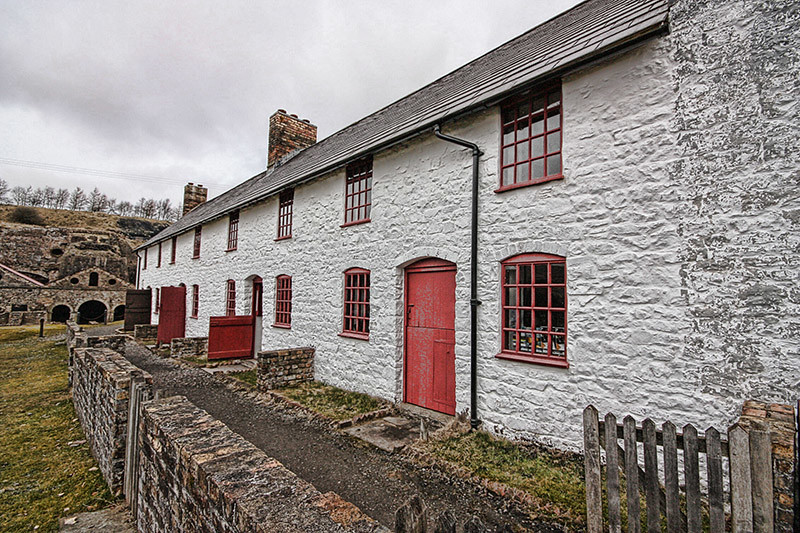
6140750989_0f6b67a218_b.jpg
 
Nice image, Wayne, and looks like a good (but expensive) idea!

Which version are you using, 3 or 6? Also, is that the ED or SE version?

Thanks for the reply,

David.
 
I think it's the edse version (with Sculpture and Plaid etc) but we have v5 of the pro version as well.
 
Thanks Wayne, I think that Lucisarts Pro is now up to version 6, at $595 :gag:

No more comments on the software from anyone else though, so maybe you are the only user on tp?
 
I can't remember what we paid now it was a few years back, it was still expensive though.
 
I had one version but stopped using it as you can pretty much above the same thing in lightroom.
 
Thanks for the reply, Dean, I downloaded the demo but images are too small to evaluate and don't save or print, and I am reluctant to spend that kind of money without being sure the software does what I want.

I have looked around the 'net and tried various tutorials, but nothing seems to come close, I would appreciate any help with LR settings though, if you are willing to share.

David.
 
I don't think you can replicate all the effects of LA in lightroom, you can play around with clarity/fill/recovery/blacks and get similar to my photo above but theres a lot of other effects in LA you couldn't possibly do, and clarity only goes so far.
 
Last time I looked at TA, it didn't do anything like what I was looking for.

Maybe I didn't try hard enough, but I never saw any example images from anyone else that were similar either.
 
Does Topaz Adjust get close to this for a more reasonable cost?

You can get some similar effects with Topaz, certainly the contrast boosting (similar to the image I posted earlier) and a LOT stronger and some of the softening/bluring but you can't match tha plaid effects (not a favorite of mine) if your not going over the top it's probably worth giving it a trial.
I found the photo pop preset a good starting place and play around with the detail tabs.
Heres 3 varations not at the strongest setting either.

6149330701_2fbcfe5c73_b.jpg
 
Thanks Wayne (again!).

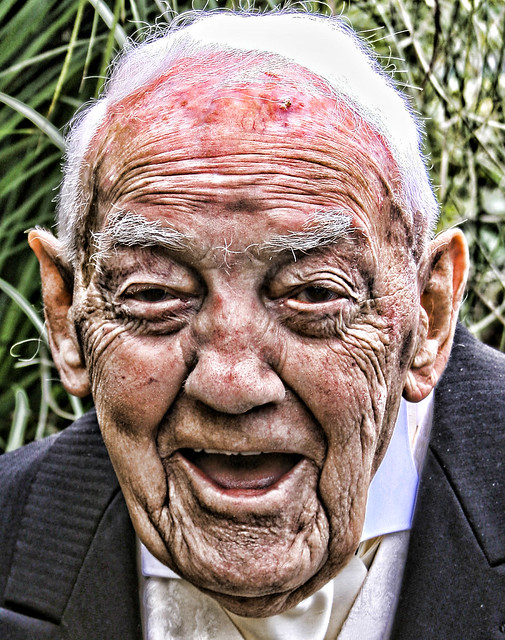
Does TA do anything similar to the Lucisart effect on people?
 
David, have you tried playing with the sliders when you import your RAW files into PS?
 
Hi Chris,
I have tried the sliders on import to CS5 without success.

I have been trying to achieve Dave Hill style processing on people, but the tutorials so far seem to be a long way out. I know that a lot of DH's look is due to the lighting, but I still thought I may be able to get closer than have so far.

One or two threads suggest that Lucisarts ED/SE is good, and as said I downloaded the trial but it is so restricted that I cannot judge whether the effects will be what I am looking for.
 
Thanks Wayne (again!).

Does TA do anything similar to the Lucisart effect on people?

I'm not quite sure exactly what effect you mean but I'm guessing the harsh gritty effect?
Topaz photo pop with a bit of addaptive exposure ajustment and a bit of detail ajustment, it'll go a heck of a lot further but it was getting OTT for me then.
Similar to Dragon almost.

6149553191_3b8ec30c86_z.jpg
 
Hi Chris,
I have tried the sliders on import to CS5 without success.

I have been trying to achieve Dave Hill style processing on people, but the tutorials so far seem to be a long way out. I know that a lot of DH's look is due to the lighting, but I still thought I may be able to get closer than have so far.

One or two threads suggest that Lucisarts ED/SE is good, and as said I downloaded the trial but it is so restricted that I cannot judge whether the effects will be what I am looking for.

I know what you mean... I did stumble on one the other day, and it was saying to increase the recovery and fill light sliders to 100, the clarity and vibrance sliders to about 100. By this stage you should have a completely washed out and saturated, (not to mention unusable!) image. Adjust the black level until that's about right and then reduce the saturation to around -70...

Open the image in PS, and duplicate the layer. Do a gaussian blur (about 10 pixels, perhaps...) on the copy for skin smoothing and then set the opacity to about 50%. Mask out the eyes, hair, etc on the blur layer so that they're sharp...

I'll see if I can post a pic later on...
 
Last edited:
Ok, here are a load of pics (self portaits, but the usual disclaimer applies, so I make no apologies now!) detailing what I read on t'internet about creating a Dave Hill-style portrait... I've also added the version that I did in Aperture...

Step 1 - the initial image...

Me-DH-Tutorial-1.jpg


Step 2 - ramp the recovery and fill light sliders all the way up

Me-DH-Tutorial-3.jpg


Step 3 - same with the clarity and vibrance sliders

Me-DH-Tutorial-4.jpg


Step 4 - set the black level (and contrast, if you want to...)

Me-DH-Tutorial-5.jpg


Step 5 - take the saturation right down (-70 in this case)

Me-DH-Tutorial-6.jpg


Step 6 - Load into PS and create the blur layer (I used Gaussian with a pixel setting of 11), set the poacity to around 50% and don't forget the mask for the important bits - eyes, hair, lips, etc... I also tweaked the overall levels a tad

Me-Dave-Hill-PS-Attempt.jpg


There you go - not a million miles away, I don't think, but obviously up for some more dodging/burning, etc, depending upon how much time you want to spend doing it. This was just a quick attempt...

Hope that helps a little... also that your monitor's okay, and that this lot is slightly better than some of the Dave Hill attempts you've seen out there...

Chris
 
...And here's how I did the photo in Aperture, just for comparison purposes... (This is a far more 'standard' edit - PS is better for doing stuff like the Dave Hill style, although I've not spent that long trying to suss out how to get a similar effect in Aperture yet...)

Me_Aperture_Processed.jpg
 
Thanks Guys, I think Chris's version is closer to where I want to be, but I think there's still some way to go.
Even though the Lucisart demo sample was very small, it was probably very near the mark - probably time to cough up the pennies, lots of them.
I think the effect I want comes from the Enhance Detail plugin, so maybeI will just buy that one for now.
Thanks again for your help.
 
Back
Top