LR4 Slow?

jockwav

Suspended / Banned
Messages
6,085
Name
James (Retired)
Edit My Images
No
I am finding LR4 really slowing down & sometimes trying to export even 1 photo it sometimes shows message like not enough memory,that,s crap.
CS5 is a much bigger prog & that does not seem to cause me any problems,does anyone else have problems with it.:shrug:
 
Lots of stuff on forums about version 4 being slow but it seems to be a bit random. I've not noticed any great change. There is a page on adobe's website on how to speed it up that might be worth checking out. I saw reference to it on lightroomkillertips.com (I think)
 
hmm yes it is slower but computer upgrade always helps :), I went for 8gb of ram, 4 core i5, and ssd drive, that makes a difference
 
I have read a lot of forums with a lot of people complaining about this issue this morning.
I will have a look on the adobe site & see if there is anything new about it,i don,t think i want to spend money on a new pc or upgrades just for lr4 when cs5 runs ok on it.:)
 
At first I found LR4 slow, but then I upgraded to i7 3.36GHz, 8GB of ram and a dedicated graphics card in my laptop and it runs a treat! :)

Then again, I only have a 500D and the RAW files are only 21mb max! lol
 
At first I found LR4 slow, but then I upgraded to i7 3.36GHz, 8GB of ram and a dedicated graphics card in my laptop and it runs a treat! :)

Then again, I only have a 500D and the RAW files are only 21mb max! lol

What model and how much did you pay if you don't mind me asking as I'm in the market for decent new laptop
 
I am finding LR4 really slowing down & sometimes trying to export even 1 photo it sometimes shows message like not enough memory,that,s crap.
CS5 is a much bigger prog & that does not seem to cause me any problems,does anyone else have problems with it.:shrug:

Make sure you have updated to the latest version, 4.3, I think.

Original LR4 was a wee bit slow.
 
I have the latest 4.3:)
 
I had a 1TB drive hanging around so i tried changing my export files to a new catalog on it & so far this morning my LR4 is performing pretty smooth,keep my fingers crossed.:)
 
James

How many photos are in your catalogue? I've heard people say it really slows down when you get into the 10,000s.

I keep my catalogue and photos on an external USB3 drive and that seems to be fine for me?
 
James

How many photos are in your catalogue? I've heard people say it really slows down when you get into the 10,000s.

I keep my catalogue and photos on an external USB3 drive and that seems to be fine for me?
Well i don,t do photography as a living,so i get rid of a lot of photos after i get fed up with them over time.:)
 
I wouldn't keep the catalogue on an external drive. The adobe page I linked to above suggests this slows Lightroom down.
Well it can,t be any slower than it is at the moment on my c: drive,so far its fine on my external but time will tell.:thumbs:
 
I went back to Version 3 it was so bad on my 4GB laptop, then relented and tried it again with latest downloaded version, and taking note of all tips - it's still unacceptably slow at exporting RAW to Photoshop so will change back to 3 again for now.
It is like 30 seconds with a moderate sized file around 12MB from an S100.
LR3 idoes it in less than 10 seconds.
I quite like various improvements and it is OK on the much more powerful desktop.
 
Well i will see how it goes as time goes on.:thumbs:
 
What model and how much did you pay if you don't mind me asking as I'm in the market for decent new laptop

I bought a Dell 15R SE earlier this year, this one: http://www.dell.com/uk/p/inspiron-15r-se-7520/pd?oc=n0015s55&model_id=inspiron-15r-se-7520

It was on offer + a discount code I found meant the price dropped to £540.

Its almost impossible to work out the pecking order for CPUs now, I just look them up, here : http://www.cpubenchmark.net

Processor and memory are what you want to concentrate on. The QM processors are good because they are quad core (not all are, even i7s) and the M means mobile, which means its more efficient for a mobile processor.

Interestingly dedicated graphics is of no use to lightroom as it doesn't use a GPU. There is a small benefit to dedicated graphics in that it won't be robbing the system RAM as it has its own, but its nothing major.
My machine actually has on board graphics and the dedicated graphics board in, the machine switches between them as it sees fit.
 
For best performance you will struggle with a laptop, it just hasn't enough disks.
With Lightroom, you have the program itself, raw files, the catalogue, the cache and the final exported images. For best performance I have the program files, cache, catalogue and this years raw files on separate fast disks. Exported jpegs and previous years raw files are on large, slower disks. If you can separate out the various components of Lightroom you do get good performance.
A 64 bits os with lots of memory and a fast processor (or two) helps also.

I don't find any issues, but with a dual Xeon 6 core server board, 24gb ram, 7 disks, (4 of which are seagate momentus xt hybrid disks), you'd expect that. The system was spec'd for Lightroom and photoshop.

What I don't have is portability though ;).
 
Last edited:
Parallelising disks will help to some degree, or you could use an SSD!

The reason I changed machine was my old one frequently got disk bound.. the new one still only has a 5400rpm drive but its far, far faster than the old one. Odd.

Didn't go for an SSD in the new one because the models with it were quite a bit more expensive. I may look at adding one on an mSATA interface at some point but I'm happy enough with the speed at the moment
 
The OP is missing the most important information.. System spec and available disk space.

Lightroom is CPU and disk intensive, pop an ssd in your machine and have your current work set on that (move it off to slower disks with more space when finished). A laptop will make no difference compared to a desktop (on a like for like spec).
 
For best performance you will struggle with a laptop, it just hasn't enough disks.

Lightroom 3.6 is perfectly OK, a few seconds more would have been reasonable and perhaps expected if the rendering was 'better' - but three times as long suggests something which needs fixing.

The stated minimum RAM is 2GB, with double that you would not expect unacceptably slow performance.
 
LR3 was great,LR4 is really bad,there are a lot of people in the same boat according to all the Adobe forums i have read & they are all hoping for a fix to come out.:shrug:
 
4wd said:
Lightroom 3.6 is perfectly OK, a few seconds more would have been reasonable and perhaps expected if the rendering was 'better' - but three times as long suggests something which needs fixing.

The stated minimum RAM is 2GB, with double that you would not expect unacceptably slow performance.

Interesting as I don't see any issues. Develop module takes 4-5 secs to open first time but that's it.

What's the exact symptom of slowness, what are you doing when it's slow. I could run the same and analyse what's getting used.
 
I found using SSD's in my laptop the real winner. I have the program and RAWs on one and the Catalogue and Exports on another, then I converted my DVD drive to a regular hard disk. It is all working fine, which is not bad for a 3 year old laptop with just 4GB RAM although I do render 1:1 on import. I have a pretty fancy Desktop at work, the 16GB of RAM does not make a huge amount of difference compared to the 4GB a home.
 
hmm yes it is slower but computer upgrade always helps :), I went for 8gb of ram, 4 core i5, and ssd drive, that makes a difference

if you can get LR to use more then 3GB RAM you're doing very well. Its just not a RAM instnsive program, CPU, Graphics card and HD I/O maybe, but not RAM
 
Importing works fine, it's not too bad at opening the image from library, and making any adjustments to full size images is not a problem.
Exporting and perhaps resizing to another location is reasonable, but try to Ctrl+E into Photoshop and you are twiddling thumbs quite simply far too long.
 
Importing works fine, it's not too bad at opening the image from library, and making any adjustments to full size images is not a problem.
Exporting and perhaps resizing to another location is reasonable, but try to Ctrl+E into Photoshop and you are twiddling thumbs quite simply far too long.

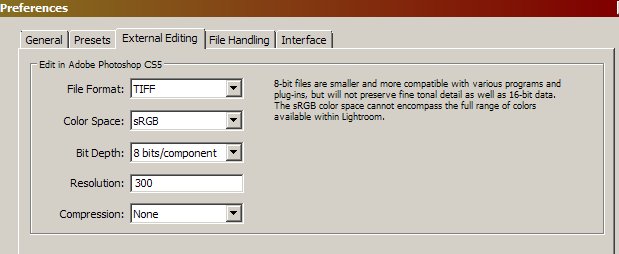
what settings are you using to ctrl+e?
 
I wouldn't keep the catalogue on an external drive. The adobe page I linked to above suggests this slows Lightroom down.

Missed that Ian and I have an SSD drive so will move mine. :thumbs:
 
what settings are you using to ctrl+e?

Clipboard01.jpg
 
Exporting and perhaps resizing to another location is reasonable, but try to Ctrl+E into Photoshop and you are twiddling thumbs quite simply far too long.

ah now thats a completely different issue. best way to get PS loaded quickly is SSD and lots of memory. PS will use as much memory as you can throw at it.
 
You're losing a little by using sRGB and 8 bit but that wouldn't hurt your speed. Do you have CS5 open already? and is LR rendering the TIFF or CS5?,
 
Yes I do tend to leave CS5 open all the time as it takes up to a minute to load itself.
I remember lightroom asking about rendering the file itself but not sure which I selected, and it only asked the first time.
Which would be best?
 
Yes I do tend to leave CS5 open all the time as it takes up to a minute to load itself.
I remember lightroom asking about rendering the file itself but not sure which I selected, and it only asked the first time.
Which would be best?

Fastest is for CS5 to render the file, but thats not the same as best. Particularly if your using LR4 with CS5 for example you may get colour issues if you let CS5 do the render. But because LR4 renders the file it slows things down a little.
 
Back
Top