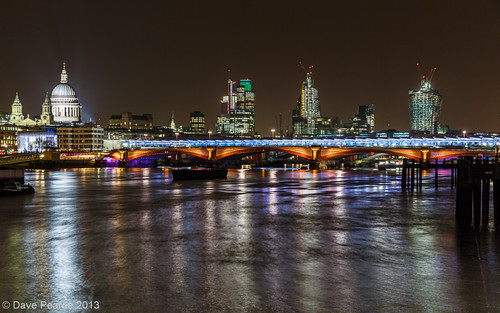
Low light photos

Mr_Kitten

Suspended / Banned
Messages
59
Name
Ant
Edit My Images
Yes
When I was using my 1000D I found that low-light photography was pretty much impossible without loads of noise and a fair bit of blurring.

Now I've got a 60D I find that I've got another problem... when shooting I'll generally leave the camera in Av and use auto-ISO... what I find is that the image becomes overexposed so that it doesn't represent what I'm actually seeing. The final image is much brighter, and in some cases it looks like it's been shot in good light... what do I need to do to capture what I'm seeing?

I'm guessing that I should probably manually set the shutter speed and limit the ISO... but how do I know what to do? Is it just experience and practice? or are there some golden rules?

Thanks!
 
Are you using a tripod? Use a tripod and keep the ISO to either 100 or 200 if your subject is still. eg a building, static car, landscapes. This keeps the noise levels at a minimum. In order to let more light in you then need to use a much slower shutter speed, hence using the tripod.

Hope this helps.
 
Last edited:
When I was using my 1000D I found that low-light photography was pretty much impossible without loads of noise and a fair bit of blurring.

Now I've got a 60D I find that I've got another problem... when shooting I'll generally leave the camera in Av and use auto-ISO... what I find is that the image becomes overexposed so that it doesn't represent what I'm actually seeing. The final image is much brighter, and in some cases it looks like it's been shot in good light... what do I need to do to capture what I'm seeing?

I'm guessing that I should probably manually set the shutter speed and limit the ISO... but how do I know what to do? Is it just experience and practice? or are there some golden rules?

Thanks!

The camera auto exposure assumes you're pointing at 18% grey.

How would your camera know it's night time? You can use the +/- button to reduce the exposure.
 
Could be anything. Need to post an example pic with camera settings used.

Welcome to TP :)
 
... what I find is that the image becomes overexposed so that it doesn't represent what I'm actually seeing. The final image is much brighter, and in some cases it looks like it's been shot in good light... what do I need to do to capture what I'm seeing?

If you are happy with the shutter speed you're getting try backing the exposure off in post capture processing. This will give the advantage of reducing the visible noise in the shot. Darks may get darker, maybe even too dark, and I don't know if you'll like the result but it may be worth trying.

Other than that, dial in exposure compensation so that the shutter speed increases.
 
Hi Ant.
I am very much an amateur but as per whats been said. It seems to me you just need to dial in - ev.

I like to take photos/candid scenes in town around early evening eg: as it's going dark or there abouts. If in AV and I take photo of a darkish scene , you are right the image will be brighter. So turn the -ev compensation down a stop and take again.
Sometimes as you say it makes more sense to do it manual. That's easy too just stop a sec slow down and think about it.
Take the AV image first. Then turn camera to manual and dial in those settings for the AV shot, this is your starting point. If as you say the image is to bright you have some choices you can alter your shutter to faster (Image will get darker) or if you don't want to alter shutter speed for some reason you could alter Iso down a stop + less noise (image will get darker). Again if for some reason you didn't want to alter the shutter or iso you can close the av down a stop ( image will get darker).
Have fun.

Gaz
 
Last edited:
Thanks all for the helpful suggestions.

@RichardTaylor yes, I know the basics and can read a histogram - but I must admit although I'd use that when taking photos in bright light, I hadn't thought of applying it to low light stuff.

Sadly I don't have any examples here as I had a strop and deleted them...

I hadn't thought of using exposure compensation, that makes perfect sense! I suppose it's better to have an underexposed image and adjust in PP rather than the other way around?
Excuse my ignorance... I've found this photography malarkey a steep learning curve and don't get to play as much as I might like.

I'm still getting to grips with shooting fully manual... But I'll definitely have a go and perhaps I'll get something I'm happy enough with to post in the C&C section.

Cheers all!
 
I suppose it's better to have an underexposed image and adjust in PP rather than the other way around?

Well, that's not the way I'd do it.

If you under expose an image and then attempt to boost the exposure post capture you run the chance of increasing visible noise. If you over expose an image you run the risk of blowing the highlights but if you can avoid that you can then back the exposure off post capture and perhaps reduce the visible noise.

If you over expose an image you are exposing to the right and there is a school of thought that thinks that this is the best thing to do. It's what I do as a matter of course if I have the time to dial in exposure compensation and get the levels over to the right of the histogram.

In low light if at all possible I personally would expose to the right and then back it off post capture. Failing that I'd take a cursor smack in the middle exposure but the one thing that I would try and avoid would be under exposing the image. But that's just me.
 
A camera's meter will try to make everything it is presented with look like a standard, 18% reflectivity, daylit scene.

If you are shooting at night or inside with stage lights, the meter will try to give you too much exposure.

A picture taken at night will need the sky to appear dark to look right.

Decreasing the exposure by a stop or two should correct this.


Steve.
 
Thanks Steve, Alan - some very useful advice.

I suppose my knowledge so far has been to underexpose shots taken on a bright day (although I've recently discovered exposure bracketing - so that's quite useful) and that's why my automatic assumption was to underexpose while not really appreciating that I'd be doing this to avoid "blowing out" an image - of course, this is not the problem in low light... so it makes sense that I'd expose to the right and then PP the image.

I'll also try decreasing the exposure a step or two. Essentially I just need to take more photos!
 
I suppose it's better to have an underexposed image and adjust in PP rather than the other way around?

It depends on whether or not your shooting raw, its generally accepted that when shooting raw its better to shoot to the right, this refers to the histogram and means its better to over expose than under expose and then adjust when processing the raw.

I still think its better to get it right in camera if possible and its only playing with exposure compensation that you'll work out the right amount to dial in for what your shooting.
After a while you'll find you instinctively know how much compensation is right for your camera and the conditions your shooting in.

Its also worth keeping the OOOff pics for a little while so you can compare them against your next attempt..
 
Your using a canon 60D, Disable the Auto lighting optimizer, that should stop your 60D over exposing.
 
I still think its better to get it right in camera if possible and its only playing with exposure compensation that you'll work out the right amount to dial in for what your shooting.
After a while you'll find you instinctively know how much compensation is right for your camera and the conditions your shooting in.

Agree. For my camera I know that when I go out and take shots at night in towns I need to use -1 to give me an image that looks like the actual scene.
 
When I was using my 1000D I found that low-light photography was pretty much impossible without loads of noise and a fair bit of blurring.

Now I've got a 60D I find that I've got another problem... when shooting I'll generally leave the camera in Av and use auto-ISO... what I find is that the image becomes overexposed so that it doesn't represent what I'm actually seeing. The final image is much brighter, and in some cases it looks like it's been shot in good light... what do I need to do to capture what I'm seeing?

I'm guessing that I should probably manually set the shutter speed and limit the ISO... but how do I know what to do? Is it just experience and practice? or are there some golden rules?

Thanks!

Okay there is a simple way to get a good night shot and here it is.

first put the camera on a tripod and connect a cable release trigger. set the camera to manual and and set the iso to 100-200. now put the camera on live view (locking the mirror). set the lens to manual focus and focus on the spot you want. Now it's time to set the exposure. Using exposure compensation dial in the exposure to the middle mark. Now make note on the shutter speed, it will be very slow (long exposure) and if it is longer than 30 seconds you will be forced to go to bulb mode. take a few shots and play with the exposure until you are happy with it. it's that simple.:thumbs:
 
Thats quite confusing IMO. There is no exposure compensation in manual mode. You need to balance the shutter speed with the aperture to get the exposure you are looking for.
For night shots I find its best to have the meter needle over on the left hand side. If left to its own devices it will try and centre itself, which will normally be too bright.

Ill add that when you focus in LV use the magnification button so you can zoom in on the screen to better see what you are focusing on.
And turn on Exposure simulation for Live view, it will give a better representation of how the final exposure will look.
 
dave_bass5 said:
Thats quite confusing IMO. There is no exposure compensation in manual mode. You need to balance the shutter speed with the aperture to get the exposure you are looking for.
For night shots I find its best to have the meter needle over on the left hand side. If left to its own devices it will try and centre itself, which will normally be too bright.

Ill add that when you focus in LV use the magnification button so you can zoom in on the screen to better see what you are focusing on.
And turn on Exposure simulation for Live view, it will give a better representation of how the final exposure will look.

What part of this did you not understand? I'm not sure where you are getting your info from but the statement about not having exposure compensation in manual mode is completely wrong. You are doing just that by adjusting the shutter and aperture, see link....

http://www.youtube.com/watch?v=ZBOo1aOb3IE

I left out the part about zooming into the screen because I find that is hard for some to follow, although it very simple to show someone. Shoot, with my bad eyes it is a extremely valuable tool.
And
Live view also locks the mirror which is way important in keeping down camera shake.
 
What part of this did you not understand?

Seriously?
I understood your post perfectly, i just dont agree with it.

Ignoring the fact that i dont agree with you, at all, how is getting the meter in the middle classed as exposure compensation? Surely that just what the camera thinks as the correct exposure using evaluative metering.

That video you linked to is showing how to use EC in P mode, not in Manual mode as you suggested. Why link to that video?

If you look at post #5 i have already suggested using EC

Anyway, ill not argue with you, whatever works for you works for you.
The Exposure compensation in manual mode argument is an old one, and there is no conclusive answer, people see it as different things. Personally i dont believe there is such a thing but you obviously do.

EDIT:
I should add, im disagreeing with the Exposure comp bit in Manual mode, not the rest of the post.
 
Last edited:
dave_bass5 said:
Seriously?
how is getting the meter in the middle classed as exposure compensation?
Perhaps I was not clear on this, the middle spot is a baseline for the compensation you will be doing.

Surely that just what the camera thinks as the correct exposure using evaluative metering.
If you do not agree with the exposure that you camera thinks is correct what do you do??? -- You compensate for it--.

That video you linked to is showing how to use EC in P mode, not in Manual mode as you suggested. Why link to that video?
From your statement I was under the impression that perhaps you were not familiar with exposure compensation (I mean no offense) and so I grabbed the first video I found to demonstrate how it works. This is the same method in manual.


Anyway, ill not argue with you, whatever works for you works for you.
The Exposure compensation in manual mode argument is an old one, and there is no conclusive answer, people see it as different things. Personally i dont believe there is such a thing but you obviously do.

I have to say I have never hard of anyone debating whether or not there is an exposure compensation in manual mode or not. It is very clearly documented, just look at canons website if you don't believe me. Or do a google search for that matter.

In conclusion you and I are doing basically the same thing, (although you didn't mention bulb mode) you just call it something different I guess.
 
Not wishing to sound rude or condescending but if you google for EC in manual mode you will see there is a huge divide. Its more in the use of the phrase EC rather than the practice IMO.

As i pointed out earlier, your video link was to someone using P mode. That, Tv and Av do of course allow EC, but you had posted to use Manual mode.
I have yet to see a video or instructions on Canon website or literature that shows this, although im willing to be proven wrong.

My take on it is if the camera sets what it thinks is the correct exposure, and you override that, that's EC.
In manual mode the camera doesn't set anything, you do. Therefore, whatever you set is the correct exposure, even if its very dark or very light. you dont compensate for your own settings in the same way, you adjust them.

Yes, we are doing exactly the same thing, although ive never needed to use Bulb mode.
I dont tend to use the meter much either. I use Exposure Sim in LV and just adjust the exposure, normally the shutter speed, until i see an exposure i want.

For example (more for the OP rather than you).

A cold City skyline by dave_bass5, on Flickr

This was in Manual mode. According to the meter this was way underexposed. The needle was about 1/3 of the way across, but thats because it was looking at all the dark sky and trying to brighten everything up.

If you look at the Exif it states
Exposure 3.2
Aperture f/7.1
Focal Length 53 mm
ISO Speed 100
Exposure Bias 0 EV

I have done some PP in LR on this, not a lot but i have lightened the water up and sharpened it, but i wanted to show how ignoring the meter, or getting to know how much -EC to use will get better results.
 
dave_bass5 said:
Not wishing to sound rude or condescending but if you google for EC in manual mode you will see there is a huge divide. Its more in the use of the phrase EC rather than the practice IMO.

As i pointed out earlier, your video link was to someone using P mode. That, Tv and Av do of course allow EC, but you had posted to use Manual mode.
I have yet to see a video or instructions on Canon website or literature that shows this, although im willing to be proven wrong.

My take on it is if the camera sets what it thinks is the correct exposure, and you override that, that's EC.
In manual mode the camera doesn't set anything, you do. Therefore, whatever you set is the correct exposure, even if its very dark or very light. you dont compensate for your own settings in the same way, you adjust them.

Yes, we are doing exactly the same thing, although ive never needed to use Bulb mode.
I dont tend to use the meter much either. I use Exposure Sim in LV and just adjust the exposure, normally the shutter speed, until i see an exposure i want.

For example (more for the OP rather than you).
http://www.flickr.com/photos/davebass5/8592898220/
A cold City skyline by dave_bass5, on Flickr

This was in Manual mode. According to the meter this was way underexposed. The needle was about 1/3 of the way across, but thats because it was looking at all the dark sky and trying to brighten everything up.

If you look at the Exif it states
Exposure 3.2
Aperture f/7.1
Focal Length 53 mm
ISO Speed 100
Exposure Bias 0 EV

I have done some PP in LR on this, not a lot but i have lightened the water up and sharpened it, but i wanted to show how ignoring the meter, or getting to know how much -EC to use will get better results.

If I may be so bold, you may consider stopping a shot like this down more in an attempt to bring it into focus.
 
That wouldn't have helped as the wind was very strong last night and i could viably see the tripod moving on occasions. What you are seeing is camera movement, not poor focusing so i was trying to keep the shutter speed as short as possible, within reason, and keeping at ISO100.
 
dave_bass5 said:
That wouldn't have helped as the wind was very strong last night and i could viably see the tripod moving on occasions. What you are seeing is camera movement, not poor focusing so i was trying to keep the shutter speed as short as possible, within reason, and keeping at ISO100.

Oh that make sense. I couldn't figure out your focus point because it was evenly out of focus (camera vibration).

In a case like that I will put my tripod about 6-8 inches off the ground, sit behind it with my legs over the legs of the tripod and with one hand on top of the camera and the other hand on the shutter release fire away. This will keep it still even in high wind.

A shot like that I would start off at a minimal f11 and probably end up around f18 or so. There is way to much distance between the foreground and the buildings to expect the dof to work at a f7. Imo.
 
Oh that make sense. I couldn't figure out your focus point because it was evenly out of focus (camera vibration).

In a case like that I will put my tripod about 6-8 inches off the ground, sit behind it with my legs over the legs of the tripod and with one hand on top of the camera and the other hand on the shutter release fire away. This will keep it still even in high wind.

A shot like that I would start off at a minimal f11 and probably end up around f18 or so. There is way to much distance between the foreground and the buildings to expect the dof to work at a f7. Imo.

The focus was on the center building in the background.
The tripod was behind a fence on the river front so it was extended quite a bit, and although i know its a bad thing i extend the column rather than the next set of leg extensions. It really was freezing last night, i had keep putting the camera away as i couldn't feel the tips of my fingers.
I wasn't really in to it last night so it was just going through the motions as i was out with a mate who has been housebound since Jan and was itching to take some night shots. I could have lowered it and shot through the fence but i just wanted to get home.
You are right though, f/11 or better would have made the shot sharper front to back. Its only a few mins walk from home so ill take it again when the weather is a bit better.

Cheers.
 
The focus was on the center building in the background.
The tripod was behind a fence on the river front so it was extended quite a bit, and although i know its a bad thing i extend the column rather than the next set of leg extensions. It really was freezing last night, i had keep putting the camera away as i couldn't feel the tips of my fingers.
I wasn't really in to it last night so it was just going through the motions as i was out with a mate who has been housebound since Jan and was itching to take some night shots. I could have lowered it and shot through the fence but i just wanted to get home.
You are right though, f/11 or better would have made the shot sharper front to back. Its only a few mins walk from home so ill take it again when the weather is a bit better.

Cheers.

No it wouldn't. There is tons of DoF at that distance. Stopping down would only put the lens further into the diffraction zone and increase the shutter speed and that's already at 3.2secs and allowing wind buffeting. In that case, raising ISO may be better.

Putting your hand on the camera (as suggested) is not a good idea at all with long shutter speeds, and raising the centre column is always a bad plan, though getting the tripod lower might have helped.

Back to the exposure compensation thing, I know what Shayne is saying but to my reading exposure compensation implies use of the EC control in one of the auto modes. That may be semantics but in manual the EC dial is disabled in the 5D3.
 
I must admit everything seemed in focus on the LCD before I took that shot, but with the slight camera movement it was hard to tell if it was enough once the shot had been taken. I would be worried about diffraction affecting the shot if I went above f/11 but its something I'm definitely going to try. I normally stick to around f/8 in the city but maybe stopping down more might help with front to back sharpness, although at web size I'm not sure it matters much.

I would be never touch the camera during a long exposure, but as I said, last night was just something to do and I wasn't really looking to get the best shot possible. Lowering the tripod would defiantly be an option, although I can't see me sitting on the ground.

I too do understand the use of EC, and I suggested that, but my issue was just the use of it in manual mode.
 
Exposure compensation in manual mode is fairly simple but you need to be in a fixed ISO to achieve it.

All you do is meter the shot as normal, needle centred etc, then if you want + exp comp you either use a larger aperture or a slower shutter speed, the needle will move into the + section of the meter and show you how many 1/3 stops your achieving.
To get - exp comp you either choose a smaller aperture or a faster shutter speed than indicated.

Its as simple as that and was the way its always been done long before camera's had AV/S/ P modes or exposure compensation dials, exposure compensation is not about using a provided dial, its about the photographer choosing to over expose or under expose in order the achieve the exposure they want.

Example: your shooting a back lit person, you turn your exp dial to +2, I on the other hand am shooting manual so I either open my aperture two stops, drop my shutter speed 2 stops or open my aperture 1 stop and lower my shutter speed by 1 stop.. we're both doing the same thing in different ways, but the way I'm doing it is the only way that works in manual mode.

If you try to do this with auto ISO set the camera will shift the ISO to compensate for the adjustments you make and thus it wont work properly.
 
Why do so many people say its not exposure compensation?
I know exactly what you are doing but surely the exposure that you set is the one you want. In manual mode you are setting all parameters. You aren't letting the camera set anything so you aren't compensation for it. Want a dark exposure, dial one in, want a lighter exposure, dial that in.
I do understand that the meter is still working in manual mode, but the camera isn't setting anything. It's just telling you if you have a dark or light exposure.
 
Last edited:
dave_bass5 said:
Why do so many people say its not exposure compensation?
I know exactly what you are doing but surely the exposure that you set is the one you want. In manual mode you are setting all parameters. You aren't letting the camera set anything so you aren't compensation for it. Want a dark exposure, dial one in, want a lighter exposure, dial that in.
I do understand that the meter is still working in manual mode, but the camera isn't setting anything. It's just telling you if you have a dark or light exposure.

You are now splitting hairs... If you are in P mode and you adjust your exposure based off what the meter says why is it different just because you have to set the meter to the baseline (middle) manually in manual mode? The only difference is that you are setting the baseline exposure in manual mode and the other modes do this for you. The exposure compensation is the same. How can anyone twist this to say its not is beyond me....
 
But in P mode you are changing what the camera is setting. The camera sets the shutter and aperture, you can make alterations to that. Yes, you are compensating for what the camera has set.
In Manual mode the camera is not setting anything, so you aren't changing or compensatinig for anything the camera has set, you are just setting the exposure to suit what you want. The meter is just telling you if it will be light or dark, it doesn't set anything.

As I said before, it's not really an argument worth getting in to because it will go on and on, and if you think it's just me please go and have a search on this subject, you,will see it is widely talked about. It probably is slplitting hairs but it works both ways.

Ill bow out now, this is going off topic and its not getting us anywhere.
 
HoppyUK said:
No it wouldn't. There is tons of DoF at that distance. Stopping down would only put the lens further into the diffraction zone.
We don't know what lens he was using so how do we know if diffraction is even going to be an issue?

Putting your hand on the camera (as suggested) is not a good idea at all with long shutter speeds.
This may not be good practice for some but my method works very well for me. I have steady hands and with my tripod so low my hand is able to push down slightly from the top of the camera making everything in between very solid. 2.3 second exposure is not really a long exposure to me, I use bulb mode all of the time 30 plus second exposure using this same method without any camera shake in heavy wind. But that just me.

Back to the exposure compensation thing, I know what Shayne is saying but to my reading exposure compensation implies use of the EC control in one of the auto modes. That may be semantics but in manual the EC dial is disabled in the 5D3.
I use the main dial to adjust the shutter speed and there for "compensating" from the baseline exposure. Lol.

Holy cow why am I still talking about this?
 
iancandler said:
Exposure compensation in manual mode is fairly simple but you need to be in a fixed ISO to achieve it.

All you do is meter the shot as normal, needle centred etc, then if you want + exp comp you either use a larger aperture or a slower shutter speed, the needle will move into the + section of the meter and show you how many 1/3 stops your achieving.
To get - exp comp you either choose a smaller aperture or a faster shutter speed than indicated.

Its as simple as that and was the way its always been done long before camera's had AV/S/ P modes or exposure compensation dials, exposure compensation is not about using a provided dial, its about the photographer choosing to over expose or under expose in order the achieve the exposure they want.

Example: your shooting a back lit person, you turn your exp dial to +2, I on the other hand am shooting manual so I either open my aperture two stops, drop my shutter speed 2 stops or open my aperture 1 stop and lower my shutter speed by 1 stop.. we're both doing the same thing in different ways, but the way I'm doing it is the only way that works in manual mode.

If you try to do this with auto ISO set the camera will shift the ISO to compensate for the adjustments you make and thus it wont work properly.

Yeah what he said!!!!
 
dave_bass5 said:
But in P mode you are changing what the camera is setting. The camera sets the shutter and aperture, you can make alterations to that. Yes, you are compensating for what the camera has set.
In Manual mode the camera is not setting anything, so you aren't changing or compensatinig for anything the camera has set, you are just setting the exposure to suit what you want. The meter is just telling you if it will be light or dark, it doesn't set anything.

As I said before, it's not really an argument worth getting in to because it will go on and on, and if you think it's just me please go and have a search on this subject, you,will see it is widely talked about. It probably is slplitting hairs but it works both ways.

Ill bow out now, this is going off topic and its not getting us anywhere.

Let me ask you this. What are you compensating for? I'm compensating for the exposure not the camera. I now get why there is a on going debate with this topic. This has become humorously entertaining.
 
Let me ask you this. What are you compensating for? I'm compensating for the exposure not the camera. I now get why there is a on going debate with this topic. This has become humorously entertaining.

No, you are doing exactly the opposite - you are compensating the camera reading.
 
Exposure compensation is simply deviating from the indicated correct metered exposure, it doesn't matter what mode your in or whether you manually compensate or use an exp compensation dial, your still doing the same thing, compensating for the meters short comings.
 
Back
Top