

Logo Aliasing

danny_bhoy

Suspended / Banned
Messages
3,894
Name
Danny
Edit My Images
No
Aliasing....I think that's the correct term anyway.

Basically the logo on my website doesn't look as sharp as it should. It looks a bit pixelated.

I've used a .PNG file that's about 100-150KB in size. Is that too small? (trying to keep file sizes down for faster loading therefore appeasing the SEO Gods)

Thanks in advance for any help :)
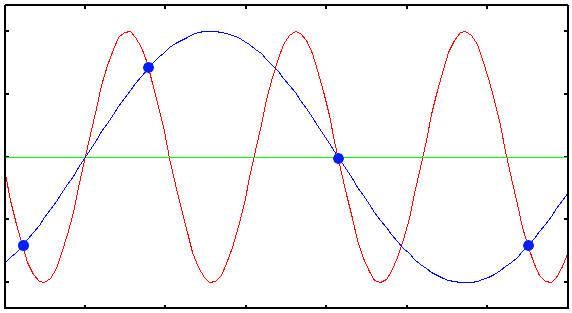
 
Aliasing is caused by fine detail that's too fine for the pixel size.

The way sampled images work, if you don't blur the input to match the sampling, you get false information added. The concept is easier to visualise in audio. If you have a high frequency soundwave - red - and don't sample it often enough - blue dots - the recreated soundwave - blue - is at a much lower frequency (which doesn't match the original):
Aliasing-plot.png
 
Does it look OK when you view it in your editing program of choice?

Are you specifying a size other than the pixel dimensions on your website?
 
Actually, just looked.

The problem is you are relying on the website to resize the logo, it seems. You need to upload a version that is the exact pixel dimensions you wish to display, that you have edited for output at that size.

Much the same as what happens if you resize a photo for display on the web without doing any output sharpening after resize. It looks soft.
 
Last edited:
Aliasing is caused by fine detail that's too fine for the pixel size.

The way sampled images work, if you don't blur the input to match the sampling, you get false information added. The concept is easier to visualise in audio. If you have a high frequency soundwave - red - and don't sample it often enough - blue dots - the recreated soundwave - blue - is at a much lower frequency (which doesn't match the original):
Aliasing-plot.png

Great explanation! Thanks for taking the time :thumbs:
 
Actually, just looked.

The problem is you are relying on the website to resize the logo, it seems. You need to upload a version that is the exact pixel dimensions you wish to display, that you have edited for output at that size.

Much the same as what happens if you resize a photo for display on the web without doing any output sharpening after resize. It looks soft.

That would explain it. Thanks Richard! I'll get on it when I'm back at the PC.
 
Back
Top