Logitech MX Keys

I wonder if there's a way to access a more detailed customising panel like you can do with laptop touchpad or mouse.
 
Sadly you cannot adjust the backlight timeout since MX Keyboard has a proximity and ambient sensor built in, which changes the backlight according to the environment.
 
I had am fault with mine after a couple of months, i got in touch with Logitech and they sent me a new keyboard out, great customer service
 
In which case, should it not be 30 seconds each time rather than 5?
As I understand it the keyboard assesses the amount light and adapts the backlight, if there is enough light it turns off the backlight to prevent battery drain.
If the battery level is low it will also switch off.

There is a frig which is to turn off the pop up notification and the jam a bit of cardboard into the F7 key ... this keeps the backlight on all the time :cool:

On a more serious note are you using the latest firmware?
 
As I understand it the keyboard assesses the amount light and adapts the backlight, if there is enough light it turns off the backlight to prevent battery drain.
If the battery level is low it will also switch off.
That makes sense but my office isn't that well lit.
There is a frig which is to turn off the pop up notification and the jam a bit of cardboard into the F7 key ... this keeps the backlight on all the time :cool:
lol, I won't be doing that.
On a more serious note are you using the latest firmware?
As far as I can tell, yes.
 
If you haven't already done so ... download the Logitech Firmware Update tool and check the version ... the latest one is 12.1.13

If this dosn't work I'd take it back and say it's nffp.
 
In an odd way that makes some kind of sense

I have seen complaints that the autosense relies on there being an active connection to the host system, which means it doesn’t detect the proximity of your hands when a Mac is sleeping. From that we might infer the software process to manage dimming doesn’t run on the keyboard itself.

If the Logitech updater software isn’t seeing the keyboard, and the same holds true in reverse for the keyboard seeing the Logitech software, that might account for why the keyboard lights are dimming much more quickly than expected - when it detects a pause in key presses, the keyboard isn’t getting an appropriate response from your computer and shuts down the lights immediately.

edit - you could try re-pairing the keyboard over Bluetooth, especially if you didn’t install Logitech’s software before pairing it with your computer originally
 
Last edited:
In an odd way that makes some kind of sense

I have seen complaints that the autosense relies on there being an active connection to the host system, which means it doesn’t detect the proximity of your hands when a Mac is sleeping. From that we might infer the software process to manage dimming doesn’t run on the keyboard itself.

If the Logitech updater software isn’t seeing the keyboard, and the same holds true in reverse for the keyboard seeing the Logitech software, that might account for why the keyboard lights are dimming much more quickly than expected - when it detects a pause in key presses, the keyboard isn’t getting an appropriate response from your computer and shuts down the lights immediately.

edit - you could try re-pairing the keyboard over Bluetooth, especially if you didn’t install Logitech’s software before pairing it with your computer originally
Well, after removing it from my Mac, I 'm unable to re-pair it. The mac just isn't finding it now. After much frustration and swearing, I 've given up and am using the little USB plug rather than bluetooth but the backlight is still turning off after only 5 seconds.

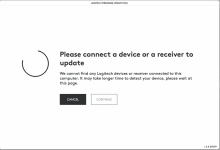
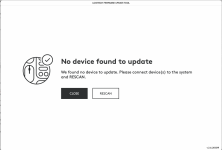
To answer @Chevin, the firmware is currently 16.00.0003. The firmware update tool now:

Screenshot 2021-12-19 at 13.53.38.png
 
Back
Top