
Little planet help

Digifrog

Suspended / Banned
Messages
1,069
Name
Scott
Edit My Images
No
Hi TP

I need some advice on creating little planets in Ps. The thing is, I know how to do them, it's pretty easy right? It seems though that there are some planets that have a distinct difference to them.

Currently I us PTgui to stitch sequential images to create a panorama and then follow the simple steps in Ps (Filter>Distort>Polar Co-ordinates) to create little planet. The problem is though, you end up with a definite centre point to which everything originates. There are some planets though that somehow avoid this problem and they appear to have the centre part of their planet forming differently. To illustrate, I get this...

image08.jpg

image courtesy of http://abduzeedo.com

...obviously a little Clone tool is required to finish off and tidy up but the central point is obvious and the line is (at this stage) obvious.

I want to achieve this form...
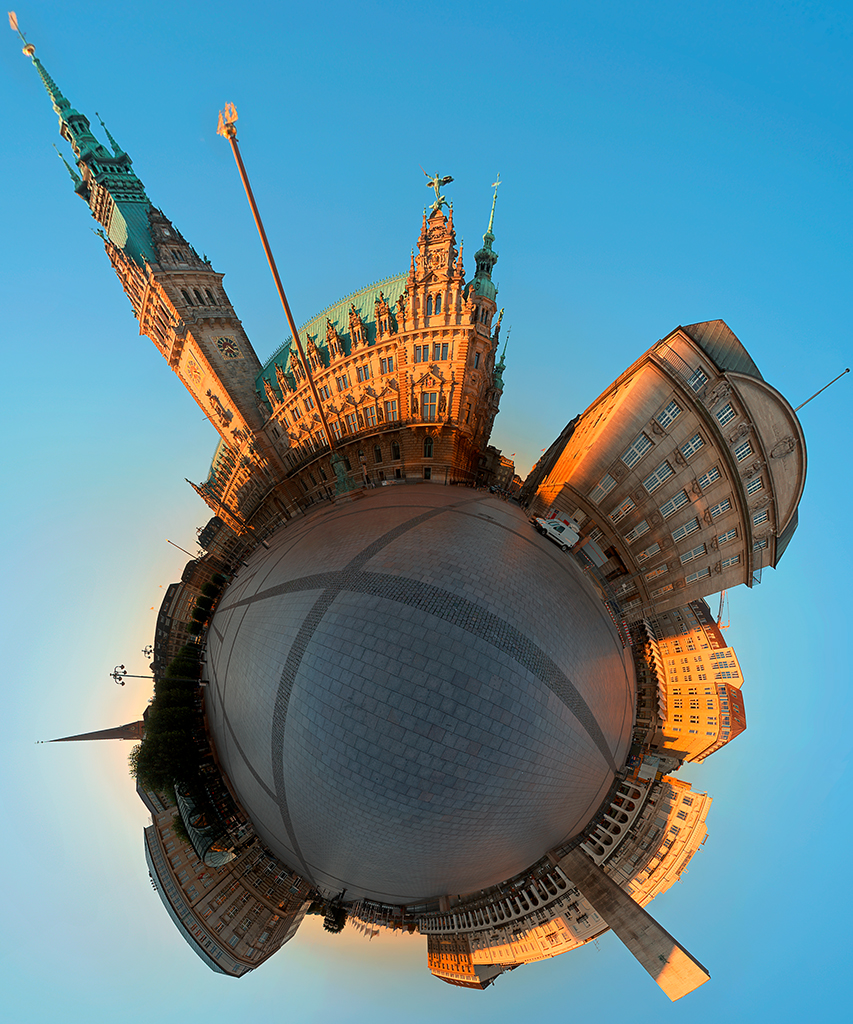
1186366463_9994c08289_o.jpg

Image courtesy of Tim http://www.flickr.com/photos/konderminator/

Am I making sense? Is the difference obvious? What's the flow here, is using a fisheye lens instead? I have the Nikon 16-35 f/4 so maybe not wide enough?

Any tips would be welcomed.

Fankoo

Scott
 
Last edited:
It des not look like you have captured the full 360 degrees
 
I agree with Kevin....it doesn't look like you have the full 360'....You also need the 'nadir' shot (directly down) and the 'up' shot (unless you are cloning them both in that is)....you can also create the Little Planet in PTGui as well if you didn't know.
 
Thanks guys.

Yep, I know the first image isn't capturing the full 360, probably a bad example. If I were to capture the full 360 then I would get the effect as seen in the 2nd image?

The 2nd image really does look like it's been done via a different process and possibly with a fisheye, the central point is non existent. This is what I want but I think the process is slightly more complex than just applying polar co-ordinates in Ps.

Neil, I didn't know you could do this in PTgui. I have an old version (8.3) and haven't really explored since I don'r use it that often.

Incidentally, can you tell me how I can get my panorama viewer window back? When clicking on 1. Load Images they load into the main frame, clicking on 2. Align Images then opens the viewer window so you have the vertical and horizontal sliders(?) This window seems to have disappeared for some reason. I used to pop open automatically but I don't see it now.

Thanks
 
Incidentally, can you tell me how I can get my panorama viewer window back? When clicking on 1. Load Images they load into the main frame, clicking on 2. Align Images then opens the viewer window so you have the vertical and horizontal sliders(?) This window seems to have disappeared for some reason. I used to pop open automatically but I don't see it now.

I presume you mean the Panorama Editor?...Yes you are right, it normally just pops up after aligning the images....but not to worry it's easy to get back....just go to 'Tools' (top bar) then scroll down until you see Panorama Editor.
To produce the Little Planet in PTGui go to the Panorama Editor (see above)....click 'Projection' then scroll down until you see 'Little Planet'.

With regards whether it's a Fisheye lens or not....I use a fisheye and get the same result as you are showing in the second image you posted.

Neil.
 
Last edited:
I presume you mean the Panorama Editor?...Yes you are right, it normally just pops up after aligning the images....but not to worry it's easy to get back....just go to 'Tools' (top bar) then scroll down until you see Panorama Editor.
To produce the Little Planet in PTGui go to the Panorama Editor (see above)....click 'Projection' then scroll down until you see 'Little Planet'.

With regards whether it's a Fisheye lens or not....I use a fisheye and get the same result as you are showing in the second image you posted.

Neil.

Thanks Neil.

You have some fine examples of this photography. Can you tell me if you use a special tripod head set up? Or if you use software other than PTgui? I presently use a grip shift ball head which probably isn't the best option but if I use it in a static environment together with the in camera virtual horizon I can probably get some result. I should also update my PTgui.

Right now trying to decide whether or not to invest in a fish eye lens for the D800E, it seems my options are limited.

Thanks again

Scott
 
Hi Scott,

I use a Nodal Ninja NN4 with RD16 Advanced Rotator http://www.red-door.co.uk/pages/productpages/nodal-ninja-panorama-head-nn4-d16.html
There are different ones dependent on your camera and lenses that you intend to use on it....if you do consider one make sure that you get the right one.
You don't necessarily need a fisheye lens for it....a wide angle lens will give the same result you would just have to take more photos and with that it leads to more work stitching more images together.
With the fisheye I would take 6 horizontal shots at 60 degree intervals, 1 directly up and two down (for the nadir)...the two down means you can remove any sign of the tripod.

Neil.
 
Thanks Neil

I think I have to see it done and to see the editing process done to be fully acquainted with it.

In the past I have shot vertoramas. One example, I shot two shots in landscape mode, one tilted down and the other tilted up. as you can guess I ended up with much errors (it was a church interior) and PTgui was unable to stitch properly due to strong barrel distortion with the wide angle lens and I'm not so well trained at creating manual control points in PTgui.

3171480462_ddcf0be37c_z.jpg


The converging verticals here ended up with misalignments causing me headaches with the Clone Tool to correct. Will I be faced with similar difficulties or was this down to my own error at time of shooting? If I can't get 2 shots to stitch how am I expected to handle a series of them.

As for the nadir, how does one manage to avoid the tripod feet?

Scott
 
Last edited:
Back
Top