Liquify or something...help!

Bend The Light

Suspended / Banned
Messages
2,619
Name
Craig
Edit My Images
No
The lady on the right doesn't like her hips in this photo...she would like it shrinking. :)

I have tried messing with the liquify stuff in CS6 but struggle with it. Anyone prepared to show me how it's done, by tutorial or written instructions? I can't seem to follow the instructions I have seen on some tutorials, so if you know of a good one, I'd live to see it.


_TS_0136 by CTS.Studio1, on Flickr

Link to full size...don't worry about the background, I can deal with that. :)
 
I would make a selection of the bumpy section plus a bit more both on the background and body the go to Edit, puppet warp. Very carefully click on the pins at the top, bottom, along the inside edge, on all the joints you have in the selection - in fact the areas you don't want to move then click on the white area outside her hips with a reasonably large brush size and give them a little bit of a nudge in

I very rarely use liquify but if I remember it is best to use a large brush and freeze the areas you don't want to move. Liquify is more destructive than puppet warp
 
I would make a selection of the bumpy section plus a bit more both on the background and body the go to Edit, puppet warp. Very carefully click on the pins at the top, bottom, along the inside edge, on all the joints you have in the selection - in fact the areas you don't want to move then click on the white area outside her hips with a reasonably large brush size and give them a little bit of a nudge in

I very rarely use liquify but if I remember it is best to use a large brush and freeze the areas you don't want to move. Liquify is more destructive than puppet warp

Thank you. I will have a look at that.:)

Cheers
 
From memory, fire up the liquefy, use the W key (to select warp)? Then a reasonable size brush 10p size or bigger, and gently move the edges, really small amounts is all you need. It's very subtle. Of course do this on a duplicate layer.
 
I don't use the liquify tool, I think its slow and clunky but it may just be me.

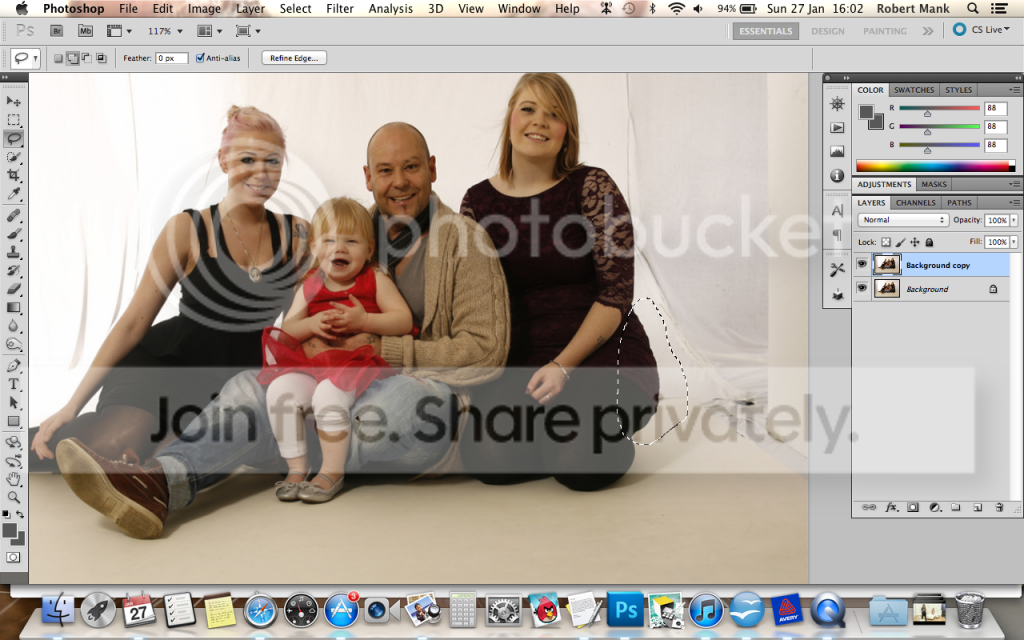
I duplicate the background. Use the lasso tool to draw round the area and a bit of background:

ScreenShot2013-01-27at160238_zps6fbb2937.png


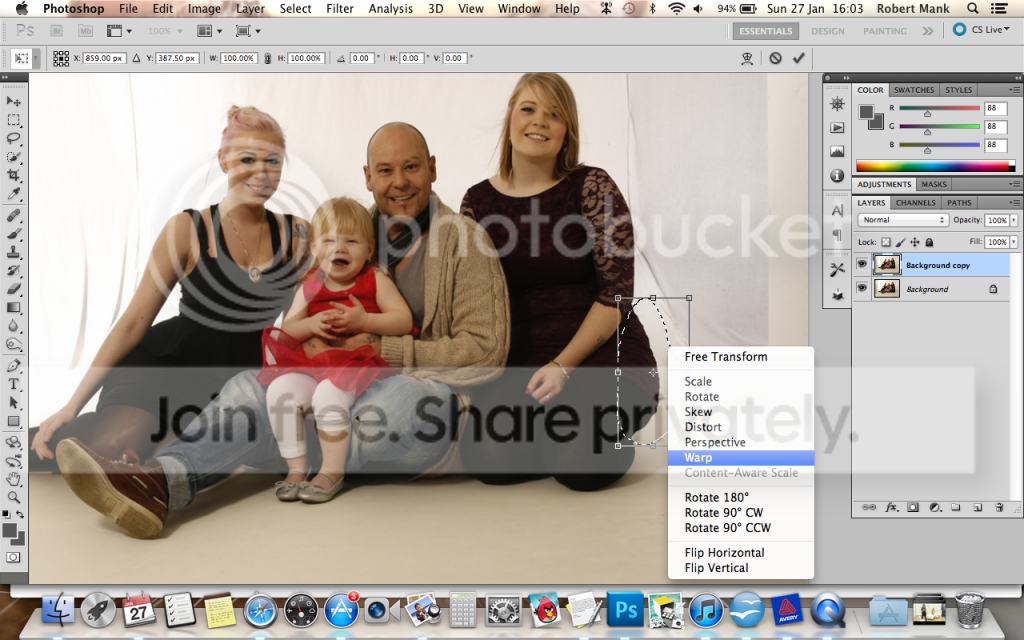
Then I free transform (cmd+T on a mac) then right click and warp:

ScreenShot2013-01-27at160311_zps8743db2d.png


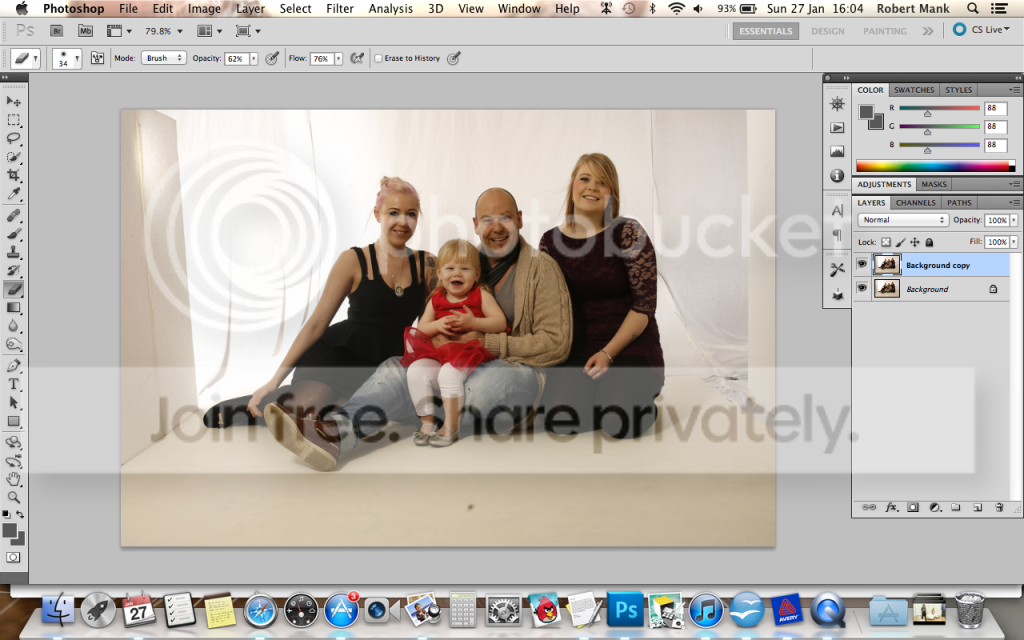
Then just pinch it in where you want it to as much or little as you like.

ScreenShot2013-01-27at160454_zps8185a3a1.png


If its a bit messy in the corner use the eraser tool and brush it out.

Hope this helps Craig. :)
 
From memory, fire up the liquefy, use the W key (to select warp)? Then a reasonable size brush 10p size or bigger, and gently move the edges, really small amounts is all you need. It's very subtle. Of course do this on a duplicate layer.

I don't use the liquify tool, I think its slow and clunky but it may just be me.

I duplicate the background. Use the lasso tool to draw round the area and a bit of background:

ScreenShot2013-01-27at160238_zps6fbb2937.png


Then I free transform (cmd+T on a mac) then right click and warp:

ScreenShot2013-01-27at160311_zps8743db2d.png


Then just pinch it in where you want it to as much or little as you like.

ScreenShot2013-01-27at160454_zps8185a3a1.png


If its a bit messy in the corner use the eraser tool and brush it out.

Hope this helps Craig. :)

Thanks guys. I have done the liquify...I'll post it in a minute see what you think.

Thanks Rob, I'll try that method too. Cheers
 
Looks good to me! How long do you spend on your editing Craig? Must take some time!!
 
Looks good to me! How long do you spend on your editing Craig? Must take some time!!

Hmmm, more than it should, but from the image at the top to this, about 2 minutes.

Since I moved to the 1D I haven't managed to get the same blown backgrounds. Not sure why :thinking:

I have plans for a proper wall in the studio, with infinity curve to the floor. Hope to have it done by Easter...that'll mean that, although the BG may not be blown, it will at least be smooth. That'll make PP easier. And also, I don't do much other colour backgrounds as the wrinkles show :( I need a smooth BG!

Cheers

Craig
 
8419108773_823a934b6c_ocopy.jpg


I just used the push left in liquify smallish brush on low flow (if i remember correctly) also couldn't resist finishing the background off :)
 
Back
Top