Lightroom - Presets Question

jeniveeev

Suspended / Banned
Messages
1,407
Name
Mac
Edit My Images
No
Hi - i have recently purchased lightroom 2 and have played around with it for a bit. I am having trouble downloading presets into "user presets" within LR. Once i have downloaded, saved and unzipped the Preset in a folder i then navigate back to LR and click on import to bring those presets into LR , but when i do this there is nothing showing in the folder that i downloaded the presets into (its empty)! if i go to the folder outwith using lightroom import the presets are there! i know its probably really simple but i just cant think what i'm doing wrong!! is there anyone that might be able to guide me on this and put me out of my misery!!??
thank you kindly
jen
 
Personally I put the presets in the folder manually. in windows it's
C drive/documents and settings/your name/aplication data/adobe/lightroom/develop presets
Dump the files in there and restart lightroom, they should appear. Wayne
 
hi wayne - ive tried that and it still read "folder empty" when i open or browse the cursor over the folder! not sure what to do!
 
hi wayne - ive tried that and it still read "folder empty" when i open or browse the cursor over the folder! not sure what to do!

Corrupt download? Try downloading them again - isn't Windows just wonderful? :D
 
What presets are they? theres a few different presets for LR, theres print, export and web presets, they go in different places.
I was assuming you ment develop presets.Wayne
 
swanseamale - im now confused LOL. i would like to download presets from killertips so i can save them into user presets (left hand panel in LR). this is all new to me so excuse me for being very basic....bear with me. :-)
 
Matt posts different presets, some are develop presets (to apply an effect to a photo) others are print presets (to put say 3 pics on page) I have never had an issues with stuff from his site. Exactly what preset did you download?
Wayne
 
i used killertips and presets from dawn gordon on flickr. where do i find matts presets and il give them a try to see if it works? develop presets is what ive been trying.
 
I got mine from killer tips too.
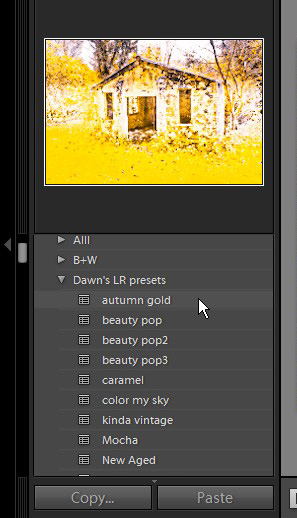
Just downloaded dawn gordons lightroom presets, dragged the whole folder out of the zip file, dragged it into the develop presets folder and they show up fine. I wonder whats different for you?
3535225339_b73c6ef9b2_o.jpg
 
ive tried dragging it and dropping into lightroom user preset folder but still not working! i have come across something though just now trying to do what you have done, hopefully you might know more about it. i tried to open the preset file in windows and this message box has appeared "lr template is not a valid win32 application"! is the problem with my unzipping of files!!? sorry for dragging this on, i promise its the last question! :-))
 
I just tried double clicking on a template file and I get a windows cant open this file box, but I can't get the same message.

Lets start from the top. I went to dawns web site, chose dawns lightroom presets and clicked download. That got me a winzip file on desktop (where I saved to) I then double clicked to open the winzip file, inside is a folder containing the actual presets 14 in the folder I downloaded. it's those I drag into lightrooms preset folder (I actually drag the folder out of the zip file and put that in as well) but it'll work either way.
PM me your e.mail and I'll send you a preset I have made, you can drop that in the preset folder and see what happens with that, I'm guessing it's something to zo with the zip file but I'm not sure. I'm off to work soon so it won't be tonight mate. Wayne
 
thank you everyone for your help. at last i have managed to download them into LR! it was a problem with unzipping the files. cheers again.
 
Glad you got it working, and my apologies for calling you mate Jen, I didn't realise your were a lady at first.
 
Back
Top