Lightroom library date order

Merlin5

Suspended / Banned
Messages
2,295
Name
Lee
Edit My Images
No
Just a quick question guys. When I click on the Library tab next to the Develop tab in Lightroom I'm getting date numbers in order but not the months. Like this:

1st May 2021 Embankment
2nd September 2021 Piccadilly
4th April 2021 West End & St James Park
5th & 6th July 2021 Richmond Park
5th June 2021 Camden Town
5th May 2021 Holland Park

Is there an option to group months together?
 
Are those folder names? It's sorting alphabetically so the 1st is before the 2nd, then the 4th... and so on.

To sort by months I use the ISO date format which when sorted alphabetically will put them in date order

So your folders would become:

2021-04-04 West End & St James Park
2021-05-01 Embankment
2021-05-05 Holland Park
2021-06-05 Camden Town
2021-07-05 Richmond Park
2021-09-02 Piccadilly
 
As Carl says, the Library tab just lists your folders in alphabetical order. (AFAIK) There's no way to sort the folder order unless you rename your folders as suggested above.

Sorting images is easy as you can just click the "sort" button which will sort images by whatever thing you want. Folders not so good. Same for Collections, Templates, Presets and most other things on that left hand sidebar.

Screenshot 2021-09-29 181236.jpg
 
Are those folder names? It's sorting alphabetically so the 1st is before the 2nd, then the 4th... and so on.

To sort by months I use the ISO date format which when sorted alphabetically will put them in date order

So your folders would become:

2021-04-04 West End & St James Park
2021-05-01 Embankment
2021-05-05 Holland Park
2021-06-05 Camden Town
2021-07-05 Richmond Park
2021-09-02 Piccadilly

Yeah, they're folder names. I made a folder on my desktop called 'Lee's Lightroom Photos'. I create sub folders in that and name the sub folders with date, month, year and title of whatever day's photos are on my camera, and then import from the camera into that sub folder. And then I import that sub folder into Lightroom. Where is the ISO date format option? And can I not group with day first, year last, and months as names instead of numbers?
 
As Carl says, the Library tab just lists your folders in alphabetical order. (AFAIK) There's no way to sort the folder order unless you rename your folders as suggested above.

Sorting images is easy as you can just click the "sort" button which will sort images by whatever thing you want. Folders not so good. Same for Collections, Templates, Presets and most other things on that left hand sidebar.

View attachment 331657

So if I continue doing what I described above by importing sub folders but renaming a month to its number (05 instead of May) it'll put day and month in order?
 
If you want Lightroom to display your photos in date order, just ask it to and it will ignore your file and folder names and use the date in the metadata.
 
Yeah, they're folder names. I made a folder on my desktop called 'Lee's Lightroom Photos'. I create sub folders in that and name the sub folders with date, month, year and title of whatever day's photos are on my camera, and then import from the camera into that sub folder. And then I import that sub folder into Lightroom. Where is the ISO date format option? And can I not group with day first, year last, and months as names instead of numbers?

There isn't an option as such, it's just how you type the dates in to the folder name. If you put today's date as "2021-09-29" it would appear above "2021-10-01" when sorted alphabetically, but if you wrote them as text then "1st October 2021" would be above "29th September 2021"
 
So if I continue doing what I described above by importing sub folders but renaming a month to its number (05 instead of May) it'll put day and month in order?
No. It'll order everything according to what the first character is. So 05-11 (5th Nov) would always be before 06-anything no matter what the month name is And the 21st will come before the 3rd (2 is lower than 3). Best to order everything as Carl does with Year-Month-Day as that keeps everything in hierarchical order if that's what you're after.

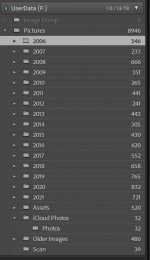
All my photos are organised in year folders with subfolders within that containing actual photos. All the years sit down the LH side nicely.

Screenshot 2021-09-29 184357.jpg
 
Ok got it. Thanks guys for your advice. (y)
 
Back
Top