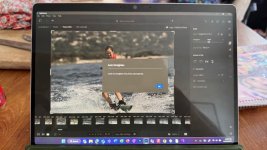
Lightroom; is it just awful?

Status
Not open for further replies.
Laptop certainly powerful enough; 32GB, 2TB SSD etc. The cropping and RAW changes are slower than PS.

What I will do when I am back is try LRc again with my whole photo database of 750k photos. Be interesting to see how it handles that.
It does seem that LRc is just not for you...I really struggle to understand how throwing 3/4 million files at it is going to do anything to change that!
 
Laptop certainly powerful enough; 32GB, 2TB SSD etc. The cropping and RAW changes are slower than PS.

What I will do when I am back is try LRc again with my whole photo database of 750k photos. Be interesting to see how it handles that.
How are you currently managing these 750k photographs. Although you and I seem to be alone, at least in this thread, in finding LR clunky (compared to PS, and in my case Capture One and PS), it should still be useful (over Bridge) for managing this number of photographs.

Even if you just use it as a DAM and immediately transfer images to ACR/PS for processing. On Import I have templates set up that automatically add metadata. This makes searching for something like all photographs taken from a particular location over a particular date period really easy, and much, much faster than Bridge, even though Bridge indexes the same metadata. I also make use of keywords a lot, which also adds to the value of a DAM, but that's of no value if you don't take the time to keyword images.

But how valuable this is obviously depends on how you need to manage your photographs.

Having said that about LR: scrolling through my library of pictures (50,000) is one example of where LR is tediously slow compared to Capture One, but both are still a lot faster than Bridge. Other than scrolling speed, LR is a far better DAM than Capture One in almost every respect.

 
It does seem that LRc is just not for you...I really struggle to understand how throwing 3/4 million files at it is going to do anything to change that!
I’ve been using LR not LRc. Would seem LRc should work better than LR. If it works as described, could be very useful for the archive.
 
How are you currently managing these 750k photographs. Although you and I seem to be alone, at least in this thread, in finding LR clunky (compared to PS, and in my case Capture One and PS), it should still be useful (over Bridge) for managing this number of photographs.

Even if you just use it as a DAM and immediately transfer images to ACR/PS for processing. On Import I have templates set up that automatically add metadata. This makes searching for something like all photographs taken from a particular location over a particular date period really easy, and much, much faster than Bridge, even though Bridge indexes the same metadata. I also make use of keywords a lot, which also adds to the value of a DAM, but that's of no value if you don't take the time to keyword images.

But how valuable this is obviously depends on how you need to manage your photographs.

Having said that about LR: scrolling through my library of pictures (50,000) is one example of where LR is tediously slow compared to Capture One, but both are still a lot faster than Bridge. Other than scrolling speed, LR is a far better DAM than Capture One in almost every respect.
At the moment stored in folders with year / month / day / project. All stored on a NAS with a 10GBe connection.

It’s also backed up to Amazon photos, which for people and subject searching is pretty damn good. Date based search could be a lot better.

To be honest, I very rarely go back to photos once edited but would nice to have something to supplement Amazon. You are right, it’s more from a DAM perspective.

LR has got to easier to work with as I’ve had no real choice but to use it. Annoying it doesn’t support reading read only tagging as I do quite a few of my selections in camera before going back to the laptop.

I’ve been on a boat doing water ski shoots so the horizon has been all over the place, hence needing to do lots of cropping. Wish it just had the photoshop crop engine!
 
Sorry, I have to disagree.
Right from the very beginnings of LR, I have never found it lacking in speed, clunky.
It integrates well with PS or any other software that I also use.
Right now if you use an ARM based Windows PC, you can’t edit RAW files in PS from LR. Been that way for a year. Adobe have to be one of the worst software development companies out there.
 
I've used Lightroom Classic for years and I've never found it clunky or slow.
I deal with large files from the R5, smaller files on the R3 and R1 but never had a problem with either. I'm even processing 102MP RAW files from the Fuji GFX100RF and Lightroom handles them well.

It's all down to the spec of the device you run it from, I'm using an Apple M2 Max Studio and it handles the job perfectly well.
With the updates made to Lightroom over the years I very rarely have to push an image into Photoshop, only when I want to do detailed object removal. All masking and editing is done directly in Lightroom, any noise reduction is done in Topaz.

It's all personal preference I suppose and what works better for you. :)
 
I think it is partly what you are used to and how your brain works. I use LRC and find it intuitive but I struggle with PS. I find the LRC DAM function very good and it can do the vast majority of my editing requirements. I don’t find it slow.
 
At the moment stored in folders with year / month / day / project. All stored on a NAS with a 10GBe connection.

It’s also backed up to Amazon photos, which for people and subject searching is pretty damn good. Date based search could be a lot better.

To be honest, I very rarely go back to photos once edited but would nice to have something to supplement Amazon. You are right, it’s more from a DAM perspective.

LR has got to easier to work with as I’ve had no real choice but to use it. Annoying it doesn’t support reading read only tagging as I do quite a few of my selections in camera before going back to the laptop.

I’ve been on a boat doing water ski shoots so the horizon has been all over the place, hence needing to do lots of cropping. Wish it just had the photoshop crop engine!
Yes, it's annoying that Adobe are still struggling to get the LR to PS workflow fixed. And I didn't realise it didn't read the tags set in camera.

As regards your horizon issue. have you tried the auto- horizon correction in LR? I haven't tried it in LR, but it works pretty well in C!1 and you can batch correct.
 
I have my workflow set up so I do my initial PP in LRC which is all stored in date order . The finalise in PS I.e change size ,use filters if needed ,finish sharpening and export to desktop .
We all have different methods but as long as your happy with your results use what your used to
 
Found a good feature of LR!

I use a Surface, which has a touch screen. To be fair, the touch interface on LR js pretty good.

See, it’s not all bad!
 
Yes, it's annoying that Adobe are still struggling to get the LR to PS workflow fixed. And I didn't realise it didn't read the tags set in camera.

As regards your horizon issue. have you tried the auto- horizon correction in LR? I haven't tried it in LR, but it works pretty well in C!1 and you can batch correct.
IMG_3239.jpeg

AI isn’t fully coming for photographers just yet!
 
View attachment 461018

AI isn’t fully coming for photographers just yet!
No idea if it would be any better than LR in this instance, but auto-straighten horizons was Capture One's first AI tool.

Not that I'm pushing C1, it certainly isn't the raw processor for everyone, especially if you want good DAM capability, and it's ridiculously expensive for anyone not using it professionally.

I'm just mentioning it as a comparison, given I've used LR and C1 extensively.
 
Tried the auto straightening on another photo and worked a treat. AI overloads still on their way.
 
Surely if you straighten that horizon then you're going to chop off the board / feet? :)
Yup. I just picked one at random. Even on one that is cropable without amputation, it still wouldn’t do it!

Photographing from the back of a boat at 400mm certainly is challenging!
 
Right now if you use an ARM based Windows PC, you can’t edit RAW files in PS from LR. Been that way for a year. Adobe have to be one of the worst software development companies out there.
They just need a bit more of everyone's money to pay for it! :rolleyes:
 
Right now if you use an ARM based Windows PC, you can’t edit RAW files in PS from LR. Been that way for a year. Adobe have to be one of the worst software development companies out there.
I'm guessing that's because ARM only has an 11% market share of Windows PCs, so they're obviously going to dedicate more time and resources towards the 89% who use x86 and people who use Mac.

Not saying it's right but it makes sense.
 
I'm guessing that's because ARM only has an 11% market share of Windows PCs, so they're obviously going to dedicate more time and resources towards the 89% who use x86 and people who use Mac.

Not saying it's right but it makes sense.
It’s because Adobe make terrible products.

They have already recompiled most of their products for ARM. There is a bug between LR and Photoshop that is entirely an Adobe problem, and they haven’t fixed it.
 
I'm the opposite, do 99% of my editing in LR, as it's quick and easy. When I do need to switch over to PS for something unusual I find it horribly cumbersome and counter intuitive, I know what I want to do, but it takes ages to find the right option in the mass of menus, etc.
I suspect it's mainly down to familiarity with the two programs.
Edit: I mean LightRoom Classic when I say LR
I am the same, I use LR classic all the time, and only use PS for vey particular tasks. I find PS is not very intuitive, and I have to watch a few YouTube videos on how to navigate the menu to achieve what I want.
 
It’s because Adobe make terrible products.

They have already recompiled most of their products for ARM. There is a bug between LR and Photoshop that is entirely an Adobe problem, and they haven’t fixed it.
No they don't. Their updates in recent years have made Lightroom so much better, the masking tools are so much better.
Just because you don't like them, which is your right to do so, doesn't make them terrible. :ROFLMAO:
 
I’ve been using LR not LRc. Would seem LRc should work better than LR. If it works as described, could be very useful for the archive.
I use LRC for all my cataloguing (180k images, since going digital in 1998), it is a great catalog program. The RAW editing is good as well and since v14 the heal and clone works much better. I I have fine detail to edit then I do prefer Photoshop 2025 CC.
I used to use CaptureOne Pro but since they moved to subscription only I have stopped updating so I am stuck at their last full paid version.
 
No they don't. Their updates in recent years have made Lightroom so much better, the masking tools are so much better.
Just because you don't like them, which is your right to do so, doesn't make them terrible. :ROFLMAO:
I think you’ve misunderstood what I said, and even so, laughing really isn’t appropriate.

There has been a bug with ARM versions of LR for nearly a year that means it does not play nicely with PS.

Literally if you click Edit in Photoshop, it won’t load. It errors out. That has nothing to do with my personal feelings on the product, that’s just a bug that they haven’t fixed.
 

Over a year later and Adobe still haven’t fixed this issue. For a company as large as Adobe, that’s fairly terrible (yet entirely par for the course with Adobe).
 
I think you’ve misunderstood what I said, and even so, laughing really isn’t appropriate.

There has been a bug with ARM versions of LR for nearly a year that means it does not play nicely with PS.

Literally if you click Edit in Photoshop, it won’t load. It errors out. That has nothing to do with my personal feelings on the product, that’s just a bug that they haven’t fixed.
I have not noticed this on my Mac Mini M4.
Please can you elaborate.
I dont use Windows though.
 
Last edited:
I have not noticed this on my Mac Mini M4.
Please can you elaborate.
I dont use Windows though.
It’s fine in my Mac too.

If you have Windows with an ARM processor, ironically very similar to the M series, there is a bug where in LR if you Edit in Photoshop, it never loads the file into PS.

Link above shows the issue has been around for over a year and they still haven’t fixed it.
 
I think you’ve misunderstood what I said, and even so, laughing really isn’t appropriate.

There has been a bug with ARM versions of LR for nearly a year that means it does not play nicely with PS.

Literally if you click Edit in Photoshop, it won’t load. It errors out. That has nothing to do with my personal feelings on the product, that’s just a bug that they haven’t fixed.
Laughing is always appropriate...life is too short not to.
 
Laughing is always appropriate...life is too short not to.
What you mean to say was “really sorry for misunderstanding your post”.

Sorry, missed out the laughing emojis.

If you can’t talk about bugs in software without laughing at posters, maybe consider why.
 
What you mean to say was “really sorry for misunderstanding your post”.

Sorry, missed out the laughing emojis.

If you can’t talk about bugs in software without laughing at posters, maybe consider why.
No that's absolutely not what I meant to say.

Maybe I meant to say, you need to chill out, it's only software after all.
 
I have used photoshop since version 0.98 on a Mac Plus - and lightroom since it first began - it used to be that you needed both to fulfil workflow, but increasingly photoshop is needed less and less - there are still a few things where it is more powerful, but lightroom (classic) has become far more complete.

It does use a lot of memory though - was very slow on a intel i7 with 16gb of RAM - expanded that to 128gb of RAM and no issues.

As for straightening the horizon, I have just edited down 5.5k photos from a Greek holiday, many of which were taken by me of jet skiers / teenagers on jet surf boards / waterskiing etc. - where rather than being in the back of a boat, I was on a jet ski with all the movement that implies... so a lot of wonky horizons... I found it pretty quick using the crop module (hit the R key on PC) and then hold ctrl down to change the cursor to the ruler tool and draw a line to rotate - move onto next photo... get through them very fast...
 
Status
Not open for further replies.
Back
Top