Lightroom Import Issue

Welshy74

Suspended / Banned
Messages
172
Name
Richard
Edit My Images
Yes
Can anyone help. Recently when I import my files LR sets up a folder of the imports at the top of the library and not in the folder I have selected. When I try and move the images to my folders it says they already there which they do show in my C Drive. But when I click on the folder in the C drive through LR the images are not there. Any idea what I can do as this never used to happen.
 
Which version are you running?

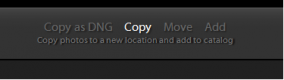
On the top bar in the middle - does it say copy, move or add? If add the images will stay in the source location

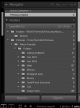
On the import module, expand destination on the right menu. Where does this say you are importing to?
Remember that Lightroom imports into a date folder under the folder you select, so I have yearly folders, i.e. currently I'm importing to F:\raw\2016 and my images from today will be in the folder f:\raw\2016\2016-11-05

Look at the top bar - make sure it says from import source (left side) to destination (right side)
 
You're using Add so the images are staying where they are and references are being added to LR.

To copy or move the images from you memory card to a folder on you PC, you must choose copy or move at the top of the import screen.
 
As said on my forst post - you're using add (Top middle). Click on the copy at the top and then it copies the imported image to the place you've requested. Add leaves the images in their original location. Bit of a pain if it's on a card reader :)

upload_2016-11-5_15-11-19.png
 
Last edited:
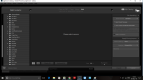
View attachment 76785 View attachment 76786

Im using LR CC. I dont have a destination option.
?? How then, do you decide where they are going to be saved to??

In my experience all the download problems in Lightroom are caused by people not specifying the correct destination for their files, or by downloading outside of Lightroom and then not synchronising their files.
 
Back
Top