

LIghtroom help please

Graham

Suspended / Banned
Messages
7,448
Name
Graham
Edit My Images
Yes
Hi,
I have lightroom CC.
I was editing some photos and it decided to close, ok no problem but last time it done this it lost all the photos I had lined up for editing (not a happy chappie)
Anyway, this time when I tried to open LR it came up with the image below when I try to open LR and I cant get it open and I dont have LR open anywhere else.
I dont have a clue where I go from here and i`m paying for this service monthly now :mad:
Oh and if I choose "choose a different catalog" it does not make any difference.
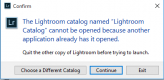
LR.PNG
 
There is an easy way to solve this and a slightly harder way

I will go with the easy way as it takes less explaining, is easy to do and achieves the same aim.

Reboot - Turn off and restart your computer
 
There is an easy way to solve this and a slightly harder way

I will go with the easy way as it takes less explaining, is easy to do and achieves the same aim.

Reboot - Turn off and restart your computer
Done it, didnt work, thanks
 
have you tried opening a new catalogue, and then trying to re open the other one. what machine is it windows or mac?

is the actual catalogue in question visible on your hard drive?
 
Thanks for your help guys,
Sorry Gremlin I didnt reply as I got it sorted now but its a PITA, Had to create a new file/caterlog so I lost all the other shots that I didnt edit, well not lost as such but its stilll a PITA.
 
This just might work for you - no promises though:

Turn off the GPU option on the Lightroom>Preferences>Performance tab.
 
What sort of drive do you have your catalogue stored on?
Good question. LR is on SSD and I have a HD For other stuff, so maybe the HDD.
 
The point of turning the computer completely off is that it would have stopped the Lightroom process that was causing your issue
 
Can't remember now but isn't just restarting the pc the same?

If a W10 PC then yes restart forces a complete reboot but shutdown & and boot does not. I learned that the reason W10 boots so quickly from a 'shutdown' closure is that shutdown is in fact a hybrid of shutdown and hibernate.
 
Good question. LR is on SSD and I have a HD For other stuff, so maybe the HDD.
Internal? USB?

I'd suspect the integrity of the drive and/or its connection.

Lightroom is incredibly tetchy about the integrity of its catalogue. If the drive disconnected while in use it could cause the cat to stop working through corruption.

No amount of reboots will solve that.
 
Last edited:
Back
Top