Lightroom alternative - want to rename (date time stamp) on import

Bebop

Suspended / Banned
Messages
7,318
Edit My Images
No
After many years of subscribing to Lightroom (and owning LR5) I am switching. It would have happened last year, but somehow they managed to get my expired credit card to pay up. Anyway, I have been going through my workflow and testing the best way forward.

I already own DxO PL3 and think this will work for me, but I am losing the ability to rename my files with a date time stamp on import. I find this a great way to sync two cameras when shooting things like sports, or to keep things in chronological order e.g. if I am sharing shooting an event with a friend. It's also a quick way to locate any images on my drives.

I also own On1RAW (yes I'm a software junky) - that will add date, which is better than nothing, but not time.

Is there any software that anyone knows of that I could use in conjunction with PL3, or is there another editing software I should be considering? I have looked at Capture One and may go that way eventually but I'd like to work with what I have if I can.

I use a Mac.

Any ideas welcomed :)
 
I like to import and use ITPC on my images using PhotoMechanic 6 then do a little processing in either DXO PL3 or Affinity - and also use a Mac. PM6 is not a cheap option though.

I quit using a standalone version of Lightroom when I went 64bit. It was decided for me!
 
Last edited:
I like to import and use ITPC on my images using PhotoMechanic 6 then do a little processing in either DXO PL3 or Affinity - and also use a Mac. PM6 is not a cheap option though.

I quit using a standalone version of Lightroom when I went 64bit. It was decided for me!
Many thanks Chris, I will check it out.

Maybe my old LR5 won't work now then either? I wondered if it would let me import the newer RAW files even if it couldn't render them, but it didn't. I didn't try it any further.

I have Affinity too and that will meet my needs for my rare Photoshop usage. It seems On1 will let you add IPTC on import, not something I think I need at the moment, but it's possible I will.

Edit: I've just had a look and it sounds perfect - though I'm not sure how it integrates with processing, so I think I'll do the free trial. I may well buy next time the time stamp is critical. It does look great for when you've got to whittle down your photos quickly.
 
Last edited:
Bebop I presume your mac is up to date and running the latest software, then it must have “photos” as part of it a lot of people overlook this as a raw convertor and editing facility . I played with it last month when joe was asking about alternatives and it’s actually quite good and totally free
 
After many years of subscribing to Lightroom (and owning LR5) I am switching. It would have happened last year, but somehow they managed to get my expired credit card to pay up. Anyway, I have been going through my workflow and testing the best way forward.

As regards the credit card:


As regards software, I echo Photo Mechanic if you aren't put off by the price. It's a real swiss army knife piece of software. PM6 "plus" (still in late beta) adds full DAM features.
 
As regards the credit card:


As regards software, I echo Photo Mechanic if you aren't put off by the price. It's a real swiss army knife piece of software. PM6 "plus" (still in late beta) adds full DAM features.
Thank you for that Graham, that's really interesting!! Last year Adobe sent me an email to say that my card had expired, so I just assumed it would end. I am intending to contact them and make sure it ends this time.

I've just been watching some Youtube videos on Photo Mechanic - very powerful! I'm wowed by the replacement coding of keywords. Captioning and keywording some recent football matches has taken me ages, not to mention the culling. It's not something I do every week though, but worth knowing about for the future.

Bebop I presume your mac is up to date and running the latest software, then it must have “photos” as part of it a lot of people overlook this as a raw convertor and editing facility . I played with it last month when joe was asking about alternatives and it’s actually quite good and totally free
Thanks Jeff, I confess it isn't something I've played with. Really I have more software than I need, but I'm just missing some functionality. Do you think it would have the option to rename files with a date time stamp? I did do some googling before starting this thread. I'm pretty sure I can rename files on my Mac, but the date time stamp is a big ask. I'm also not sure how it would impact the folders - I know with iPhotos it wasn't easy to get to your photos.
 
I've just been watching some Youtube videos on Photo Mechanic - very powerful! I'm wowed by the replacement coding of keywords. Captioning and keywording some recent football matches has taken me ages, not to mention the culling. It's not something I do every week though, but worth knowing about for the future.

It is an amazing program, which I couldn't live without, and I only use a fraction of its power, the support forum and the tech support is also very good. I use the replacement coding tools for captions where I have the common names and scientific names for birds, mammals etc built into PM e.g. typing "\white\" into any field is instantly replaced with "Whitethroat or Common Whitethroat (Sylvia communis)" .
 
I've just been watching some Youtube videos on Photo Mechanic - very powerful! I'm wowed by the replacement coding of keywords. Captioning and keywording some recent football matches has taken me ages, not to mention the culling. It's not something I do every week though, but worth knowing about for the future.

This. The longer I have had it, the more I use it.
 
Thank you for that Graham, that's really interesting!! Last year Adobe sent me an email to say that my card had expired, so I just assumed it would end. I am intending to contact them and make sure it ends this time.

I've just been watching some Youtube videos on Photo Mechanic - very powerful! I'm wowed by the replacement coding of keywords. Captioning and keywording some recent football matches has taken me ages, not to mention the culling. It's not something I do every week though, but worth knowing about for the future.


Thanks Jeff, I confess it isn't something I've played with. Really I have more software than I need, but I'm just missing some functionality. Do you think it would have the option to rename files with a date time stamp? I did do some googling before starting this thread. I'm pretty sure I can rename files on my Mac, but the date time stamp is a big ask. I'm also not sure how it would impact the folders - I know with iPhotos it wasn't easy to get to your photos.
not totally sure or if you can use plug ins with it , but it seemed pretty good when I had a go and everything does seem to be added in date order ,I often drag processed pics out of photos to use . its my main back up storage first line of defence if flickr should go tits up .i.e I process a file in Lightroom cc and then convert to j.peg for adding to flickr .. any that I deem worthwhile then gets put into photos
 
not totally sure or if you can use plug ins with it , but it seemed pretty good when I had a go and everything does seem to be added in date order ,I often drag processed pics out of photos to use . its my main back up storage first line of defence if flickr should go tits up .i.e I process a file in Lightroom cc and then convert to j.peg for adding to flickr .. any that I deem worthwhile then gets put into photos
I'm revisiting my whole work flow and will have to go back through years of photos and export full size jpegs - many will have been exported already but not all at full size. I didn't realise access to edits would go if I ever stopped subscribing. I have at least colour coded every processed photo so it shouldn't be too difficult, just a churning computer and some more disk space needed.

My first new step will be using On1 to import using date I guess. In the meantime thank you to @Tulipone and @myotis - it wasn't on my radar and may well end up being bought.
 
I had purchased it years ago and it fell out of use until I started taking photos for work and needed some organisation. I knew that my backup regime was bad and when I properly looked, I found that I had backups of backups of backups, generally burnt to bluray. I had a lot of disks. Then I paid to update to PM6 and it made untangling things far easier than it would have been and now all renamed, ordered and tagged. I suspect it could still be better than it is, but at least I can now find things. I now ingest, keyword and cull whilst importing - generally moving to DXO to sort out geometry and make my adjustments.
 
Dark Table has the ability to rename and is a very good piece of software for processing your Raw files.
 
Dark Table has the ability to rename and is a very good piece of software for processing your Raw files.

Thank you, I’ll have a look. I’m currently trialling Photo Mechanic, but have now also learned that I won’t lose the facility to import using Lightroom - despite what the Adobe chat line told me!
 
Thank you, I’ll have a look. I’m currently trialling Photo Mechanic, but have now also learned that I won’t lose the facility to import using Lightroom - despite what the Adobe chat line told me!
Bebop

I use two open-source bits of software to process my images... I use Digikam of importing and sorting my archive, it's rather powerful as well regarding searching and tagging.

As mentioned the other is Darktable, which is very powerful. I am finding that I am not missing Lightroom or On1 Raw what I was using as a substitute.

I no longer use any Adobe programs and have severed that financial tether, as a photoshop replacement I am using Affinity Photo which does everything that Photoshop did for me.

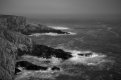
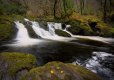
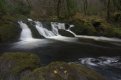
I still manage to pump out stuff like this

_DSC0032.jpg

XP022892.jpg

_DSC9479.jpg

DSC_5941.jpg

As mentioned Dark Table can seem a little intimidating at first but once you have found all the modules you need and have played with them or as I did what quite a few Youtube videos it soon becomes a very efficient workflow that is extremely powerful.

Hope that helps....
 

Attachments

  • _DSC9480.jpg
    _DSC9480.jpg
    150.5 KB · Views: 6
Bebop

I use two open-source bits of software to process my images... I use Digikam of importing and sorting my archive, it's rather powerful as well regarding searching and tagging.

As mentioned the other is Darktable, which is very powerful. I am finding that I am not missing Lightroom or On1 Raw what I was using as a substitute.

I no longer use any Adobe programs and have severed that financial tether, as a photoshop replacement I am using Affinity Photo which does everything that Photoshop did for me.

I still manage to pump out stuff like this

View attachment 295539

View attachment 295540

View attachment 295542

View attachment 295543

As mentioned Dark Table can seem a little intimidating at first but once you have found all the modules you need and have played with them or as I did what quite a few Youtube videos it soon becomes a very efficient workflow that is extremely powerful.

Hope that helps....
Lovely shots. You're certainly not being held back with the software then :)

I'm in the 11th hour now and feeling a bit overwhelmed with it all, hurriedly trying to learn other software and am not sure I can try something else now - perhaps will look into Darktable and Digikam for the future. I can see Darktable is pretty comprehensive! Predictably Adobe have offered me 3 free months in the next year and I'm tempted to take it so I can more leisurely decide my way forward.

Sometimes I have to sort and edit a large number of photos in a short time. Photo Mechanic does seem very quick to browse and cull, but it is an extra expense and 9 months of LR is looking more desirable at the minute,.. but I do hate the subscription model :rolleyes:
 
@ bebop

Can I ask & pick your brains.....

Are you trialling PM or PM plus?

Also, once you start PM and let it loose on your folders does it read all LR keywords and tags.......to avoid the need to enter them again?

When you open a file in PL3 from it are all the keywords 'visible'?

I read that sometimes PL3 will strip EXIF data & keywording upon export back to source folder.

Like you and others I would like to move away from LR (in my case v6.12).......and latterly have only been using it for its DAM function.

PM cost though high(ish) is just about ok but PM Plus I would, for my needs, find hard to justify...........???

TIA :)
 
@ bebop

Can I ask & pick your brains.....

Are you trialling PM or PM plus?

Also, once you start PM and let it loose on your folders does it read all LR keywords and tags.......to avoid the need to enter them again?

When you open a file in PL3 from it are all the keywords 'visible'?

I read that sometimes PL3 will strip EXIF data & keywording upon export back to source folder.

Like you and others I would like to move away from LR (in my case v6.12).......and latterly have only been using it for its DAM function.

PM cost though high(ish) is just about ok but PM Plus I would, for my needs, find hard to justify...........???

TIA :)
You can no longer trial just Photo mechanic 6 unfortunately - that would have made it a bit less complicated for me. I wish I'd started the trial earlier as I have run out of time. I feel both are quite expensive, PM+ particularly, but the review time for culling is extremely impressive and if you have lots of photos to rate or delete in a short time it would be useful.

Yes PM was able to 'see' the colours and keywords from Lightroom.

Yes the keywords are visible in PL3 from PM. However if you add more keywords in PL3, these are not apparent in PM as it writes to .dop files and not .xml.

I haven't got to grips with all the functionality of PM (or PM+) and I'm not completely sure how useful the extra features are. I think in PM6 you can still for instance, search on keywords. I have only catalogued a couple of folders just to play. I think in PM+ you can search for say ISO 100. It didn't feel as instinctive as I thought it might to be honest, but I have managed it :)

PL3 does not appear to have stripped out the Exif on export - it has even included the caption that I entered in PM - I can't see any keywords, but maybe there weren't any in that image as I was just playing. This was an image that had been 'ingested' in PM and then edited in PL3 - testing out a new workflow.

I am going to continue the trial of Photo Mechanic and may add PM6 to my arsenal even though I'm not going to manage to leave Lightroom immediately. I still have a lot to learn.

Edit: Just to add, I haven't yet found a way of going directly from PM to PL3, though I think you can set it up to go to Lightroom. It may be possible to go directly to PL3. PM cannot see your PL3 edits of course.
 
Last edited:
You can no longer trial just Photo mechanic 6 unfortunately - that would have made it a bit less complicated for me. I wish I'd started the trial earlier as I have run out of time. I feel both are quite expensive, PM+ particularly, but the review time for culling is extremely impressive and if you have lots of photos to rate or delete in a short time it would be useful.

Yes PM was able to 'see' the colours and keywords from Lightroom.

Yes the keywords are visible in PL3 from PM. However if you add more keywords in PL3, these are not apparent in PM as it writes to .dop files and not .xml.

I haven't got to grips with all the functionality of PM (or PM+) and I'm not completely sure how useful the extra features are. I think in PM6 you can still for instance, search on keywords. I have only catalogued a couple of folders just to play. I think in PM+ you can search for say ISO 100. It didn't feel as instinctive as I thought it might to be honest, but I have managed it :)

PL3 does not appear to have stripped out the Exif on export - it has even included the caption that I entered in PM - I can't see any keywords, but maybe there weren't any in that image as I was just playing. This was an image that had been 'ingested' in PM and then edited in PL3 - testing out a new workflow.

I am going to continue the trial of Photo Mechanic and may add PM6 to my arsenal even though I'm not going to manage to leave Lightroom immediately. I still have a lot to learn.

Edit: Just to add, I haven't yet found a way of going directly from PM to PL3, though I think you can set it up to go to Lightroom. It may be possible to go directly to PL3. PM cannot see your PL3 edits of course.

Many thanks for the insights.....food for thought :)

I think I will have to 'kick it's tyres' sometime soon?
 
I haven't got to grips with all the functionality of PM (or PM+) and I'm not completely sure how useful the extra features are. I think in PM6 you can still for instance, search on keywords. I have only catalogued a couple of folders just to play. I think in PM+ you can search for say ISO 100. It didn't feel as instinctive as I thought it might to be honest, but I have managed it :)

PM6 + does take a bit of learning, but usually once you learn something you realise just how much faster it is. For example I assume you eventually worked out that to search for ISO you type "iso = 200" (without the quotes, and with the iso you were looking for) in the search field.

While a bit infuriating the first time round once you learn how this works, it's much faster to type iso = 200, and then for example edit to iso = 400 than making your way through a list of prepared options that you need to click on.

And it leads the way for you now knowing the principles of creating complex searches that can also be created very quickly (and saved) for further use.

The filter and browse tools only have a limited number of key options to minimise time spent scrolling through options. But are still quicker if for example you don't know what a term includes. e.g choosing "keyword" in either the Filter of Browse options will list all the keywords in your catalogue that you can choose from.

As virtually everything in PM6 is customisable, I'm surprised that you can't customise the filter and browse options, but that will probably come.

Totally unintuitive is setting up external editors (e.g. PL3) beyond the obvious two options in the Preferences Launching tab.

Once in the launching tab of the preferences look for :

"Assign specific editing application for each file type" and click "set"

Scroll down through the list of file types until you get to an editable list of "custom editors" and edit it.

You can also simply drag a thumbnail from PM6 into PL3 and the file will open.

The technical support in both the forum or by email is very good and very fast, I don't think I have ever waited for more than 24 hours for support, who will happily answer general usage questions as well technical problems.

Edit: I suddenly realise I may have misunderstood, if you only want to use one external editor, then doing it is obvious when you get to the Preferences Launch page. My advice was fro when you want to add multiple editor options to the right click menu in PM.
 
Last edited:
Capture One will add fields to file names on import. I use the feature to add the date to file names.
 
In common with many software products where there are two (or more) variants......I have looked for a features comparisons list re: PM and PM plus. But it seems there is no such table on the PM website:(

Has anyone spotted such a comparison table???
 
PM6 + does take a bit of learning, but usually once you learn something you realise just how much faster it is. For example I assume you eventually worked out that to search for ISO you type "iso = 200" (without the quotes, and with the iso you were looking for) in the search field.

While a bit infuriating the first time round once you learn how this works, it's much faster to type iso = 200, and then for example edit to iso = 400 than making your way through a list of prepared options that you need to click on.

And it leads the way for you now knowing the principles of creating complex searches that can also be created very quickly (and saved) for further use.

The filter and browse tools only have a limited number of key options to minimise time spent scrolling through options. But are still quicker if for example you don't know what a term includes. e.g choosing "keyword" in either the Filter of Browse options will list all the keywords in your catalogue that you can choose from.

As virtually everything in PM6 is customisable, I'm surprised that you can't customise the filter and browse options, but that will probably come.

Totally unintuitive is setting up external editors (e.g. PL3) beyond the obvious two options in the Preferences Launching tab.

Once in the launching tab of the preferences look for :

"Assign specific editing application for each file type" and click "set"

Scroll down through the list of file types until you get to an editable list of "custom editors" and edit it.

You can also simply drag a thumbnail from PM6 into PL3 and the file will open.

The technical support in both the forum or by email is very good and very fast, I don't think I have ever waited for more than 24 hours for support, who will happily answer general usage questions as well technical problems.

Edit: I suddenly realise I may have misunderstood, if you only want to use one external editor, then doing it is obvious when you get to the Preferences Launch page. My advice was fro when you want to add multiple editor options to the right click menu in PM.
Thats really helpful, thanks Graham. I almost did come back here to ask a few questions but I don't like to take up people's time. I can't tell you how many times I failed to see the Launch Preferences :rolleyes: Perhaps blinded in my haste to find it! Looks easy now - doh!

I like that you could choose different applications for different RAW files, I hadn't realised you could drag a thumbnail either - that's great! I only discovered the crop and zoom option last night.

What I am a little unclear on, is what constitutes PM6 and what is PM+. I can't find a spec list anywhere and because you have to trial all of it, I can't tell what I'd lose with PM6. Can you search for an ISO value in PM6? I think you probably can.

One property of PM+ seems to be the ability to hold previews and info on all of your images on multiple drives even when they are not connected. That seems pretty powerful for searches when you use multiple drives like me.
 
In common with many software products where there are two (or more) variants......I have looked for a features comparisons list re: PM and PM plus. But it seems there is no such table on the PM website:(

Has anyone spotted such a comparison table???
I thought you were responding to my post and then I come here and discover I haven't hit Post! Yes it is not easy to tell. I think the major strength appears to be my last sentence above - the ability to search and see ALL of your photos on every drive even when not connected.
 
Has anyone spotted such a comparison table???
I haven't seen such a table, but they are identical except for the features listed here:

chttps://home.camerabits.com/tour-photo-mechanic-plus/

The non-Plus version has some limited filtering capability and search tools, but these weren't based on a catalogue/index, very slow and unsuitable for any serious searching.

PM6 Plus just adds proper cataloguing features to the non-plus version.

A table of features wouldn't do any more than add the list of features on the linked page to the bottom of a list of PM6 features and put ticks against them.

However, I'm not trying to say a table wouldn't be useful.
 
Capture One will add fields to file names on import. I use the feature to add the date to file names.
Thank you, yes I thought it did. I did start a trial of Capture One but I didn't have enough time to invest in learning at the time - I found it quite different to Lightroom! Also because I have some software already, from an economic point of view I was trying to work with what I have. I can see lots of people seem to favour it over Lightroom, so it is on my radar :)
 
What I am a little unclear on, is what constitutes PM6 and what is PM+. I can't find a spec list anywhere and because you have to trial all of it, I can't tell what I'd lose with PM6. Can you search for an ISO value in PM6? I think you probably can.

One property of PM+ seems to be the ability to hold previews and info on all of your images on multiple drives even when they are not connected. That seems pretty powerful for searches when you use multiple drives like me.

I may have answered the PM6 vs PM6+ question in my reply to Box Brownie. You can't really search for anything in PM6, except in a very limited fashion.

The latter point of searching when drives aren't connected is part of what defines a DAM as being a DAM.
 
I am currently looking at darktable
could any of the users tell me where icc printer profiles should be
I don't seem to get any options when going to print
 
I have seen that but when I go to print I see the printer but a generic profile not the Canon ones
 
After much deliberation and messing around with alternatives I have decided that it's a case of better the devil you know
I have downloaded the latest version of Lightroom
 
After much deliberation and messing around with alternatives I have decided that it's a case of better the devil you know
I have downloaded the latest version of Lightroom
I know the feeling. I have abandoned my subscription, but am not convinced I have everything sorted. I can always go back to it.

Photolab 3 doesn't do softproofing for printing, and I've discovered ON1 does, but I still need to test it. I'm liking Photo Mechanic so far, but not the price, and I still haven't got it quite doing what I want it to for importing. It would be easier to stick with Lightroom!
 
I'm liking Photo Mechanic so far, but not the price, and I still haven't got it quite doing what I want it to for importing. It would be easier to stick with Lightroom!

Much as I Iike C1 and PM there are advantages in just sticking with LR, and I think you need to be confident of the benefits you might get from C1/PM before making the switch.

Having said that, what is it that you can't quite get PM to do for importing. I "might" be able to help.
 
Much as I Iike C1 and PM there are advantages in just sticking with LR, and I think you need to be confident of the benefits you might get from C1/PM before making the switch.

Having said that, what is it that you can't quite get PM to do for importing. I "might" be able to help.
Although I started a trial of C1 seem time ago, I didn't realise how much time I was going to need to invest to try it out, so I didn't get very far. Currently I'm liking DxO Photolab 3 (they have just launched 4), but I don't like it's filter system and you can't softproof. Otherwise it is ticking the boxes for me.

PM - if I have photos from two dates on an SD card and I want to ingest them into two date folders - can I do that in one swoop? It's on my list of things to sort out.
I think one time I was able to select what I wanted to ingest and leave others behind. This last time I hadn't cleared my card and ended up ingesting everything both the new and old images and then deleting the ones I didn't want. I have managed to date and/or date time stamp the filenames on images when ingesting.

I am starting to feel a bit half hearted about PM because I don't really want the expense, but on the other hand if I can get it to do what I want, then it's on my wishlist for the future.
 
I think both folk above have valid points, certainly about PM6 and DXO PL3. I moved from Lightroom stand-alone as my iMac was 64bit and Lr was not. I had to find alternatives. When you need to change, eating the problems is easier. When you want to change, you wonder why you need to go through pain. Neither are as integrated as the Adobe products.
 
PM - if I have photos from two dates on an SD card and I want to ingest them into two date folders - can I do that in one swoop? It's on my list of things to sort out.
I think one time I was able to select what I wanted to ingest and leave others behind. This last time I hadn't cleared my card and ended up ingesting everything both the new and old images and then deleting the ones I didn't want. I have managed to date and/or date time stamp the filenames on images when ingesting.

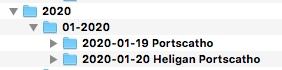
Assuming this is what you want to do. In the folder name field of the ingest dialog box you can separate files into date based folders by adding "variables" into this field

Mine has {iptcyear4}/{iptcmonth0}-{iptcyear4}/{iptcyear4}-{iptcmonth0}-{iptcday0}

Which splits the files into sub-folders that look like this

1603819458919.png

If you look at the variables I have listed you should be able to see how it works (the text I type in after ingest, but I could have this added from the metadata template by adding something like {location} to the end of the string, but what I put here is a bit too variable for this to work.

{iptcyear4}/{iptcmonth0}-{iptcyear4}/{iptcyear4}-{iptcmonth0}-{iptcday0} {location}

But you can create multiple ingest templates and select different templates for different ingest jobs. And now that I've explained this to you I realise I could save a lot of time by doing this for the locations I regularly visit (but it's not always locations I add, I just add a bit of text so I can identify the folder contents from finder without opening it.

There are dozens (hundreds) of variables that you can drop into virtually any PM field to do all sorts of clever things. e.g. you can type {act} into a field within the metadata template, hold down alt and click on OK (which changes to evaluate) and it will run the {act} variable and replace it with the shutter count of the camera that took the image.

For the duplicate images. on the ingest dialog you can tick "incremental ingest: copy new photos only" which should stop you importing images twice OR you can navigate to the card from inside PM, open the images on the SD, select the ones you want to ingest and then "ingest from selection". Note, the "copy new photos only" doesn't always work for me, but I've never bothered to find out why.

Yes, the price of PM means you do need to feel confident that it's going to be worth it.

As an aside, but I think I've mentioned it before, the support, either by emailing them directly, their forum or on Facebook (where they have a company presence) is very good at not just helping with issues, but also helping you develop workflow.

I hope this helps.
 
Assuming this is what you want to do. In the folder name field of the ingest dialog box you can separate files into date based folders by adding "variables" into this field

Mine has {iptcyear4}/{iptcmonth0}-{iptcyear4}/{iptcyear4}-{iptcmonth0}-{iptcday0}

Which splits the files into sub-folders that look like this

View attachment 296855

If you look at the variables I have listed you should be able to see how it works (the text I type in after ingest, but I could have this added from the metadata template by adding something like {location} to the end of the string, but what I put here is a bit too variable for this to work.

{iptcyear4}/{iptcmonth0}-{iptcyear4}/{iptcyear4}-{iptcmonth0}-{iptcday0} {location}

But you can create multiple ingest templates and select different templates for different ingest jobs. And now that I've explained this to you I realise I could save a lot of time by doing this for the locations I regularly visit (but it's not always locations I add, I just add a bit of text so I can identify the folder contents from finder without opening it.

There are dozens (hundreds) of variables that you can drop into virtually any PM field to do all sorts of clever things. e.g. you can type {act} into a field within the metadata template, hold down alt and click on OK (which changes to evaluate) and it will run the {act} variable and replace it with the shutter count of the camera that took the image.

For the duplicate images. on the ingest dialog you can tick "incremental ingest: copy new photos only" which should stop you importing images twice OR you can navigate to the card from inside PM, open the images on the SD, select the ones you want to ingest and then "ingest from selection". Note, the "copy new photos only" doesn't always work for me, but I've never bothered to find out why.

Yes, the price of PM means you do need to feel confident that it's going to be worth it.

As an aside, but I think I've mentioned it before, the support, either by emailing them directly, their forum or on Facebook (where they have a company presence) is very good at not just helping with issues, but also helping you develop workflow.

I hope this helps.
That's brilliant, thank you so much Graham. I will have another go with it. I think I did choose copy new photos only, but perhaps having renamed them confused things. You mention navigating to the card - that must have been what I did when I managed to select those that I wanted. I couldn't work out why it was different the next time and I didn't have that option - now I understand, thank you. I shall keep at it and try ingesting to separate folders next time with your variables.
 
@myotis That worked a treat, thank you. I understand now how I can click on ‘variables’ and enter them into the folder or file name and can add custom text too.
All becomes easy once you know how [emoji16]
 
@myotis That worked a treat, thank you. I understand now how I can click on ‘variables’ and enter them into the folder or file name and can add custom text too.
All becomes easy once you know how [emoji16]
Yes, once you know how, it's very powerful. I keep on finding things I didn't know it could do.

I'm not sure if I posted this link

 
Back
Top