Lightroom 4 very slow

HoppyUK

Suspended / Banned
Messages
23,200
Name
Richard
Edit My Images
No
Bit of a question and answer post. Having upgraded form LR3, I'm finding LR4 very slow.

I don't have the fastest machine in the world, but it still rips through LR3 in more or less real time. I first noticed how long it took to export only a few images. Then I was doing some spot removal and wondered why nothing was happening! It can take several seconds for changes to appear :(

Had a quick google, and I'm not alone. On forums and blogs, lots of people with high spec machines having trouble. Lightroom Queen Victoria Brampton's blog was helpful. It seems Adobe is aware and v4.2 may do something about it, but meanwhile the issues seem to centre around using highlights, shadows and clarity sliders, in combination with noise reduction. Lens corrections enabled doesn't help either, possibly sharpening too.

Some people are reverting to LR3, and I would too but I need the latest camera profiles for work so I'm stuck for now. Very disapointed frankly, though I'm liking a lot of the new stuff.

Anyone else with problems, and preferably some fixes? :thumbs:
 
I run LR4 with no problems whatsoever, but I think there is a pattern emerging in that the people who are having speed problems almost always have upgraded from LR3. (I first bought LR as version 4).

Could it be that legacy files from LR3 are to blame?
 
I run LR4 with no problems whatsoever, but I think there is a pattern emerging in that the people who are having speed problems almost always have upgraded from LR3. (I first bought LR as version 4).

Could it be that legacy files from LR3 are to blame?

Not heard that one. Sounds like it might be easy to fix.

Here's hoping! Thanks.
 
no - and it does seem a bit random as to when it appears slow and when its fine. Sometimes its so bad as to be unusable, and others it'll fly along without issue. I don't believe its an spec issue as my new mac book is slower then my older mac pro, despite them being of a similar spec.

Your images on an SSD shouldn't make a difference though. Its the catalogues and previews that would
 
Your images on an SSD shouldn't make a difference though. Its the catalogues and previews that would
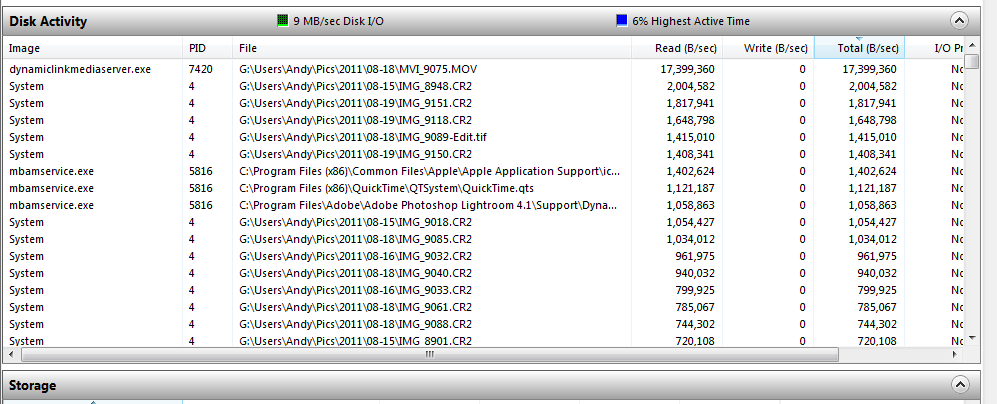
Want a bet? this is disk usage of lightroom 4 as I'm running up and down the catalogue

files.gif


But then you'd know that if you'd read the thread I linked to ;)
 
Thanks guys :)

Andy, whatever the ins and outs of your findings, do you have a view on what the best workarounds might be (eg applying critical adjustments last) and is this likely to be something Adobe can fix easily?
 
I have the same speed issues. It works a lot snappier on dng files. So at the moment I convert all raw files on import.
 
It's definitely there but I can't put my finger on it. If I have photoshop open as well and am editing images in there and saving back to lightroom, then I've found it's worth quiting and restarting photoshop every so often.

I've got seagate hybrid momentus xt disks, but I'm going to put my OS disk onto SSD to see if it makes a difference.
 
Have to say Richard, other than LR4 taking a little longer to start up, once it had imported and rendered all my photos, I've not really noticed a performance difference. Perhaps it's my workflow, the fact I tend to only do basic edits and probably the fact that I have a machine where you don't notice the performance issues so much (an i7@4.3GHz).
 
Have to say Richard, other than LR4 taking a little longer to start up, once it had imported and rendered all my photos, I've not really noticed a performance difference. Perhaps it's my workflow, the fact I tend to only do basic edits and probably the fact that I have a machine where you don't notice the performance issues so much (an i7@4.3GHz).

So it's either save up, or wait for a LR fix :(

I'll live with it then, and try working around what appear to be the known problem settings.

Thanks.
 
Mine has good days and bad days, some days its super snappy, other days painfully slow....however, I am reserving judgement as its running on my 4 yr old iMac which has a problem anyway [possibly processor related, and causing several issues with speed, machine freezes, etc] and will be off to the quacks [apple genius bar] on Monday for a full medical & some treatment. :shrug:
 
arad85 said:
Have to say Richard, other than LR4 taking a little longer to start up, once it had imported and rendered all my photos, I've not really noticed a performance difference. Perhaps it's my workflow, the fact I tend to only do basic edits and probably the fact that I have a machine where you don't notice the performance issues so much (an i7@4.3GHz).

Mines not a sluggish machine. 4x hybrid drives, 16gb ram, windows7 64 bit and dual 4 core processors running at 3.6 MHz
 
Want a bet? this is disk usage of lightroom 4 as I'm running up and down the catalogue

files.gif


But then you'd know that if you'd read the thread I linked to ;)

:) I did say 'shouldn't'. I always understood it was the preview database as you run up and down the catalog
 
What Hugh said (before he got into an argument about SSDs).

It seems random. Some days it's almost as fast as 3, other days it is horrific. I've spent some time trying to isolate the problem and just can't find a pattern.

It's not a 3 -> 4 thing since I generate a new catalogue for each client. It's also not something that for most people can be fixed by SSDs. I take too many pictures for SSDs to help and also it seems to be a processor bound (rather than disk bound) issue. Many people reporting all cores maxed out with LR4 doing very little.

If you're happy with the processing in 3 but need 4 for camera support then there are 2 things you can try:

1. Set process version to 2010. This can speed it up a lot.
2. Convert your files to DNG with Adobe's DNG converter and then use v3 until v4 is a stable release.
 
Having just upgraded to 4 from 3.6, I'm finding a similar problem.

It takes an age to import the files and then forever to load each one .

But once they're loaded up I've been able to do some simple adjustments relatively painlessly.

I exported a few small jpegs the other day and that took forever as well.

I'm not convinced that for most images the new highlight/whites sliders are much of an advantage either......
 
Thanks guys :)

Jonathan, that's cool trick using PV2010. Got some stuff from a Canon 5D3 to do later, will give it a go :thumbs:
 
Just checking, have you updated to 4.1? I had speed issues with 4.0, but 4.1 sorted them.
 
Thanks guys :)

Jonathan, that's cool trick using PV2010. Got some stuff from a Canon 5D3 to do later, will give it a go :thumbs:

Jonathan, you're a genius :D

Import into LR4 (which has profiles for new cameras like the Canon 5D3 and Nikon D800) then switch to PV2010 in the camera calibration settings of the develop module. All controls revert to LR3 of course, but speed restored :thumbs:

Thanks!
 
Just checking, have you updated to 4.1? I had speed issues with 4.0, but 4.1 sorted them.

It was supposed to fix the speed issues that hey denied existed... Now they admit that going anywhere near clarity, NR or lens corrections can cause a fit.

There's an interesting point on LightroomQueen that there may be something very odd about individual cameras (copies of cameras - not models).

Jonathan, you're a genius :D

Import into LR4 (which has profiles for new cameras like the Canon 5D3 and Nikon D800) then switch to PV2010 in the camera calibration settings of the develop module. All controls revert to LR3 of course, but speed restored :thumbs:

Thanks!

:D

I find it not quite as fast as 3 - I guess the maps and other crapware slow it down some. But it's usable in PV2010.

Of course you could create an import preset that forces it to PV2010 on the way in.
 
Having just upgraded to 4 from 3.6, I'm finding a similar problem.

It takes an age to import the files and then forever to load each one .

But once they're loaded up I've been able to do some simple adjustments relatively painlessly.

I exported a few small jpegs the other day and that took forever as well.

I'm not convinced that for most images the new highlight/whites sliders are much of an advantage either......

I now suspect this may not have been due to LR4 running slowly itself but rather a problem with that particular import.

I don't know if it's possible but it may have been reading the images directly from the CF card, rather than actually importing them......
 
I now suspect this may not have been due to LR4 running slowly itself but rather a problem with that particular import.

I don't know if it's possible but it may have been reading the images directly from the CF card, rather than actually importing them......

its possible to import images by just adding them in their current location, so you could of added them on the CF card
 
It was either that, then, or they were being imported into my NAS back-up drive and being edited from there. I couldn't find them on my C drive.

Anyway, having got that sorted I'm glad to say that actually editing the files doesn't seem any slower than LR4. Fingers Crossed.
 
I know that Lightrooom like memory. Lots of it. I have an iMac with 8gb of ram and it runs very smooth. I also keep my operating system and programs on a different partition.
 
I know that Lightrooom like memory. Lots of it.
Not really. LR will only use ~2G of memory (I don't call 2G lots ;)). Photoshop on the other hand will use as much as you'll give it.
 
I have just come across this on another forum. I have no need to try it myself, but for those of you experiencing speed problems it could be worth a go.

http://photography-on-the.net/forum/showthread.php?p=14714795#post14714795

It seems to be working for some people (or maybe the random speed ups just make it look like it is).

This fix would have FAR more credibility if it wasn't exactly the same as Adobe's suggestion to fix slow LR issues when going from v2 - v3....

Post #149 refers.

Not really. LR will only use ~2G of memory (I don't call 2G lots ;)). Photoshop on the other hand will use as much as you'll give it.

Nope....running 64 bit it can use lots. There is however a well documented memory leak.

I have 11GB and it still sucks ;)
 
Nope....running 64 bit it can use lots. There is however a well documented memory leak.

I have 11GB and it still sucks ;)
Just because you have 11G (which is a very odd number to have). doesn't mean it's using all of it... Even 64bit, I can only get it to use ~2G. I don't import '000s of images in one go, so I'm not stressing it that way.

The memory leak appears to be geotagging based from what I can see.
 
Just because you have 11G (which is a very odd number to have).

Thanks for your concern. I assure you 11 is the correct number.

Adobe list 2GB as the MINIMUM memory requirement for LR4. They also suggest that to "optimise" performance you'll want at least 4 - http://helpx.adobe.com/lightroom/kb/optimize-performance-lightroom.html

If you're being throttled to 2GB then I'd suggest you check if you're really running in 64 bit mode.

Memory leak problems have been documented since v3 and although appear better in 4 don't seem to have gone away entirely.

One interesting point is that if using PV2010 makes your copy of LR dramatically faster then it's not the catalogue, it's not the files, it's not an old version of LR, it's not your hardware. It's something in the code of PV2012. It absolutely has to be.
 
I assure you 11 is the correct number.
You might want to look at the memory configuration then. You really should have an even number of GB as depending on how you have it organised, there is 1GB which will run slower than the other 10 as the system can't use the two channels properly. At a guess you have 2 x 4G sticks, 1x 2G and 1 x 1G. Assuming they are installed correctly (i.e. the 2 x 4G are paired in the correct slots) you'll only be losing speed in 1G. If you have them mixed (4G + 1G and 4G + 2G) then only 6G of your 11G will be fast.

Adobe list 2GB as the MINIMUM memory requirement for LR4. They also suggest that to "optimise" performance you'll want at least 4 - http://helpx.adobe.com/lightroom/kb/optimize-performance-lightroom.html
There is a difference between the minimum amount of memory in the computer and the amount LR uses. 4G in the computer allows the other processes in the computer to actually have some memory available to them. Say 1G for the OS, ~2G for LR, gives 0-1G for other things before swapping.

I think that statement (essentially saying 4G is enough) alone suggests that Adobe don't expect you to need more than ~2G for LR usage (memory leak bugs excluded).

If you're being throttled to 2GB then I'd suggest you check if you're really running in 64 bit mode.
It only installs the "correct" version for your computer. I.e. if you have a 64bit OS it only installs the 64 bit version. There is very little reason for memory usage to climb continuously in LR (bugs excepted of course) as you're only ever processing one image and you don't have layers.

One interesting point is that if using PV2010 makes your copy of LR dramatically faster then it's not the catalogue, it's not the files, it's not an old version of LR, it's not your hardware. It's something in the code of PV2012. It absolutely has to be.
Yes, fully agreed. Perhaps it's because I have a reasonably powerful computer that I don't notice any slowdown.
 
It's probably safe to assume

1. I use LR quite a bit
2. I have a reasonably powerful computer
3. I've done a little reading on the matter

I have LR4 running a significant proportion of every day (it's prepping some images for eBay right now because it's a weekend/day off) and so I've actually looked into this a little.

It genuinely is costing professional photographers money right now. If I quote for a job based on 2 hours' post and then it takes 4 then that costs me. So I am "heavily incentivised" to find a solution. But I can't.

If Adobe could put their hand on their heart and say "buy this piece of hardware and it will work" then I would go out and buy it - even if it were a PC. But the simple fact is they can't. They have no idea what makes it run slowly on one machine on one day and not on another.

I'm delighted you have good performance. Many professionals are not currently finding that to be the case. Maybe we stress it more. Maybe we have higher expectations. Maybe none of us know anything about computers. But the entire imaging community appears flummoxed at the moment. Just like they were when LR3 came out.
 
Why are you still using it if it is costing you money?
 
I'm with arad85. Its worked perfectly for me since upgrading - in fact I absolutely love it. If however I discovered it was slowing me down in any way I'd have gone back to LR3 in a heartbeat.
 
PS. How much memory is it using?

To be clear:

  • I don't have any performance issues, but that doesn't mean others don't
  • I'm only questioning the use of memory - nothing else - and that's from an interest viewpoint more than anything else
 
Why are you still using it if it is costing you money?

Because it's costing me less than the alternatives.

I could switch to another raw processor but it would take at least a couple of weeks to become proficient enough to achieve more. And right now, I don't have 2 weeks to learn new s/w.

In fact, Bridge CS6 seems to be very good. So I'm using that and image processor for a lot of things. But there are many things that even a crippled LR4 does better than Bridge.

I could revert to 3. But certain work would need redoing since there appears to be no way to downgrade a catalogue.
 
I could revert to 3. But certain work would need redoing since there appears to be no way to downgrade a catalogue.
Why not just do all new work in 3?

And how much memory is it actually using when you are using it (which was my original point you jumped on... ;)).
 
Why not just do all new work in 3?

And how much memory is it actually using when you are using it (which was my original point you jumped on... ;)).

Really.

LR4 works great for you. It sucks for me. Is there much point continuing in a thread that's supposed to be about ways to speed it up? I'm guessing that everybody borrowing your computer isn't a viable option.

Why not use 3?

Because of the ACR issues. If I use 3 and then edit on CS6 I will get ACR conflicts which will cause colour shifts (largely because Adobe were either technically idiotic or financially astute when they split the ACR code). Sometimes not enough to worry about, other times moreso. Plus I'll have to come up with a different workflow for my Fuji (not supported in LR3) and Hasselblad (only supported very late in LR3's life and somewhat different in LR4). Plus many of the trouble shooting suggestions for LR4 start with "delete LR3".

How much memory?

Depends what it's doing. But usually the cores max out before it can get to 4GB. Although too little memory seems to hurt it, most people are reporting issues with CPU usage not memory. Having said that, trying to run LR4, CS6 and an OS in less than say 8GB would be ambitious.
 
to be honest i agree with andy which is why ive just fitted new SSD to my system as per his thread in the computers section.

lightroom (3 in my case) just doesnt use that much memory, i dont know why, but ive peaked mine at 1.5gb if i remember rightly. thats even with high ISO 5dMK2 RAW.

it uses a lot of CPU when batch processing, otherwise disk access times seem to count. like andy has demonstrated when accessing the image files themselves (i'll test this next week after an event but im expecting good things).

Just because you have 11G (which is a very odd number to have). doesn't mean it's using all of it... Even 64bit, I can only get it to use ~2G. I don't import '000s of images in one go, so I'm not stressing it that way.

ive never even seen memory usage spike when batch importing to be honest.
 
Back
Top