
and please use their services
You are using an out of date browser. It may not display this or other websites correctly.
You should upgrade or use an alternative browser.
You should upgrade or use an alternative browser.
Lightroom 4 Awesome
- Thread starter rookies
- Start date
archstanton
Suspended / Banned
- Messages
- 281
- Name
- Malc
- Edit My Images
- Yes
Yep, was a much bigger jump than I was expecting for the upgrade, highlight recovery's excellent on it, noticeably better than 3.

redddraggon
Suspended / Banned
- Messages
- 1,818
- Name
- James
- Edit My Images
- Yes
Overall I much preferred Aperture 3 over Lightroom 3, but with the highlights/shadows sliders being added to LR4, it's jumped over Aperture IMO.
OP

rookies
Suspended / Banned
- Messages
- 8,064
- Name
- Andrew
- Edit My Images
- No
redddraggon said:Overall I much preferred Aperture 3 over Lightroom 3, but with the highlights/shadows sliders being added to LR4, it's jumped over Aperture IMO.
Noise reduction on Lightroom is excellent

siblingchris
Suspended / Banned
- Messages
- 1,352
- Name
- Chris
- Edit My Images
- Yes
I've been using LR4 trial but I'm new to RAW pp to be honest
At the moment what I am doing with it does not seem miles away from Nikon's ViewNX but that is most likely because I am a noob
I really don't know whether to stick with ViewNX and get Elements 11 (I have real old v5 right now!) or whether LR4 is all I need. Would be nice to have everything in one package but there is no way I am paying for Photoshop CS, it's just way over priced for my home use IMHO
At the moment what I am doing with it does not seem miles away from Nikon's ViewNX but that is most likely because I am a noob
I really don't know whether to stick with ViewNX and get Elements 11 (I have real old v5 right now!) or whether LR4 is all I need. Would be nice to have everything in one package but there is no way I am paying for Photoshop CS, it's just way over priced for my home use IMHO
OP
rookies
Suspended / Banned
- Messages
- 8,064
- Name
- Andrew
- Edit My Images
- No
Well for Lightroom it seem a great price for what it does... I felt everything can be done within lightroom without having to have any other software.
U love aperture if apple come out with a new version quick i prob stay with aperture though but they so slow bringing out new software
U love aperture if apple come out with a new version quick i prob stay with aperture though but they so slow bringing out new software
OP
rookies
Suspended / Banned
- Messages
- 8,064
- Name
- Andrew
- Edit My Images
- No
I purchased LR4 a couple of weeks ago and I'm blown away with not only the quality of processing but the ease of workflow. Can't wait for the Retina support
Have you ever used aperture?

OP
rookies
Suspended / Banned
- Messages
- 8,064
- Name
- Andrew
- Edit My Images
- No
sep9001 said:I like the clarity slider.
That good too to put soft skin on people
siblingchris
Suspended / Banned
- Messages
- 1,352
- Name
- Chris
- Edit My Images
- Yes
Al1944 said:How much is Photoshop
+1 yeah and what version are you using
Does the latest photoshop elements have the same RAW processing capabilities of Lightroom?
redddraggon
Suspended / Banned
- Messages
- 1,818
- Name
- James
- Edit My Images
- Yes
A little bit of time spent learning layers on Photoshop will make you realise how mediocre the results are from Lightroom. It's great for organising your files but that's about it.
Lightroom is totally different from Photoshop. Lightroom is meant more for global batch edits, whereas PS is more pixel level editing.
They are meant to complement each other, not compete.

Pookeyhead
Suspended / Banned
- Messages
- 11,746
- Name
- David
- Edit My Images
- No
A little bit of time spent learning layers on Photoshop will make you realise how mediocre the results are from Lightroom. It's great for organising your files but that's about it.
LR is not meant to be your main editing program. It's for RAW processing and making more general adjustments like levels, curves, historgram adjustments, noise reduction, white balance, exposure adjustments (global and local) etc. Actual complex editing should always be done in PS. As someone else has said, LR is not meant to replace PS. It's meant to allow you to make the above adjustments at RAW level and not on a bitmapped image file. Once you've done all that, you can then export as a TIFF to do all your complex layered image editing in Photoshop.

ben.tite
Suspended / Banned
- Messages
- 78
- Name
- Ben
- Edit My Images
- No
Have you ever used aperture?
I've used aperture in the past but not tried the newest version. It seems very good and the quality is also impressive too

Longimanus
Suspended / Banned
- Messages
- 1,218
- Name
- Lee
- Edit My Images
- Yes
I have been using Aperture for the last 12 months, I tried the free trial of LR4 and really liked the layout and I seemed to be able to get my pictures as I liked quicker
Really tempted to get it now
Really tempted to get it now

Al1944
Suspended / Banned
- Messages
- 7,210
- Edit My Images
- No

Graham00
Suspended / Banned
- Messages
- 3,145
- Name
- Graham Mc
- Edit My Images
- Yes
Since i've had LR4 (over a month) i have since had 4 flickr 'Explore' photo's where's never before did that happen. The brilliant adjustment brush is just the best thing i've ever used as a tool apart from using a clone tool !
I think it's fantastic apart from the only problem i tried to merge PSE10 catalogue with it, then it directed all my LR catalogue to the C:\ SSD which took it away from my E:\ 1TB HHD but alls well now i think.
I think it's fantastic apart from the only problem i tried to merge PSE10 catalogue with it, then it directed all my LR catalogue to the C:\ SSD which took it away from my E:\ 1TB HHD
but alls well now i think.
Last edited:
KatieHoweyPhoto
Suspended / Banned
- Messages
- 12
- Name
- Katie
- Edit My Images
- No
Lightroom 4 is so much better than Lightroom 3. The functions are a lot better for photo editing than before, although I do find LR 4 a lot slower than LR 3. It takes a lot longer to load.

digital
Suspended / Banned
- Messages
- 1,180
- Edit My Images
- No
Now need find it cheap as i not a student
Do you have a child or a grandchild? You can use the Student and Teacher scheme if you have.

Neil B
Suspended / Banned
- Messages
- 3,320
- Edit My Images
- No
Lightroom is totally different from Photoshop. Lightroom is meant more for global batch edits, whereas PS is more pixel level editing.
They are meant to complement each other, not compete.
LR is not meant to be your main editing program. It's for RAW processing and making more general adjustments like levels, curves, historgram adjustments, noise reduction, white balance, exposure adjustments (global and local) etc. Actual complex editing should always be done in PS. As someone else has said, LR is not meant to replace PS. It's meant to allow you to make the above adjustments at RAW level and not on a bitmapped image file. Once you've done all that, you can then export as a TIFF to do all your complex layered image editing in Photoshop.
My comment was pointed more to the noise reduction side of LR4, PS or CS using layers gives a lot better results.
I do have LR4 but for me it's just for import and export too flickr.
Last edited:
Longimanus
Suspended / Banned
- Messages
- 1,218
- Name
- Lee
- Edit My Images
- Yes
Do you have a child or a grandchild? You can use the Student and Teacher scheme if you have.
Can you expand on this please, how can you use this scheme if you have a child?

- Messages
- 6,343
- Name
- Nick
- Edit My Images
- Yes
My comment was pointed more to the noise reduction side of LR4, PS or CS using layers gives a lot better results.
I do have LR4 but for me it's just for import and export too flickr.
I have recently started using Lightroom after several years of using CS2 (with the Noiseware plugin).
I recently decided to move to raw and I had thought that I would just use Lightroom (version 3 came free with my camera) to load raw images and then transfer them across to CS2, with which I am very comfortable. However I couldn't resist having a little play with Lightroom for processing and before I knew it I had ordered an upgrade to version 4 and bought a book about it.
Not surprisingly there are things I can't do in Lightroom, but I am astonished at what I can do with it, and how easily, and with what good (to my eye) results. I don't have many raw images to play with yet, and the opportunities for getting more of my favourite invertebrate and flower piccies are a bit limited at the moment. So, in order to get some substantial practice with Lightroom I am currently going through a day's (750+) JPEG images from my backlog, from a shoot at a nature reserve in May. I am about a third of the way through and have picked and processed about 30 images (processed for screen viewing - haven't explored processing for printing yet). I have only been tempted to go into CS2 once, to do some cloning, but it turned out that I could do it in Lightroom after all. So thus far everything, including noise reduction, has been done in Lightroom, and a good proportion of the images are ISO 800, which is as high as I could comfortably go with my G3 when using CS2 and the Noiseware plugin. (Culling and image selection is a significant operation for these fairly large image sets. For that I assumed I would continue to use Faststone. Here too, I have not left Lightroom yet.)
I'm not suggesting Lightroom is a substitute for Photoshop or a similarly high-functionality application. There are obviously plenty of things that you simply can't achieve in Lightroom, for example perspective correction (which doesn't matter to me as it happens) or more general warping (which does).
And there are some other areas which have been implemented in Lightroom but seem a bit weak to me - cloning/healing is one (cloning is crude - complicated to explain - and healing tends to leave faint but visible outlines around the "healed" area). Highlights/shadows is another weak area IMO; you only have a couple of stops of latitude. I for one need more, and for difficult cases I will have to go over to Photoshop, where even CS2 has Shadows and Highlights functionality which not only allows more latitude, it also allows much more subtle control with its additional Tonal Width and Radius parameters.
However, there are some other things that I had assumed needed some Photoshop functionality that Lightroom doesn't have, but which it turns out can be achieved in Lightroom by other means.
For example, in CS2 I would use a soft light layer merge-down to enrich colours. Gentle use of the Vibrance slider in Lightroom seems to achieve what I need, more easily and quicker.
Or selective noise reduction. I had assumed this needed either layers and masks or, what I used, CS2 selection facilities coupled with native CS2 or plugin noise reduction. In Lightroom 4 you can define areas for selective noise reduction (and loads of other functions) using the Adjustment Brush, which has a very good auto mask facility. And where the auto mask allows overspill, you can simply hold down the Alt key and use the brush (still in auto mask mode) to reverse the operation. It is similar to painting on a mask in Photoshop. And having defined the area you can then decide how much Luminance and Colour noise reduction to apply, and the detail protection to apply in each case. It doesn't have the huge range of options the (for example) Noiseware plugin has, but thus far I am finding it sufficient for my purposes. (And btw if it isn't quite right you can come back to it later and alter the area covered and/or the parameters, independently from any other operations - i.e. you don't have to go back through an undo stack undoing other things that you don't want to change and do again. It is a similar effect to what you can do with adjustment layers in Photoshop etc).
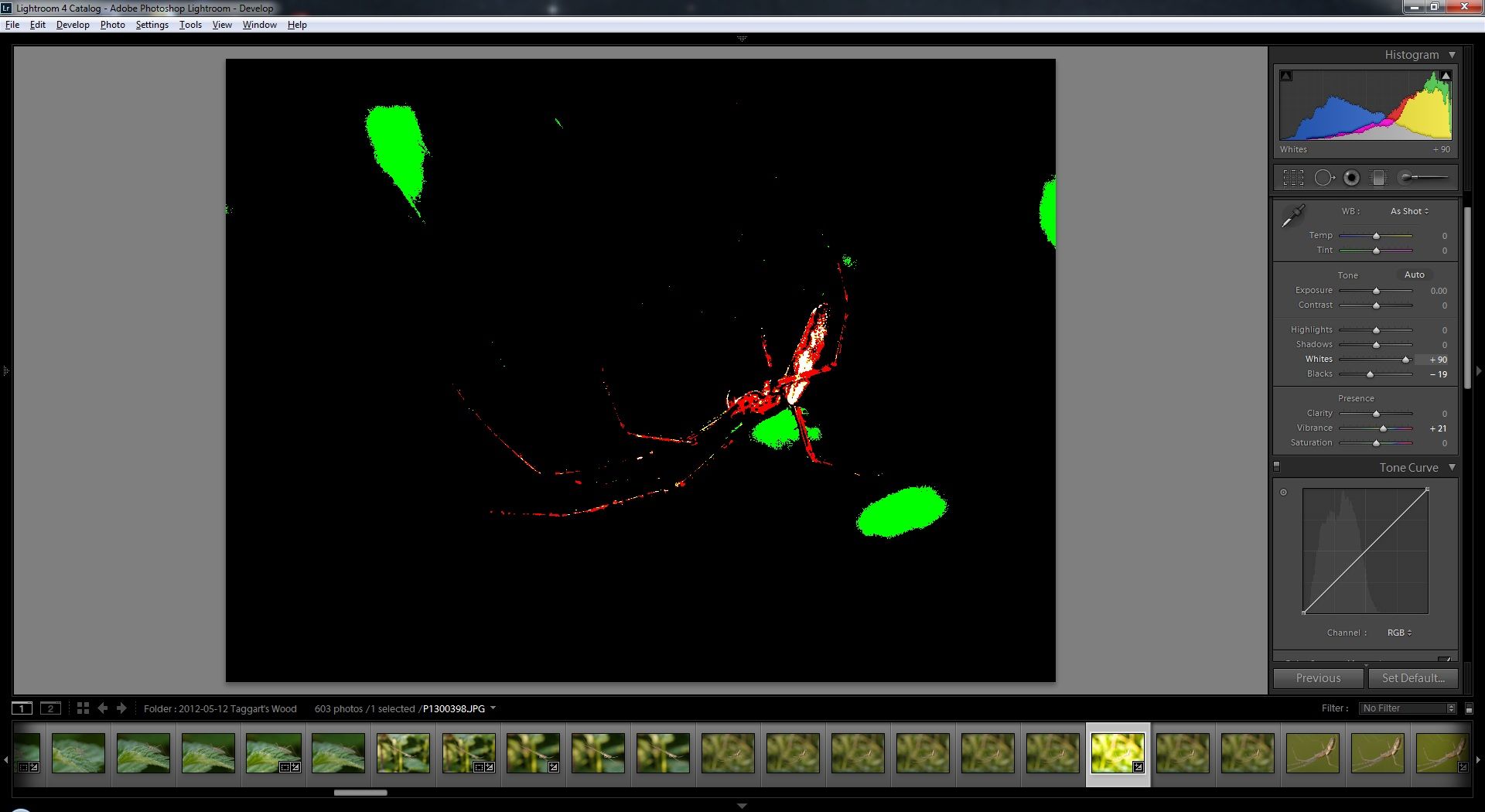
And in some cases Lightroom combines two fairly straightforward facilities to provide a combination of power and ease of use that I have not seen before (but I am several generations behind with Photoshop, and so perhaps this is quite normal these days). For example, one of my first steps in Photoshop would be to look at the histogram and close up any gaps at the top or bottom. That is easy enough, but deciding how much further to pull in either the white point or black point is more tricky - you need to know what is clipping and I would sometimes use the separate Threshold function to find out the distribution of highlights so as to get a better idea of what I could get away with. In Lightroom 4 the Whites and Blacks slider seems to be very similar to moving the white and black points in Levels in Photoshop. But, if you hold down the Alt key while using the sliders you get a Threshold view, which shows separate channel clipping as well as full 3-channel clipping, see below. So simple, but so very effective, usable and quick.
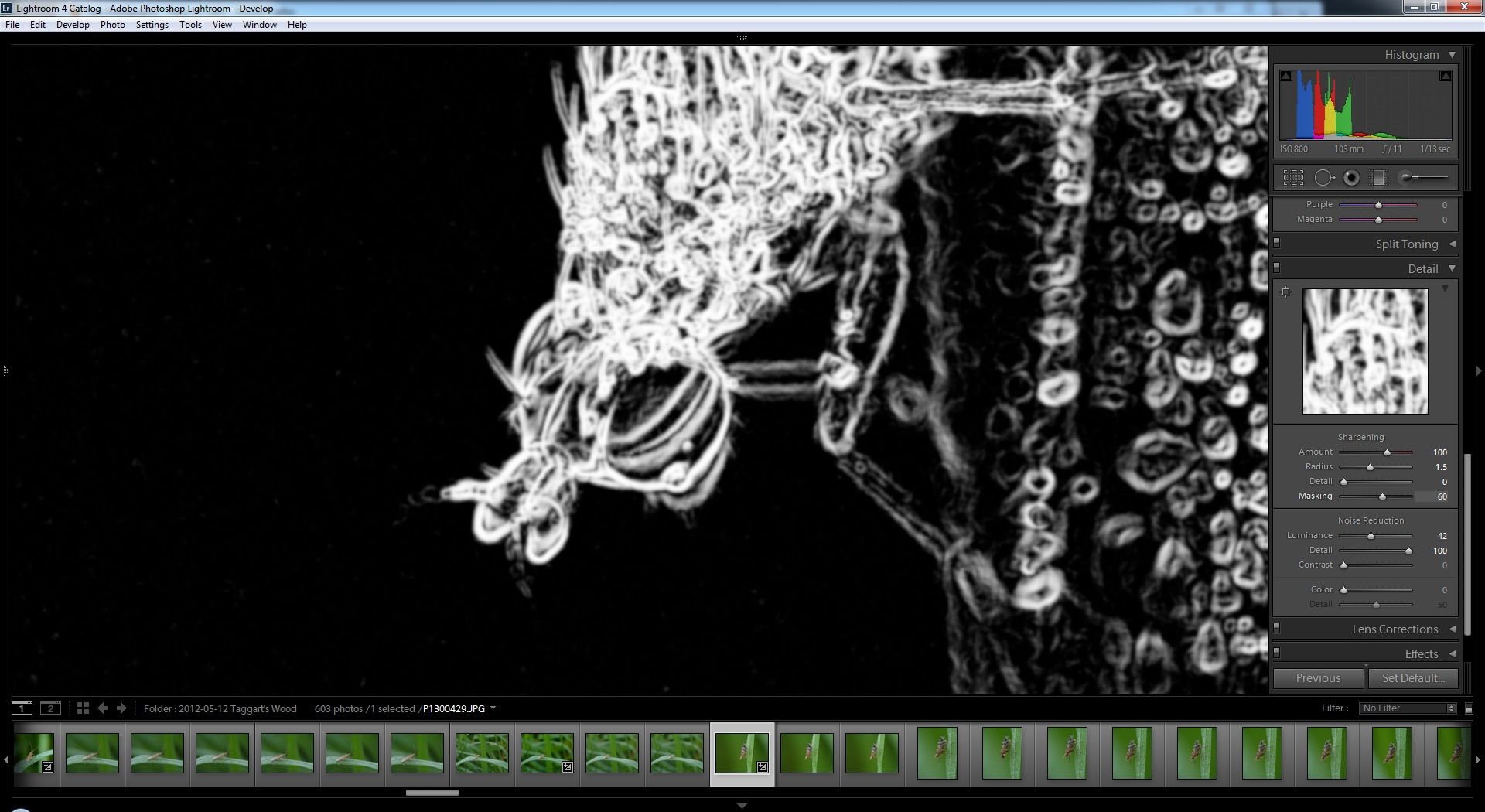
There is something similar with sharpening. If you hold down the Alt key while using the Amount slider the (part of) the image you are looking at goes greyscale, which makes it much easier to see the impact of sharpening, including the adverse effect on noise. If you hold down the Alt key while using the Radius or Detail slider you get to see, in greyscale, which areas in the picture are going to be impacted by the sharpening, the areas changing as you use the sliders. The Masking slider stops sharpening being applied to areas with no or weak edges, and if you hold down the Alt key while using the Masking slider you get to see in greyscale where the sharpening will and won't be having an effect, see below. Again, simple, but very effective in function and usability.

Musicman
Suspended / Banned
- Messages
- 9,866
- Name
- Rob Telford
- Edit My Images
- No
GardenersHelper said:There are obviously plenty of things that you simply can't achieve in Lightroom, for example perspective correction (which doesn't matter to me as it happens)
LR's Lens Corrections panel has vertical and horizontal perspective corrections. I use them all the time.
- Messages
- 6,343
- Name
- Nick
- Edit My Images
- Yes
LR's Lens Corrections panel has vertical and horizontal perspective corrections. I use them all the time.
Excellent! Thanks. I'm glad to be wrong about that.
(But no generalised warp though, which is what I sometimes need.)

swanseamale47
Suspended / Banned
- Messages
- 10,876
- Name
- wayne clarke
- Edit My Images
- Yes
+1 yeah and what version are you using
Does the latest photoshop elements have the same RAW processing capabilities of Lightroom?
Yes and no, it has the same processing engine under the hood, but lacks some of the raw options like split toning, curves, hue/saturation, etc.
digital
Suspended / Banned
- Messages
- 1,180
- Edit My Images
- No
Can you expand on this please, how can you use this scheme if you have a child?
http://www.adobe.com/uk/special/education/students/studentteacheredition/order_fulfillment.html should explain.

symmetricalOCD
Suspended / Banned
- Messages
- 478
- Name
- Ben
- Edit My Images
- Yes
I have recently started using Lightroom after several years of using CS2 (with the Noiseware plugin).
I recently decided to move to raw and I had thought that I would just use Lightroom (version 3 came free with my camera) to load raw images and then transfer them across to CS2, with which I am very comfortable. However I couldn't resist having a little play with Lightroom for processing and before I knew it I had ordered an upgrade to version 4 and bought a book about it.
Not surprisingly there are things I can't do in Lightroom, but I am astonished at what I can do with it, and how easily, and with what good (to my eye) results. I don't have many raw images to play with yet, and the opportunities for getting more of my favourite invertebrate and flower piccies are a bit limited at the moment. So, in order to get some substantial practice with Lightroom I am currently going through a day's (750+) JPEG images from my backlog, from a shoot at a nature reserve in May. I am about a third of the way through and have picked and processed about 30 images (processed for screen viewing - haven't explored processing for printing yet). I have only been tempted to go into CS2 once, to do some cloning, but it turned out that I could do it in Lightroom after all. So thus far everything, including noise reduction, has been done in Lightroom, and a good proportion of the images are ISO 800, which is as high as I could comfortably go with my G3 when using CS2 and the Noiseware plugin. (Culling and image selection is a significant operation for these fairly large image sets. For that I assumed I would continue to use Faststone. Here too, I have not left Lightroom yet.)
I'm not suggesting Lightroom is a substitute for Photoshop or a similarly high-functionality application. There are obviously plenty of things that you simply can't achieve in Lightroom, for example perspective correction (which doesn't matter to me as it happens) or more general warping (which does).
And there are some other areas which have been implemented in Lightroom but seem a bit weak to me - cloning/healing is one (cloning is crude - complicated to explain - and healing tends to leave faint but visible outlines around the "healed" area). Highlights/shadows is another weak area IMO; you only have a couple of stops of latitude. I for one need more, and for difficult cases I will have to go over to Photoshop, where even CS2 has Shadows and Highlights functionality which not only allows more latitude, it also allows much more subtle control with its additional Tonal Width and Radius parameters.
However, there are some other things that I had assumed needed some Photoshop functionality that Lightroom doesn't have, but which it turns out can be achieved in Lightroom by other means.
For example, in CS2 I would use a soft light layer merge-down to enrich colours. Gentle use of the Vibrance slider in Lightroom seems to achieve what I need, more easily and quicker.
Or selective noise reduction. I had assumed this needed either layers and masks or, what I used, CS2 selection facilities coupled with native CS2 or plugin noise reduction. In Lightroom 4 you can define areas for selective noise reduction (and loads of other functions) using the Adjustment Brush, which has a very good auto mask facility. And where the auto mask allows overspill, you can simply hold down the Alt key and use the brush (still in auto mask mode) to reverse the operation. It is similar to painting on a mask in Photoshop. And having defined the area you can then decide how much Luminance and Colour noise reduction to apply, and the detail protection to apply in each case. It doesn't have the huge range of options the (for example) Noiseware plugin has, but thus far I am finding it sufficient for my purposes. (And btw if it isn't quite right you can come back to it later and alter the area covered and/or the parameters, independently from any other operations - i.e. you don't have to go back through an undo stack undoing other things that you don't want to change and do again. It is a similar effect to what you can do with adjustment layers in Photoshop etc).
And in some cases Lightroom combines two fairly straightforward facilities to provide a combination of power and ease of use that I have not seen before (but I am several generations behind with Photoshop, and so perhaps this is quite normal these days). For example, one of my first steps in Photoshop would be to look at the histogram and close up any gaps at the top or bottom. That is easy enough, but deciding how much further to pull in either the white point or black point is more tricky - you need to know what is clipping and I would sometimes use the separate Threshold function to find out the distribution of highlights so as to get a better idea of what I could get away with. In Lightroom 4 the Whites and Blacks slider seems to be very similar to moving the white and black points in Levels in Photoshop. But, if you hold down the Alt key while using the sliders you get a Threshold view, which shows separate channel clipping as well as full 3-channel clipping, see below. So simple, but so very effective, usable and quick.
There is something similar with sharpening. If you hold down the Alt key while using the Amount slider the (part of) the image you are looking at goes greyscale, which makes it much easier to see the impact of sharpening, including the adverse effect on noise. If you hold down the Alt key while using the Radius or Detail slider you get to see, in greyscale, which areas in the picture are going to be impacted by the sharpening, the areas changing as you use the sliders. The Masking slider stops sharpening being applied to areas with no or weak edges, and if you hold down the Alt key while using the Masking slider you get to see in greyscale where the sharpening will and won't be having an effect, see below. Again, simple, but very effective in function and usability.
I can't thankyou enough for sharing the 'alt key' trick!
- Messages
- 6,343
- Name
- Nick
- Edit My Images
- Yes
I can't thankyou enough for sharing the 'alt key' trick!
It's pretty good isn't it.
I watched loads of videos on the Adobe site and it was in one of them I think. I'm (slowly) reading through Martin Evening's book on Lightroom 4 and hoping there is some more magic yet to be revealed!
- Messages
- 6,343
- Name
- Nick
- Edit My Images
- Yes
I am about a third of the way through and have picked and processed about 30 images (processed for screen viewing - haven't explored processing for printing yet). I have only been tempted to go into CS2 once, to do some cloning, but it turned out that I could do it in Lightroom after all. So thus far everything, including noise reduction, has been done in Lightroom, and a good proportion of the images are ISO 800, which is as high as I could comfortably go with my G3 when using CS2 and the Noiseware plugin....
[As for] selective noise reduction. I had assumed this needed either layers and masks or, what I used, CS2 selection facilities coupled with native CS2 or plugin noise reduction. In Lightroom 4 you can [do various things, and] .... thus far I am finding it sufficient for my [noise reduction] purposes.
I took a rest from the nature reserve set to have (another, 5th) go at some more difficult images. Amongst them there are a couple of ISO 3200 (raw) images that have been particularly problematic. I have tried Lightroom by itself, and Lightroom with (trial versions of) Nik and Topaz noise reduction plugins. After many attempts I still wasn't able to get results that seemed "good enough" to me.
All that was done working with 16 bit functionality. I then tried using the Noiseware plugin in CS2 with layers and masks. Even though I had to drop down to 8 bits to use the Noiseware plugin, I still got better (to my eye) results with just a couple of attempts using a technique I'm not familiar with than with several tens of attempts with Lightroom with and without the 16 bit plugins. It wasn't anything particular about Noiseware; it was the flexibility of painting (and unpainting) on layer masks with a choice of opacity for the brushes and for the layers, and then combining the effects across layers.
The results still didn't quite reach my personal "good enough" bar, and I may just be asking too much of my camera/my (or any) post processing software/these particular images. But it did remind me forcibly of the additional flexibility and power of Photoshop, GIMP, PaintShop Pro, Paint.net etc compared to Lightroom.

decigallen
Suspended / Banned
- Messages
- 1,157
- Edit My Images
- No
The biggest annoyance about Lightroom STILL hasn't been remedied with the 4th one. When you've a group of images selected and you click on an image within the group it doesn't de-select the rest. So many times this has caused me to delete photos. Today it was 350 wedding photos that I'd edited - I still have the pics but all my edits are gone. 3 hours work.
A simple Undo Delete function is all i've wanted since I first used lightroom. How hard would that be to program?!?!
A simple Undo Delete function is all i've wanted since I first used lightroom. How hard would that be to program?!?!

JonathanRyan
Suspended / Banned
- Messages
- 10,765
- Name
- Jonathan
- Edit My Images
- Yes
The biggest annoyance about Lightroom STILL hasn't been remedied with the 4th one. When you've a group of images selected and you click on an image within the group it doesn't de-select the rest.
That's deliberate behaviour. Lightroom has the concept of "most selected" and "other selected". Takes a moment to get your head round but very powerful.
Doesn't it pop up a "really delete" window? That tells you how many you are going to delete.
decigallen
Suspended / Banned
- Messages
- 1,157
- Edit My Images
- No
It does, I know. But its easy to not look at that when you're in full workflow mode and editing quickly.
A simple undo delete option would sort out any problem or confusion. I'm really not alone in this issue from what I've read online. It happens to me rarely, but when it does it wastes hours of my time.
A simple undo delete option would sort out any problem or confusion. I'm really not alone in this issue from what I've read online. It happens to me rarely, but when it does it wastes hours of my time.

pmaccyd
Suspended / Banned
- Messages
- 234
- Name
- Paul
- Edit My Images
- Yes
As a die hard Aperture user it's a bit sad that I've just moved to Lightroom (a couple of days ago.) I've always struggled with the earlier versions of Lightroom and found Aperture a breath of fresh air. Sadly though with no major upgrades from Apple and no concrete rumours of Aperture 4. Moving (although a PITA) was a no brainier for me, to many good features to ignore. Bet Aperture 4 comes out tomorrow!!

Cagey75
Suspended / Banned
- Messages
- 17,146
- Name
- Keith
- Edit My Images
- No
I've been using LR since 2. When I got 4 at first I was missing the fill light slider, but soon discovered that between highlight and shadow sliders it's much more powerful. Loving it. It runs smooth as butter on my i7 lappy too.
I almost always finish up in PS though.
I almost always finish up in PS though.