Lighting help

AMac

Suspended / Banned
Messages
203
Name
Alex
Edit My Images
Yes
Hi everyone,

I am trying to learn a bit more about off camera flash. I would like to be learning portraits but none of the family have enough patience to sit still for long enough lol.

So I have decided to learn it on still life, but I am only just starting out so I do not know very much yet!

With this image I was trying to get a dramatic look, sort of bright one side and strong shadows.
It has one off camera flash through an umbrella, 1/60 - 4.5-100 iso, flash set to -1/16.
However if I turn the flash up to get stronger shadows, it makes the black paper background go grey.
I have tried messing around, but can not get it right, should a smaller aperture make the background darker?
Thanks for any help or advice.
http://www.flickr.com/photos/16747305@N02/6251090940/
 
Last edited:
You need to get the background further away from the light, or get the light closer to the candle and dial it down. It's the light-subject/light-background ratio that's important, as the light attenuates with distance. If that doesn't do it, cut out one or more gobos from black cardboard and use them to block unwanted light.

Think of it this way.. if the candle was right next to the background, you couldn't illuminate it without also spilling the same amount of light on the background. If the background as a mile away, there'd be no light falling on it for sure. Your solution is somewhere in between :D

A smaller aperture will darken the entire scene by lowering the exposure so it's no help.
 
Yes, the subject needs to be further from the candle or the light needs to be closer to the candle to reduce the amount of light hitting the background - but basically you're using the wrong modifier for your purpose, an umbrella is far too big, the light from it is wrapping around the subject - and moving it closer will make the problem far worse.

You need to try again, but without the umbrella.
 
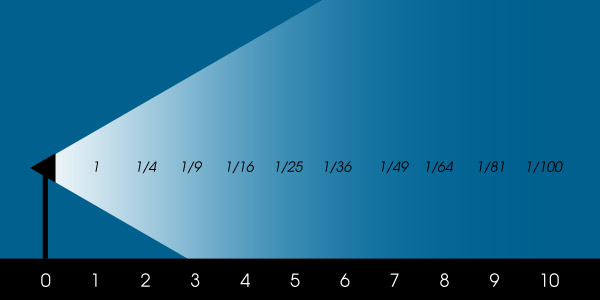
The inverse square law dictates that light decays over distance so if you move the umbrella twice the distance away from the subject then you'll only get 25% of the light.

Move your subject closer to the umbrella and further away from the background.

1.jpg


Get your distance to subject right, keep your aperture and ISO consistent and then move away from the background. If you're short of room then move the umbrella closer and narrow your aperture to retain the correct exposure.

Remember, the closer the light the softer the light. When you move the umbrella closer you're ultimately creating a larger light source.
 
The inverse square law dictates that light decays over distance so if you move the umbrella twice the distance away from the subject then you'll only get 25% of the light.

Move your subject closer to the umbrella and further away from the background.


Get your distance to subject right, keep your aperture and ISO consistent and then move away from the background. If you're short of room then move the umbrella closer and narrow your aperture to retain the correct exposure.

Remember, the closer the light the softer the light. When you move the umbrella closer you're ultimately creating a larger light source.

Good post but... not the right answer for the OP.
The OP specifically said
With this image I was trying to get a dramatic look, sort of bright one side and strong shadows.
. If he follows your advice he'll get even more of a wraparound effect and the shadows will be far less strong.

Even though your advice is spot on in theory, for this situation he needs to remove the umbrella to get the light source much smaller. He can then move it closer
 
Cheers guys,
I think I have got it, try to get the candle further away from the background, lose the umbrella to reduce the light size and move the flash closer to the candle.
will give it a ago sometime time this week.
I guess a home made snoop (if that is the correct word) might help to.
 
Back
Top