Lighting Challenge #9: Black on Black

sk66

Suspended / Banned
Messages
9,557
Name
Steven
Edit My Images
Yes
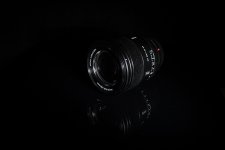
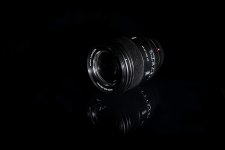
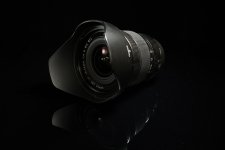
The brief: A dark and dramatic picture of a black lens on a black background. Branding is important.

The challenge here is to photograph a black object on a black background while providing separation. It’s really a challenge about falloff, one of the key characteristics of lighting. In order to illuminate a black object while also not illuminating the background notably you need to have a high rate of falloff, a large separation distance, or some combination of both.

This is a chart that shows the light falloff of a diffused light source verses a very hard point light source (the Inverse Square Law). The main thing to take away from this is that falloff increases rapidly when the subject distance is less than ~ 3x the diagonal/diameter for a diffused source. And by approximately 5x the distance the diffused light source looks and acts like a hard light source. I.e. there is no point to using small modifiers from large distances.
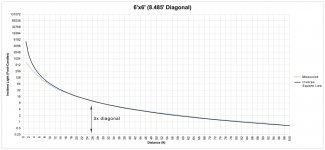
Diffused-falloff.jpg

Because the distance is shorter, the power must be lower, and the light travels less distance... If you cannot get the power low enough, just add more diffusion. You cannot move the light farther away, because that makes the light harder and the rate of falloff less. This shows the fallacy of changing the distance to change the softness (apparent size)… that works, but it affects only one aspect of lighting character. And you cannot just change the camera exposure settings, because that doesn’t change the lighting ratio or where it’s falling.


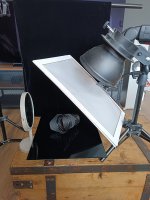
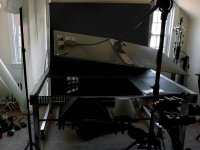
My setup. (this is not the exact setup/positioning as the original image was taken years ago)
DSCF2911-1024jpg-3.jpg

- Black paper roll background. Doesn’t really matter what it is as long as it is black. It doesn’t need to be seamless as the break should be invisible in the blackness (or edited out).

- A stainless steel mirror for the reflection; the mirror becomes the color of the background at the right camera angles, and it is highly effective at creating the reflected image; sometimes too effective (can be faded in post).
Other options would be black acrylic (perspex), or a gloss black tile (sample tile?). I’ve gotten double sink cutouts (marble/etc) for free from custom countertop shops before. A very thin sheet of clear acrylic over a black surface can work (e.g. poster frame "glass"). Thicker sheets/glass will create two reflections; one from each air interface/surface; that can be eliminated by painting the back of the plate black. A glass mirror will create a double reflection.

- The reflection is optional; but it makes creating the separation easier. Pointing the light away from the camera creates a larger range of angles/height the camera can be placed without the light showing in the surface; but all of the surface is illuminated. And because it is a reflective surface it is bouncing some light back up into the object, illuminating it from below and separating it from the surface. This is more obvious in the setup image.
Without the reflective surface you will need a bounce panel placed close, but in a position where it can be edited out. And a lighting angle that works for both the subject and the bounce panel. A gloss black surface will still reflect some light; it may/may not be enough.

- The light is a 4ft x 2ft (4.4 ft diagonal) diffused LED panel on a boom stand. It is not the light I actually used. I probably used a 4ft octa, or a 2ft x 3ft softbox… it doesn’t matter, I could have used a sheet; I could have placed the surface close to the ceiling and used a bounced table lamp. What matters is that it is large enough and close enough.

- The entire left side of the table area is covered by a silk (transparent shower curtain). This is necessary because convex surfaces see a huge area, and reflect it back to the camera. When photographing shiny things I find it’s easier to think in terms of creating the environment that is going to be reflected as opposed to “lighting.”
The white surface is also required for illumination from that side. It could be a bounce panel and a separate light. It could be a bounce panel placed close enough to bounce the main light (probably difficult with the high curvature of this lens). Or the silk could be lit from the opposite side… in this case there’s an open window and a white wall (bounce surface) a short distance away.

- The window to the right would probably need covered; I believe I blacked out both windows when I took the final image… I often do that as default for this kind of work.
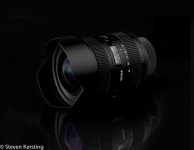
15154626313_6a45a473f6_c.jpg

A few notes:

It is extremely hard to eliminate an unwanted reflection/catchlight by changing camera position… it follows the camera around. I.e. almost every surface of the lens is being illuminated, so the reflection/catchlight exists everywhere. The camera can only see the one being reflected back to it, and when you move the camera it sees that one.

The reflection in the surface is at a greater focal distance than the subject is.

A dark image means a lack of light recorded which means a lack of data, higher levels of noise, and a reduced ability to edit it without causing issues (banding, blocking up, etc). These types of images benefit from overexposure knowing the exposure will require editing.
Specular highlights and white lettering can be allowed to clip. However, translucent highlights cannot (i.e. the focus distance window).

Once you understand everything the basics of lighting are rather easy. I was able to setup and take the setup image in about 10 minutes ; that includes swapping backgrounds, placing/cleaning the mirror, positioning the light, and snapping the picture. And the result is probably 90% there… it’s the remaining 10% that takes all the time. It does help that the table, BG's, and light are always set up and that I have a dedicated space. But FWIW, everything I used was "overkill" for this challenge...

And finally, if I were to take the picture again I would probably try to change some things; mainly the reflection in the lens; maybe composite a couple different exposures, maybe try to get a touch more light in under the lens… the image isn’t perfect; I don’t think I’ve ever taken a perfect image.
 
Last edited:
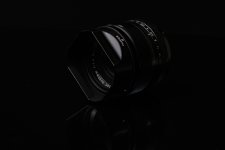
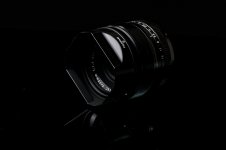
Here`s my attempt (not at all easy ;))

setup.jpgDSCF8128 SoC SML.jpgDSCF8128 edit SML.jpg

set up, soc and an edited one.
Fuji xt5 80mm godox 685
 
Here`s my attempt (not at all easy ;))
Nice; you've made it a little harder on yourself.

Because you are lighting from "behind" it has created very little visible reflection and you've lost most of the front (recovered somewhat). In my example I am lighting more from the front. It is light bouncing off the lens and into the acrylic that creates the reflection. Lighting more from the front also makes it easier to not see the light in the reflection... because the light is bouncing/reflecting away from the camera.

You could have used a small paper bounce panel (V-flat) to lift the front/reflection instead of changing the light position (to keep the main light feathered away from the BG).
 
Last edited:
Nice; you've made it a little harder on yourself.

Because you are lighting from "behind" it has created very little visible reflection and you've lost most of the front (recovered somewhat). In my example I am lighting more from the front. It is light bouncing off the lens and into the acrylic that creates the reflection. Lighting more from the front also makes it easier to not see the light in the reflection... because the light is bouncing/reflecting away from the camera.

You could have used a mall paper bounce panel (V-flat) to lift the front/reflection instead of changing the light position (to keep the main light feathered away from the BG).
I appreciate your reply, thank you.

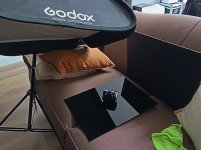
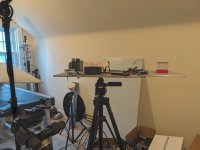
I'll try again tomorrow and see what I can manage. But a bit limited with only an A3 piece of acrylic. As you can see, it's a bit ad-hoc :ROFLMAO: Plus all my flat surfaces are below big ass skylights. So had to use the sofa.
 
Last edited:
I appreciate your reply, thank you.

I'll try again tomorrow and see what I can manage. But a bit limited with only an A3 piece of acrylic. As you can see, it's a bit ad-hoc :ROFLMAO: Plus all my flat surfaces are below big ass skylights. So had to use the sofa.
I've got a crappy old tripod I've converted into a "product stand." Basically, just attach a camera plate to a piece of board, then place your product/acrylic/etc on top of it. Sometimes having a smaller work surface makes it a lot easier to position everything around it. A stool of almost any sort could work, but might be a bit low.

I also use it as a laptop table for photographing tethered; and to just collect crap like it is now.
 

Attachments

  • Untitled-1.jpg
    Untitled-1.jpg
    434.4 KB · Views: 13
Last edited:
Good method. I use an old Black & Decker Workmate, it can be a bit low sometimes but I also have a few bricks:)
The main advantage (other than the fact that I was given it) is that I can put lights wherever they need to be.
 
My table isn't a table at all. It's a table top, probably the extra from a batch made by a cabinet shop to replace the table tops of a small restaurant. This one has a slight warp to it, so never got made into an actual table with legs. It is Formica covered top and edges with a red wine colored laminate, but it doesn't matter. My son found it in a Flea Market. He thinks he paid $2 for it, but he brought it to me as a possible starter for the table that I was looking for. I have a woodworking shop, so he expected me to make the rest of the table to use it with, but I never did. It occupies less space in my studio when stored this way.

I place this table top on the top of a tall wooden stool that I bought from Walmart, whenever I want to use it for photography. I add a piece of the runner tray liner material that was intended for use to line toolbox drawers, to the top of the stool, so the table top won't slide around easily. The slight warped area is always turned to one side so it doesn't show in the shots. This has worked as my table for many photo shoots, but in the past several years and deteriorating old age health, my ability to shoot this low has forced me to need a raised table surface. Since it isn't actually used as a table to sit at, I was free to raise it any amount needed. I liked what I had, and it collapses easily, so I just added 4 of the bed raising plastic molded pieces to it, raising the stool and table top about 8" higher. It now sits at about 34" from the floor to the top surface. It's amazingly steady for a 3 layer pile, so it is what I have been using now for a shooting table. Over the last several years I have been buying 54" square table covers in different colors to use when I want it to look like a restaurant table, or just use a large square of black felt when a non reflecting black surface is needed. If I want a larger table surface, It's just a piece of plywood or some Weathered boards that I have assembled together for use when I want a Weathered look surface to work from.

Anything that suites you and your need for the kind of shot that you want to take, will be perfect, no matter how you put it together. Nobody sees what is not in the shot, so it doesn't matter. The movie industry surrounds what you see in their movies with all kinds of things when making movies and you only see in the movies what they want you to see. Some backgrounds are real, but today the Western that you are watching could have been made in a city parking lot. They make use of all kinds of tricks like this or create what is needed in their computers, and you can too, with your photo processors. It's a different way of thinking, but takes a while to learn.

Use what you have, or can assemble. Make the one looking at your photos think what you want them to think when they look at it. Very little of it has to be real to pull this off.

Charley
 
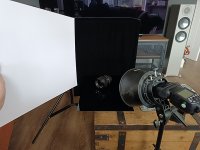
Second attempt (and a lot more trial and error). But happy with the final (apart from the dust). I used some black velvet for the bg this time, and a No 10 grid.

Fuji T5 and godox 685. Fuji 35mm ƒ/8.0, 1/100s, ISO 400

setup take 2.jpgDSCF8250 soc.jpg
Edited version...

Viltrox 27mm f1.2 Pro sml.jpg
 
Last edited:
That's better IMO. Honestly, I like the unedited version a bit more; I feel the contrast is a bit high in the final. But that could very easily be a difference in calibration/display settings; I thought the same of your first submission.

I wouldn't have thought to use a hard light like this, and I do prefer the soft light version; but that is just personal opinion. This does emphasize that the main issue here (falloff) is about distance and not size/softness.
 
That's better IMO. Honestly, I like the unedited version a bit more; I feel the contrast is a bit high in the final. But that could very easily be a difference in calibration/display settings; I thought the same of your first submission.

I wouldn't have thought to use a hard light like this, and I do prefer the soft light version; but that is just personal opinion. This does emphasize that the main issue here (falloff) is about distance and not size/softness.
Thanks, Steven. My main reason for the edit, was all the bloody dust specks on the acrylic sheet. But as usual I played with the sliders a bit ;)
To be honest, I didn`t have any room for the softbox thingy, so decided to try with the grid thing.

That is one of the biggest headaches with product photography... dust, fingerprints, minor defects that went unnoticed...
Nightmare, and I (thought) cleaned everything. Hey ho was a great challenge all the same. Thank you (y)
 
I don't want to take this thread off-course, but these challenges are about learning useful techniques, and this technique is very useful. I don't think that we should worry too much about blemishes, dust and similar, commercial photographers (or at least their assistants) often spend more time on subject prep than on the actual photography, but we don't need to worry about this.
 
I don't want to take this thread off-course, but these challenges are about learning useful techniques, and this technique is very useful. I don't think that we should worry too much about blemishes, dust and similar, commercial photographers (or at least their assistants) often spend more time on subject prep than on the actual photography, but we don't need to worry about this.
Fair point, and noted (y)
 
If one hasn't messed with this you just don't realize how big of a difference small changes can make...
I really have enjoyed all of these challenges, and it has helped in my understanding.
 
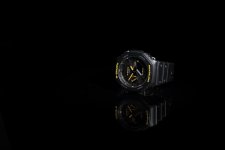
So not a lens, but had another play today. Very similar setup as before (sorry forgot to take pic). Just cropped a bit and a few dust flecks removed. Other than that, very minimal PP.

XT5 godox 685 #10 grid f8 iso200

G-Shock sml.jpg
 
So not a lens, but had another play today.
Nice.
Being picky, the highlight is a bit harsh IMO; part of that is probably the metal buckle peaking out from behind I think. The left edge, and the right edge of the face, could benefit from a bit of bounced fill as well.
 
Nice.
Being picky, the highlight is a bit harsh IMO; part of that is probably the metal buckle peaking out from behind I think. The left edge, and the right edge of the face, could benefit from a bit of bounced fill as well.
Thanks, Steven.
Yeah the highlights on the buttons and bloody buckle were a bit of a pain. I'll look into trying to get the face lit better.
I appreciate your input and suggestions.
 
Your light is small/hard for curved/specular surfaces; your softbox would be a better choice.
I'll try the soft box next then (y)
Watch this space (no pun intended) ;)
 
I have some small square (about 12"X 12") Godox SA-30 Soft boxes that I bought several years ago for one shoot, but find that I'm frequently using them for my tabletop shoots. They are used with Bowens mount adapters or S2 brackets, so fully interchangeable with all of my other soft boxes and studio lights, even my speedlites and AD200 Pro II lights with the use of S2 Brackets to adapt them. I also have and use Godox 9" X 36" soft boxes, usually vertically oriented, when shooting vases of flowers to light them evenly from tabletop up. For these, to avoid glare off of the hard shiny vase I position the soft boxes on both sides of the table just slightly behind the subject, so feathering the light from them. If additional light is needed on the vase and flowers, I use pieces of white foam core placed standing on edge on the table clamped to pieces of wood to create a foot for the foam core on each side of the camera lens to reflect some of the soft box light back toward the front of the flowers and vase. To avoid any lens flare from the lights I place a piece of black foam core with a hole in it's center in front of the camera lens, positioned to block any of the light from directly reaching the camera lens. Only the vase and flowers can then be seen through this hole by the camera.

Charley
 
Well, being that I seem to be the only one having a go at this. I figured I`d give it another try. 1/13th f8 iso400 godox 685. Mirror and diffuser. The only adjustments were WB to flash, and filled the edges with CA fill.


setup.jpg10-24 SoC.jpg
 
Last edited:
Well, being that I seem to be the only one having a go at this. I figured I`d give it another try. 1/13th f8 iso400 godox 685. Mirror and diffuser.
I'd be curious to see what difference the diffusion panel made. It would certainly counter the 10˚ honeycomb and add more wrap, but it is so close to the source and the subject that I'm not sure how effective/significant it actually is.

The mirror is somewhat problematic IMO in that it has created multiple distracting hotspots in the front element. The problem with convex reflective surfaces is that they see/reflect everything. So for a uniform/pleasing reflection you have to fill the entire area it sees... the entire area doesn't have to be of uniform brightness, sometimes a graduation is more pleasing.
Or, you can plan for this from the beginning (composite second image, etc). FWIW, the smaller reflections are probably internal reflections of the larger one.
 
Last edited:
I wasn't going to post in this thread for various reasons, but as @Paulie-W is the only person who has so far I thought it would be rude not to:)
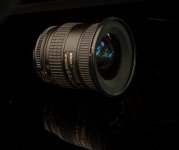
One of my reasons for not posting is that I just don't have any suitable subjects. This is one of my most modern lenses, bought second-hand about 25 years ago, and it's seen heavy use. I didn't even bother to clean it up. At least it does have branding, which is an important need.

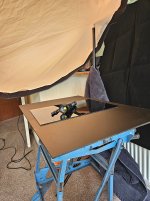
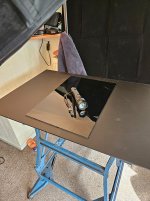
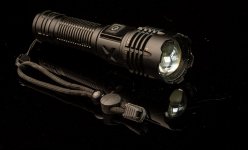
My second subject is an LED torch, much more recent, it's probably only been in my hi viz jacket for a few years, I did blow the bits of straw and hay off but didn't go beyond that on the cleaning side. No branding on this one. My setup shots were taken right at the end, and only show the torch.
Here's my first setup shot
1000000562.jpg
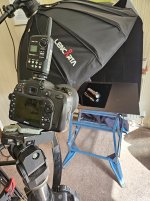
I haven't got a boom arm - no space - but have a little attachment that fits to a sturdy tripod that does the job, but it was unbalanced, I should really have swapped the tripods around, the one that the camera is on would have been fine - but I wanted to use it with the camera because it's much easier to get the height right with the pneumatic damped centre column that it has, so the lighting stand shown in the pic is stopping it from crashing to the ground. The lighting stand is shiny black, and because it's a Lencarta Redline stand it has those bright red locking knobs, not normally a problem but although the red weren't reflecting as such within the frame, they were there so a black towel hid them from sight. Right at the back is a bit of very black material, it looks far more black than the towel because it does a great job of absorbing the light, even at this very close distance.
The large sheet of acrylic has a matt finish, it was there to prevent unwanted colour contamination and to support the shiny black bit of acrylic that supports the subject. That shiny one has seen better days, I cleaned it up, it does the job but of course needs some retouching, which I never do for any tutorial-type shots. It is also only just big enough.
1000000563.jpg
1000000564.jpg

@sk66 used a lighting silk to light the lens, that's absolutely essential but I just don't have room for one, another excuse for not posting . . .
If I did have one then it would have hung free and loose, and would have been lit unevenly to create a graduated specular highlight. I could have just about found room for a diffusion panel but, as it's stretched taut it wouldn't have been the same.
So here's my shot
lens.jpg
The lens was facing a very large window, so I increased the exposure so that some light from the window would produce a poor alternative to a lighting silk.
I then photographed the torch, at 1/125th, again with the window light making a contribution of sorts
torch off.jpg
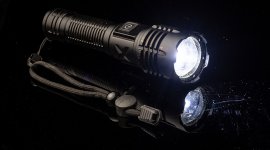
And, finally, I switched the torch on
long exp torch.jpg
This shot really does show the need for retouching:)

So, there you go, all SOOC, it's going to be very easy for everyone to do much better, so please get on with it:)
 
Last edited:
I'd be curious to see what difference the diffusion panel made. It would certainly counter the 10˚ honeycomb and add more wrap, but it is so close to the source and the subject that I'm not sure how effective/significant it actually is.

The mirror is somewhat problematic IMO in that it has created multiple distracting hotspots in the front element. The problem with convex reflective surfaces is that they see/reflect everything. So for a uniform/pleasing reflection you have to fill the entire area it sees... the entire area doesn't have to be of uniform brightness, sometimes a graduation is more pleasing.
Or, you can plan for this from the beginning (composite second image, etc). FWIW, the smaller reflections are probably internal reflections of the larger one.
Thanks, Steven.
I do think it has softened the light somewhat. But will play again, and see.
Strangely enough, I actually quite like all the reflections (distractions) in the element. But like everything, it's all subjective I guess :)
 
Hi

I have had a go at this. Struggled with the reflection I am assuming that it was more to do with the surface I was using it was pretty rough looking perspex I hope someone can clarify. Of course it could be my light/camera position. I did want the light more above to light the lens more but this just showed the perspex as greyish.
I took some with just the velour as a back drop too.

Gaz

Light more above.

Light lower.

Bounce added for lens rim.

Velour as base.

Velour as base, did have a bounce card to the right edge.

Bounce cards to highlight the edges.

Set up.
 
I have had a go at this. Struggled with the reflection I am assuming that it was more to do with the surface I was using it was pretty rough looking perspex I hope someone can clarify.
Some nice results there.

The issue with the greying perspex is mostly just angles... if the light were positioned terribly wrong the perspex would have been white (a reflection of the umbrella). And part of the issue is that you are not really using falloff because your light source is a bounce umbrella which is too far away. I.e. you have a lot of light/power you don't really need for the lens image. If your light had been much closer and weaker less light would reach the perspex directly. But that said, using just falloff wouldn't work as well with the AD200 image because it is standing vertical and on velour (the bottom would get lost).

Your use of bounce is generally very well done. But you can see the edges/end of it in the lens element... if you want a smooth/clean reflection whatever is going to be reflected by the curved element has to be huge relative to its' size. Using bounce to light a less reflective surface (side of AD200/speaker) does require more power/less falloff than something more reflective does, so the light position/distance has worked well for that.

And you've got a bit of the double reflection I noted you would get; but it's pretty subtle, the velour underneath worked better than I would have thought.

I really like the JBL speaker image. My only niggle is that when viewed full size it appears to be a rather dusty.
 
Last edited:
Hi thanks for the detailed reply. It's very much appreciated.
To be honest I have never used that umbrella on a product before so that's a good lesson to learn. Should I have used the soft box ?
On the first image where the light is over the subject I actually lifted the light stand up and over the lens, just out of the cameras view so very close. I could not show that in a BTS photo.

I definitely couldn't fathom how to stop reflections or achieve a smooth one in the glass element.

Yes the speaker is filthy I used it at work for ten minutes then decided against it as it's handy to have at home.

Plaster wrecks stuff pretty quickly.

Gaz
 
To be honest I have never used that umbrella on a product before so that's a good lesson to learn. Should I have used the soft box ?
I wouldn't say "should have" as the result you got is pretty good. But it would have made things easier and perhaps gotten a better result. For example, you can feather a softbox to minimize/eliminate light pollution of the perspex surface, along with more falloff due to placing it closer... i.e. more illumination/retention of the top edge as in the first image and retaining the reflection of the second image.
 
I'll try the soft box next time.
I seem to be able to get acceptable results reasonably easily but the finer points you mention, that extra 10% I find really difficult.
Funnily enough I just sold some roller skate wheels on Vinted and I took some photos of them on this acrylic. I used a reflector dish which I hadn't before, as I wanted a harder light. The reflection was very good then. I guess the light wasn't hitting the base.
I'm on my phone at the minute but I will upload a copy later. You maybe able to clarify that.


Thanks
 
Last edited:
Back
Top