Lighting Challenge 6, chiaroscuro lighting

Garry Edwards

Moderator
Messages
13,475
Name
Garry Edwards
Edit My Images
No
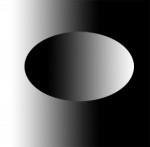
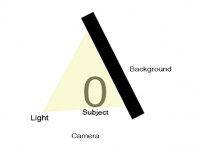
Chiaroscuro (from the Italian for light and dark) is a simple but very effective lighting approach that has been used by painters for centuries. It creates the closest thing we can get to a 3-D image in a 2-D medium, and of course it can also be combined with other lighting techniques and with selective focus. Basically, it just involves lighting one side of the subject only, and lighting the opposite side of the background only, so that we have the light side of the subject against the dark side of the background, and vice versa. So, in principle, it’s as simple as this computer graphic, but it can also be as complex as we want or need it to be.
graphic.jpg

I’ve written about it before, starting here and going into a fair amount of detail https://www.talkphotography.co.uk/tutorials/chiaroscuro-lighting.139/

But, for this lighting challenge, we’re going to use just one light:)
Is it even possible to do it with just one light? Yes it is, by taking advantage of the Inverse Square Law, which as you know causes light intensity to fall off over distance. The ISL can be both an enemy and a friend, and for this lighting challenge it’s a friend!

Why use a single light when it’s easier to use two? The answer is in the word CHALLENGE – use the ISL to do what seems to be impossible! The ISL is central to all creative lighting, it’s something that needs to be mastered as well as just understood, and it can only be mastered by usage.

I’ve just written a tutorial about the ISL here https://www.talkphotography.co.uk/tutorials/the-magic-of-distance-aka-the-inverse-square-law.164/ and if you don’t understand its importance in lighting, reading through it should help you with this lighting challenge.

Before we get stuck in, a statement of the obvious – Chiaroscuro lighting is very popular as a portrait lighting technique, but it’s just as useful and effective with other subjects too, so photography whatever you have to hand.

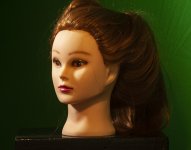
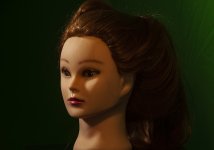
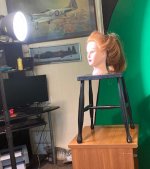
Here’s a stepback shot, showing my most patient and reliable model
chiaro_standard_stepback.jpg

Ignore the Spitfire and the Lancaster, look at the background instead. Chroma green may not be an ideal choice, but it’s what I have.

It’s hard to show, but the background has been placed at an acute angle, so that the right-hand side is much closer to the mannequin subject than the left-hand side, better shown in this simple graphic
angled background.jpg


Take a look at this video, which shows how the angled background works

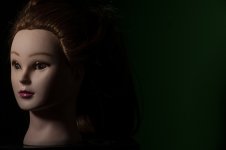
If we don’t angle the background and leave it square behind the subject, we get this, even though the background is very close to the subject, because nearly all of the light has fallen away over the distance between the subject and the background, our friend the ISL in action
chiaro_no background angle.jpg

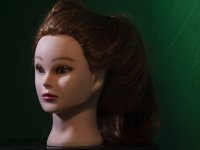
But if we do angle it, we get this, because the ISL has left much more light falling on to the background on the right-hand side
chiaro_softbox_1.jpg
These pop-up backgrounds are supposed to be flat and crease-free, but the problem that shouldn’t be there can be easily fixed in PP.

The lighting arrangement here is basically Rembrandt, and I was planning for this lighting challenge to be about Rembrandt lighting but as luck would have it we now have an interesting thread that explains Rembrandt lighting, so I didn’t need to bother. https://www.talkphotography.co.uk/threads/creating-rembrandt-lighting-look-in-portraitiure.763231/

And finally, a couple of people have commented that these challenges are . . . challenging – that’s the whole idea But if this one is too challenging and doesn’t attract enough participation then I’ll take the hint and stop them.
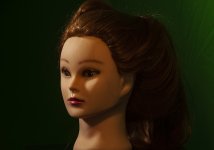
 

Attachments

  • chiaro_1.jpg
    chiaro_1.jpg
    234.1 KB · Views: 8
  • chiaro_1.jpg
    chiaro_1.jpg
    234.1 KB · Views: 8
  • chiaro with fill, standard.jpg
    chiaro with fill, standard.jpg
    311.7 KB · Views: 7
  • chiaro_1.jpg
    chiaro_1.jpg
    234.1 KB · Views: 8
And finally, a couple of people have commented that these challenges are . . . challenging – that’s the whole idea But if this one is too challenging and doesn’t attract enough participation then I’ll take the hint and stop them.
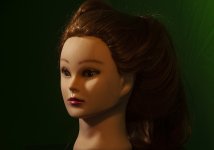
Noooooo, challenging is what a challenge is all about. If they're too easy, there is no challenge ;)
Please don't stop them Garry. I actually really look forward to having a go at these (y)
 
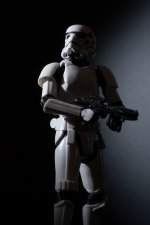
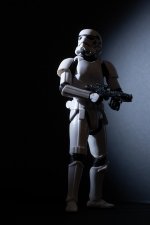
Well after a bit (lot) of faffing around, and reading properly lol. I think I finally got somewhere close ;)
..............................
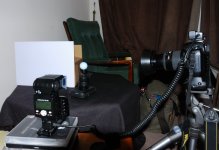
Lighting was a LED torch with black card and a small cut out, with some sellotape holding it in place.

Trooper 1 soc.jpgTropoper 2 soc.jpgstep back.jpg
 
Your torch was a bit too high, leading to a dark area on the background next to the head, but otherwise spot-on:)

See how easy it is? Just a torch, a couple of bits of cardboard, a growing understanding of the properties of light and you're well ahead of the people who are going to take part but haven't yet done so. Now we just need 20 more people . . .
 
Your torch was a bit too high, leading to a dark area on the background next to the head, but otherwise spot-on:)

See how easy it is? Just a torch, a couple of bits of cardboard, a growing understanding of the properties of light and you're well ahead of the people who are going to take part but haven't yet done so. Now we just need 20 more people . . .
Thanks, Garry.
Looking back, I probably should have cut a square (ish) hole in the card to make it easier. As the circular light took a bit of manipulating as to avoid spilling out too much at the back end.

Now we just have to wait on the others ;)
 
That was hard and good fun. Thanks Gary.

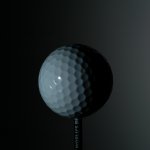
The subject was a golf ball again (I don't play golf so don't mind drilling a hole in it and turning it into a golf ball on a stick).

I used a flash. I had to turn down the power to the minimum and blank off some of the flash to stop it blowing the highlights. It was set at 24mm with a black piece of paper with a horizontal slot in to let some of the light through and a piece of translucent plastic in front to act as a diffuser. This gave me a flat, wide light source that I could direct towards the golf ball but didn't output much towards the far left hand side of the background. The background had to be at a very acute angle to the camera to get a good light fall off. I moved the background about to try and match the 50% light points on the ball and background.

An interesting problem was the light bouncing back off the background to light up the right hand edge of the ball. I pulled back the background as far as I could on the right hand side but I couldn't eliminate the light skimming off the shiny surface. Also, the far left edge of the ball is being negatively lit by the darker background so there is a slight shadow on the dimples there. The light is pretty much directly to the left of the ball but the curved shiny surface doesn't show that- the brightest part is at 45 degrees if viewed from above. I think that if I moved the flash further round to behind the ball a bit it would help with this.

Camera was a D100 with a 28-105 lens.

2024 Lighting 6 1.JPG2024 Lighting 6 2.JPG
 
You've found a good use for a golf ball, well done:)
There's nothing else to say really, you've done a good job. Real-world, it would be much easier to create Chiaroscuro lighting with 2 lights but you've demonstrated that it can be done well with just one, which is what this (quite difficult) challenge is all about.

As you and @Paulie-W have found out, delicate adjustments make a huge difference when we light creatively.
 
Had another try, and probably need a more powerful light (as the effect is a bit subtle). Linited space in my TV area ;) Will try again with a flash at sometinme and see what I can get.

Anyway I quite like it.

Portrait by Paulie-W, on Flickr
 
@Garry Edwards Im confused by this challenge, cant seem to get it with one light without a horrible shadow? Not sure what Im doing wrong to be honest.
This is probably the most "challenging" of the one-light challenge, it's easy enough with 2 lights.

I've taken another look at my initial post, and can't see any way of explaining it better than I have, it really is all about getting everything precisely right, getting the background at the right very acute angle (also necessary when using 2 lights) and taking full advantage of the effect of the Inverse Square Law.

I think that there are only 2 things to say

1. Use 2 lights if you have them, you don't need to make it harder by only using one, the whole idea is that people learn how to use the principles, there's nothing wrong with making life easier, the only competition is with ourselves.
2. I'm not sure what you mean by a horrible shadow. Why not post what you have (with stepback shots) and see whether anyone has any suggestions?
 
didnt take any stepback shots i have to admit and it was a quick try before the wife got back from shopping in the sitting room lol. I'll have a read through again and take my time, not sure Im completely getting how to get it right with one light, I do have 2 but like we say the challenge is in the one light so I'd like to see if I can achieve that :)
 
Last edited:
The first one looks right to me
 
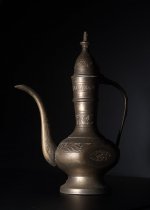
My attempt, I used a continuous light source which is much less powerful than my strobes as this was such a small setup. The background/ base is a simple product photography kit using the black inserts I got for Christmas.
Had to play with the subjects distance from the bg, its angle and the height of the light but I think I got there in the end. Personally I think the darkfield lighting was more difficult to get results I was pleased with but this was a close second in difficulty for sure.

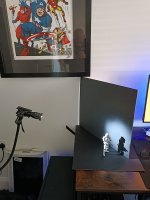
The setup, the slinky was my first subject. Don't mind the off camera flash trigger I just forgot to remove it, this is still only a one light setup.
PXL_20260125_223029368.RAW-01.COVER[1].jpg

And the results
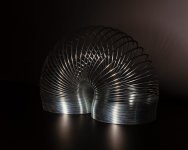
DSC04949.jpg

DSC04956.jpg
DSC04941.jpg
 
Last edited:
Very interesting shots, but the chiaroscuro effect is largely missing because the background needs to be at a pretty extreme angle.
Don't worry about it, just move your light source to a much more acute angle, and angle the background to suit and it will work - we all learn from mistakes, not successes:)
 
Very interesting shots, but the chiaroscuro effect is largely missing because the background needs to be at a pretty extreme angle.
Now I'm confused. I thought I had gotten it as per your examples.
Is this not the idea?
DSC04941v2.jpg

Does it need to be a more extreme transition between light and dark?
I had it setup at similar angles to yours so I'm wondering if the spread of my light or perhaps distance from subject might be a problem.
Perhaps I'll try it with a speedlight, it would save me the 10s exposures at least. :)
 
Last edited:
Now I'm confused. I thought I had gotten it as per your examples.
Is this not the idea?


Does it need to be a more extreme transition between light and dark?
I had it setup at similar angles to yours so I'm wondering if the spread of my light or perhaps distance from subject might be a problem.
Perhaps I'll try it with a speedlight, it would save me the 10s exposures at least. :)
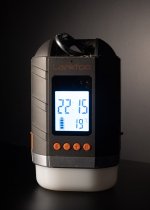
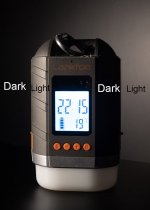
The last one, of the clock, (?) is absolutely fine, but for some reason it wasn't showing on my computer when I replied last night . . . I was commenting on what I saw, the other two. Maybe old age is getting to me, I apologise.
 
The last one, of the clock, (?) is absolutely fine, but for some reason it wasn't showing on my computer when I replied last night . . . I was commenting on what I saw, the other two. Maybe old age is getting to me, I apologise.
No need to apologise Garry, when I was posting I had forgotten to resize that last one to the forum limit so I quickly resized and added it a couple minutes later. Not your old age at all.

Weirdly all 3 images were shot at similar angles. I did change the shutter speeds a bit to compensate for the shiny metal and avoid burnt out glares.
 
Wow, just looked at them with my phone and I think my pc screen is a touch bright as they look much darker on the phone.
 
No need to apologise Garry, when I was posting I had forgotten to resize that last one to the forum limit so I quickly resized and added it a couple minutes later. Not your old age at all.
Right, that's one of the mysteries of the universe explained, I replied too quickly, before your edit:)
Weirdly all 3 images were shot at similar angles. I did change the shutter speeds a bit to compensate for the shiny metal and avoid burnt out glares.
Photography is all about light, and light follows the immutable laws of physics. We can photograph any number of different subjects with identical lighting and camera position/angle, and every one will be different.

Take the slinky, interesting shape but very complex, the light is bouncing off it at multiple angles, and some light will be able to pass straight through it, nothing is impossible but it isn't the easiest of subjects for this lighting technique and you've probably done better than I would. Incidentally, there is no artificial light source on earth big enough to prevent those multiple and very bright specular reflections. To avoid those reflections you'd need to shoot it outdoors on a very dull, overcast day. This would produce a very boring shot, with no discernible reflections. This is all explained (hopefully) in the thread on specular reflections https://www.talkphotography.co.uk/threads/lighting-challenge-2-a-shiny-subject.760043/ Incidentally, the only effect of changing your shutter speed on this shot is to change the exposure, it doesn't affect the lighting effect.

The bronze (?) pot is solid, it blocks the light far better and so the chiaroscuro effect is far stronger. Again, the specular reflections are a bit strong, not that it matters for this lighting challenge, but again that's down to the relative sizes of the subject and the light source or, in other words, to the physics of light.

Your final subject, the clock, is a different shape entirely, and works better largely because it's shape completely blocks the light coming from the left, leaving the right side naturally in shadow, adding to the chiaroscuro effect:)

As I keep saying, the quality (whatever that means) of the finished shots is neither here nor there. What we're trying to do is to learn how light actually works, each new bit of knowledge is an extra tool that we can use in the future. This is why far more people should try these exercises for themselves and contribute to the lighting challenge threads, nobody should ever be embarrassed by their results.
 
No embarrassment here Garry, I find these challenges quite fun regardless of the quality of the results. Especially if I get there in the end. :D
What you're saying about the different subjects makes perfect sense if I had taken a min to really think before posting. I had tried to mitigate the specular highlights with a circular polariser but they were impossible to fully control and still kinda get the chiaroscuro effect.

Currently got some baguettes in the oven for the mixed light challenge/ lunch.
 
A polariser could never work on bare metal, and only works within a very limited range of angles of incident anyway. They can be useful, but not for this.
 
A polariser could never work on bare metal, and only works within a very limited range of angles of incident anyway. They can be useful, but not for this.
Yeah, that's the conclusion I came to as well. Certain orientations of the filter did affect the final image but only if you pixel peek and it never really tamed them down.
 
The first one looks right to me

Thanks Garry, I wasn't sure, think my head was going round in circles on this one. I know I'd have little bother doing it with a second flash but really wanted to meet the one light challenge.
 
Back
Top