light room

Ganton Gunner

Suspended / Banned
Messages
996
Name
peter
Edit My Images
Yes
ok just got lightroom 1st ever go at image editing
any advice appreciated
PAS_4581.jpg
PAS_4581.jpg
 
Last edited:
I'm just learning lightroom myself. The thing with any editing is that's it's a very personal thing. As long as it has achieved what you want then it's good. For me the vignette is too harsh and dark, but if you wanted to frame it like that then that's fine. I don't think it's a particularly great picture to practice with.

What other changes did you make to it?
 
As above, also did you take the image in RAW or JPEG?
 
ok i cant remember all the names of the things but i know i lightened the shadows and reduced the highlights to get a bit more colour in the face etc.
and changed something that made the sand look a little more sand coloured ive a lot to learn yes and i agree i over did the vignette and think i would have been better cropping it
 
was done in Raw mode but i had a camera jpeg aswell which is the one i put up for comparison if that makes sense
 
Cool, LR works well with RAW.

There are various tutorial on YouTube, worth watching a few to see what it can do.

This is a good one to get started and making sure the folder structure is correct from the start

View: https://youtu.be/QSwkDC3q7uk
 
Don't wish to dishearten you, but rather than worrying about editing in Lightroom, I suggest you should first learn more about how to compose a photograph and what makes a good image. Editing software won't save turn a fundamentally bad image into a good one.
For me this image isn't worth editing. I've taken many bad images in my time, so I've learnt a bit about when to dump an image and start again! :)
I suggest rather than trying to shoot a dog at the wrong angle with an uninteresting beach as the background, perhaps you should try with something or someone more cooperative. Pets are notoriously difficult and aren't really interested in having their photo taken. Think about the light and the composition and try and get it right in the camera before considering any editing. There are lots of tutorials on general photographic techniques in the Beginners section of TP which are excellent.
(BTW I'm a great fan of Lightroom, but as with many things, less is more!)
 
Don't wish to dishearten you, but rather than worrying about editing in Lightroom, I suggest you should first learn more about how to compose a photograph and what makes a good image. Editing software won't save turn a fundamentally bad image into a good one.
For me this image isn't worth editing. I've taken many bad images in my time, so I've learnt a bit about when to dump an image and start again! :)
I suggest rather than trying to shoot a dog at the wrong angle with an uninteresting beach as the background, perhaps you should try with something or someone more cooperative. Pets are notoriously difficult and aren't really interested in having their photo taken. Think about the light and the composition and try and get it right in the camera before considering any editing. There are lots of tutorials on general photographic techniques in the Beginners section of TP which are excellent.
(BTW I'm a great fan of Lightroom, but as with many things, less is more!)


the picture was the 1st one i grabbed back out of my recycle bin as i only had 5 pictures that were taken in RAW and i binned them all so will take no offence at the comments about the picture
it was just 1 of the only ones i had to have a play with in Lightroom
 
it was just 1 of the only ones i had to have a play with in Lightroom
I can understand that, but really there is no substitute for actually going out and taking more photos, any photos! You learn more by shooting lots of images, than by working in PP on rubbish images.
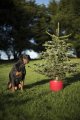
So I thought I'd try something with my dog, by way of demonstration. Just to make it different, I combined it with the end of the festive season tree dumping. This shot, the best of three, is an unprocessed raw image exported out of LR with no processing at all. Of course it may possibly be improved by tweaking sliders in LR, but it doesn't need cropping or vignetting, IMO.
It's by no means a wonderful photo and I won't be entering it for any prizes, but I hope it shows that you don't need a lot imagination to think up something a little better than a shot of the dog on its own. BTW she was most reluctant to park her arse on freezing wet grass, so I couldn't hang about. Therefore with pets you need to be prepared as far as the camera settings are concerned, as they're not going to be obliging and wait for you.
Don't get stuck behind a keyboard; go out and shoot and have fun thinking up angles and compositions! :)
 

Attachments

  • PGLOVER_2017_00022.jpg
    PGLOVER_2017_00022.jpg
    281.4 KB · Views: 49
I can understand that, but really there is no substitute for actually going out and taking more photos, any photos! You learn more by shooting lots of images, than by working in PP on rubbish images.
So I thought I'd try something with my dog, by way of demonstration. Just to make it different, I combined it with the end of the festive season tree dumping. This shot, the best of three, is an unprocessed raw image exported out of LR with no processing at all. Of course it may possibly be improved by tweaking sliders in LR, but it doesn't need cropping or vignetting, IMO.
It's by no means a wonderful photo and I won't be entering it for any prizes, but I hope it shows that you don't need a lot imagination to think up something a little better than a shot of the dog on its own. BTW she was most reluctant to park her arse on freezing wet grass, so I couldn't hang about. Therefore with pets you need to be prepared as far as the camera settings are concerned, as they're not going to be obliging and wait for you.
Don't get stuck behind a keyboard; go out and shoot and have fun thinking up angles and compositions! :)


been out today took over 300 pictures at Flamborough Head deleted about 200 of them and did the rest through Lightroom as i wanted to keep them took me 4 hours not sure i want to edit any more :'(
 
had a play with a picture i took yesterday at Flamborough
1st up is pre lightroom just straight exported as it was
PAS_4758_0.jpg
 
Last edited:
and here it is after i edited/tweaked it in light room please be honest i am still trying to learn
PAS_4758_2.jpg
 
You are getting there Peter. I had a 2 minute fiddle with your dog photo just to show you my take on it. not perfect, far from it in 2 minutes. but basically, i changed the colour of the sand, removed the dog lead and shadow, and added a little light effect. all done purely within LR.

Your coastal path picture above is definitely on the way. As others have said, and i may have missed this, but are you able to shoot in RAW? it makes all this sorcery much easier :)

im not going to comment on composition as you have had plenty of advice above.

View attachment 92902
 
Last edited:
i am shooting in raw mode only just gone onto it though switched over a week ago and went fully at it not raw + jpeg just raw + raw backup the flamborough pic was taken in raw the 1st one unedited i just straight exported from raw to jpeg as was so i could show what i edited from if that makes sense :)
 
i think for sure i have a lot to learn about editing yet and i realise the dog picture was erm terrible lol looking back at the Vignette i actually wonder now if i had been drinking
 
and here it is after i edited/tweaked it in light room please be honest i am still trying to learn
Yes, well done, you have been able to draw detail out of the shadows, using Lightroom. Perhaps you already understand this, so forgive me for repeating the point that a raw unprocessed image is always going to look flat compared to the final exported jpg. A raw file has for example no colour gamut and is unsharpened.
There is something not quite right with the colours in the lower region of the final image, but since I wasn't there, maybe that's the way it is
Your raw image as seen on my screen monitor, has a large dynamic range. Perhaps when taking the shot, you might have a achieved a better balanced image if you had looked at the in-camera histogram display and adjusted your camera settings accordingly. Apologies if you already are an expert with your camera and don't need me pointing out the obvious.
What I find is that a lot of post processing can be avoided by learning more about the camera. I now find that the more I learn and understand the technology of my cameras, (and I am still struggling), the less pp I need.
Using polarising filters is another fairly simple way to achieve great sky colour contrast in landscapes, without the need for post-processing. Indeed I doubt if LR could replicate the effects of polarising filters.
Good luck!
 
IMHO, vignettes are something not to get too attracted to ....... now and again maybe ........ but they always look what they are, (obvious:)) especially when "noticeable"


don't be tempted to "lets try a vignette" - on the rare occasions that they work ...... it will be obvious and then maybe not appropriate
 
Last edited:
been out today took over 300 pictures at Flamborough Head deleted about 200 of them and did the rest through Lightroom as i wanted to keep them took me 4 hours not sure i want to edit any more :crying:
100 photos from an outing?

I think you need to cull better or you'll spend more time at a keyboard than taking photos!
 
I know. 100 was what he whittled it down to. If I get 10 from an outing I'd be amazed.

i didnt say 100 good photo's though i had my 3 god children with me and had quite a few pictures of them enjoying themselves and did not have the heart to bin them all :(
 
i didnt say 100 good photo's though i had my 3 god children with me and had quite a few pictures of them enjoying themselves and did not have the heart to bin them all :(

I don't suffer from that problem. I'm brutal at culling - I only have six from xmas day but it's six I'm reasonably happy with.
 
Yes, well done, you have been able to draw detail out of the shadows, using Lightroom. Perhaps you already understand this, so forgive me for repeating the point that a raw unprocessed image is always going to look flat compared to the final exported jpg. A raw file has for example no colour gamut and is unsharpened.
There is something not quite right with the colours in the lower region of the final image, but since I wasn't there, maybe that's the way it is
Your raw image as seen on my screen monitor, has a large dynamic range. Perhaps when taking the shot, you might have a achieved a better balanced image if you had looked at the in-camera histogram display and adjusted your camera settings accordingly. Apologies if you already are an expert with your camera and don't need me pointing out the obvious.
What I find is that a lot of post processing can be avoided by learning more about the camera. I now find that the more I learn and understand the technology of my cameras, (and I am still struggling), the less pp I need.
Using polarising filters is another fairly simple way to achieve great sky colour contrast in landscapes, without the need for post-processing. Indeed I doubt if LR could replicate the effects of polarising filters.
Good luck!

i know not a lot about my camera if i am honest i know all the basic settings ie aperture and shutter speed and iso etc but do not know about looking at histogram on my camera
will have to have a look at polarising filters and what they do :) i have just learnt to do long exposures i will need some ND filters the only filter i have is a UV one which i was recommended to leave on permanently
 
You are getting there Peter. I had a 2 minute fiddle with your dog photo just to show you my take on it. not perfect, far from it in 2 minutes. but basically, i changed the colour of the sand, removed the dog lead and shadow, and added a little light effect. all done purely within LR.

Your coastal path picture above is definitely on the way. As others have said, and i may have missed this, but are you able to shoot in RAW? it makes all this sorcery much easier :)

im not going to comment on composition as you have had plenty of advice above.

View attachment 92902

You might want to look at your monitor if you think that WB looks ok.

.... or I do :eek:
 
.......the only filter i have is a UV one which i was recommended to leave on permanently

If you have paid a lot of money for your lens, why degrade the glass by putting a filter on it. Shops will always try and convince you to buy filters "to protect the lens". I never use a filter unless for a good reason.
 
Years ago my local (at the time) camera shop (Laughton's/Wildings in Wilmslow) showed me a broken UV filter that one of their customers had brought in. The customer in question had been photographing the RAC Rally (or some such event) and the filter had a stone chipping embedded in it that had been kicked up by one of the cars! Fortunately it hadn't come into contact with the front lens element, so all it cost him was a new filter and the use of the shop's filter wrench to get the broken and presumably slightly deformed one off! Anyway, that's one of the 'good reasons' I always have a UV filter on the end of my SLR lenses!
 
Last edited:
Good for you to try and get to grips with LR.
I can't say that I am great with editing, but it is through using (pictures good or bad) that you realise what you can do with the aplication.

Note there is an AUTO button - it is a generic, fix all to the lowest common denominator kind, BUT, it does help you to see what adjustments are made to get there.

I got a few books by Scott Kelby - he's very marmite - you have to decide if you like his style of teaching. Failing that, there is a plethora of information on You Tube, as has already been pointed out.

For me, using the X and P buttons was the first thing that I got to grips with. With RAW files so much larger, you will see that your drive will soon be filled up with images that are 'ok'.
Import. Select (cull) using X and Control + Delete to remove.
Then look at the ones you saved, do the same again.

Good luck, and I hope you enjoy the steep learning curve you have embarked upon.
 
Last edited:
You might want to look at your monitor if you think that WB looks ok.

.... or I do :eek:

The 2 minute timer went off before I got to WB :)

It wasn't a 'look how cool this is, more of a look how much you can change it'

Either that, or I've missed your point entirely :)

The OP wasn't looking for a masterclass, merely pointing in the general direction.
 
Years ago my local (at the time) camera shop (Laughton's/Wildings in Wilmslow) showed me a broken UV filter that one of their customers had brought in. The customer in question had been photographing the RAC Rally (or some such event) and the filter had a stone chipping embedded in it that had been kicked up by one of the cars! Fortunately it hadn't come into contact with the front lens element, so all it cost him was a new filter and the use of the shop's filter wrench to get the broken and presumably slightly deformed one off! Anyway, that's one of the 'good reasons' I always have a UV filter on the end of my SLR lenses!

There is an argument that if you do the sort of photography (rally, war zones etc) where your lenses may become damaged that makes sense. But if you don't a hood is more then enough protection especially as the front element on most lenses is sacrificial and easily changed. UV is a bit pointless. Every digital sensor ever has a UV filter anyway.
 
Years ago my local (at the time) camera shop (Laughton's/Wildings in Wilmslow) showed me a broken UV filter that one of their customers had brought in. The customer in question had been photographing the RAC Rally (or some such event) and the filter had a stone chipping embedded in it that had been kicked up by one of the cars! Fortunately it hadn't come into contact with the front lens element, so all it cost him was a new filter and the use of the shop's filter wrench to get the broken and presumably slightly deformed one off! Anyway, that's one of the 'good reasons' I always have a UV filter on the end of my SLR lenses!
So the shop convinced you that you should degrade the lens performance in the unlikely event that a stone or similar might strike it! They probably keep that broken filter there permanently to boost filter sales. [emoji4]
If a stone or similar hits the face of a lens, it's most unlikely that the lens will escape the damage.
That's your choice of course, but I never cease to be amazed that people will pay lots for good glass and then promptly stick a (usually inferior) filter on it. It defeats the purpose of buying quality glass. Last time I damaged a telephoto lens, my insurance company paid up in full.
Especially in conditions where you want to reduce flare, or in low light at wide apertures where you want to avoid ghost reflections off the filter, it would be better to avoid filters.
 
So the shop convinced you that you should degrade the lens performance in the unlikely event that a stone or similar might strike it! They probably keep that broken filter there permanently to boost filter sales. [emoji4]
If a stone or similar hits the face of a lens, it's most unlikely that the lens will escape the damage.
That's your choice of course, but I never cease to be amazed that people will pay lots for good glass and then promptly stick a (usually inferior) filter on it. It defeats the purpose of buying quality glass. Last time I damaged a telephoto lens, my insurance company paid up in full.
Especially in conditions where you want to reduce flare, or in low light at wide apertures where you want to avoid ghost reflections off the filter, it would be better to avoid filters.


well i don't have insurance on my photography equipment i don't have that much money invested in it in reality
i am not a pro or anything my pictures are in reality for me and my families pleasure and i am not sure i would necessarily notice any improvement .
so for me i think the filter is probably a better option .
 
So the shop convinced you that you should degrade the lens performance in the unlikely event that a stone or similar might strike it! They probably keep that broken filter there permanently to boost filter sales. [emoji4]
If a stone or similar hits the face of a lens, it's most unlikely that the lens will escape the damage.
That's your choice of course, but I never cease to be amazed that people will pay lots for good glass and then promptly stick a (usually inferior) filter on it. It defeats the purpose of buying quality glass. Last time I damaged a telephoto lens, my insurance company paid up in full.
Especially in conditions where you want to reduce flare, or in low light at wide apertures where you want to avoid ghost reflections off the filter, it would be better to avoid filters.

No, one of the staff had just finished replacing the broken filter when I called in, so it wasn't a sales ploy, just a talking point with one of their 'regulars'. Besides, I was already using filters so he would have been 'preaching to the converted' in any case! :LOL:

To be honest, I think it's likely that more images have been noticeably 'degraded' by factors such as camera shake and lens flare [due to not using a lens hood] than from using a good quality filter, which can be changed comparatively cheaply if it gets scratched, falls victim to cleaning marks, etc. So do we all use a pro-quality tripod and a lens hood for every shot we take in anything other than perfect lighting conditions? Where do people draw the line in their quest for optical perfection? I can see your point of view, but I'd think a minimal drop in image quality due to having a good quality filter on the end of a lens might be the least of a photo's problems in many cases.

Anyway, I think we've probably done this topic to death now, so it's probably best to un-hijack (is that even a word?) the thread and return the topic to Lightroom. (y) Sorry for the slight detour Peter! :whistle:
 
on cold winter days i take quite a few images through the glass of a closed sitting room window ..... if you are looking for the best that you can achieve with your expensive gear such a method does cause image degradation

I have never used a UV filter on the front ...... some of my lens are worth quite a lot of £'s ...... why would I want to put a £30 piece of glass in front of them and also - some longer lens do have a UV filter as part of their design, the Nikon 600mm f4 for example ..... but it is placed at the other end of the lens ....... it is not there to protect anything
 
I have UV filters on my lens and last year was happy I had one on my 100mm macro lens, fell down some stairs woke up in hospital with stitches in my head, when I got back home I found the lens was and still great, but the filter smashed, so it protected that :)

do you use a lens hood Dave?
 
Back
Top