

Lens Flare in Sunrise Shots

Tunbridge

Suspended / Banned
Messages
1,282
Name
Stephen
Edit My Images
Yes
I took this shot at the weekend and although I’m pleased with the composition the lens flare has spoilt the image. Some lens flare can look ok when its nice straight lines coming from the sun, but not the large blotches I seem to achieve - here in the left of te shot. Now I’m pretty new at landscape images but thought I’d give it a bash. This is my first attempt at a sunrise and clearly it needs work.

Is there anyway I can avoid the unattractive blotchy lens flare when shooting into the sun or is it just a given that it’s going to happen? What’s the answer, cloning it out? I have seen plenty of images like this without it so it’s obviously something I’m doing wrong. I only use LR4 and don’t have photoshop so any major re-work PP isn’t an option.

I also don’t have any grad filters, but I did use a 10 stop filter as I was attempting a nice milky sea but there isn’t really enough of it in the shot to matter.

It was taken on my D7000 with a Nikon 17-55mm f2.8 (widest lens I have) set at 17mm, ISO100, f/16, 30 seconds.
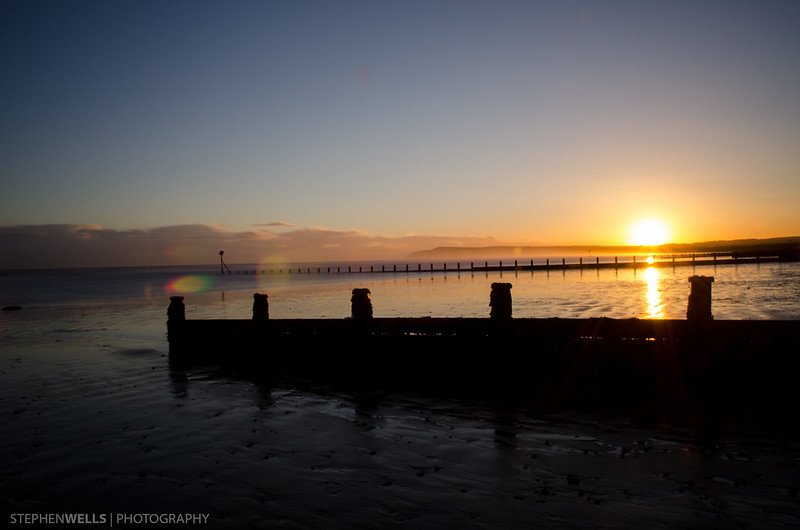

2012_1202RedcarBeach10Stop004-8 by Tunbridge Wells, on Flickr

Any advise apppreciated...
 
A couple of things that hardly need saying first of all....lens and filter(s) must be spotlessly clean, and in particular, free from any finger marks. And, a lens hood is essential.

Did you try the shot without the filter? They can cause flare problems, particularly at the 'cheaper' end of the cost scale. If you must shoot directly into the sun, sometimes a polariser can help reduce flare. One final suggestion that I have found helpful, providing you are using a tripod is, using live view, use your open hand to add some additional sheilding until the flare disappears. Problem with this is that sometimes the flare only goes away after your hand appears in the image!

In general, I find that it is best to avoid direct sun and just keep it out of the frame.
Somebody else might add to the above, soon. Let us know how you get on.


Ernie
 
Thanks for commenting. Everything was nice and clean but you could be right about the filter as it is one of the cheap Haida 10 stop filters which was only about £50. Sadly I didn't try without it but I will try next time. Obviously the 10 stop made using live view impossible too but again that's a good tip.

I'll have to have a rethink and try a different approach as the main idea of the shot was to have the Sun in there. Maybe having the sun bang in the middle might help things so I'm shooting square on at it, I could always then crop to sort out the right composition.
 
The hood advice is good in general but won't help in this instance - a hood helps by keeping direct sunlight off the front element - hard to do when the sun is part of the picture!

As Ernie also said, the lens (and filters) must be absolutely spotless. As you say, there's not enough movement in the water to get the milky effect you're after, so you may as well have reshot without it which may well have removed the problem. If you try again with the 10 stopper, see if you can stop any light getting between the filter and the lens - maybe some insulating tape around the edges?

ETA. For the milky water effect, try a day when the sea's a bit rough (white horses, we call them - tops of little waves being blown off). That gives something to blur in the long exposure. Your picture looks more like reflections off rippled sand than off water.
 
Last edited:
Thanks nod, the filter is screw on anyway so no issues with light getting in the sides. Looks like another early morning to have another attempt but I suspect that shooting into the sun is always going to have the risk of flare.
 
Flare is an unfortunate fact of life! Spotless lenses/filters and good coatings can reduce the risk but it's largely a matter of luck. If you don't want it in your photos, don't press the release button if you see it in the viewfinder.
 
Thanks guys, it's part of the learning curve I guess. Don't get much practice shooting into the sun as it hasn't been out much!
 
..or, you could take two exposures, blocking out the sun in the 2nd exposure with your finger, then combine the images in PS & mask out the flare

Doh, forget that, just realised your using LR not PS;)

Or, you could take the shot before the sun rises over Huntcliffe. That's what I normally (but I also use ND grads) do & you get the nicely orange sky/clouds but no uncontrollable flare
 
Or, you could take the shot before the sun rises over Huntcliffe. That's what I normally (but I also use ND grads) do & you get the nicely orange sky/clouds but no uncontrollable flare

Good advice, only problem on this occassion was that I only just made it in time to get this shot. Think I need to start getting up earlier! In my defence it was -2.5degC!
 
How about taking the shot just a little bit earlier?

There is quite a lot of sun in the frame there, maybe just at the sun peaks over the horizon and is not fully up? I know you don't get long for this...
 
RichardtheSane said:
How about taking the shot just a little bit earlier?

There is quite a lot of sun in the frame there, maybe just at the sun peaks over the horizon and is not fully up? I know you don't get long for this...

Yes I'll give that a go, would probably work better on a day with more cloud interest in the sky though as it was a bit bland until the sun appeared.
 
Back
Top